
If your show relies on remote guests, caller segments, or live phone interviews, the right console can make setup far easier. A good podcast console with phone call input helps you route calls cleanly, monitor audio in real time, and keep your voice and caller balanced.
In this roundup, we focus on practical options for creators who want simple control, portable recording, and useful features without overcomplicating the workflow.
Best 10 Podcast Console with Phone Call Input Picks for 2026
Best for Phone-Ready Duo Recording
Movo Portable Podcast Bundle for Phones
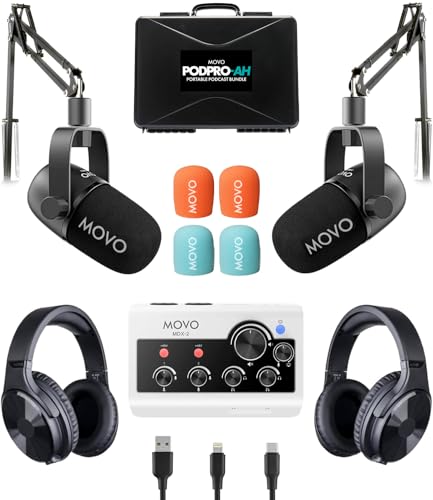
- Dual-channel interface works with iPhone, Android, and computers
- Includes two mics, two headphones, and two tabletop stands
- Battery-powered design and travel case improve portability
Best For: Two-person podcasts, interviews, and mobile recording with phone compatibility.
Best for Phone Call Interviews
Zoom PodTrak P4 Multitrack Podcast Recorder Bundle

- 4 XLR mic inputs with 4 individual headphone outputs
- Mix-minus and TRRS support for phone call guests
- Includes podcast mics, pop filters, SD card, and batteries
Best For: Podcasters who need a portable recorder for multi-person shows and phone call interviews.
Best for Voice Effects
Podcast Mic Bundle with Sound Board

- Sound board adds 24 effects and voice changing
- Built-in noise reduction for cleaner vocals
- Simple plug-and-play setup for PC and mobile
Best For: Beginners who want an easy all-in-one bundle for streaming, podcasting, and voice effects.
Best for Built-In Recording
Podcast Bundle for 2 with Mixer & Mics

- Built-in recorder with 8GB memory card included
- Two mic inputs for co-hosts and interviews
- Works with phones, PCs, and cameras via plug-and-play setup
Best For: Beginners and duo creators who want easy recording, vocal effects, and phone connectivity.
Best for Phone Call Routing
Podcast Mic Bundle with Audio Mixer
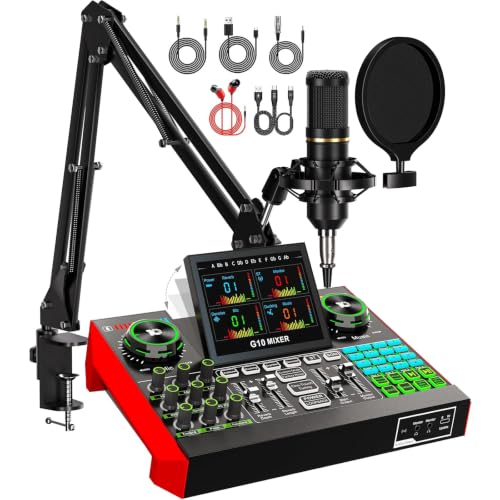
- Mic and mixer bundled together
- Adds voice effects and denoise controls
- Good starter pick for streaming and call-in audio
Best For: Beginners who want an easy all-in-one bundle for podcasting, livestreams, and phone-call input.
Best for Voice Effects & Phone Calls
Podcast Equipment Bundle with Mixer

- Plug-and-play mixer with mute, loopback, and karaoke controls
- Includes voice changers, sound pads, Bluetooth, and denoise
- Good fit for streaming, phone-call audio, and casual podcasting
Best For: Streamers and beginners who want a feature-packed mixer for calls, effects, and simple recording.
Best for All-in-One Streaming

- Mixer, mic, and accessories in one kit
- Bluetooth, noise reduction, and voice effects
- Portable battery-powered setup for creators
Best For: Creators who want a simple all-in-one audio kit for podcasts, live streams, and phone-connected sessions.
Best for Phone Call Effects
Audio Mixer Podcast Bundle with P15 Mic

- Bundle includes mixer, microphone, and sound effects tools
- Works with PC, phone, tablet, streaming, and gaming setups
- Noise reduction and voice changer features add flexibility
Best For: Beginners and casual creators who want an easy way to mix voice, phone calls, and sound effects.
Best Heavy-Duty Pick
Podcast Mic Bundle with Sound Card Mixer
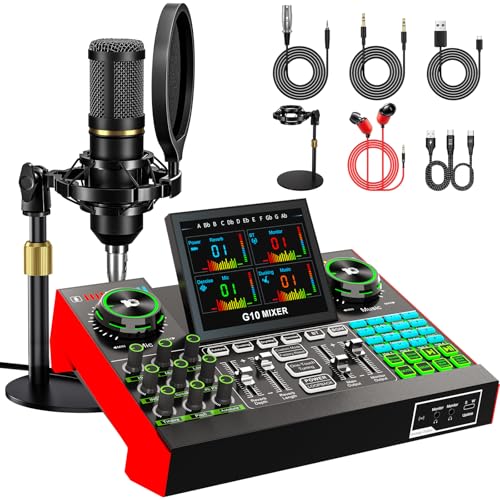
- All-in-one mic and mixer bundle
- Voice changer plus 16 sound effects
- Noise reduction for cleaner vocals
Best For: Streamers and beginner podcasters who want easy controls and creative voice tools.
Best Simple Pick
Podcast Microphone Bundle with Live Sound Card

- All-in-one mic and mixer bundle
- Supports PC and phone streaming
- Includes voice changer and denoise features
Best For: Creators who want a simple starter kit for phone-call style podcast and streaming setups.
Best for Phone-Ready Duo Recording – Movo Portable Podcast Bundle for Phones
If you want a podcast console with phone call input that’s also built for two-person recording, the Movo PodPro-TH bundle is a practical all-in-one option. It combines a dual-channel interface, two dynamic mics, and headphones, so you can start interviewing, co-hosting, or field-recording with less gear to piece together.
Best For: Creators who need a portable two-mic podcast setup for iPhone, Android, or computer-based recording.
Pros:
- Dual-channel MDX-2 interface supports phone, tablet, and computer connections via USB-A, USB-C, and Lightning.
- Includes two dynamic XLR mics, two tabletop stands, and two headphones for a complete starter kit.
- Battery-powered operation and travel case make it easier to record on the go.
- Cardioid mic design helps cut background noise for cleaner spoken-word audio.
Cons:
- Not as compact as a single-device mini recorder if you only need solo use.
- Best suited to simple two-person setups rather than larger multi-mic productions.
As a portable bundle, this is a strong fit if you want a podcast console with phone call input without building the rig from scratch. It’s especially appealing for pairs who need reliable voice capture and straightforward phone compatibility in one package.
Best for Phone Call Interviews – Zoom PodTrak P4 Multitrack Podcast Recorder Bundle
If you want a practical podcast console with phone call input, the Zoom PodTrak P4 bundle gives you an easy way to run multi-host sessions, bring in remote guests, and monitor everyone separately. The included accessories also make it a ready-to-go setup for new shows or mobile recording.
Best For: Podcasters who need an all-in-one portable recorder with phone call support, multiple mic inputs, and a full starter bundle.
Pros:
- Four XLR mic inputs and four independent headphone outputs for multi-person recording.
- Mix-minus and TRRS phone connection help reduce feedback during call-ins and interviews.
- Records separate tracks and includes sound pads for intros, effects, and live production control.
- Bundle adds SD card, rechargeable batteries, podcast mics, pop filters, and stands.
Cons:
- Best suited to podcasting workflows; less ideal if you only need a basic single-mic recorder.
- The included accessory bundle may be more than some buyers need.
As a podcast console with phone call input, the P4 stands out for making remote guests simple without sacrificing control over local mics and monitoring. It is especially appealing if you want a portable recorder that can grow with your show.
Best for Voice Effects – Podcast Mic Bundle with Sound Board
If you want a podcast console with phone call input-style setup for streaming, gaming, or casual podcasting, this bundle gives you a fast all-in-one path to get started. The included sound board, 3.5mm condenser microphone, and built-in effects make it easy to mix your voice, add reverb, and keep background noise under control without a complex studio rig.
Best For: Beginners and content creators who want a simple, budget-friendly way to add voice effects, noise reduction, and live audio control to PC or mobile streams.
Pros:
- All-in-one bundle includes a mic, stand, and sound board
- 24 sound effects plus voice changer and reverb modes
- Built-in noise reduction helps keep vocals cleaner
- Easy plug-and-play use with PC, Mac, and mobile devices
Cons:
- 3.5mm mic format is less flexible than XLR setups
- Feature set is focused more on effects than advanced studio control
- May be overkill if you only need a basic microphone
This is a strong pick if you care more about quick setup and fun live features than pro-level audio routing. For buyers comparing a podcast console with phone call input options, it stands out as an easy starter bundle with enough controls to make streams and recordings more engaging.
Best for Built-In Recording – Podcast Bundle for 2 with Mixer & Mics
If you want a podcast console with phone call input that also keeps your sessions organized, this bundle is built around simple plug-and-play recording. It includes two dynamic mics, a built-in recorder with 8GB memory storage, and extra vocal effects, making it a practical pick for creators who want to start fast without a complicated setup.
Best For: Beginners, duet podcasters, and streamers who want an all-in-one mixer with recording, voice effects, and easy phone or computer connectivity.
Pros:
- Built-in recorder with included 8GB memory card for direct session capture
- Two mic inputs plus dynamic mics make it useful for interviews and co-host shows
- Plug-and-play setup works with phones, PCs, and cameras
- Extra features like stereo mode, voice changes, and RGB lighting add flexibility
Cons:
- Playback is tied to the memory card workflow, not standalone device review
- Feature-heavy controls may feel overwhelming if you only need a basic mixer
- Wireless Bluetooth is for accompaniment only, not full audio input
Overall, this is a strong value option if you want a podcast console with phone call input and built-in recording in one starter-friendly package. It leans more toward convenience and creative effects than pure studio minimalism, but that tradeoff makes it appealing for new podcasters and streamers.
Best for Phone Call Routing – Podcast Mic Bundle with Audio Mixer
If you want a budget-friendly podcast console with phone call input, this bundle covers the basics for live streaming, gaming, singing, and simple call-in style setups. It combines a BM800 condenser mic with a compact sound board so you can route voice, add effects, and shape the sound without building a full studio rig.
Best For: Beginners and casual creators who want an all-in-one starter bundle for podcasting, livestreams, and phone-call audio control.
Pros:
- Includes a microphone and audio mixer in one bundle
- Supports live voice effects, denoise, and basic sound shaping
- Useful for streaming, gaming, singing, and entry-level podcast setups
Cons:
- Not as refined as a dedicated broadcast mixer
- 3.5mm-based setup may require adapter juggling with some phones
- Best suited to simple home use rather than pro studio workflows
For buyers who mainly need an accessible podcast console with phone call input, this is a practical starter option that bundles key pieces together. It makes the most sense if you want quick setup, voice effects, and a single package instead of buying each component separately.
Best for Voice Effects & Phone Calls – Podcast Equipment Bundle with Mixer
If you want a podcast console with phone call input that also doubles as a live-streaming sound board, this bundle covers a lot of ground. It combines a dynamic microphone, mixer, Bluetooth support, and built-in voice effects so you can handle calls, vocals, and on-air playback from one compact setup.
Best For: Streamers, beginners, and creators who want an easy plug-and-play mixer with voice changing, denoise, and phone-call-friendly inputs.
Pros:
- Plug-and-play setup with one-touch controls, mute, loopback, and karaoke mode
- Includes 6 voice changers, 2 sound effects, and 4 customizable sound pads
- Dynamic mic and noise reduction help cut background sound for cleaner vocals
- Works with major platforms like YouTube, Twitch, OBS, and Discord
Cons:
- Feature-rich layout may feel crowded for total beginners
- Included headphones are mainly for testing, not a full monitoring upgrade
- Best suited to casual streaming and recording rather than pro studio workflows
This is a practical pick if you want a podcast console with phone call input and plenty of entertainment features without extra software hassles. It leans more toward creator convenience and fun effects than pure studio-grade recording, but that makes it appealing for streaming, gaming, and lightweight podcast production.
Best for All-in-One Streaming – G9 Podcast Equipment Bundle
If you want a practical podcast console with phone call input that also covers streaming, singing, and casual live production, the G9 bundle is a flexible all-in-one choice. It combines a mixer, 3.5mm condenser mic, Bluetooth playback, and voice effects in one setup, so you can get started without piecing together extra gear.
Best For: Creators who want a simple plug-and-play audio kit for podcasts, live streams, TikTok, YouTube, karaoke, and phone-connected sessions.
Pros:
- All-in-one bundle includes the mixer, mic, and basic accessories
- Bluetooth, noise reduction, and sound effects make live content more engaging
- Supports solo use or small group sessions for interviews and co-hosting
- Built-in battery adds portability for indoor or outdoor recording
Cons:
- 3.5mm mic setup is less flexible than XLR-based systems
- Feature-rich controls may take a little time to learn
- Best suited to casual creator use rather than pro studio workflows
Overall, the G9 makes sense if you want a podcast console with phone call input that prioritizes convenience and content-ready features over studio-grade expandability. It is especially appealing for creators who want one device to handle voice, music, effects, and mobile-friendly live streaming.
Best for Phone Call Effects – Audio Mixer Podcast Bundle with P15 Mic
If you want a compact podcast console with phone call input for live chats, streaming, or quick recording setups, this bundle is built around simple routing and fun voice effects. It’s a practical pick for creators who want an all-in-one sound card and microphone package without piecing together separate gear.
Best For: Beginners and casual creators who want an easy way to mix voice, phone calls, and sound effects for podcasts, gaming, or livestreams.
Pros:
- Includes a microphone and sound card bundle, so you can get started with less guesswork
- Supports phone, PC, tablet, streaming, gaming, and recording use cases
- Voice changer and sound effects add flexibility for live shows and entertainment content
- Noise reduction features help keep spoken audio cleaner in simple home setups
Cons:
- Feature-heavy controls may be more than some users need for basic voice-only recording
- Best suited to casual and entry-level use rather than pro studio workflows
- Effect-driven design may not appeal to creators wanting a minimalist mixer
This is a good fit if you need a podcast console with phone call input and want extra creative tools in one bundle. It makes the most sense for users who value convenience, built-in effects, and multi-device compatibility over advanced broadcast-grade control.
Best Heavy-Duty Pick – Podcast Mic Bundle with Sound Card Mixer
If you want a podcast console with phone call input-style setup that also doubles as a streaming and singing controller, this bundle is built for flexible, all-in-one use. It combines a 3.5mm condenser mic with a live sound card, so you can plug in fast, shape your voice, and add effects without a complicated audio chain.
Best For: Streamers, beginner podcasters, and live performers who want easy plug-and-play control, voice effects, and noise reduction in one compact kit.
Pros:
- Includes both the microphone and sound board for a simple starter setup
- Built-in voice changer, reverb, EQ, and 16 sound effects add creative control
- Noise reduction helps keep speech clearer for podcasts and live streams
- Works with PC, Mac, and mobile devices for broad compatibility
Cons:
- 3.5mm mic design is less flexible than XLR-based podcast gear
- Feature-rich controls may take some time to learn
- Better suited to casual and creator use than pro studio recording
This is a strong pick if you want a podcast console with phone call input-style workflow plus extra effects for live content. It favors convenience and creativity over studio-grade expandability, which makes it a smart buy for beginners and solo creators.
Best Simple Pick – Podcast Microphone Bundle with Live Sound Card
If you want a podcast console with phone call input for livestreams, interviews, or gaming chats, this bundle gives you the basics in one package. It combines a condenser microphone, compact sound card mixer, and onboard voice effects so you can manage simple setups without buying each piece separately.
Best For: New podcasters, streamers, and creators who want an all-in-one starter kit for phone-call style audio setups.
Pros:
- Includes both a microphone and live sound card mixer in one bundle
- Works across PC and phone-based streaming setups
- Voice changer and denoise tools add flexibility for casual content
- Good starter option for interviews, singing, and gaming
Cons:
- Not as advanced or expandable as a full pro mixer
- Accessory-heavy bundles can be less polished than standalone gear
- Sound quality will depend on setup and room acoustics
This is a practical pick if you need a podcast console with phone call input and want a simple bundle that covers the essentials without a steep learning curve. It makes the most sense for creators who value convenience, effects, and quick setup over studio-grade control.
How We Picked the Best Podcast Console with Phone Call Input
We prioritized products that are relevant to a Podcast Console with Phone Call Input workflow, including models with live sound card functions, phone compatibility, multichannel input options, built-in recording, and monitoring features. We also looked for ease of use, portability, and overall value for solo hosts, interview setups, and small teams.
Quick Comparison
For straightforward mobile recording and remote interviews, compact bundles are usually the easiest route. For more control, choose a console or recorder with multiple mic inputs and separate headphone monitoring. If you want call-ins plus streaming effects, a sound board-style mixer may be a better fit than a basic audio interface.
Key Buying Factors for a Podcast Console with Phone Call Input
Phone Connectivity
Check whether the unit supports 3.5mm phone input, USB phone compatibility, or adapter-based routing. Some products work best with smartphones, while others are better suited to tablets, PCs, or hybrid streaming setups.
Input and Monitoring
Look at how many microphones and headphones you can connect at once. For interviews, separate headphone outputs and clear gain control can make a big difference in avoiding clipping and feedback.
Recording and Streaming Tools
Built-in recording, sound pads, voice effects, and noise reduction can be helpful, but only if they match your workflow. If you value simplicity, focus on stable audio and easy operation before extras.
Portability and Power
Portable recorders and bundle kits are ideal for creators who move between locations. Desktop mixers may offer more flexibility, but they can be less convenient for travel or quick phone-call segments.
Who Should Buy Which Podcast Console with Phone Call Input?
Choose a compact bundle if you are starting a show, recording on a phone, or need an affordable all-in-one setup. Pick a multitrack recorder if you want more control over separate voices and higher-quality editing later. Go with a sound card or mixer bundle if your priority is live interaction, call-ins, streaming effects, and easy switching between podcasting, gaming, or social content.
For most buyers, the best choice is the one that matches your call workflow first and your effects/features second. That keeps your Podcast Console with Phone Call Input reliable, simple, and ready to grow with your show.