
Professional podcast production consoles can simplify live mixing, recording, routing, and remote guest management in one workspace. The right setup depends on your show format, microphone count, monitoring needs, and whether you produce video as well as audio.
We selected 10 options ranging from streamlined creator mixers to full production bundles, helping broadcasters and serious podcasters match features with workflow, studio space, and budget.
Best 10 Podcast Production Consoles for Broadcast Picks for 2026
Best All-in-One Console

- Four XLR inputs and APHEX voice processing
- Standalone multitrack recording to microSD or USB
- Eight SMART pads for effects and live control
Best For: Broadcast-style podcasts and flexible standalone production
Best for Adaptive Workflows

- Three control modes with a 7-inch touchscreen
- AutoMix supports up to two microphones
- Records to computer or SD card
Best For: Solo hosts and two-person shows needing guided controls
Best Compact Dual-Mic Studio
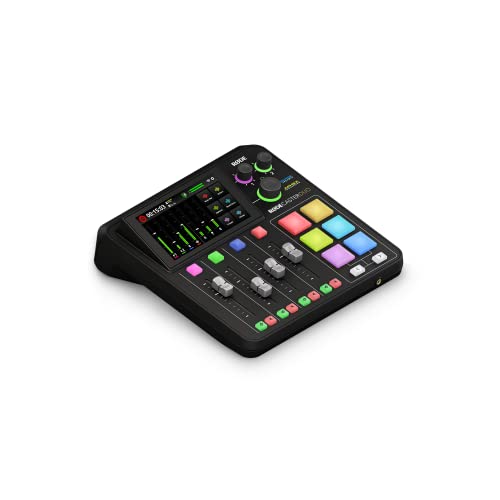
- Two combo inputs with high-gain Revolution Preamps
- Four faders, touchscreen, and six SMART pads
- APHEX processing plus headset monitoring support
Best For: Compact two-microphone podcast and streaming setups
Best Starter Bundle
MAONO Podcast Equipment Bundle

- Includes a 3.5mm condenser microphone
- Four recordable and eight built-in effects
- Supports PC, smartphone, and multi-platform streaming
Best For: Beginners building a home podcast or live-stream setup
Best for Easy Setup

- Four combo inputs and dual USB/Bluetooth channels
- Customizable SMART pads with 64 available actions
- Stereo or multitrack recording with onboard processing
Best For: Podcasters and small broadcast teams wanting a feature-rich all-in-one console
Best Complete Starter Kit

- Includes four microphones and essential recording accessories
- Offers XLR and 3.5mm inputs with independent controls
- Adds noise reduction, effects, Bluetooth, and USB connectivity
Best For: Four-person podcasts and beginners wanting an all-in-one setup
Best for Video Broadcasts

- Switches four HDMI and two USB video sources
- Combines audio inputs with scenes, overlays, and chroma keying
- Supports direct streaming and ISO recording to USB storage
Best For: Video podcasts and multicamera livestream productions
Best Complete Studio Bundle
RODECaster Pro II Broadcast Kit

- Includes four microphones, headphones, and essential accessories
- APHEX processing, touchscreen controls, and SMART pads
- USB-C, Bluetooth, and Wi-Fi connectivity
Best For: Multi-person podcasts, interviews, and complete home studios
Best Two-Creator Value

- Two microphones, stands, mixer, and cables included
- Noise reduction and zero-latency monitoring
- Plug-and-play support for computers and mobile devices
Best For: Two-person podcasts, interviews, and casual streaming
Best Video Production Upgrade
RODECaster Video Creator Bundle

- Switches six 1080p60 sources with layered scenes and graphics
- Mixes up to 20 audio inputs and supports wireless devices
- Streams via Wi-Fi 6 or Ethernet and records MP4 or multitrack WAV
Best For: Video podcasts, livestreams, events, and multi-camera shows
Best All-in-One Console – RØDECaster Pro II
For podcast production consoles for broadcast, the RØDECaster Pro II is a strong all-in-one option for creators who want microphone inputs, monitoring, processing, recording, and live control in one desk unit. Its four XLR inputs, APHEX presets, multitrack recording, and standalone operation reduce the need for additional hardware.
Best For: Broadcast-style podcasts, live streams, and producers who want a self-contained studio console.
Pros:
- Four XLR microphone inputs with studio preamps.
- APHEX processing can make voices broadcast-ready with one tap.
- Records multitrack to a computer, microSD card, or USB drive.
- Eight customizable SMART pads support effects and mix-minus phone calls.
Cons:
- It may offer more features than a simple one-microphone setup requires.
- Microphones are not included.
The RØDECaster Pro II is a particularly capable choice when flexible routing, live sound cues, and computer-free recording matter. Its feature-rich design is best suited to users who expect their production needs to grow.
Best for Adaptive Workflows – Mackie DLZ Creator XS
The Mackie DLZ Creator XS gives podcast production consoles for broadcast a more guided workflow through its 7-inch touchscreen and three control modes. It combines XLR, USB-C, and Bluetooth connectivity with AutoMix, customized headphone mixes, and recording to a computer or SD card.
Best For: Podcasters and streamers who want an interface that can adapt from simple controls to more advanced operation.
Pros:
- Easy, Enhanced, and Pro modes accommodate different experience levels.
- AutoMix manages levels for up to two microphones.
- Supports multitrack recording via USB-C, NDI, or SD card.
- Six customizable trigger pads can handle samples, effects, and show controls.
Cons:
- Condenser microphones require 48V phantom power to be enabled.
- Its listed two-channel design is aimed at smaller microphone setups.
With AutoMix and touchscreen-guided controls, the DLZ Creator XS is practical for solo hosts and two-person shows. It is especially appealing when ease of use and flexible recording options are priorities.
Best Compact Dual-Mic Studio – RØDECaster Duo
The RØDECaster Duo is a compact choice among podcast production consoles for broadcast, with two Neutrik combo inputs, high-gain Revolution Preamps, four faders, and APHEX processing. Its touchscreen, SMART pads, and headset support provide useful control without requiring a large studio footprint.
Best For: Compact podcast studios, two-microphone productions, streaming, and content creation.
Pros:
- Two combo inputs accept microphones and instruments.
- Revolution Preamps provide up to 76dB of gain with low noise.
- Four broadcast-quality faders and six SMART pads support hands-on control.
- Includes APHEX effects and a 3.5mm TRRS headset connection.
Cons:
- It has fewer microphone inputs than larger production consoles.
- Its listed connectivity is centered on USB rather than a broad selection of connection types.
The RØDECaster Duo balances useful broadcast-oriented controls with a smaller footprint. It is a sensible fit for creators who need two high-quality inputs and integrated processing rather than a larger multi-host setup.
Best Starter Bundle – MAONO Podcast Equipment Bundle
The MAONO Podcast Equipment Bundle is an accessible entry point for podcast production consoles for broadcast, pairing an audio mixer with a 3.5mm condenser microphone. It is designed for smartphone and PC use and adds sound pads, voice effects, monitoring, and simultaneous streaming features for beginner-focused setups.
Best For: New podcasters, mobile creators, and home live-streaming setups that need a microphone included.
Pros:
- Includes a 3.5mm condenser microphone for a ready-to-start setup.
- Offers four recordable and eight built-in sound effects.
- Supports up to two people, four devices, and four streaming platforms.
- Works with PCs, smartphones, iPhones, tablets, Windows, and Mac systems.
Cons:
- Phones without a 3.5mm jack require an OTG adapter, which is not included.
- The product notes indicate that users may need to consult the guide or videos because of its feature complexity.
- Its 3.5mm microphone connection is less oriented toward professional XLR microphone systems.
This bundle prioritizes convenience and entertainment features over a traditional broadcast-console workflow. It makes the most sense for beginners who want an included microphone and broad device compatibility for live content.
Best for Easy Setup – RØDE RØDECaster Pro II
The RØDE RØDECaster Pro II is a strong choice among podcast production consoles for broadcast when you need flexible inputs, onboard processing, and reliable recording options. It supports four combo inputs, dual USB and Bluetooth channels, and stereo or multitrack recording to a microSD card, external storage device, or computer.
Best For: Podcasters and small broadcast teams seeking a powerful all-in-one production console with room for advanced sound control.
Pros:
- Four combo inputs with low-noise, high-gain Revolution preamps
- Eight customizable SMART pads with up to 64 user actions across eight banks
- Built-in APHEX processing, compression, de-essing, EQ, noise gate, and more
- Records stereo or multitrack to microSD, external storage, or computer
Cons:
- Its extensive feature set may require more setup time for beginners
- Bluetooth output and USB connectivity may not replace every dedicated broadcast connection
With nine channels and a quad-core engine, the RØDECaster Pro II is designed for demanding podcast and content-production workflows. It is especially compelling if you want hands-on control and professional-style processing without assembling multiple separate devices.
Best Complete Starter Kit – M100 4-Person Podcast Bundle
The M100 bundle is a practical entry point for podcast production consoles for broadcast, especially when several people need to record immediately. It combines a mixer, four dynamic microphones, desktop stands, monitoring earphones, and the required cables in one package.
Best For: Four-person podcasts, beginner streamers, and creators who want a plug-and-play setup with included microphones and accessories.
Pros:
- Complete four-person kit with microphones, stands, earphones, and cables
- Supports dual XLR and dual 3.5mm microphone inputs with separate volume control
- Includes noise reduction, reverb, pitch correction, loopback, side chain, and voice effects
- USB plug-and-play compatibility with Windows, iOS, and Android systems
Cons:
- Its feature set is oriented toward accessible content creation rather than a specialized studio workflow
- The supplied details do not specify the complete channel count
- Built-in battery operation may require charging during extended sessions
The bundle emphasizes convenience: four speakers can connect with minimal extra shopping, while Bluetooth playback, RGB lighting, and a rechargeable 4000mAh battery support streaming and mobile use. It is a sensible choice for new teams prioritizing completeness and ease of setup.
Best for Video Broadcasts – RØDE RØDECaster Video
The RØDE RØDECaster Video extends podcast production consoles for broadcast into a combined video and audio workflow. It switches up to six video sources while providing two studio-grade Neutrik combo inputs for microphones, instruments, or other audio sources.
Best For: Video podcasts, multicamera livestreams, and broadcast productions that need integrated switching, graphics, streaming, and audio capture.
Pros:
- Handles four HDMI and two USB video sources
- Provides seven customizable multi-source scenes
- Includes media playback, graphic overlays, chroma keying, and transitions
- Supports direct streaming and USB-storage recording, including isolated recording
Cons:
- Only two studio-grade combo audio inputs are listed
- Its video-focused feature set may be more than needed for audio-only podcasts
- It is corded electric rather than battery powered
With 1080p60 support, Wi-Fi or Ethernet streaming, and features such as Inspect Mode and audio-based auto-switching, this console is built for productions where video direction matters as much as sound. ISO recording also gives editors more flexibility after the broadcast.
Best Complete Studio Bundle – RODECaster Pro II Broadcast Kit
For buyers comparing podcast production consoles for broadcast, this RODECaster Pro II bundle is designed as a ready-to-record multi-person studio. It combines the console with four microphones, four headphones, boom arms, stands, XLR cables, and storage, while the touchscreen, SMART pads, flexible controls, and APHEX processing support polished podcast and livestream production.
Best For: Multi-host podcasts, interviews, roundtables, and creators who want a nearly complete recording setup.
Pros:
- Includes four broadcast microphones and headphones for group recording.
- APHEX processing tools help shape clear, polished voice recordings.
- Offers dual USB-C, Bluetooth, and Wi-Fi connectivity.
- Touchscreen and SMART pads provide accessible production controls.
Cons:
- The 36.1-pound bundle is less convenient for portable setups.
- Its four-channel configuration may be more equipment than a solo creator needs.
This is the strongest all-in-one choice when you need a broadcast-oriented podcast station for several people and want to avoid sourcing accessories separately.
Best Two-Creator Value – TENLAMP G10 Dual-Mic Mixer
The TENLAMP G10 is a compact option for podcast production consoles for broadcast when the format centers on two creators. Its mixer, matched condenser microphones, desktop stands, and cables provide a simple starting point, with noise reduction, independent gain controls, zero-latency monitoring, and plug-and-play support for computers and mobile devices.
Best For: Two-person podcasts, interviews, gaming streams, karaoke, and mobile-friendly creator setups.
Pros:
- Includes two condenser microphones and desktop stands.
- Independent gain control, mute, and real-time headphone monitoring support collaboration.
- Works with PC, Mac, iPhone, and Android devices without drivers.
- Voice effects, auto-tune, reverb, and noise reduction add creative flexibility.
Cons:
- Its two-channel design is limited for larger panels or roundtables.
- The 3.5mm microphone setup is less suited to buyers seeking a larger XLR broadcast rig.
This bundle prioritizes ease and entertainment features over expansion, making it a practical entry-level fit for two-person content rather than a large broadcast production.
Best Video Production Upgrade – RODECaster Video Creator Bundle
For video-first shows, the RODECaster Video expands the role of podcast production consoles for broadcast by combining live HD video switching with professional audio control. It can handle six 1080p60 video sources, up to 20 audio inputs, layered scenes, graphics, and direct streaming, while this bundle adds two microphones, headphones, mic arms, cables, and storage.
Best For: Video podcasts, livestreams, events, and creators producing multi-camera shows.
Pros:
- Supports six 1080p60 video sources and two HDMI outputs.
- Provides up to 20 audio inputs, dual combo inputs, and wireless receiver support.
- Scene presets, nine mix-effect layers, keyers, and graphics enable complex live production.
- Streams through Wi-Fi 6 or Ethernet and records MP4 or multitrack WAV files.
Cons:
- Its video-production feature set may be excessive for audio-only podcasts.
- The bundle includes only two microphones, limiting larger panel recordings without additional equipment.
This is the most capable choice for creators who need synchronized audio, video switching, graphics, and streaming in one production console rather than a conventional audio mixer alone.
How We Picked These Podcast Production Consoles for Broadcast
We focused on consoles and bundles that support a practical broadcast workflow: connecting multiple microphones, monitoring guests, recording clean audio, and managing levels without relying entirely on a computer. We also considered connectivity, control layout, portability, included accessories, and how well each option can scale from solo shows to multi-person productions.
The selection includes dedicated audio production studios, adaptive digital mixers, video-capable production consoles, and complete starter bundles. Because included microphones and accessories vary, compare the exact package contents before ordering.
Quick Comparison
| Best For | Look For | Typical Advantage |
|---|---|---|
| Solo or two-person podcasts | Compact footprint and simple routing | Fast setup and easy desk placement |
| Multi-host broadcasts | Several inputs and independent monitoring | More flexible guest and microphone management |
| Live production | Scene, pad, mix-minus, or real-time control features | Fewer software steps during a broadcast |
| Video podcasts | Video switching plus integrated audio | One coordinated production workflow |
| New creators | Bundled microphones, headphones, and arms | Lower setup complexity and accessory costs |
Key Buying Factors for Podcast Production Consoles for Broadcast
Inputs, Routing, and Expansion
Count every microphone, phone, computer, instrument, and remote-call source you expect to use at once. Separate headphone mixes and mix-minus routing are especially valuable for interviews, call-ins, and live broadcasts because they help prevent feedback and let guests hear the correct sources.
Recording and Computer Connectivity
Check whether the console records to a computer, memory card, or both. USB connectivity is useful for multitrack editing and streaming, while standalone recording can provide a backup and reduce dependence on a host computer. Confirm operating-system compatibility and the number of channels sent over USB.
Controls, Processing, and Reliability
Physical faders, programmable buttons, mute controls, and built-in processing can make live work faster. Look for compressor, limiter, equalization, de-essing, and noise-reduction tools when you need consistent speech levels. A clear interface matters as much as a long feature list during a live show.
Audio Versus Video Production
If your broadcasts include multiple cameras, choose a video-capable console or plan for a separate switcher. Audio-focused units may offer deeper podcast mixing, while hybrid systems can reduce cabling and synchronization issues. Verify video inputs, output formats, and software support before buying.
Who Should Buy Which Podcast Production Consoles for Broadcast?
Choose a compact console if you mainly record alone or with one co-host and want a tidy, quick-to-learn setup. A larger production studio or adaptive digital mixer is better for recurring interviews, several microphones, remote guests, and live shows that require more routing control.
Choose a video production console if publishing video clips, livestreams, or multicamera episodes is central to your workflow. Complete bundles are most suitable for beginners or small teams that need microphones, headphones, and mounting hardware immediately; experienced broadcasters may prefer a console-only package so they can use equipment they already trust.
Before checkout, confirm the number and type of inputs, phantom-power requirements, headphone outputs, included cables, storage support, warranty, and return policy. The best Podcast Production Consoles for Broadcast are the ones that fit your actual show format without forcing unnecessary complexity.