The right studio sign does more than decorate your set: it signals when recording is underway and helps your workspace look polished on camera. The best choices range from simple ON AIR indicators to dimmable neon-style signs and portable RGB light boxes.
We compared these 10 podcast studio signs for live streaming by visibility, power options, controls, mounting flexibility, and suitability for home studios, gaming rooms, and professional recording spaces.
Best 10 Podcast Studio Signs for Live Streaming Picks for 2026
Compact Battery ON AIR Light

- Battery powered for flexible placement
- Soft, low-glare LED illumination
- Compact wall- or desk-friendly design
Best For: Portable podcast and streaming setups
Door Privacy Hangers
Double-Sided Recording Warning Signs

- Two plastic door hangers included
- Double-sided recording messages
- Hangs directly from most door handles
Best For: Studios needing a simple do-not-disturb cue
Dimmable USB Neon Sign
Colorful Podcast Background Accent
- USB powered for convenient setup
- Built-in dimming switch
- 16.1-by-7.4-inch colorful display
Best For: Podcast and streaming background decor
Microphone ON AIR Neon
Adjustable Live Streaming Sign

- Five brightness levels from 10% to 100%
- Microphone-themed broadcast design
- Desk or wall mounting options included
Best For: Feature-rich podcast and streaming backdrops
Best Overall Signal
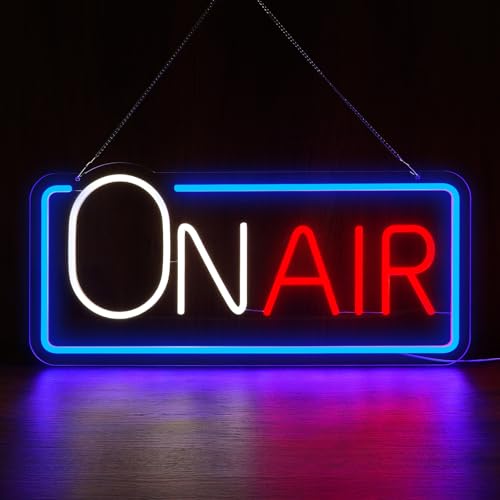
ON AIR Neon Sign with Do Not Disturb

- Large 15.7-inch acrylic sign
- Red, blue, and white LED glow
- USB-powered with hanging chain
Best For: Prominent podcast and streaming studio setups
Best Portable Pick

- Rechargeable for 6–8 hours
- 16 colors with remote and touch controls
- Desktop or wall mounting
Best For: Traveling and flexible live-streaming setups
Best Simple Decor

- Red-and-white ON AIR lettering
- USB-powered acrylic design
- Wall or desktop placement
Best For: Straightforward podcast, gaming, and home-office decor
Compact Broadcast Cue
Remote-Controlled On Air Light

- Soft, glare-free LED illumination
- Battery-powered with remote control
- Compact wall-mountable acrylic design
Best For: Small home studios and streaming desks
Colorful Studio Statement
Pink-Blue Live On Air Neon Sign

- Approximately 13 inches wide
- Dimmable from 10% to 100%
- USB powered with a 59-inch cable
Best For: Colorful podcast and gaming backgrounds
Flexible Creator Accent

- Bright, cool-to-touch LED glow
- Wall or desktop placement
- USB or battery power listed
Best For: Adaptable podcast, streaming, and gaming setups
Compact Battery ON AIR Light – Simple Studio Status Sign
For podcast studio signs for live streaming, this compact battery-powered ON AIR light offers a simple way to mark recording time. Its soft, no-glare LED illumination suits indoor studios, desks, walls, and streaming backgrounds.
Best For: Streamers, podcasters, and creators who want a portable, easy-to-install recording indicator.
Pros:
- Battery powered for flexible placement without a nearby outlet.
- Soft LED light is described as flicker-free and low-glare.
- Wall-mount design works on studio walls, desks, or decor setups.
- Compact 9.84-by-3.54-by-3.54-inch format fits smaller spaces.
Cons:
- The battery compartment is compact and may require repositioning batteries for proper contact.
- Intended for indoor use.
This is a practical choice when convenience and portability matter more than a large neon-style display. Check the battery fit during setup, then use it as a compact visual cue for recordings and live sessions.
Door Privacy Hangers – Double-Sided Recording Warning Signs
These door hangers provide a straightforward alternative to illuminated podcast studio signs for live streaming when the main goal is privacy. The two-pack uses printed recording messages to help signal that a session is underway.
Best For: Home studios, offices, online classes, and recording spaces where a door-mounted do-not-disturb reminder is useful.
Pros:
- Two signs are included for multiple rooms or backup use.
- Double-sided design offers different recording messages.
- Universal-style door-handle hole supports quick hanging.
- Plastic construction is suitable for office and studio use.
Cons:
- This is a passive printed sign, not a lighted or electronic indicator.
- It requires a compatible door handle for mounting.
If interruptions are your primary concern, these signs communicate recording status directly at the door. They are less suitable for on-camera background lighting but offer an inexpensive, visible privacy cue.
Dimmable USB Neon Sign – Colorful Podcast Background Accent
For podcast studio signs for live streaming, this USB-powered neon-style sign adds a prominent ON AIR focal point to a recording background. Its built-in dimming switch lets you adjust the brightness for podcasts, streams, and general room lighting.
Best For: Creators building a colorful wall or desk backdrop for podcasts, streaming, gaming, or home-office content.
Pros:
- USB power makes it convenient for compatible power sources.
- Built-in dimming switch supports adjustable brightness.
- Large 16.1-by-7.4-inch size creates a visible background accent.
- Includes mounting hardware and can be wall mounted or placed in a setup.
Cons:
- Requires access to a compatible USB power source.
- The larger footprint may be more than needed for very small desks or walls.
This sign balances decorative impact with practical control. Choose it when you want a colorful, recognizable ON AIR element that remains easy to power and adjust during recording.
Microphone ON AIR Neon – Adjustable Live Streaming Sign
This microphone-themed option is designed for buyers comparing podcast studio signs for live streaming and recording. Its multicolor broadcast design, five brightness levels, and included mounting accessories make it suitable for both on-camera backgrounds and studio decor.
Best For: Podcasters, streamers, and content creators who want a prominent microphone-themed ON AIR display with adjustable brightness.
Pros:
- Five brightness levels range from 10% to 100%.
- Microphone graphic reinforces its podcast and broadcast purpose.
- Can be displayed on a desk or mounted on a wall.
- Includes hooks, chain, crystal wire, and a screw kit.
Cons:
- Its 16.54-by-8.9-inch size needs adequate display space.
- Wired control means the setup is not described as battery powered.
With a larger landscape format and strong color contrast, this sign is aimed at creators who want their recording status to double as a recognizable visual feature. Its adjustable brightness helps tailor the effect to different camera scenes.
Best Overall Signal – ON AIR Neon Sign with Do Not Disturb
For creators comparing podcast studio signs for live streaming, this large acrylic ON AIR sign combines a clear recording cue with a separate “PLEASE DO NOT DISTURB” message. Its three-color glow and USB power make it a practical wall sign for camera-facing studios, home offices, and podcast rooms.
Best For: Podcasters and streamers who want a prominent, professional-looking interruption warning on camera.
Pros:
- Combines “ON AIR” and “PLEASE DO NOT DISTURB” messaging.
- Large 15.7-by-6.7-inch acrylic backboard with red, blue, and white illumination.
- USB-powered design works with power banks, computers, or wall adapters.
- Includes a metal hanging chain for wall or door installation.
Cons:
- Wall-focused mounting may be less convenient for users who want a desktop sign.
- The 1.6-pound size requires more space than a compact portable light.
This is the strongest choice when visibility and a clear do-not-disturb signal matter more than portability. The multicolor glow should also stand out well in recording and streaming backgrounds.
Best Portable Pick – Rechargeable RGB ON AIR Sign
For podcast studio signs for live streaming that need to move between locations, this rechargeable ON AIR light offers a cordless setup with 16 RGB colors, remote control, and touch adjustment. Its compact design can sit on a desk or mount on a wall, making it useful for flexible home studios and travel shoots.
Best For: Mobile creators and streamers who need a portable status light with adjustable colors and brightness.
Pros:
- Built-in battery provides approximately 6–8 hours of continuous use.
- Offers 16 colors, three brightness levels, remote control, and touch operation.
- Supports both desktop placement and wall or backdrop mounting.
- Compact, lightweight design is suited to travel and outdoor shooting.
Cons:
- Requires recharging rather than offering continuous USB-powered operation.
- Its smaller format may be less visually prominent than a large wall sign.
This model is the most flexible option in the group. Choose it when cordless operation, quick repositioning, and color control are more valuable than a larger studio display.
Best Simple Decor – Classic ON AIR Neon Wall Sign
If you want podcast studio signs for live streaming without extra controls or a complex setup, this acrylic ON AIR LED sign keeps the design straightforward. Its red-and-white lettering, USB power, and lightweight construction suit podcast rooms, gaming spaces, home offices, and media areas.
Best For: Creators seeking a simple, lightweight ON AIR accent for a wall or desk.
Pros:
- Bold red-and-white ON AIR design adds a clear studio cue.
- USB-powered for convenient use in a home recording or streaming setup.
- Lightweight acrylic construction can be mounted or placed on a desk.
- Fits podcasting spaces, game rooms, media rooms, and home offices.
Cons:
- Does not list rechargeable battery operation or color-changing controls.
- Provides an ON AIR message but not a separate do-not-disturb phrase.
This is a sensible choice for a clean, classic studio look. It offers the essential visual status cue while keeping the installation and operation uncomplicated.
Compact Broadcast Cue – Remote-Controlled On Air Light
For podcast studio signs for live streaming, this compact black acrylic On Air light offers a simple, low-profile way to signal recording or broadcasting. It uses three AA batteries, includes a remote control, and can be wall-mounted indoors.
Best For: Streamers, podcasters, and home-studio users who want a compact battery-powered recording indicator.
Pros:
- Soft LED illumination is described as glare-free and flicker-free.
- Battery-powered design avoids the need for a nearby outlet.
- Includes a remote control and supports wall mounting.
- Lightweight acrylic construction weighs about 0.3 kg.
Cons:
- Three AA batteries are required and are not included.
- The battery compartment is compact, and batteries may need repositioning for proper contact.
- Intended for indoor use.
This is a practical choice when you need a straightforward recording cue without adding another USB cable to your setup. Its compact size and remote control are useful for desks, walls, and small streaming backgrounds.
Colorful Studio Statement – Pink-Blue Live On Air Neon Sign
For podcast studio signs for live streaming, this 13-inch pink-and-blue microphone neon sign adds a prominent visual cue and colorful background element. It is USB powered, wall-mounted, and has brightness controls ranging from 10% to 100%.
Best For: Broadcast rooms, podcast studios, gaming spaces, and streamers who want a larger decorative sign with adjustable brightness.
Pros:
- Large approximately 12.8-inch design is easy to see in a studio background.
- Three-button control allows brightness adjustment from 10% to 100%.
- USB cable is approximately 59 inches long for flexible placement.
- Flexible silicone strip and acrylic back plate are designed for durability and safe use.
Cons:
- Requires USB power rather than batteries.
- The pink-and-blue color scheme may not suit every studio aesthetic.
- Protective film must be removed from the sign for the intended finished appearance.
Choose this model if visibility and colorful presentation matter more than a subtle footprint. Its dimming controls make it easier to balance the sign with cameras and other room lighting.
Flexible Creator Accent – USB Live On Air Neon Sign
For podcast studio signs for live streaming, this Live On Air neon sign is designed to add a bright broadcast-style accent to streaming, recording, and gaming spaces. Its acrylic and LED construction can be wall-mounted or placed on a desk, with USB or battery power listed for setup flexibility.
Best For: Podcasters, streamers, gamers, and content creators seeking a modern neon-style studio accent.
Pros:
- Bright, energy-efficient LED glow is designed to remain cool to the touch.
- Can be wall-mounted or displayed on a desk.
- USB or battery power provides flexible placement options.
- High-quality acrylic and LED components are intended for durable use.
Cons:
- Supplied notes do not specify the sign’s dimensions.
- Power requirements and battery details are not fully described.
- Neon styling may be less suitable for understated studio decor.
This sign is a versatile option for creators who want a quick visual upgrade without committing to a fixed display location. Its desk-or-wall placement makes it adaptable as your recording setup changes.
How We Picked the Best Podcast Studio Signs for Live Streaming
We focused on signs that serve a practical purpose during recording or live broadcasts while also improving the appearance of a creator setup. The selection includes wired and rechargeable models, traditional warning indicators, door hangers, neon-style signs, and options with remote or touch controls. We considered how easily each type can be seen on camera, whether it works in a compact room, and how much control users have over brightness and color.
Because product specifications and included accessories can vary, check the current listing for dimensions, mounting hardware, cable length, power requirements, and control features before ordering.
Quick Comparison
| Sign type | Best for | Main advantage |
|---|---|---|
| Classic LED ON AIR sign | Home studios and desks | Clear recording status with a simple appearance |
| Neon-style sign | Video backgrounds and streaming rooms | Stronger decorative impact on camera |
| RGB rechargeable sign | Flexible setups and mobile creators | Portable, colorful lighting with adjustable controls |
| Door hanger | Shared homes and offices | No installation or electrical power required |
Key Buying Factors for Podcast Studio Signs for Live Streaming
Visibility and Size
Choose a sign large enough to read from the doorway or appear clearly in your camera frame. A compact desk sign suits close-up setups, while a larger wall sign works better in a studio or shared workspace.
Power and Placement
USB-powered signs are convenient near a computer, hub, or wall adapter. Rechargeable models offer more freedom for temporary locations but require charging. Also confirm whether the sign is designed for tabletop use, wall mounting, hanging, or multiple placement methods.
Brightness and Controls
Dimming is useful when the sign appears in video and you need to avoid glare. Remote controls, touch buttons, and color modes add flexibility, while a basic ON/OFF switch may be preferable when reliability and simplicity matter most.
Style and Build
Neon-style signs create a more colorful background, but a traditional ON AIR light can communicate recording status more directly. Look for stable construction, protected LED elements, and a design that complements your existing lighting rather than competing with it.
Who Should Buy Which Podcast Studio Signs for Live Streaming?
Choose a classic ON AIR LED sign if you want an unmistakable recording indicator for a desk, office, or home studio. Choose a neon-style microphone or ON AIR sign if the sign will be part of your visible streaming background. Choose a rechargeable RGB model if you move between rooms or want colored ambient lighting. Choose a door hanger if your main goal is to warn household members or coworkers without adding another powered device.
For most fixed streaming setups, prioritize visibility, dimming, and dependable USB power. For multipurpose creator rooms, portability and adjustable color may be worth paying more for.