
The best podcast workstations for adjustable setups make it easier to position microphones, interfaces, lights, tablets, and cameras exactly where you need them. This roundup combines portable kits, desktop stands, boom arms, recording consoles, and useful accessories for different recording spaces and budgets.
Whether you are building a compact solo station or a more capable multi-device setup, focus on adjustability, connection options, desk compatibility, and how easily each component can be repositioned between sessions.
Best 10 Podcast Workstations for Adjustable Setups Picks for 2026
Portable Two-Person Kit

- Complete two-person podcast package
- Dual-channel interface with mobile connections
- Battery-capable for recording on the go
Best For: Mobile two-person podcasts and interviews
Compact Audio Upgrade

- Two-channel USB recording interface
- Vintage preamp and analog compressor
- Supports desktop and mobile recording
Best For: Creators wanting vocal processing in a compact interface
Flexible Desk Mounting

- 34-inch adjustable boom arm
- 360-degree phone and tablet holder
- Clamp fits desks up to 2.4 inches thick
Best For: Organized desk setups for podcasts and streaming
Simple Desktop Stand

- Adjusts from 9 to 13 inches
- Stable sand-cast base with rubber feet
- Compact option for short-height miking
Best For: Basic desktop podcast microphone placement
All-in-One Production Pick

- Six 1080p60 video sources and up to 20 audio inputs
- Includes mic, arm, headphones, cables, and storage card
- Supports scenes, multiview, graphics, and direct streaming
Best For: Video podcasts and expandable livestream workstations
Beginner Streaming Pick
SK500 Podcast Equipment Bundle

- Includes mic, stand, mixer, earphones, cables, and adapters
- Five faders with noise reduction and voice effects
- Supports compatible computers, phones, tablets, and PS5
Best For: Entry-level podcasting, streaming, and gaming audio
Flexible Audio Starter
FIFINE T683 USB Microphone Kit
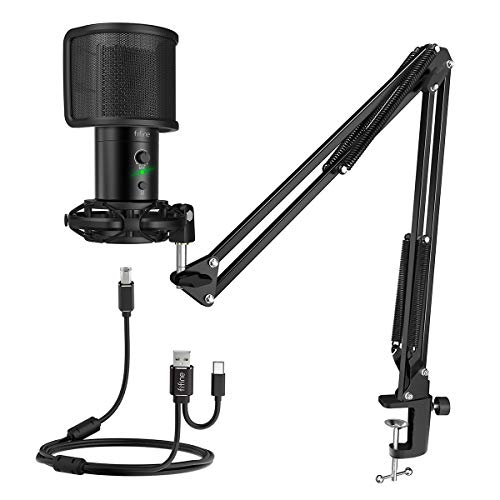
- Swiveling boom arm for adjustable positioning
- Includes pop filter, shock mount, and USB cable
- Gain, mute, and headphone monitoring controls
Best For: Home podcasters and streamers building an adjustable microphone station
Compact Mic Positioning
Height-Adjustable Table Mic Stand

- Telescopes from 6.8 to 10.9 inches
- Weighted metal base supports desktop stability
- Detachable for compact storage
Best For: Shure MV7-series owners seeking a low-profile desktop stand
Adjustable Video Lighting
UBeesize 10-Inch Desk Ring Light

- 10 brightness levels and three color modes
- Telescoping arm extends up to 13 inches
- 360-degree rotation with a padded C-clamp
Best For: Video podcasters and streamers needing flexible desk lighting
Portable Two-Person Kit – Movo PodPro Bundle
For creators comparing podcast workstations for adjustable setups, the Movo PodPro offers a ready-made two-person recording system that can move between a desk, home studio, or travel location. Its battery-capable interface and multiple device cables make it especially flexible for mobile recording.
Best For: Two-person podcasts, interviews, and creators recording with phones, tablets, or computers.
Pros:
- Includes two XLR microphones, headphones, tabletop stands, and cables.
- Dual-channel interface provides two XLR inputs, two headphone outputs, and 48V phantom power.
- Supports USB-A, USB-C, and Lightning connections for computers and mobile devices.
- Battery-powered interface offers up to eight hours of use with phantom power off.
Cons:
- The complete bundle is more equipment than a solo podcaster may need.
- Battery life is reduced to about three hours when phantom power is enabled.
With microphones, monitoring, stands, and connectivity included, this is a practical starting point for a flexible two-person workstation. It is particularly appealing when portability matters as much as a complete setup.
Compact Audio Upgrade – Universal Audio Volt 176
The Universal Audio Volt 176 is a compact choice for podcast workstations for adjustable setups, providing a two-channel USB interface that can serve a desktop, laptop, tablet, or phone-based recording workflow. Its Vintage preamp mode and built-in compressor add hands-on control for vocals and instruments.
Best For: Solo creators and musicians who want a compact interface with vocal-focused processing and broad device compatibility.
Pros:
- Vintage mode is designed to deliver the character of classic UA 610 preamps.
- Built-in analog compressor is based on the 1176-style design for added vocal clarity and punch.
- Supports Mac, Windows, iPad, and iPhone recording workflows.
- Works with LUNA and a range of supported audio software and plug-ins.
Cons:
- It is an interface rather than a complete podcast kit, so microphones and stands are separate purchases.
- Mobile iPhone or iPad use may require an external power supply and, for some devices, a Lightning to USB Camera Adapter.
This interface suits an adjustable workstation built around a computer or mobile device, especially when you want more than basic input capture. Its processing features can help streamline vocal recording without adding a separate compressor.
Flexible Desk Mounting – Rockville R-BOOM 34
For podcast workstations for adjustable setups, the Rockville R-BOOM 34 package combines a 34-inch articulated microphone arm with a tablet and smartphone mount. The desk clamp and 360-degree device adjustment help keep microphones and recording screens positioned within reach.
Best For: Podcasters and streamers who want an organized desk setup with adjustable microphone and screen positioning.
Pros:
- 34-inch boom arm provides reach and multiple articulation points.
- Internal locking teeth support adjustments without exposed springs or constant knob loosening.
- Included mount fits phones and tablets from 4.7 to 12.9 inches.
- Desk clamp supports surfaces up to 2.4 inches thick and includes rubber protection pads.
Cons:
- The stated load capacity is limited to 4.4 pounds, so microphone weight must be considered.
- The package includes mounting hardware rather than a microphone or audio interface.
This is a strong workspace-focused option for creators who already have recording gear and need better positioning. The combined mic arm and device holder can reduce desk clutter while keeping controls or notes visible.
Simple Desktop Stand – On-Stage DS7200C
The On-Stage DS7200C is a straightforward addition to podcast workstations for adjustable setups, offering short-height desktop microphone support without the footprint of a boom arm. Its removable shaft adjusts from 9 to 13 inches for seated recording and other close-range applications.
Best For: Desktop podcasters who need a stable, height-adjustable stand for short-height microphone placement.
Pros:
- Adjustable height from 9 to 13 inches accommodates different desktop positions.
- Solid sand-cast base is designed for stability and vibration dampening.
- Non-slip rubber feet help keep the stand in place.
- Removable shaft makes the stand easier to adapt or store.
Cons:
- Its desktop design offers less reach and positioning flexibility than a boom arm.
- It is a stand only, so the microphone and other recording equipment are separate.
Choose this model when simplicity and a small desktop footprint matter more than extended reach. It provides basic height adjustment for a clean, stable microphone position in a compact workstation.
All-in-One Production Pick – RODECaster Video Bundle
For creators building podcast workstations for adjustable setups, this RODECaster Video bundle combines production, monitoring, microphone support, and essential cables in one package. The console supports up to six 1080p60 video sources, 20 audio inputs, scene presets, and touchscreen control, making it suited to flexible podcast and livestream workflows.
Best For: Video podcasts, livestreams, and creators who want an expandable production-centered workstation.
Pros:
- Includes the RODECaster Video console, headphones, microphone, mic arm, storage card, and connection cables.
- Provides integrated HD video switching, multiview monitoring, scene presets, and layered graphics tools.
- Offers dual combo XLR-1/4-inch inputs, wireless receiver support, USB-C connectivity, and direct RTMP streaming.
Cons:
- At 11.4 pounds, the bundle is less convenient for highly portable setups.
- Its extensive production features may be more than needed for a simple audio-only podcast.
This is the most comprehensive option here for an adjustable, growth-oriented workstation. It is particularly compelling when video switching and live production matter as much as recording audio.
Compact Positioning Pick – ZealSound Gooseneck Mic Stand
This clamp-on stand is a practical choice for podcast workstations for adjustable setups, especially where desk space is limited. Its 13-inch gooseneck bends in any direction, while the clamp attaches to surfaces up to 2.24 inches thick without requiring a freestanding base.
Best For: Small desks, shared workstations, voice-over setups, and podcasters who frequently reposition a microphone.
Pros:
- 360-degree flexible gooseneck allows quick height and angle adjustments.
- Heavy-duty clamp includes an anti-slip pad and fits desks up to 2.24 inches thick.
- Supports microphones up to 2.2 pounds and includes a 3/8-inch to 5/8-inch metal adapter.
- Compact 13-inch reach preserves more usable desktop space than a longer boom arm.
Cons:
- The 13-inch reach may not suit setups requiring a microphone positioned farther away.
- Compatibility depends on microphone weight, mounting thread, or the included holder’s 1.1- to 1.38-inch diameter range.
Choose this stand when fast, hands-on positioning and a small footprint are priorities. It adds adjustability without the bulk of a conventional boom arm, though larger or unusually shaped microphones require careful compatibility checks.
Beginner Streaming Pick – SK500 Podcast Equipment Bundle
The SK500 is a starter-friendly option for podcast workstations for adjustable setups, bundling a microphone, triangular desktop stand, mixer, earphones, and connection cables. Its faders, noise reduction, voice enhancement, and sound effects provide hands-on control for podcasts, gaming, and live streaming.
Best For: Beginners creating podcasts, livestreams, gaming content, or voice recordings with compatible phones, computers, tablets, and PS5 systems.
Pros:
- Includes an XLR-to-3.5mm microphone, tripod stand, earphones, cables, adapters, and manual.
- Provides five volume faders, real-time monitoring, noise reduction, and voice enhancement.
- Offers two microphone inputs, three device outputs, dual-device broadcasting, and five voice-change options.
- Runs for approximately four to five hours on a full charge, according to the supplied notes.
Cons:
- It does not support USB microphones or phantom power and uses a 3.5mm microphone input.
- It is not compatible with Xbox as an output device, and the notes exclude PS4 compatibility.
- Wireless accompaniment uses Bluetooth, but connected speakers require a 3.5mm audio cable.
This bundle makes setup approachable for creators who want physical controls and included accessories rather than a more complex interface. Confirm device compatibility before buying, particularly if your workflow uses USB microphones, Xbox, PS4, or phantom-powered equipment.
Flexible Audio Starter – FIFINE T683 USB Microphone Kit
For podcast workstations for adjustable setups, the FIFINE T683 is a practical all-in-one microphone bundle. Its swiveling boom arm, desk clamp, and included shock mount help you position the mic around your workspace, while USB connectivity keeps setup straightforward.
Best For: Home podcasters, streamers, and creators who want an adjustable microphone setup with included accessories.
Pros:
- Swiveling boom arm supports flexible microphone positioning.
- Includes a pop filter, shock mount, desk mount, and USB cable.
- Plug-and-play compatibility with Mac and Windows PCs, plus PS4.
- Gain control, mute button, and headphone monitoring add useful recording controls.
Cons:
- Requires a desk or table edge up to 2 inches thick for the clamp.
- Not compatible with Xbox.
- It is a larger bundled setup than a compact desktop stand.
The T683 makes sense when you want adjustable reach and a complete starter kit rather than a microphone alone. Its arm-based design can help keep the mic off the desktop and away from keyboard movement.
Compact Mic Positioning – Height-Adjustable Table Mic Stand
Among podcast workstations for adjustable setups, this height-adjustable table stand suits users who prefer a low-profile desktop arrangement. The telescoping post provides a 6.8- to 10.9-inch height range, while the weighted metal base avoids the need for a boom-arm clamp.
Best For: Shure MV7-series users who want a stable, space-conscious desktop microphone stand.
Pros:
- Height adjusts from 6.8 to 10.9 inches for different speaking angles.
- Weighted metal base helps maintain stability during recording and adjustment.
- Non-slip underside helps limit sliding and tabletop marks.
- Detachable design supports compact drawer or cabinet storage.
Cons:
- Designed for Shure MV7, MV7+, MV7X, and MV7i models.
- Microphone and cables are not included.
- The adjustment collar must be tightened before use.
This stand is a focused choice for a compatible Shure microphone and a tidy desk. It offers height flexibility without requiring a desk clamp or boom arm, though its model compatibility is limited.
Adjustable Video Lighting – UBeesize 10-Inch Desk Ring Light
For podcast workstations for adjustable setups, the UBeesize 10-inch ring light adds flexible illumination without taking much desk space. Its telescoping arm, 360-degree rotation, and C-clamp let you position light around a webcam, recording area, or home-office desk.
Best For: Podcasters, streamers, and remote workers who need adjustable front or side lighting for camera-facing video.
Pros:
- Provides 10 brightness levels and three color modes.
- Telescoping stand extends up to 13 inches.
- 360-degree rotation supports varied lighting angles.
- Metal C-clamp fits desks up to 2.5 inches thick and includes protective padding.
Cons:
- Its primary role is lighting, not microphone support.
- Requires access to AC power for consistent output.
- The clamp may not suit desktops thicker than 2.5 inches.
The UBeesize is useful when your adjustable podcast setup also needs more consistent video lighting. Its clamp-based design preserves desktop space, while the height and angle adjustments make it easier to adapt the light to different camera positions.
How We Picked the Best Podcast Workstations for Adjustable Setups
We selected these products for their usefulness in flexible podcasting environments rather than treating every item as a complete studio. The list includes all-in-one bundles, USB and desktop audio hardware, adjustable microphone supports, tablet and lighting mounts, and accessories that can help organize a changing recording space.
Our evaluation priorities were positioning range, mounting practicality, compatibility with common phones and computers, audio workflow support, portability, and value. A workstation should make recording easier without forcing every creator into the same desk layout.
Quick Comparison
- Best for portable recording: Movo PodPro Portable Podcast Equipment Bundle.
- Best for interface-focused setups: Universal Audio Volt 176.
- Best for integrated production: RODECaster Video bundle.
- Best for flexible microphone positioning: Rockville R-BOOM 34 and ZealSound Gooseneck Stand.
- Best for simple desktop placement: OnStage DS7200C and the height-adjustable table stand.
- Best for lighting support: UBeesize 10-inch desk ring light.
Key Buying Factors for Podcast Workstations for Adjustable Setups
Desk Compatibility and Adjustment Range
Check clamp opening sizes, base dimensions, arm reach, and available height adjustment before buying. Clamp-on arms save desk space, while weighted desktop stands are easier to move and may suit shallow or shared desks better.
Microphone and Device Compatibility
Confirm whether a stand or arm supports your microphone’s weight, mounting thread, and body shape. If you use a Shure MV7-series microphone or another heavy model, choose a support designed for that load. Tablet mounts and phone bundles should also match your device size and connection method.
Audio Connections and Workflow
USB microphones are straightforward for solo recording, while an audio interface offers more control over XLR microphones and monitoring. Look for the inputs, outputs, gain control, loopback, processing, and computer or mobile compatibility your production actually requires.
Ergonomics, Portability, and Cable Management
A good adjustable setup keeps the microphone near mouth level, reduces arm and shoulder strain, and leaves room for notes or controls. Portable bundles are useful for travel, but larger arms, consoles, and lighting mounts may provide better stability at a permanent desk.
Who Should Buy Which Podcast Workstations for Adjustable Setups?
Choose a portable bundle if you record in multiple locations or want a quick phone-based setup. Choose an audio interface and separate stand if sound control and future microphone upgrades matter most. Choose a production console bundle if you need hands-on control for video, multiple sources, headphones, and streamlined live or recorded workflows.
For small desks, a gooseneck stand, compact desktop stand, or clamp-on arm can provide useful positioning without taking over the workspace. Creators who record video should consider adding an adjustable ring light and tablet or phone mount. Before ordering, measure your desk, list your devices, and decide whether you prioritize portability, stability, or expansion.