
The best podcast workstation brings your microphones, headphones, phone, computer, and live-production controls into a setup that is easy to manage. The right choice depends on whether you record solo, host two-person conversations, stream, or need a portable rig.
We compared these 10 options by connectivity, included equipment, control features, portability, and ease of use so you can choose a practical workstation for your recording space and workflow.
Best 10 Podcast Workstations for Creators Picks for 2026
Best Wireless Duo Kit

- Two microphones with wireless, USB, and XLR connectivity
- Separate tracks for two-person wireless recordings
- Up to 60 hours of battery life and 60-meter range
Best For: Duo podcasts, interviews, and flexible mobile recording
Best Compact Production Hub
RØDECaster Duo Production Studio
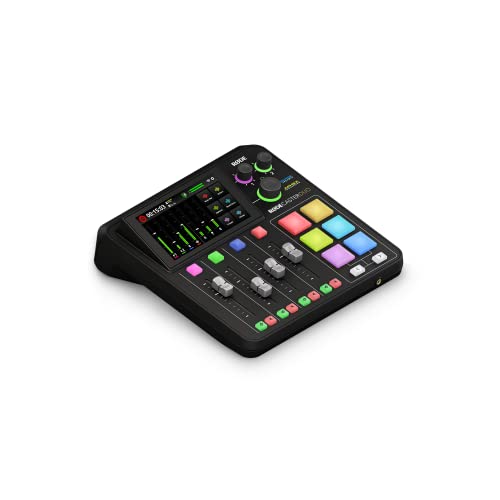
- Two combo inputs with high-gain Revolution Preamps
- Four faders, six SMART pads, and touchscreen control
- APHEX processing for podcasting, streaming, and music
Best For: Desk-based creators who want tactile production controls
Best Adaptive Mixer
Mackie DLZ Creator Digital Mixer
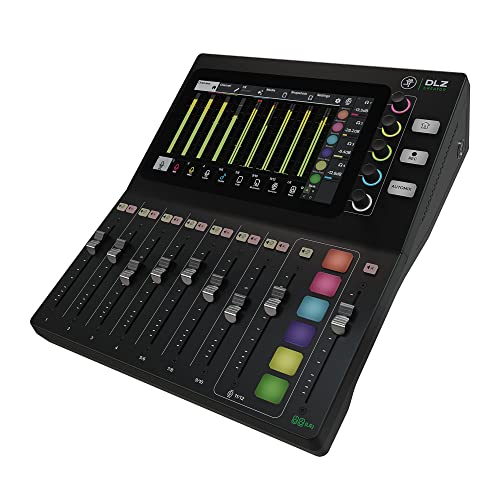
- Three touchscreen control modes for different experience levels
- AutoMix supports up to four microphones
- Records to computer or SD card with four headphone mixes
Best For: Multi-person podcasts, streams, and growing production workflows
Best Portable Phone Kit
Movo PodPro Mobile Podcast Bundle

- Dual-channel interface with two XLR microphones and headphones
- Includes USB-A, USB-C, and Lightning cables
- Battery-powered interface with travel case
Best For: Two-person mobile recording with phones, tablets, or computers
Best Audio Control Hub

- Controls multiple PC and Mac audio sources
- Five-inch customizable color display
- Supports submixes, routing, volume, and mute control
Best For: Computer-based creators managing complex podcast and streaming audio
Best Complete Starter Kit
ALPOWL Podcast Equipment Bundle

- Includes two microphones and a V8 live sound card
- Adds stands, pop filters, shock mounts, and headphones
- Supports podcasting, streaming, gaming, and voice recording
Best For: Beginners building a two-person home podcast setup
Versatile Starter Station

- Complete microphone, mixer, stand, and headphone kit
- Supports phones, computers, microphones, and instruments
- Adds voice effects, tone controls, and noise reduction
Best For: Creators wanting flexible podcasting and live-streaming controls
Budget Studio Kit
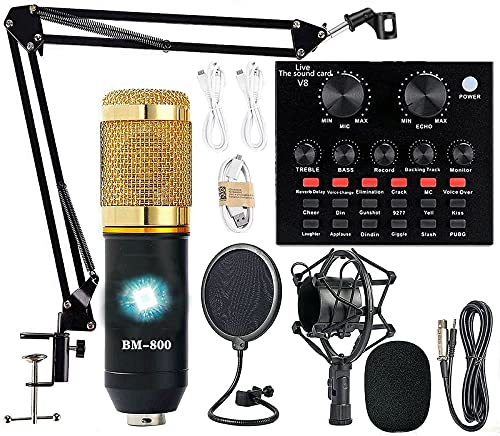
- Includes mic, arm, shock mount, pop filter, and sound card
- Supports computers, mobile devices, and gaming platforms
- Adds voice effects for livestreaming and social video
Best For: Beginners seeking an all-in-one recording package
Dual-Mic Creator Rig

- Includes two microphones and suspension arms
- Supports major desktop, mobile, and gaming platforms
- Adds voice effects and direct instrument inputs
Best For: Two-person podcasts and multimedia livestream production
Best Wireless Duo Kit – PD200W Hybrid Podcast Bundle
The MAONO PD200W is one of the most flexible podcast workstations for creators who need a two-person setup that can move between a desk, camera, phone, and computer. Its two microphones support wireless, USB, and XLR connections, making it easy to start simply and expand into a more advanced audio setup.
Best For: Duo podcasts, interviews, and creators who want wireless recording with wired backup options.
Pros:
- Includes two microphones, stands, receiver, and connection cables.
- Supports wireless, USB, and XLR workflows.
- Offers separate tracks for two wireless microphones.
- Provides up to 60 hours of battery life and a 60-meter wireless range.
Cons:
- Camera and Lightning accessories are sold separately.
- Some advanced sound controls require the MaonoLink app.
Choose this bundle if cable-free operation and portability matter as much as sound quality. It is especially appealing for creators who want a complete two-person kit without committing to a permanently wired workstation.
Best Compact Production Hub – RØDECaster Duo Production Studio
The RØDECaster Duo is a compact choice among podcast workstations for creators who want hands-on control over recording, streaming, music, and content production. It combines microphone and instrument inputs, physical faders, programmable SMART pads, touchscreen control, and onboard processing in one desktop unit.
Best For: Podcasters and streamers who want tactile controls and a compact all-in-one production studio.
Pros:
- Includes two Neutrik combo inputs with high-gain Revolution Preamps.
- Provides four broadcast-quality faders and six SMART pads.
- Features a high-resolution touchscreen with haptic feedback.
- Includes APHEX processing and a 3.5mm TRRS headset connection.
Cons:
- Only two combo input jacks are listed.
- Requires corded power for operation.
The Duo is a strong fit for creators who prefer dedicated controls over software-only workflows. Its compact footprint keeps a capable production center within reach without taking over the desk.
Best Adaptive Mixer – Mackie DLZ Creator Digital Mixer
The Mackie DLZ Creator is designed for podcast workstations for creators who want the interface to match their experience level. Its 10.1-inch touchscreen offers Easy, Enhanced, and Pro control modes, while AutoMix helps manage up to four microphones during multi-person recordings.
Best For: Multi-person podcasts, live streams, and creators who want guided controls with room to grow.
Pros:
- Three control modes adapt to different skill levels.
- AutoMix manages levels for up to four microphones.
- Records multitrack audio to a computer via USB-C or directly to an SD card.
- Supports up to four customized headphone mixes.
Cons:
- Its 9.1-pound weight makes it less portable than compact mixers.
- The supplied details list a USB Type-B output connector rather than USB-C.
- It requires corded power.
This mixer makes the most sense for creators producing shows with several speakers or guests. AutoMix and customizable headphone mixes can reduce hands-on monitoring work, while Pro mode provides more control as your workflow develops.
Best Portable Phone Kit – Movo PodPro Mobile Podcast Bundle
The Movo PodPro is a practical option for podcast workstations for creators who record with phones, tablets, or computers. The bundle pairs a battery-capable dual-channel interface with two XLR microphones, headphones, stands, cables, and a travel case for recording away from a fixed studio.
Best For: Two-person mobile podcasts, interviews, and creators recording with iPhone, Android, Mac, or PC devices.
Pros:
- Includes two microphones, two headphones, stands, cables, and a travel case.
- Works with USB-A, USB-C, and Lightning-connected devices.
- Offers two XLR inputs, two headphone outputs, and 48V phantom power.
- Battery-powered interface provides up to eight hours of operation with phantom power off.
Cons:
- The listed maximum sample rate is 16 kHz.
- Battery life drops to three hours with phantom power enabled.
- The microphones require XLR connections rather than direct USB.
For creators who prioritize an all-in-one travel kit, the PodPro covers the essential two-person setup without requiring separate microphone, monitoring, and cable purchases. Its battery operation is useful for field recording, provided you plan around phantom-power runtime.
Best Audio Control Hub – BEACN Mix Create
For creators looking for podcast workstations for creators, the BEACN Mix Create is a compact USB-C control surface focused on managing computer audio. Its five-inch color display, customizable controls, routing tools, and submix support make it useful for organizing microphones, applications, headphones, and streaming audio from one desktop unit.
Best For: PC and Mac creators who want centralized control over multiple USB audio sources, stream mixes, and headphone or chat routing.
Pros:
- Manages more than four sources and supports an unlimited number of assigned audio sources.
- Five-inch full-color display provides customizable source identification.
- Push-button encoders offer volume adjustment and quick muting.
- Submix and routing tools help separate what the creator hears from what the audience hears.
Cons:
- It is a USB audio controller rather than a complete microphone-and-interface podcast kit.
- Its feature set is geared toward computer-based setups and requires the BEACN app for deeper personalization.
The Mix Create is a strong fit when your main challenge is managing software and USB audio sources efficiently. Choose it alongside compatible microphones and recording software if you need a complete podcast workstation.
Best Wireless Two-Person Setup – ZealSound Wireless Podcast Microphone
For podcast workstations for creators who record interviews or co-hosted shows, the ZealSound wireless microphone set offers two microphones with a shared 2.4 GHz receiver. It combines wireless flexibility with USB-C and Lightning compatibility, making it practical for computer, tablet, and mobile recording setups.
Best For: Two-person podcasts, interviews, video podcasts, livestreams, and creators who move between desktop and mobile devices.
Pros:
- Two wireless microphones connect to one computer or mobile device through the included receiver.
- 48 kHz/24-bit capture and cardioid pickup are designed for detailed, centered vocals.
- USB-C and Lightning adapters support PCs, Macs, iPhones, iPads, Android devices, and tablets.
- Each microphone includes gain, echo, mute, and zero-latency headphone monitoring controls.
Cons:
- Using both microphones on one device requires wireless mode.
- The supplied notes do not specify wireless range or battery life.
This is one of the more convenient options for creators who need a quick two-speaker setup without a separate mixer or audio interface. Its flexible connections also make it easier to record outside a traditional desktop studio.
Best Complete Starter Kit – ALPOWL Podcast Equipment Bundle
For beginners assembling podcast workstations for creators, the ALPOWL bundle combines two BM-800 condenser microphones with a V8 live sound card and supporting accessories. The package is designed to cover basic two-person podcasting, livestreaming, singing, gaming, and voice recording without requiring separate purchases for stands, pop filters, or headphones.
Best For: Entry-level two-person podcast, streaming, and home-recording setups on Windows, Mac, iOS, Android, or Chrome OS.
Pros:
- Includes two microphones, pop filters, shock mounts, scissor-arm stands, wind screens, headphones, and a live sound card.
- USB plug-and-play design requires no phantom power according to the supplied notes.
- Compatible with major computer and mobile platforms plus software such as OBS, Audacity, and iMovie.
- Provides two channels for a two-speaker recording arrangement.
Cons:
- The bundle weighs 2.59 kg and may require more desk space than a compact microphone setup.
- The supplied notes mention that the device may need charging before first use or after extended storage.
- Its BM-800 microphones and included accessories are aimed at starter setups rather than highly specialized studio workflows.
The ALPOWL kit offers the broadest collection of physical accessories in this group, making it appealing when you want to start recording with minimal shopping. It is best evaluated as an affordable all-in-one foundation for basic podcasting and live content.
Versatile Starter Station – G10 Podcast Mixer Bundle
For creators comparing podcast workstations for creators, this bundle offers a broad set of inputs and live-production controls in one package. It includes the P15 microphone, G10 mixer, stand, monitoring headphones, power cable, and OTG cable, with support for computers, phones, instruments, and headphones.
Best For: Podcasters, gamers, streamers, and creators who want voice effects and flexible device connectivity.
Pros:
- Includes the core microphone, mixer, stand, headphones, and cables.
- Supports dual 3.5mm microphone inputs, XLR and 6.5mm microphones, and instrument input.
- Offers noise reduction, tone controls, pitch control, voice changing, and 16 sound effects.
- Cardioid microphone pickup and an included windscreen help focus voice recording.
Cons:
- The microphone should be charged before initial use.
- The extensive controls may be more than a simple audio setup requires.
This is a feature-rich workstation for creators who need live-streaming flexibility rather than a minimal microphone-only kit. Its one-year warranty and stated support response within 12 hours add useful buying reassurance.
Budget Studio Kit – BM-800 AM100-V8 Bundle
This BM-800 package is a straightforward entry point for shoppers comparing podcast workstations for creators. It combines a condenser microphone, suspension arm, shock mount, pop filter, windscreen, cables, and live sound card for podcasting, streaming, music recording, and short-form video.
Best For: Beginners recording podcasts, vocals, livestreams, and social video across computers and mobile devices.
Pros:
- Includes an adjustable arm, shock mount, pop filter, windscreen, microphone, and sound card.
- Cardioid pickup is designed to capture sound primarily from in front of the microphone.
- Works with Windows, Mac OS, smartphones, tablets, PS4, Xbox, Switch, and other game platforms.
- Provides multiple voice effects and connection options for calls, livestreams, and video creation.
Cons:
- The listed setup uses USB and a 3.5mm audio input rather than a stated XLR connection.
- The microphone bundle should be charged before use.
With a 36-month warranty and six-month no-reason return period, this kit is a practical value choice for new creators who want a complete recording setup without assembling components separately.
Dual-Mic Creator Rig – V8SS Podcast Workstation
Among podcast workstations for creators, this V8SS bundle stands out for its two-microphone configuration and cross-platform focus. The package combines two condenser microphones with suspension arms, a mixer, USB-C connectivity, voice effects, and direct instrument inputs for podcasting, streaming, recording, and remote creation.
Best For: Two-person podcasts, livestreamers, and creators who need instrument input and broad device compatibility.
Pros:
- Includes two broadcast-grade condenser microphones with anti-vibration suspension arms.
- Supports Windows, Mac OS, Android, iOS, Chrome OS, smartphones, PC, PS5, and Xbox.
- Provides four voice variations, 10 sound effects, and multiple live-production functions.
- Accepts electric guitar, bass, and electronic drum inputs while retaining instrument dynamics.
Cons:
- It has two channels, which may limit larger multi-microphone productions.
- The battery should be fully charged before initial or extended use.
- Driver installation may require contacting the manufacturer if it does not start automatically.
This is the most collaboration-oriented option of the three, pairing dual microphones with instruments and USB-C connections. Its one-year manufacturer warranty and stated technical support provide added setup assistance.
How We Picked These Podcast Workstations for Creators
We focused on the parts that most affect day-to-day recording: microphone compatibility, input and output options, computer and mobile connectivity, monitoring controls, portability, and the quality of the included accessories. We also considered whether each setup is better suited to solo recording, two-person podcasts, live streaming, music, or general content creation.
The list includes established production consoles such as the RØDECaster Duo and Mackie DLZ Creator, compact computer mixers such as the BEACN Mix Create, and complete microphone bundles designed to reduce the number of separate purchases. Feature-rich workstations are not automatically better; the best fit is the one that matches your equipment and technical comfort level.
Quick Comparison
- Best for an integrated two-person studio: MAONO PD200W or RØDECaster Duo.
- Best for guided controls: Mackie DLZ Creator.
- Best for PC and Mac audio management: BEACN Mix Create.
- Best for mobile recording: Movo PodPro or ZealSound wireless microphone.
- Best for a low-cost starter bundle: The ALPOWL and BM-800-based packages.
Check the included cables and connectors before ordering. Some bundles are built around 3.5mm connections, while dedicated mixers commonly use USB or XLR workflows. Adapter requirements can affect the real cost and ease of setup.
Key Buying Factors for Podcast Workstations for Creators
Inputs and Microphone Support
For solo shows, one microphone input may be enough. Two-person podcasts need at least two usable inputs, while panel discussions require additional channels. XLR inputs generally provide a more upgradeable path for microphones; USB and 3.5mm options can be simpler for phones, computers, and entry-level kits.
Computer, Phone, and Wireless Connectivity
Confirm compatibility with your recording device. USB-C is convenient for modern computers, but iPhone and Android recording may require a compatible cable or adapter. Wireless microphones improve mobility, although wired microphones usually offer a simpler connection and fewer battery concerns.
Monitoring and Live-Production Controls
Look for a headphone output with independent volume control, mute buttons, mix-minus or monitoring support, and easy access to levels. Sound effects, voice processing, and routing controls can be valuable for live shows, but they may be unnecessary if you edit everything after recording.
Portability and Included Accessories
A portable kit should be compact, quick to connect, and powered conveniently. Complete bundles can offer good value when they include microphones, stands, cables, and an interface, but inspect the accessory quality and plan for future upgrades.
Who Should Buy Which Podcast Workstations for Creators?
New creators should prioritize a straightforward bundle with the necessary microphone, interface, and cables. Two-person podcast teams should choose a workstation with two independent microphone inputs and comfortable headphone monitoring. Streamers and live hosts may benefit from physical mute, routing, voice-effect, and sound-trigger controls. Mobile creators should favor lightweight phone-compatible equipment, while experienced producers may prefer a dedicated mixer with stronger routing and room to expand.
Before buying, list your microphones, recording device, number of speakers, and preferred connection type. That short checklist will usually narrow these Podcast Workstations for Creators to the few options that fit your actual workflow.