
A comfortable podcast setup can make long recording, editing, and streaming sessions easier on your back, shoulders, and wrists. The right workstation also keeps microphones, mixers, keyboards, and headphones within easy reach.
We selected 10 desks, stands, mixers, microphone accessories, and ergonomic upgrades for different studio sizes and workflows. Use the guide below to match your equipment, working style, and available space with a practical setup.
Best 10 Podcast Workstations for Ergonomic Setups Picks for 2026
Best Microphone Starter Kit

- USB and XLR outputs
- Zero-latency headphone monitoring
- Includes arm and pop filter
Best For: Flexible beginner podcast recording
Best Studio Workstation

- Dual or single rack configurations
- Soft-close keyboard tray
- Integrated cable management
Best For: Permanent home recording studios
Best Large Surface

- 71-inch-wide workstation
- Two speaker shelves and headphone holders
- 160-pound maximum load
Best For: Spacious multi-device podcast studios
Best Audio Control Hub

- Centralizes PC and Mac audio sources
- 5-inch color display with customizable controls
- Submix and routing tools for creator workflows
Best For: Computer-based podcasting, streaming, and multi-source audio control
Best Full-Size Keyboard Desk
88-Key Standing Studio Workstation

- Hand-crank adjustment from 31.3 to 40.2 inches
- 55.1-inch surface fits 88-key keyboards and gear
- 330-pound static load capacity
Best For: Spacious home studios and podcast setups with large equipment
Best Compact Gear Riser

- 6.6-to-10.6-inch adjustable width
- 30-degree angle for easier control access
- Non-slip pads and front stopper stabilize gear
Best For: Compact podcast desks needing better gear access and organization
Best Adjustable Workstation

- Hand-crank height adjustment from 31.3 to 40.2 inches
- 47.2-inch surface fits a 61-key keyboard and studio gear
- Steel frame supports up to 330 pounds
Best For: Creators who need a spacious sit-stand workstation for podcasts, streaming, and music production
Best Mixer Stand
Angled RØDECaster Pro II Mount

- Purpose-built for the RØDECaster Pro II
- Angled design improves viewing and access
- Low-profile design allows cable routing underneath
Best For: RØDECaster Pro II users refining an existing podcast desk
Best Microphone Support
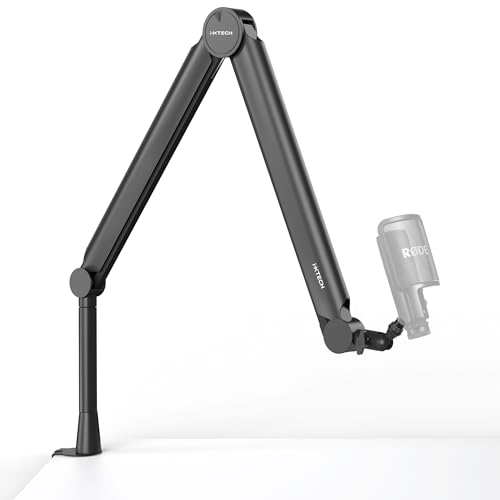
- 360-degree arm with 25.5-inch reach
- Supports microphones up to 2.2 pounds
- Includes clamp, grommet, and cable-management features
Best For: Podcasters and streamers seeking flexible mic positioning and a cleaner desk
Best Mobile Pick – Foldable Rolling Standing Desk
For podcast workstations for ergonomic setups, this foldable mobile desk offers a compact way to alternate between sitting and standing. Its tilting surface, pneumatic height adjustment, and rolling base can help position a laptop or lightweight recording accessories at a more comfortable angle.
Best For: Portable podcasting, laptop-based recording, and flexible sit-stand setups.
Pros:
- Tilting desktop adjusts from 0° to 90° for different viewing and typing angles.
- Pneumatic adjustment supports multiple sitting and standing heights.
- Foldable design and no-assembly setup simplify storage and transport.
- Hidden wheels or lockable casters support mobility on different surfaces.
Cons:
- The 17.6-pound load rating limits heavier audio equipment.
- The 25.6-by-18.9-inch surface is relatively compact.
- It is more suited to laptop-centered setups than full studio rigs.
This is a practical choice when portability and adjustable positioning matter more than workspace capacity. Confirm that your microphone, interface, and other accessories fit within the modest weight and desktop limits.
Best Microphone Starter Kit – Samson Q2U Podcast Pack
A microphone is central to podcast workstations for ergonomic setups, and this Q2U bundle gives a compact recording station a flexible audio starting point. USB and XLR connectivity support direct computer recording now, with the option to connect to a mixer or PA system later.
Best For: New podcasters who need a microphone, arm, pop filter, and monitoring in one bundle.
Pros:
- USB connection works with Mac, PC, and Chromebook computers.
- XLR output provides compatibility with mixers and PA systems.
- Zero-latency headphone monitoring includes a level control.
- Bundle includes a microphone arm, pop filter, cables, and desktop stand.
Cons:
- The listed microphone channel count is one.
- The bundle is an audio component rather than a complete desk workstation.
- Its unidirectional pickup pattern may require deliberate microphone positioning.
The Q2U pack is a useful foundation for an ergonomic podcast station because the included arm can help move the microphone closer without crowding the desktop. It is especially practical for creators who want both USB simplicity and an upgrade path to XLR equipment.
Best Studio Workstation – Gator Frameworks Elite Desk
For larger podcast workstations for ergonomic setups, the Gator Frameworks Elite desk provides dedicated space for monitors, mixers, MIDI controllers, and other studio equipment. Its rack shelving, keyboard tray, and cable-routing features help organize a more permanent home recording station.
Best For: Podcasters, streamers, and home studios using rack equipment and multiple audio devices.
Pros:
- Double-level platform accommodates studio monitors and audio gear.
- Rack space can be configured as dual 8U or single 4U storage.
- Soft-close tray supports keyboards up to 49 notes and 35 pounds.
- Removable leg panels and under-desk routing help manage cables.
Cons:
- Assembly is required.
- The 59.5-pound desk is less convenient to move than a portable station.
- Its fixed 40-inch height does not provide listed sit-stand adjustment.
This desk makes the most sense for a dedicated recording room where equipment organization and rack access are priorities. Buyers seeking frequent posture changes may need a separate ergonomic seating or standing solution.
Best Large Surface – Acme Saida Music Desk
The Acme Saida is a spacious option for podcast workstations for ergonomic setups, with room for multiple devices and accessories across its 71-inch width. Speaker shelves, a keyboard tray, and two headphone holders keep common recording tools within reach while leaving the main surface open.
Best For: Multi-device podcast studios that need broad workspace and dedicated accessory storage.
Pros:
- 71-inch-wide surface offers substantial room for recording equipment.
- Two elevated speaker shelves can free up the main desktop.
- Dual headphone holders keep headphones accessible and organized.
- Metal frame and engineered-wood construction support up to 160 pounds.
Cons:
- Assembly is required.
- The 32-inch depth and 77.1-pound weight require significant floor space.
- Its listed maximum height is 40 inches, with no stated height adjustment.
This is a strong fit when surface area is more important than portability. Its wide layout can support a complete podcast setup, but measure the room carefully and plan monitor placement around the fixed-height design.
Best Audio Control Hub – BEACN Mix Create
For podcast workstations for ergonomic setups, the BEACN Mix Create puts frequently used computer audio controls in one compact USB-C mixer. Its display, push-button encoders, and routing tools can help reduce reaching across your desk while recording, streaming, or monitoring audio.
Best For: Podcasters, streamers, and creators who want centralized control over multiple PC or Mac audio sources.
Pros:
- Manages multiple applications, microphones, headsets, and other USB audio sources.
- 5-inch full-color display helps identify controlled apps or hardware.
- Push-button encoders provide volume adjustment and quick muting.
- Submix and routing features support separate creator and audience mixes.
Cons:
- Designed for computer-based audio control rather than a standalone analog mixer.
- Its feature set may be more than needed for a simple single-source podcast setup.
- Requires a corded USB-C connection and companion software for its broader controls.
The Mix Create is a strong fit when ergonomic audio management matters more than traditional mixer inputs. It is especially useful for computer-centered podcast and streaming desks with several sources to monitor.
Best Full-Size Keyboard Desk – 88-Key Standing Studio Workstation
Among podcast workstations for ergonomic setups, this standing studio desk is a practical choice when you need room for a full-size keyboard and recording equipment. Its hand-crank height adjustment supports sitting or standing, while the wide two-tier surface keeps core gear within reach.
Best For: Home studios, podcasters, producers, and streamers who need a spacious height-adjustable workstation.
Pros:
- 31.3-to-40.2-inch hand-crank height range supports seated and standing work.
- 55.1-inch desktop is designed to fit an 88-key MIDI keyboard plus studio equipment.
- Heavy-duty steel frame supports up to 330 pounds of static load.
- Two-tier design, leveling feet, and rounded corners support an organized workspace.
Cons:
- Manual height adjustment is slower than an electric standing desk.
- Its 88-key-focused footprint may be larger than necessary for compact podcast setups.
- Assembly is required, and the supplied notes list no manufacturer warranty.
This workstation makes the most sense when your podcast desk also serves as a music-production station. The broad surface and substantial weight capacity accommodate larger equipment, though smaller spaces may favor a more compact desk.
Best Compact Gear Riser – Adjustable Desktop MIDI Stand
For podcast workstations for ergonomic setups, this adjustable desktop stand raises compact audio gear into a more accessible position without replacing your desk. Its 30-degree angle can make controls and displays easier to view, while the adjustable width helps organize a crowded recording surface.
Best For: Podcasters, streamers, and home-studio users working with compact interfaces, samplers, controllers, or other desktop gear.
Pros:
- Adjusts from 6.6 to 10.6 inches wide for compatible compact equipment.
- 30-degree angle improves access to knobs, buttons, pads, and displays.
- Non-slip pads and a front stopper help keep gear positioned securely.
- Raises equipment to free desktop space and includes installation hardware.
Cons:
- Device dimensions should be checked before purchase.
- Intended for compact desktop equipment rather than full-size keyboards or large mixers.
- PETG construction is lightweight, so it may not provide the heft of a metal stand.
This stand is a simple ergonomic upgrade for a crowded podcast desk. It improves viewing and access while preserving workspace, provided your interface or controller fits the adjustable width and supported footprint.
Best Adjustable Workstation – 61-Key Standing Studio Desk
For podcast workstations for ergonomic setups, this standing studio desk offers a practical foundation for creators who also use keyboards and other studio equipment. Its hand-crank height adjustment supports seated or standing work, while the wide, two-tier design helps keep essential gear within reach.
Best For: Producers, podcasters, streamers, and home-studio users who need room for a 61-key MIDI keyboard and want to alternate between sitting and standing.
Pros:
- Hand-crank height adjustment from 31.3 to 40.2 inches supports flexible working positions.
- 47.2-inch desktop accommodates a 61-key keyboard, monitors, controllers, and other studio equipment.
- Heavy-duty steel frame supports up to 330 pounds and includes adjustable leveling feet.
- Two-tier layout helps organize studio gear and keep equipment accessible.
Cons:
- Manual height adjustment requires turning the hand crank.
- Its keyboard-focused width and 26.6-inch depth may be more desk than a compact podcast-only setup needs.
- No manufacturer warranty is listed in the supplied details.
This is a strong choice when ergonomic flexibility and substantial studio capacity matter more than a small footprint. It is especially well suited to podcast or streaming spaces that also double as music-production workstations.
Best Mixer Stand – Angled RØDECaster Pro II Mount
Among podcast workstations for ergonomic setups, this compact tilt stand is a simple way to improve access to a RØDECaster Pro II. The angled design raises and tilts the mixer for easier viewing, while the open space underneath helps with cable routing.
Best For: RØDECaster Pro II users who want a low-profile desktop accessory for improved viewing, access, and cable organization.
Pros:
- Designed specifically for the RØDECaster Pro II.
- Angled positioning can make controls easier to view and reach during recording.
- Elevates the mixer and leaves room underneath for neater cable routing.
- Compact footprint suits home studios and professional podcast desks.
Cons:
- Compatibility is specific to the RØDECaster Pro II.
- It is a mixer mount rather than a complete workstation or desk.
- The supplied details do not list dimensions beyond the package dimensions.
This stand makes the most sense as an ergonomic upgrade to an existing podcast desk. It will not add workspace, but it can improve the position and accessibility of a compatible mixer without consuming much desktop area.
Best Microphone Support – Adjustable VALIANT Boom Arm
For podcast workstations for ergonomic setups, a flexible microphone arm can reduce desk clutter and place the mic where you need it. This VALIANT boom arm rotates 360 degrees, supports microphones up to 2.2 pounds, and includes both clamp and grommet mounting options.
Best For: Podcasters, streamers, gamers, and home-studio users who need an adjustable microphone position with integrated cable management.
Pros:
- 360-degree adjustment and a 25.5-inch arm provide flexible microphone positioning.
- Dual suspension springs support up to 2.2 pounds and are designed to reduce shaking or movement.
- C-clamp and grommet mounting options accommodate different desk setups.
- Clip-on cable management helps keep wires organized, and the arm folds for storage.
Cons:
- Maximum supported microphone weight is limited to 2.2 pounds.
- Mounting requires a suitable desk edge or a drilled grommet hole.
- The listed warranty is limited to 90 days from purchase.
This is a useful ergonomic addition when microphone placement and clear desk space are priorities. Its universal 3/8- and 5/8-inch threading broadens accessory compatibility, but users should confirm their microphone and shock mount stay within the weight limit.
How We Picked These Podcast Workstations for Ergonomic Setups
We focused on products that can improve posture, reach, organization, or workflow efficiency during podcast production. The selection includes height-adjustable and standing desks, studio workstations with keyboard or rack space, angled equipment stands, mixer mounts, microphone arms, and compact audio-control tools.
We also considered compatibility, adjustability, footprint, mobility, and the type of equipment each product can support. Because podcast studios vary widely, this list includes both complete workstation foundations and targeted accessories that can make an existing desk more comfortable.
Quick Comparison
| Best For | Look For |
|---|---|
| Flexible sitting and standing | Height adjustment, stable casters, and a suitable work surface |
| Keyboard and rack-based studios | Keyboard trays, rack shelves, and enough depth for monitors |
| Compact desktop setups | Angled stands, small mixers, and accessories with low footprint |
| Microphone positioning | Strong clamps, smooth adjustment, and adequate reach |
| Multi-source audio control | Dedicated controls, display visibility, and USB compatibility |
Key Buying Factors for Podcast Workstations for Ergonomic Setups
Height and Posture
Your elbows should stay close to your body, with your wrists in a neutral position while typing or operating controls. A standing desk can provide useful position changes, but stability and a comfortable working height matter more than standing capability alone.
Surface Area and Equipment Access
Measure your microphones, monitor stands, mixer, keyboard, and recording accessories before choosing a desk. Leave room for cable routing and ventilation, and avoid placing frequently used controls too far forward or too high.
Compatibility and Mounting
Check desk thickness, clamp clearance, connector access, and the weight limits of boom arms or mounted gear. Rack shelves and keyboard trays are helpful only when their dimensions match your equipment.
Stability, Mobility, and Cable Management
Wheels are useful in multipurpose rooms but should lock securely. A stable base reduces noise and accidental movement, while cable channels, under-desk storage, and organized power distribution help keep the recording area safe and uncluttered.
Who Should Buy Which Podcast Workstations for Ergonomic Setups?
Choose a height-adjustable mobile desk if you alternate between sitting and standing or need to move your setup. A larger studio workstation is better for keyboard-based production, rack equipment, monitors, and permanent cabling.
For smaller desks, an angled MIDI or mixer stand can raise controls into a more comfortable viewing position without replacing the entire workstation. A compatible mixer tilt stand is especially useful when front-panel visibility is poor. Add a boom arm when a floor stand or fixed microphone position forces awkward reaching.
Finally, consider a dedicated USB audio mixer if you regularly manage multiple sources, guests, or software controls. The best choice is the one that supports your equipment while keeping your shoulders relaxed, your screen visible, and essential controls within easy reach.