
Building a podcast studio at home takes more than choosing a microphone. Your desk, interface, monitoring setup, storage, and room acoustics all affect how efficiently you record and how professional your finished audio sounds.
These 10 podcast workstations for home studios cover complete starter bundles, dedicated production desks, compact USB recording kits, and privacy booths. Use the guide below to match the right setup to your space, workflow, and budget.
Best 10 Podcast Workstations for Home Studios Picks for 2026
Best Rack-Ready Workstation
Sound Town SDRK-WS69 Studio Desk
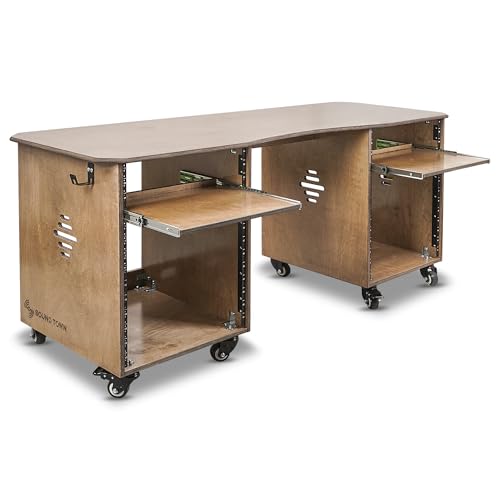
- 68.9-inch desktop for recording and streaming
- Dual 13U cabinets with slide-out trays
- Casters, brakes, and headphone hooks
Best For: Equipment-heavy home studios with rack-mounted gear
Best Two-Person Starter Kit

- Dual microphones and audio mixer included
- XLR, 3.5mm, USB, and mobile compatibility
- Individual controls, effects, and voice modes
Best For: Beginner two-person podcasts and live streams
Best Compact Storage Desk
47-Inch Gray Music Studio Desk

- 47-by-24-inch recording workspace
- Eight compartments plus a drawer
- Raised shelf supports monitors up to 43 inches
Best For: Compact podcast and music-production spaces
Best Private Recording Space
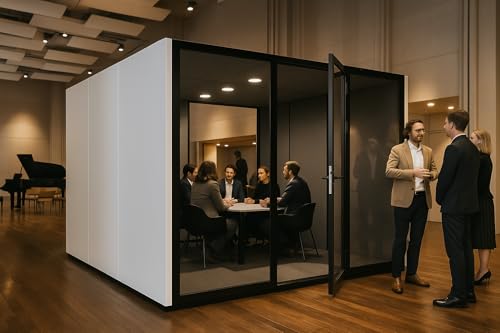
- Approximately 25 dB ±5 noise reduction
- Integrated light, power, USB, and ventilation
- Freestanding glass-front enclosed booth
Best For: Large spaces needing dedicated acoustic isolation
Best All-in-One Mixer

- Two combo inputs with high-gain preamps
- Four faders, touchscreen, and SMART pads
- Built-in APHEX processing and headset input
Best For: Podcasters and streamers wanting an integrated desktop production console
Best Acoustic Workspace

- RW35dB (±5dB) sound isolation rating
- Desk, power, USB ports, and cable management
- LED lighting, ventilation, glass door, and wheels
Best For: Creators building a private enclosed recording or broadcast area
Best Complete Starter Bundle

- Two-input USB-C interface with 24-bit/96 kHz conversion
- Studio One Artist software and plug-in bundle included
- Monitors, headphones, cables, stand, and pop filter included
Best For: Beginners building a complete desktop podcast or recording setup
Portable USB Pick

- Large 25mm condenser capsule
- Direct USB plug-and-play connection
- Built-in zero-latency headphone monitoring
Best For: Solo podcasts and compact desktop studios
All-in-One Streaming Bundle

- Two microphones with suspension arms
- USB-C support across major platforms
- Voice effects and instrument inputs
Best For: Multi-person podcasts and livestream production
Complete Recording Setup

- 2-in/2-out USB-C audio interface
- Includes mic, headphones, boom arm, and cable
- Software bundle supports recording and production
Best For: Expandable home studios and vocal recording
Best Rack-Ready Workstation – Sound Town SDRK-WS69 Studio Desk
For podcast workstations for home studios, the Sound Town SDRK-WS69 is a strong choice when you need a broad desktop plus dedicated rack storage. Its dual 13U cabinets, slide-out trays, headphone hooks, and casters help keep recording equipment organized and accessible.
Best For: Home studios, podcast setups, recording rooms, streaming stations, and users with rack-mounted gear.
Pros:
- Generous 68.9-by-23.6-inch desktop accommodates podcasting, recording, editing, and streaming equipment.
- Two 13U side cabinets provide substantial rack storage, with 3U and 10U slide-out trays.
- Baltic birch plywood construction, casters, lever brakes, and non-slip feet support a durable, mobile setup.
- Headphone hooks on both sides help reduce desktop clutter.
Cons:
- The large footprint may be difficult to fit in a compact room.
- Assembly is required.
- Its rack-focused design may offer more storage than basic podcast users need.
Choose this desk if rack equipment and organization are priorities. The weathered brown finish and mobile cabinet design make it especially practical for a dedicated, equipment-heavy home studio.
Best Two-Person Starter Kit – H1 Podcast Equipment Bundle
Unlike furniture-based podcast workstations for home studios, the H1 bundle focuses on getting two people recording quickly. It includes dual condenser microphones, stands, an audio mixer, cables, headphones, and flexible connections for computers, mobile devices, and gaming platforms.
Best For: Two-person podcasts, interviews, live streams, gaming content, and beginner home recording setups.
Pros:
- Complete two-person kit includes microphones, stands, mixer, headphones, cables, and accessories.
- Supports XLR and 3.5mm microphone inputs, with 48V phantom power for compatible condenser microphones.
- Works with PCs, laptops, smartphones, tablets, PS4, Xbox, OBS, TikTok, and YouTube.
- Offers individual channel controls, headphone monitoring, customizable sound effects, voice modes, and RGB lighting.
Cons:
- The included manufacturer warranty is listed as 90 days.
- The feature-rich mixer may take time for beginners to learn.
- It is an audio bundle rather than a desk or room-acoustic solution.
This is a convenient starting point for creators who need a two-person audio setup without sourcing each component separately. Its portable, battery-powered mixer and broad device compatibility also suit flexible recording and streaming workflows.
Best Compact Storage Desk – 47-Inch Gray Music Studio Desk
The 47-inch Gray Music Studio Desk is a practical option for podcast workstations for home studios where vertical storage matters. Its raised shelving, drawer, and open compartments provide places for monitors, speakers, notebooks, controllers, and other recording accessories while preserving legroom.
Best For: Compact home studios, bedroom podcast setups, music production, audio mixing, and combined office-workstation use.
Pros:
- 47-by-24-inch work surface provides room for a computer and core audio equipment.
- Eight open compartments and a storage drawer keep accessories within reach.
- Raised center shelf supports a flat monitor up to 43 inches, according to the supplied specifications.
- Steel sled base and mixed-material construction support up to 100 pounds when evenly distributed.
Cons:
- The 47-inch width offers less workspace than larger studio desks.
- The product is listed with a single seating position and no height adjustment.
- Even weight distribution is required to stay within the 100-pound capacity.
This desk balances a relatively compact footprint with useful vertical organization. It makes sense for creators who want one workstation for podcast recording, editing, study, and general home-office tasks.
Best Private Recording Space – KB Soundproof Office Pod
For podcast workstations for home studios that need isolation from household distractions, the KB Soundproof Office Pod provides a dedicated enclosed environment. It is designed for podcasting, voice recording, calls, and focused work, with claimed noise reduction of approximately 25 dB ±5.
Best For: Large home studios, voice recording, podcasting, remote work, video conferences, and distraction-sensitive users.
Pros:
- Designed to reduce noise by approximately 25 dB ±5 for a quieter recording environment.
- Includes integrated 4000K lighting, a five-hole power socket, and a USB socket.
- Built-in exhaust ventilation includes independent light and fan controls.
- Glass-front aluminum construction creates a dedicated, freestanding booth.
Cons:
- Its approximately 118-by-118-by-90.5-inch dimensions require substantial floor space.
- The listed weight is about 1,807.8 pounds, so relocating it may be difficult despite the portable-use description.
- Assembly is required.
This pod is a specialized solution rather than a conventional desk. Consider it when controlling ambient noise and creating a private recording room matter more than conserving floor space.
Best All-in-One Mixer – RØDECaster Duo
The RØDECaster Duo is a strong choice among podcast workstations for home studios when you want recording, monitoring, processing, and content-production controls in one compact unit. It provides two combo inputs, four faders, SMART pads, a touchscreen, and USB connectivity.
Best For: Podcasters, streamers, and creators who want an integrated production console with built-in effects.
Pros:
- Two Neutrik combo inputs with up to 76 dB of gain.
- Four broadcast-quality faders, six SMART pads, and a touchscreen interface.
- Includes APHEX processing and a 3.5mm TRRS headset connection.
Cons:
- Provides two microphone/instrument combo inputs, so larger multi-person setups may need more inputs.
- Requires corded power.
Choose this model if hands-on control and built-in vocal processing matter more than assembling separate interface and mixer components. Its compact footprint also suits a dedicated desktop workstation.
Best Acoustic Workspace – Mobile Privacy Pod
This mobile privacy pod takes a different approach to podcast workstations for home studios by creating a dedicated recording environment rather than supplying audio electronics. Its acoustic panels, enclosed design, desk, lighting, ventilation, and power connections can help organize a home recording space.
Best For: Solo creators or small teams who need a private, enclosed workspace for recording, calls, study, or live broadcasting.
Pros:
- Acoustic panels provide sound isolation rated at RW35dB (±5dB).
- Integrated desk, USB ports, power outlets, and cable management support a tidy setup.
- Includes LED lighting, dual silent-fan ventilation, a glass door, and rolling wheels.
Cons:
- Its large footprint and approximately 90.55-inch exterior height require substantial room space.
- It is an acoustic workspace, not an audio interface, mixer, or microphone system.
- Designed for up to one or two people rather than larger recording groups.
This is best viewed as the room-within-a-room component of a podcast setup. You will still need microphones and recording hardware, but the pod can provide a more private, organized location for capturing audio.
Best Complete Starter Bundle – PreSonus AudioBox 96 Kit
The PreSonus AudioBox 96 Studio Bundle is a practical entry point for podcast workstations for home studios because it combines a USB-C audio interface, software, monitors, headphones, cables, and recording accessories. It is designed for desktop recording, voice-over work, streaming, and mobile studio use.
Best For: Budget-conscious beginners who want the main hardware and software needed to start recording at home.
Pros:
- AudioBox 96 offers two combo inputs, XMAX-L preamps, MIDI I/O, and 24-bit/96 kHz conversion.
- Includes Studio One Artist software and a plug-in bundle for recording and editing.
- Bundle includes CR3-XBT Bluetooth monitors, headphones, cables, boom stand, and pop filter.
Cons:
- The two-input interface is better suited to smaller recording setups.
- The included CR3-XBT monitors are compact 3-inch models.
- Listed operating-system compatibility includes iOS and macOS, so users on other systems should verify support.
For someone assembling a first home studio, this bundle reduces the need to source each component separately. It is particularly appealing when you need both monitoring and basic recording accessories alongside the interface.
Portable USB Pick – Samson Meteor Mic
Samson Meteor Mic USB Condenser Podcasting Podcast Recording Desktop Microphone
Check Price On AmazonThe Samson Meteor Mic is a straightforward choice for podcast workstations for home studios when you want a compact USB condenser microphone without a separate audio interface. It connects directly to a Mac or PC, requires no drivers, and includes headphone monitoring for recording and editing.
Best For: Solo podcasters, voiceover work, and compact desktop recording setups.
Pros:
- Large 25mm diaphragm condenser capsule for detailed vocal recording.
- Plug-and-play USB connection works with most computer-based DAW software.
- Built-in headphone jack supports no-latency monitoring, volume control, and microphone muting.
- Portable metal design includes a carry bag and can work with iPhone or iPad using an optional adapter.
Cons:
- Its single-channel USB design is better suited to one-microphone recording than multi-person sessions.
- Apple mobile use requires an optional Lightning or 30-pin camera adapter.
Choose the Meteor Mic if simplicity, portability, and direct computer connectivity matter most. It provides a focused starting point for a home studio without adding mixer or interface hardware.
All-in-One Streaming Bundle – Podcast Equipment Bundle
This podcast equipment bundle is designed for podcast workstations for home studios that also handle livestreams, short-form video, and other interactive content. It combines two condenser microphones, a mixer-style audio interface, voice effects, USB-C connectivity, and instrument inputs in one package.
Best For: Multi-person podcasts, livestreamers, and creators who want voice effects and broad device compatibility.
Pros:
- Includes two condenser microphones with suspension arms for a ready-to-use two-person setup.
- USB-C connections support computers, smartphones, and tablets across Windows, macOS, Android, iOS, and Chrome OS.
- Offers four voice variations and 10 sound effects for live content and creative recording.
- Accepts electric guitar, bass, and electronic drum inputs in addition to microphone audio.
Cons:
- The battery-powered system should be fully charged before initial use or after extended storage.
- Driver installation may require contacting the manufacturer’s support team if it does not start automatically.
- Its effects-focused feature set may be more than needed for simple voice-only podcasting.
This bundle makes sense when a home studio needs more than basic microphone recording. Its two-mic configuration, cross-platform support, effects, and instrument inputs give creators room to expand into live production.
Complete Recording Setup – Arturia MiniFuse 2 Pack
The Arturia MiniFuse 2 Recording Pack is a comprehensive option for podcast workstations for home studios, combining a USB-C audio interface, cardioid microphone, closed-back headphones, boom arm, cable, and software. It supports both voice recording and broader music-production workflows.
Best For: Home-studio users who want a complete vocal recording and monitoring setup with expansion for instruments or MIDI.
Pros:
- Includes a 2-in/2-out interface with combo inputs, 48V phantom power, balanced outputs, MIDI I/O, and a USB hub.
- CM1 cardioid condenser microphone is suited to focused vocal capture and handles up to 130 dB SPL.
- EF1 closed-back headphones provide dedicated monitoring with 40mm drivers and 32-ohm impedance.
- Desk-clamp boom arm offers adjustable positioning, while the software bundle adds recording and production tools.
Cons:
- The multi-component package requires more setup and desk space than a single USB microphone.
- The boom-arm clamp is intended for desks under 2 inches thick.
- Its added MIDI, software, and instrument-oriented features may be unnecessary for basic podcast recording.
For buyers building a lasting home studio, this pack offers a stronger foundation than a microphone-only solution. The interface, monitoring, mounting hardware, and software cover the main pieces needed to record, edit, and expand.
How We Picked These Podcast Workstations for Home Studios
We focused on the components that matter most in a practical home podcast setup: recording connectivity, microphone support, monitoring, workspace organization, portability, and acoustic control. The selection includes all-in-one equipment bundles for beginners, desks designed to hold studio gear, and soundproof or sound-absorbing booths for creators who need more privacy.
We also considered how easily each type of workstation can grow. A simple USB microphone may be ideal for solo recording, while an audio interface with multiple inputs is better for interviews, co-hosts, or future microphone upgrades.
Quick Comparison
| Workstation type | Best for | Main advantage | Watch for |
|---|---|---|---|
| Complete equipment bundle | New podcasters | Several essential components included | Included accessories may be entry-level |
| Audio interface bundle | Flexible recording setups | Better upgrade path and input control | Requires separate desk and room treatment |
| Studio desk or rack workstation | Organized permanent studios | Storage, trays, and gear management | Needs adequate floor space |
| Acoustic or soundproof booth | Shared homes and noisy rooms | Improves privacy and recording consistency | Costs more and may limit mobility |
Key Buying Factors for Podcast Workstations for Home Studios
Inputs and Recording Format
For one person, a USB microphone or two-input interface is usually sufficient. Choose more inputs if you regularly record guests in the room. A 24-bit/96 kHz interface provides useful recording headroom, although microphone technique and room acoustics generally matter more than maximum sample rate.
Desk Space and Cable Management
Measure your available area before buying. A rack desk can keep interfaces, mixers, and accessories accessible, while a compact studio desk may work better in a bedroom or office. Look for slide-out trays, open compartments, cable openings, and enough depth for monitors or a laptop.
Acoustic Control
Soundproof booths and acoustic pods can reduce environmental distractions and improve consistency, but they do not replace good microphone placement. In a normal room, rugs, curtains, bookshelves, and carefully positioned furnishings can also help reduce reflections.
Monitoring and Comfort
Closed-back headphones help prevent microphone bleed during recording. Check that the interface supports direct monitoring with low latency, and choose a chair and desk height that remain comfortable during long editing sessions.
Who Should Buy Which Podcast Workstations for Home Studios?
Beginners: Choose a complete podcast bundle or USB microphone setup if you want the shortest path from unboxing to recording.
Growing creators: An interface bundle with XLR connectivity offers better control and a clearer upgrade path for microphones and headphones.
Two-person shows: Prioritize multiple inputs, monitoring controls, and a desk large enough to position both microphones comfortably.
Creators in busy homes or shared offices: Consider an acoustic or soundproof booth when outside voices, calls, or household noise regularly interrupt recording.
Permanent studios: A rack workstation or storage-focused studio desk is the best fit when you have dedicated floor space and several pieces of equipment to organize.