
The best podcast workstation matches your recording style, available space, and comfort with audio production. The options in this roundup range from compact all-in-one mixers to full furniture-based setups and portable phone kits.
Whether you record two-person conversations, livestream, or produce episodes on the go, focus on microphone connectivity, monitoring, workflow, and room for future upgrades.
Best 10 Podcast Workstations Picks for 2026
All-in-One Podcast Hub

- Four mic inputs and four headphone outputs
- 14-track SD card recording
- Customizable sound pads and touchscreen control
Best For: Multi-host podcasts and live production
Rack-Ready Studio Desk
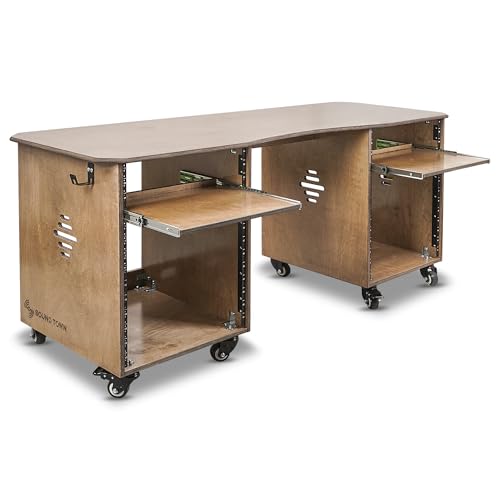
- 68.9-inch desktop for production gear
- Two 13U rack cabinets with slide-out trays
- Casters, brakes, and headphone hooks
Best For: Home studios needing desk space and rack storage
Flexible Two-Person Kit

- Two dynamic microphones included
- Wireless, USB, and XLR connectivity
- Separate wireless tracks for two voices
Best For: Two-person podcasts and mobile interviews
Compact Production Control

- Two combo inputs with high-gain preamps
- Four faders, touchscreen, and SMART pads
- Built-in APHEX processing and headset input
Best For: Compact podcast studios and solo creators
Best All-in-One Pick

- Dual XLR inputs with 60dB preamps
- Eight customizable sound-effect buttons
- USB-C, 3.5mm, Bluetooth, and loopback
Best For: Two-person podcasts and feature-rich streaming setups
Best Portable Kit
Movo PodPro for Mobile Recording

- Two microphones, headphones, stands, and cables included
- Battery-powered interface with up to 8-hour life
- USB-A, USB-C, and Lightning connectivity
Best For: Mobile two-person podcasts and interviews
Best Effects-Focused Setup

- Two dynamic mics and headphones included
- Eight sound effects and four voice-change modes
- Four-input interface with battery and instrument input
Best For: Interactive podcasts, gaming streams, and voice-over creation
Versatile Creator Hub

- Two microphones and mixer included
- USB-C, console, and mobile compatibility
- Voice effects plus instrument inputs
Best For: Two-person podcasts, streaming, and interactive recording
Two-Person Starter Station

- Dual mics, stands, mixer, and headphones
- 48V phantom power with XLR input
- Individual controls and customizable effects
Best For: Co-hosted podcasts and beginner streaming setups
Compact Voice-Changer Setup

- BM-800 mic with arm and pop filter
- Cardioid pickup for focused vocals
- Broad device compatibility and effects
Best For: Solo recording, casual streaming, and short-form video
All-in-One Podcast Hub – TASCAM Mixcast 4
The TASCAM Mixcast 4 is a versatile choice for podcast workstations that need mixing, recording, monitoring, and sound effects in one unit. Its four mic inputs, four headphone outputs, touchscreen controls, and onboard recording make it practical for multi-person shows and live production.
Best For: Multi-host podcasts, live streams, event production, and creators who want onboard recording and customizable sound pads.
Pros:
- Four mic inputs and four individual headphone outputs support group recording.
- Records up to 14 tracks directly to an SD card.
- Eight banks of customizable illuminated pads can trigger music, jingles, and effects.
- Includes Bluetooth, aux, USB, and computer audio connectivity.
Cons:
- Its broad feature set may be more than a simple solo setup requires.
- It is a corded unit rather than a portable battery-powered workstation.
Choose the Mixcast 4 when you want a dedicated control center for recording and live podcast production. The touchscreen workflow and included Podcast Editor software add convenience, while the multiple inputs and outputs leave room for a growing production setup.
Rack-Ready Studio Desk – Sound Town SDRK-WS69
The Sound Town SDRK-WS69 provides the physical foundation for podcast workstations, combining a wide desktop with two 13U rack cabinets. Its slide-out trays, headphone hooks, casters, and plywood construction help organize audio gear while keeping the main work surface available for computers and accessories.
Best For: Home studios and podcast rooms with multiple rack-mounted devices, accessories, and a need for substantial desktop space.
Pros:
- 68.9-inch-wide desktop provides generous room for recording and editing equipment.
- Dual 13U cabinets accommodate rack gear with 3U and 10U slide-out trays.
- Headphone hooks on both sides help reduce desktop clutter.
- Casters provide mobility, while lever brakes and rubber feet improve stability.
Cons:
- Assembly is required.
- Its large footprint may not suit compact rooms.
- It is a furniture workstation, not an audio mixer or recording interface.
This desk is a strong infrastructure choice for a permanent or semi-permanent recording room. Select it if storage and cable-conscious organization matter as much as having a broad surface for your podcast setup.
Flexible Two-Person Kit – MAONO PD200W Bundle
The MAONO PD200W bundle gives podcast workstations a flexible two-microphone starting point. Each dynamic mic supports wireless, USB, and XLR connections, while the shared receiver can record two voices to separate tracks for easier interviews and co-hosted shows.
Best For: Two-person podcasts, interviews, mobile creators, and setups that may switch between wireless, USB, and XLR recording.
Pros:
- Includes two microphones, desktop stands, cables, and a Type-C receiver.
- Supports wireless, USB, and XLR connections for different workflows.
- Separate tracks for the two wireless microphones simplify editing.
- Offers up to a 60-meter wireless range and up to 60 hours of battery life with RGB off.
Cons:
- Camera and Lightning accessories are sold separately.
- It is designed for two microphones rather than larger panel discussions.
- Advanced app controls require the MaonoLink software.
This is a practical kit for creators who want to start recording quickly without committing to a single connection type. Its dual-mic wireless design is especially useful for interviews, while XLR compatibility leaves a path toward a more traditional studio setup.
Compact Production Control – RØDECaster Duo
The RØDECaster Duo is a compact production studio for podcast workstations that need hands-on control without a large mixer. It combines two combo inputs, four faders, a touchscreen, SMART pads, headphone monitoring, and APHEX processing in a small desktop unit.
Best For: Solo creators, compact podcast studios, streamers, and users who want integrated mixing, effects, and monitoring.
Pros:
- Two Neutrik combo inputs accept microphones and instruments.
- Four broadcast-quality faders and six bank-switching SMART pads provide tactile control.
- Includes APHEX processing with effects such as Aural Exciter and Big Bottom.
- Supports headphone monitoring and headset recording through its 3.5mm TRRS input.
Cons:
- Its two combo inputs are less suited to larger multi-guest productions.
- The unit depends on a corded power supply.
- Its feature-rich controls may take time to learn.
The RØDECaster Duo is a good fit when desk space is limited but you still want physical faders and built-in processing. It offers a concentrated control surface for podcasts, streaming, music production, and other content workflows.
Best All-in-One Pick – MAONO E2 Gen2B for Two
For creators comparing podcast workstations, the MAONO E2 Gen2B is a flexible two-person setup centered on an audio interface with dual XLR combo inputs, 60dB preamps, and plug-and-play USB-C or 3.5mm connections. Its built-in controls also support live streaming and mobile workflows.
Best For: Two-person podcasts, streaming, and creators who want phone-and-computer connectivity with onboard effects.
Pros:
- Dual XLR inputs and 60dB preamps support clear co-host recording.
- Eight customizable sound-effect buttons can store clips up to 20 seconds.
- Includes noise reduction, loopback, Bluetooth, voice effects, and real-time monitoring.
- Supports Windows, macOS, iOS, Android, and ChromeOS devices.
Cons:
- The package includes the interface and cables but does not list microphones, headphones, or stands.
- Its 3.62 kg weight may be less convenient for frequent travel.
The E2 Gen2B is a strong choice when you want a feature-rich podcast workstation without adding a separate preamp or effects unit. It is especially appealing for paired recording and interactive live content, provided you already have microphones and monitoring gear.
Best Portable Kit – Movo PodPro for Mobile Recording
The Movo PodPro is a complete two-person option for podcast workstations that need to travel. It combines a battery-powered dual-channel interface, two XLR dynamic microphones, two headphones, tabletop stands, cables, and a travel case for recording with computers, phones, or tablets.
Best For: Mobile interviews, two-person podcasts, and creators who want microphones and monitoring gear included.
Pros:
- Includes two CastMic XLR dynamic microphones, stands, headphones, and XLR cables.
- Battery-powered interface offers up to eight hours of operation, or three hours with phantom power on.
- USB-A, USB-C, and Lightning cables support PC, Mac, iPhone, iPad, and Android connections.
- Two headphone outputs and stereo 1/4-inch outputs add monitoring flexibility.
Cons:
- The listed maximum sample rate is 16 kHz.
- The 5.76 kg item weight may be substantial for a portable kit.
Unlike interface-only podcast workstations, the PodPro supplies the core recording hardware for two people in one package. Its battery operation and travel case make it practical for field sessions, though its audio specifications are more focused on straightforward podcast production than high-resolution recording.
Best Effects-Focused Setup – M100 Bundle for Two
The M100 bundle gives podcast workstations a two-person format with two dynamic microphones, headphones, a four-input USB-C interface, and a 4000mAh battery. It emphasizes hands-on control, with customizable effects, voice changing, RGB lighting, loopback, monitoring, and instrument input.
Best For: Beginner-friendly podcasts, gaming streams, voice-over work, and creators who want built-in entertainment effects.
Pros:
- Includes two dynamic microphones, two headphones, stands, and XLR cables.
- Supports XLR and USB microphone connections for flexible device setups.
- Offers eight customizable sound effects, four voice-change modes, loopback, noise reduction, and mute controls.
- Four mic inputs, two monitor jacks, and an instrument input support expanded recording options.
Cons:
- Mic RGB and onboard controls are inactive when the microphones use XLR mode.
- The supplied notes do not specify the interface’s maximum sample rate.
- USB connectivity does not support Xbox.
The M100 is a particularly entertaining choice for creators who want more than basic voice capture. Its battery, saved settings, sound effects, and instrument input make it versatile for live content, while the included microphones and headphones help new users get started quickly.
Versatile Creator Hub – V8SS Podcast Bundle
For creators comparing podcast workstations, this V8SS bundle combines two condenser microphones, a mixer, suspension arms, USB-C connectivity, and built-in voice effects. Its plug-and-play design supports computers, mobile devices, consoles, and multiple content formats.
Best For: Two-person podcasts, live streaming, interviews, and creators who want instrument inputs and voice effects.
Pros:
- Includes two broadcast-style condenser microphones with anti-vibration suspension arms.
- Supports USB-C connections across PC, smartphones, iPad, and multiple operating systems.
- Offers noise reduction, four voice variations, 10 sound effects, and four sound modes.
- Accepts electric guitar, bass, and electronic drum inputs.
Cons:
- The listed audio interface has two channels, which may limit larger setups.
- Battery charging is recommended before initial use or after extended storage.
This is a flexible podcast workstation for users who want a broad feature set without assembling separate microphones, mixer controls, and instrument inputs. Its extra effects are especially useful for interactive broadcasts.
Two-Person Starter Station – H1 Podcast Bundle
This H1 kit is a practical entry point for podcast workstations built around two-person recording. It includes dual condenser microphones, stands, an audio mixer, monitoring accessories, and connections for computers, phones, tablets, and consoles.
Best For: Co-hosted podcasts, interviews, beginner livestreamers, gaming audio, and mobile recording.
Pros:
- Complete two-person package with two microphones, desktop stands, mixer, headphones, and cables.
- Provides 48V phantom power, XLR input, and an additional 3.5mm microphone input.
- Individual channel controls include mute, headphone monitoring, and microphone volume faders.
- Includes customizable sound effects, six voice modes, Bluetooth accompaniment, and RGB lighting.
Cons:
- The manufacturer warranty is listed as 90 days from purchase.
- Its 48 kHz frequency specification is more focused on standard content creation than high-resolution production.
With its clearly labeled controls and ready-to-use accessories, the H1 is well suited to beginners who want to start recording or streaming with two people. The built-in battery also supports portable use during sessions.
Compact Voice-Changer Setup – BM-800 AM100-V8 Bundle
For shoppers assembling affordable podcast workstations, the AM100-V8 provides a BM-800 condenser microphone, arm stand, shock mount, pop filter, windscreen, and live sound card in one package. Its cardioid pickup pattern is designed to focus on the sound source in front of the microphone.
Best For: Solo podcasts, voice recording, TikTok and YouTube content, casual streaming, and voice-effect experimentation.
Pros:
- Includes the core microphone accessories needed for a basic recording setup.
- Cardioid pickup and pop-filter accessories support focused vocal recording.
- Works with Windows, Mac OS, smartphones, tablets, PS4, Xbox, Switch, and other listed platforms.
- Provides multiple sound effects and connection options for recording, calls, and livestreaming.
Cons:
- The audio interface is listed with one channel, making it primarily a solo setup.
- The audio input is a 3.5mm jack rather than an XLR input.
- The included microphone and arm setup may require more adjustment than a desktop-only kit.
This bundle makes sense when you need a straightforward solo podcast workstation with basic accessories and playful voice features. Its broad device compatibility adds flexibility, while the single-channel design keeps the setup focused.
How We Picked These Podcast Workstations
We selected these Podcast Workstations to cover the main ways creators record today: desktop production, two-person interviews, mobile recording, livestreaming, and more structured studio builds. We considered the number and type of microphone inputs, USB or wireless connectivity, monitoring options, included accessories, portability, and the amount of setup required.
Because these products serve different budgets and workflows, “best” depends on your recording priorities. A dedicated production console may be ideal for a regular show, while a compact bundle can be the better choice for a beginner or occasional creator.
Quick Comparison
| Best For | Look For | Recommended Type |
|---|---|---|
| Professional podcast production | Multiple inputs, routing, effects, and reliable monitoring | Dedicated audio production studio |
| Two-person shows | Two quality microphones and separate level control | Dual-mic bundle or compact mixer |
| Streaming and live content | Sound pads, voice effects, and fast controls | Podcast mixer with onboard features |
| Phone-based recording | Small footprint, mobile compatibility, and simple connections | Portable podcast kit |
| Permanent studio setup | Rack storage, cable space, and a stable work surface | Studio workstation desk |
Key Buying Factors for Podcast Workstations
Inputs and Microphone Compatibility
Check whether the system accepts XLR, USB, TRS, or wireless microphones. XLR connections offer a practical upgrade path and usually provide better control for multi-person shows. Also confirm how many microphones can be used simultaneously rather than relying on the product’s accessory count.
Monitoring and Recording Workflow
Headphone outputs, independent volume controls, mute buttons, and real-time monitoring help prevent clipping and missed audio. If you edit while recording, look for onboard recording, multitrack support, or software compatibility that fits your computer and operating system.
Size, Furniture, and Connectivity
A mixer may be the heart of a setup, but you still need space for microphones, headphones, a computer, and cables. A rack desk can organize permanent equipment, whereas a compact unit is easier to store. Verify USB, phone, and Bluetooth requirements before buying, especially for mobile recording.
Included Accessories and Upgrade Potential
Bundles can reduce setup costs by including microphones, stands, cables, and an interface. Compare the quality and replaceability of those accessories. A beginner-friendly package is useful if it works immediately, but a system with standard connections is often a better long-term investment.
Who Should Buy Which Podcast Workstations?
Choose a dedicated mixer or production studio if you record frequently, host live sessions, or want physical controls for effects, routing, and multiple sources. These systems suit creators who value workflow and expect to grow.
Choose a two-person bundle if your show centers on a co-host or guest and you want the core microphones and interface in one purchase. Confirm that the included microphones fit your room and voice types.
Choose a portable kit if you record interviews away from a desk or publish primarily from a phone. Convenience matters more than extensive routing in this use case.
Choose a rack workstation desk if you already own audio gear and need a permanent, organized home for it. Measure your room, equipment depth, and cable clearances before ordering.