
When you’re looking to enhance your live streaming setup, choosing the right portable video switcher can make all the difference. These devices offer versatility and ease of use, catering to a range of production needs. From events to casual streaming, the options available can be overwhelming. But before you settle on a choice, you’ll want to understand the key features that set these switchers apart and how they can elevate your broadcasts.
FoMaKo 4K HDMI Video Mixer Switcher (M6)

If you’re looking for a portable video switcher that excels in live streaming, the FoMaKo 4K HDMI Video Mixer Switcher (M6) is an excellent choice for churches, studios, and educational settings. With four HDMI inputs, including two at 4K 60FPS, and advanced production features like dual PIP and over 30 changeover effects, it delivers professional results. You’ll appreciate the built-in media library and customizable screen modes that enhance your program creation. Plus, its dual network streaming capabilities guarantee seamless connectivity. With a 3-year warranty and 24/7 support, you can trust FoMaKo to meet your streaming needs effectively.
Best For: The FoMaKo 4K HDMI Video Mixer Switcher (M6) is best for churches, studios, and educational institutions seeking a reliable and advanced solution for live streaming and video production.
Pros:
- Supports high-quality 4K 60FPS video input and multiple streaming options for versatile production.
- Offers advanced production features such as dual PIP, media library, and customizable screen modes for enhanced creativity.
- Includes a solid 3-year warranty and 24/7 expert support for peace of mind.
Cons:
- The learning curve may be steep for beginners unfamiliar with video switchers.
- Limited to 1080p output, which may not meet the needs of all users expecting full 4K output.
- Requires adequate technical setup and knowledge to fully utilize all features effectively.
Roland V-8HD HD Video Switcher for Live Events

The Roland V-8HD HD Video Switcher is an excellent choice for live event producers, especially those working with multiple HDMI sources. This lightweight, ultra-compact switcher lets you mix up to eight HDMI inputs seamlessly. Its five-layer effects engine enables advanced visual compositions, while the built-in multi-viewer preview monitor enhances your production. You’ll appreciate the AUX output for sending different feeds, and automated video switching with macros simplifies your workflow. Users rave about its reliability and intuitive controls, making it ideal for solo operators. Though it’s not 4K, its robust design and performance keep you covered in demanding environments.
Best For: Live event producers and solo operators who require a reliable and intuitive HD video switcher for mixing multiple HDMI sources.
Pros:
- Lightweight and compact design makes it easy to transport and set up in various environments.
- Five-layer effects engine allows for advanced video compositions and creative visual presentations.
- User-friendly controls are designed for ease of use, particularly beneficial for solo operators under pressure.
Cons:
- Limited to HD resolution, which may not meet the needs of users looking for 4K solutions.
- Potentially noisy fan can be distracting in quiet settings during live events.
- Software-based alternatives may offer more features at a lower cost, making it less competitive in some scenarios.
Osee GoStream Deck All in One Pro Live Streaming Video Mixer Switcher Kit

For content creators and videographers on the go, the Osee GoStream Deck All in One Pro Live Streaming Video Mixer Switcher Kit is an unbeatable choice. Weighing under 5kg, it’s compact and portable, making it perfect for mobile live streaming. With 4 HDMI inputs, a 14-inch 1080*1920 monitor, and USB connectivity, you’ll enjoy seamless integration with your favorite streaming software like OBS and Zoom. Users appreciate its ease of use and functionality, though some have reported occasional freezing issues. Overall, this kit offers great value, and with expandable features, it’s designed to enhance your live streaming experience.
Best For: Content creators and videographers seeking a portable and versatile live streaming solution.
Pros:
- Compact and lightweight design for easy transport, weighing under 5kg.
- Seamless integration with popular streaming software like OBS and Zoom.
- Expandable features with multiple HDMI inputs and USB connectivity for enhanced functionality.
Cons:
- Some users have reported freezing issues during live streams.
- Occasional problems with the recording method have been noted.
- Customer rating of 4.2 out of 5 stars indicates room for improvement.
MOVMAGIC MF10S Portable Live Video Switcher

Designed for content creators who require versatility in live streaming, the MOVMAGIC MF10S Portable Live Video Switcher stands out with its impressive input capabilities. With five HD inputs, including 4K60P support, you’ll easily manage various sources. The built-in picture overlay and PIP functions let you create dynamic visuals by layering up to eight images. Plus, it features professional key control for subtitles and graphics. Remote management through a network server and integrated PTZ camera control simplifies multi-camera setups. Whether you’re streaming events or creating content for YouTube, the MF10S adapts seamlessly to your needs.
Best For: The MOVMAGIC MF10S Portable Live Video Switcher is best for content creators and live streamers seeking a versatile and feature-rich solution for multi-camera productions.
Pros:
- Offers 5 HD inputs with 4K60P support for high-quality streaming.
- Advanced picture processing features like overlay and PIP enable dynamic visual presentations.
- Integrated PTZ camera control and remote management simplify setups for solo operators.
Cons:
- The learning curve may be steep for beginners unfamiliar with professional video switching.
- Limited to specific input configurations that may not accommodate all user needs.
- Portability may be hindered by the size of the unit, making it less convenient for travel.
FoMaKo 4-Channel HDMI Live Streaming Switcher (KC601 Pro)

Looking for a versatile live streaming solution? The FoMaKo 4-Channel HDMI Live Streaming Switcher (KC601 Pro) has you covered. With a 5.5-inch FHD LCD screen and support for up to 1080p at 60FPS, it’s perfect for professional content creation. You can easily switch between four HDMI inputs, utilizing T-bar controls and over 30 effects for changing scenes. Its USB 3.0 interface allows seamless integration with your PC, making it a built-in webcam for streaming on platforms like Facebook and YouTube. Plus, with dual XLR inputs and an 8-channel mixer, audio quality is exceptional. Enjoy 24/7 expert support for any challenges!
Best For: Content creators and live streamers seeking a professional-grade switcher with multiple input options and advanced effects.
Pros:
- Versatile functionality with 4 HDMI inputs and a variety of transition effects for dynamic scene changes.
- High-quality audio performance through dual XLR inputs and an 8-channel mixer for enhanced sound control.
- User-friendly design with a built-in 5.5-inch LCD screen, eliminating the need for external monitors.
Cons:
- Steep learning curve noted by some users, especially for those unfamiliar with live streaming technology.
- Manual may lack clarity, making it difficult for beginners to fully utilize all features.
- Reported reliability issues, such as overheating, which may require customer support intervention.
R2 Pro 4-Channel HDMI Video Switcher

The R2 Pro 4-Channel HDMI Video Switcher is an ideal choice for content creators who need seamless switching between multiple video sources during live events or broadcasts. With its versatile design, you can connect up to four HDMI sources, making it perfect for dynamic productions. The user-friendly 5.5-inch touchscreen simplifies scene switching, audio mixing, and graphics overlays. Plus, you can easily stream to platforms like YouTube or Twitch through a single HDMI output. Weighing only 3.3 pounds, it’s compact and portable, ensuring hassle-free transport and setup anywhere you go. Users rate it highly, appreciating its quality and ease of use.
Best For: Content creators and live streamers looking for a versatile and user-friendly video switcher for dynamic productions.
Pros:
- User-friendly 5.5-inch touchscreen for intuitive control and easy access to functions.
- Compact and lightweight design for portable use and hassle-free setup.
- Supports streaming to popular platforms like YouTube, Facebook, and Twitch through a single HDMI output.
Cons:
- Does not support 4K video output, limiting high-definition capabilities.
- Limited to four HDMI inputs, which may not suffice for larger productions.
- Some users may prefer more advanced features or additional customization options.
Osee GoStream Duet Kit Pro Live Streaming Video Mixer Switcher

For content creators seeking a versatile and efficient solution for live streaming, the Osee GoStream Duet Kit Pro stands out with its all-in-one design. Weighing just 5kg, this compact mixer features four HDMI/SDI inputs and a 14-inch 1080p monitor, ensuring you can switch between multiple cameras effortlessly. You’ll appreciate the silent fan and multiple power options, including USB power banks. With USB ports supporting popular streaming software like OBS and Zoom, it’s perfect for mobile setups. Users rave about its ease of use and productivity boost, making it a top choice for anyone serious about live streaming.
Best For: Content creators and live streamers looking for a portable, all-in-one video mixer that simplifies multi-camera streaming.
Pros:
- Compact and lightweight design makes it easy to transport for mobile live streaming.
- Supports multiple power solutions, allowing flexibility in various environments.
- High user ratings highlight its ease of use and productivity-enhancing features.
Cons:
- Limited to four HDMI/SDI inputs, which may not be sufficient for larger productions.
- May require additional accessories for optimal setup and usage.
- Some users may prefer higher resolution monitors for more detailed viewing.
FEELWORLD LIVEPRO L1 V1 Multi Camera Video Mixer Switcher

If you’re a solo content creator seeking to elevate your live streams, the FEELWORLD LIVEPRO L1 V1 Multi Camera Video Mixer Switcher is an ideal solution. With its 2-inch LCD display and four HDMI inputs supporting 1080p, you can effortlessly switch between multiple camera angles. It allows real-time streaming via USB 3.0, enhancing your production quality. The user-friendly interface makes single-person operation a breeze, while you can monitor six images and audio levels simultaneously. Plus, remote operation through LAN and XPOSE software adds convenience. The package includes all necessary accessories for a smooth setup. Embrace professional streaming effortlessly!
Best For: Solo content creators looking to enhance their live streaming experience with professional multi-camera switching capabilities.
Pros:
- User-friendly interface designed for single-person operation.
- Supports real-time streaming with multiple 1080p camera angles.
- Includes remote operation via LAN and XPOSE software for added convenience.
Cons:
- Limited to 4 HDMI inputs, which may not suffice for larger productions.
- The 2-inch LCD display may be small for detailed monitoring.
- Requires a stable internet connection for optimal performance during live streaming.
FoMaKo 4K HDMI Video Mixer Switcher
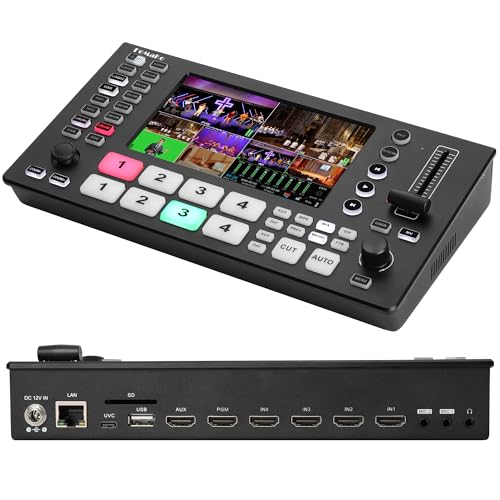
Packed with advanced features, the FoMaKo 4K HDMI Video Mixer Switcher is perfect for content creators who demand high-quality production without breaking the bank. Weighing just 2.2 pounds and measuring 7 x 14 x 4 inches, it’s portable and user-friendly. With four 4K 60FPS HDMI inputs and a USB input, you can easily switch between sources. Enjoy real-time monitoring on the integrated 5.5-inch FHD LCD screen. Plus, its advanced video effects, 30 changes, and dual recording capabilities make it versatile for any live stream. It’s compatible with platforms like Facebook and YouTube, ensuring seamless broadcasting.
Best For: Content creators and live streamers looking for a portable, high-quality video mixing solution at an affordable price.
Pros:
- Advanced video effects and 30 transition options enhance production quality.
- Dual recording capabilities allow for simultaneous saving to SD card and USB flash drive.
- Compatible with major streaming platforms, enabling easy broadcasting.
Cons:
- Reports of screen flickering may affect user experience.
- Limited output resolution of 1080p 60FPS could be a downside for some users.
- Warranty information is not readily available, which may concern potential buyers.
RGBlink Mini V3 Video Switcher
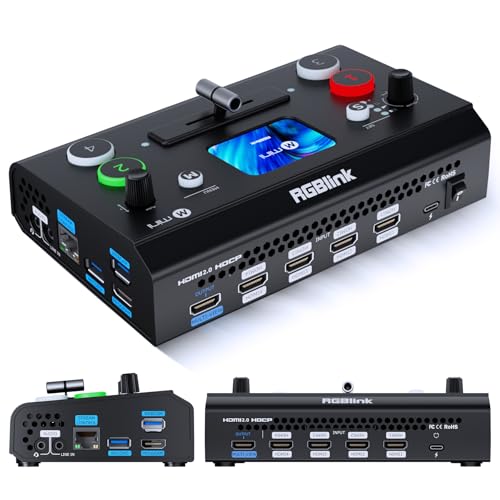
The RGBlink Mini V3 Video Switcher is an ideal choice for content creators who crave professional-quality live streaming in a compact package. With four HDMI inputs and dual 1080P outputs, you can effortlessly manage your multi-cam setup. The intuitive 2.1 touch screen guarantees smooth changes with zero lag. You can also record directly to USB drives, making it perfect for events, gaming, or webinars. Plus, with flexible TAO Cloud activation, you can access additional features. Although some users report issues with app connectivity, many appreciate its solid build and price-to-performance ratio for live streaming.
Best For: Content creators seeking a compact and professional-quality live streaming solution with multiple HDMI inputs and outputs.
Pros:
- Compact design with 4 HDMI inputs and dual 1080P outputs for flexible streaming setups.
- Intuitive 2.1 touch screen interface that allows for smooth transitions and zero lag.
- Ability to record directly to USB drives, enhancing convenience for events, gaming, and webinars.
Cons:
- Some users experience issues with app connectivity and firmware updates.
- Mixed feedback on customer support, with reports of inadequate responses to inquiries.
- Limitations such as lack of ISO recording and slow response from buttons have been noted by users.
Factors to Consider When Choosing a Portable Video Switcher
When choosing a portable video switcher, you need to take into account several key factors. Think about the input and output options, size and portability, and how user-friendly the interface is. You’ll also want to evaluate streaming and recording features, along with connectivity and compatibility with your gear.
Input and Output Options
Choosing the right portable video switcher involves carefully considering its input and output options. Look for switchers with multiple input types like HDMI, SDI, and USB, accommodating various cameras and media sources—many support four or more inputs. Check the output capabilities too; some models provide multiple formats such as HDMI and SDI, offering flexibility for different display systems or streaming platforms. Ascertain the switcher can handle high-definition formats, ideally 1080p at 60FPS, with some advanced options even supporting 4K. Also, consider the number of layers and effects for enhanced live production, including picture-in-picture and overlays. Finally, verify compatibility with streaming services like YouTube or Facebook and recording options for seamless, high-quality productions.
Size and Portability
Size and portability are essential factors to take into account in your search for a portable video switcher. The weight of these devices varies considerably, typically ranging from under 3 pounds to around 12 pounds for models packed with features. You’ll find that compact designs often measure less than 16 inches in length and 8 inches in width, making transport and setup a breeze in any environment. Look for ergonomic features, like intuitive control panels and accessible touchscreen displays, which enhance usability. Additionally, switchers with built-in monitors eliminate the need for extra equipment, boosting portability. Finally, verify that the switcher can operate on multiple power options, such as AC, DC, or USB power banks, for added convenience during events.
User Interface Design
A user-friendly interface is essential for smooth operation during live events, where every second counts. When choosing a portable video switcher, look for intuitive controls that minimize the learning curve, especially if you’re new to the technology. Touchscreen displays can enhance usability, allowing you to switch scenes and adjust audio levels quickly. Ergonomically designed control panels with tactile buttons help prevent accidental touches, ensuring your changes are secure. Real-time monitoring features, like integrated LCD screens, let you visualize both input and output feeds, giving you precise control. Finally, clear labeling and a logical layout of controls will facilitate faster navigation, which is vital when you’re managing multiple video sources and effects solo.
Streaming and Recording Features
When it comes to live streaming, the capabilities of your video switcher can make or break your production. Look for switchers that support various input resolutions, like 4K at 60FPS, to guarantee high-quality streaming and recording. Models offering multiple output formats, including 1080p at 60FPS, help you meet different platform requirements. Check for USB 3.0 or USB Type-C outputs for lossless recording to external storage, which enhances your archiving options. Choose switchers with built-in media libraries and customizable graphics overlays to elevate the visual quality of your streams. Finally, verify the device supports dual network streaming options like RTMP/SRT for simultaneous broadcasting across multiple platforms, maximizing your reach and impact.
Connectivity and Compatibility
High-quality streaming not only relies on features but also on how well your video switcher connects with various devices and platforms. First, verify your switcher has multiple HDMI inputs—most models support up to four—to accommodate various source devices. Confirm its compatibility with popular streaming platforms like OBS, Vmix, and Zoom for enhanced production capabilities. USB ports are also essential; they support external devices and enable USB recording for capturing high-quality content. Look for support of HDMI and SDI inputs to connect professional cameras, giving you versatility in production environments. Finally, assess the output formats available, as some switchers offer various resolutions like 1080p or 4K, guaranteeing your broadcasts meet specific quality needs.