
When you’re aiming to enhance your editing and mixing workflow, the right post-production control surface can make all the difference. With options featuring motorized faders, customizable displays, and user-friendly designs, you can greatly boost your efficiency. But with so many choices available, how do you decide which one fits your needs best? Let’s explore the top contenders and what they bring to the table.
Elgato Stream Deck + White – Studio Controller for Post Production
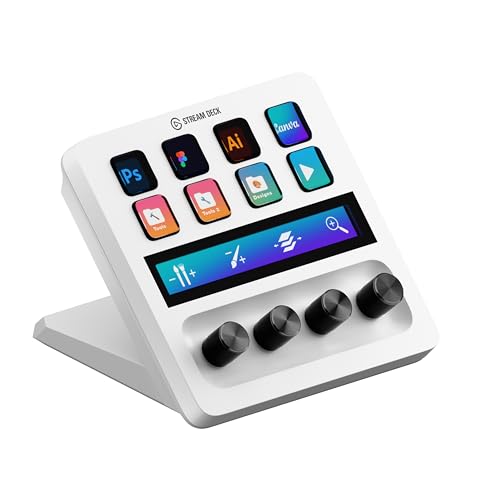
The Elgato Stream Deck + White is an essential tool for video editors, designers, and music producers looking to elevate their post-production workflow. With 8 customizable LCD keys, you can launch shortcuts effortlessly, saving you valuable time. The 4 dials allow you to scrub through timelines and adjust layers or volume with precision. Plus, the touch strip offers smooth navigation across tool panels, making it easier to access your favorite tools. Optimized for programs like Adobe Premiere Pro and Photoshop, this studio controller enhances your editing, retouching, and color grading tasks, ensuring you work efficiently and creatively.
Best For: Video editors, designers, and music producers seeking to enhance workflow efficiency in post-production.
Pros:
- Customizable LCD keys streamline access to shortcuts, improving speed and efficiency.
- Precision dials allow for accurate adjustments in timelines, layers, and volume.
- Touch strip facilitates smooth navigation across various tool panels for enhanced usability.
Cons:
- May have a learning curve for new users unfamiliar with customizable workflows.
- Limited compatibility with some software outside of the optimized applications.
- Price point may be high for casual users or hobbyists not requiring advanced features.
Behringer X-TOUCH ONE Universal Control Surface

Designed for both studio and live applications, the Behringer X-TOUCH ONE Universal Control Surface is an ideal choice for musicians and audio engineers who need a reliable and efficient way to manage their digital audio workstations (DAWs). It features a touch-sensitive motorized fader, 34 illuminated buttons, and a jog/shuttle wheel, ensuring precise control. With support for major DAWs like Pro Tools and Logic Pro, it seamlessly integrates into your setup. Plus, the user preset mode allows for custom assignments, enhancing your workflow. Backed by a 3-year warranty, the X-TOUCH ONE is a solid investment for any audio professional.
Best For: Musicians and audio engineers seeking a reliable control surface for managing their digital audio workstations with precision and efficiency.
Pros:
- Touch-sensitive motorized fader allows for real-time automation sync with DAWs.
- User preset mode enables custom assignments of Mackie Control parameters for enhanced workflow.
- Compatible with major DAWs and both Mac and PC systems, ensuring versatility in various setups.
Cons:
- Limited to a single motorized fader, which may not be sufficient for larger projects.
- Some users may require a learning curve to fully utilize all features and functionalities.
- The build quality, while solid, may not match that of higher-end control surfaces.
Korg Nanokontrol Studio Bluetooth/USB MIDI Control Surface

For musicians and producers seeking a versatile and compact solution, the Korg Nanokontrol Studio stands out as an excellent choice. This Bluetooth/USB MIDI control surface offers the flexibility you need for both mobile and desktop setups. With its refined and stylish design, it fits seamlessly into any workspace. The dual connectivity options—USB and wireless—provide freedom in your music production process. You’ll appreciate how easy it is to integrate into your workflow. Just remember to refer to the User Manual before use to get the most out of this powerful tool. Grab your Korg Nanokontrol Studio and elevate your editing experience!
Best For: Musicians and producers looking for a compact and versatile MIDI control surface for mobile and desktop use.
Pros:
- Dual connectivity options: Supports both USB and Bluetooth for added flexibility in music production.
- Compact design: Ideal for mobile setups without sacrificing functionality.
- Stylish appearance: Refined design that complements any workspace.
Cons:
- Learning curve: May require time to fully understand all features and functionalities.
- Limited controls: Depending on the user’s needs, it may not have enough controls for complex setups.
- Battery life: Wireless use may require frequent recharging compared to wired options.
Behringer X-TOUCH Universal Control Surface

Looking for a versatile control surface that adapts seamlessly to both studio and live environments? The Behringer X-TOUCH Universal Control Surface is your answer. With 9 touch-sensitive motor faders and dynamic LCD scribble strips, you’ll gain precise control over your mix. Plus, it supports HUI and Mackie Control protocols, ensuring effortless integration with your favorite DAW. Its Ethernet interface provides real-time MIDI capabilities, making it perfect for both recording sessions and live performances. Whether you’re adjusting levels or maneuvering through tracks, the X-TOUCH offers the functionality and flexibility you need for streamlined editing and mixing.
Best For: Musicians and audio engineers looking for a versatile control surface that excels in both studio and live settings.
Pros:
- 9 touch-sensitive motor faders provide precise control for mixing and editing.
- Dynamic LCD scribble strips offer an instant overview of track names and parameters.
- Supports HUI and Mackie Control protocols for seamless integration with various DAWs.
Cons:
- May require setup time to configure with specific software.
- Ethernet connectivity may not be compatible with all systems without additional adapters.
- Limited portability due to its size and weight compared to simpler controllers.
Studiologic SL Mixface 4-Layer Control Surface

If you’re a mobile music producer seeking a sleek yet powerful control surface, the Studiologic SL Mixface is an excellent choice. This 4-layer controller combines style and simplicity with a robust engine, perfect for on-the-go creativity. It effortlessly hosts and auto-maps to major DAW applications, allowing you to switch between your DAW and instruments with just a button press. Plus, its MIDI capabilities let you transform any keyboard into a versatile 4-layer controller. With Bluetooth and USB connectivity, you can connect to any computer seamlessly. Just remember to bring 3 AAA batteries for wireless use, as they aren’t included!
Best For: Mobile music producers looking for a stylish and powerful control surface that enhances their workflow.
Pros:
- Seamless DAW integration: Effortlessly hosts and auto-maps to major DAW applications.
- Versatile MIDI capabilities: Transforms any keyboard into a full 4-layer MIDI controller.
- Flexible connectivity options: Connects via Bluetooth and USB simultaneously for convenience.
Cons:
- Battery requirement for wireless use: Requires 3 AAA batteries (not included) for wireless operation.
- Limited onboard controls: May not have as many physical controls compared to larger, stationary controllers.
- Potential learning curve: Users may need time to familiarize themselves with the auto-mapping features.
BirdDog MAKI Studio Control Surface for MAKI Live Camera
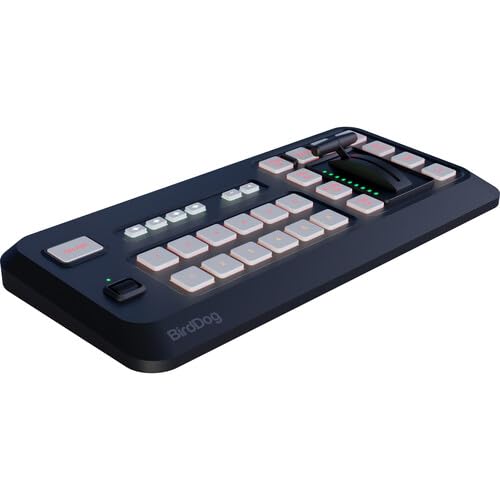
The BirdDog MAKI Studio Control Surface stands out as an essential tool for video creators seeking seamless management of their MAKI Live Box cameras. With its effortless control, you can smoothly manage up to six program and six preview sources using dedicated selection buttons. The precise T-Bar shifts elevate your video production, making it look more professional. Plus, you can customize overlays with stinger, title, and logo buttons to enhance your visuals. For audio, the four recall banks provide intuitive control, refining your sound. Overall, it greatly boosts your production quality and efficiency, making it a must-have for any serious creator.
Best For: Video creators looking for efficient control and enhanced production quality in managing MAKI Live Box cameras.
Pros:
- Effortless management of multiple camera sources for smooth production.
- Customizable overlays enhance visual appeal and branding.
- Intuitive audio control with recall banks for refined sound management.
Cons:
- May have a learning curve for beginners unfamiliar with video production equipment.
- Limited to MAKI Live Box cameras, restricting broader compatibility.
- Higher price point may not be suitable for all budget levels.
Expressive E Touché SE USB Instrument Control Surface for Music Production

Designed specifically for laptop musicians, the Expressive E Touché SE USB Instrument Control Surface offers an intuitive way to manipulate sounds through taps, slides, and gestures. With over 250 professionally designed sounds ready to go, you can dive straight into your music production. It allows you to control multiple plug-in parameters simultaneously, making it easy to modify your sound in extraordinary ways. Plus, it supports third-party VST instruments, giving you access to even more expressive capabilities. With the companion Lié software, you can customize your setup for specific sounds, presets, and plug-ins, enhancing your creative workflow.
Best For: The Expressive E Touché SE is best for laptop musicians seeking an intuitive control surface for enhancing their music production with expressive sound manipulation.
Pros:
- Intuitive Control: Allows for easy manipulation of sounds through taps, slides, and gestures, enhancing creativity.
- Extensive Sound Library: Comes with over 250 professionally designed sounds, ready for immediate use.
- Third-Party Support: Compatible with various VST instruments, expanding expressive capabilities and sound options.
Cons:
- Compatibility Limitations: Requires macOS 10.11+ or Windows 10 (64bit) for full functionality.
- Learning Curve: Users may need time to familiarize themselves with the Lié software and its customization options.
- Portability Concerns: While designed for laptop musicians, the device may still require additional space in a mobile setup.
iCON Pro Audio P1-M DAW Control Surface with Motorized Faders

For audio professionals and music producers seeking to enhance their workflow, the iCON Pro Audio P1-M DAW Control Surface shines with its touch-sensitive motorized faders. You’ll appreciate the 12-bit resolution that guarantees precise control over your mixes. The customizable 4-inch touchscreen allows you to manage up to 80 functions effortlessly using drag and drop in iMAPTM software. With seamless integration across three DAWs, including Pro Tools and Logic Pro, you can switch between projects without missing a beat. Its robust design guarantees durability, while the option to expand control capabilities makes it an essential addition to your setup.
Best For: Audio professionals and music producers looking to streamline their workflow and enhance productivity in music production.
Pros:
- Precision Control: Touch-sensitive motorized faders with 12-bit resolution provide accurate mixing capabilities.
- Customizable Interface: The 4-inch touchscreen allows for up to 80 functions to be managed easily through drag and drop.
- DAW Compatibility: Supports seamless integration with multiple DAWs, enabling efficient project switching.
Cons:
- Price Point: May be considered expensive for entry-level users or hobbyists.
- Learning Curve: Some users may require time to fully utilize all features and functionalities.
- Expandability Costs: Additional extender units and display units may add to the overall investment.
iCON Pro Audio P1 Nano Compact USB C-MIDI Control Surface
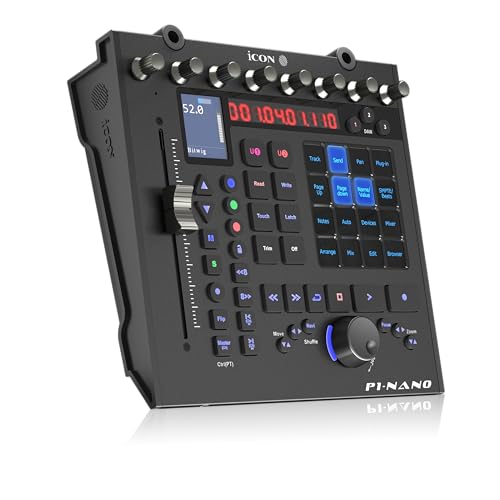
Compact and powerful, the iCON Pro Audio P1 Nano USB C-MIDI control surface is perfect for musicians and producers seeking portability without sacrificing functionality. Weighing just 1.97 pounds, it fits easily into your gear bag. The 4-inch customizable touchscreen displays up to 80 functions across five color-coded layers, while the touch-sensitive motorized fader and eight dual-function knobs provide precise control. It integrates seamlessly with major DAWs like Logic Pro X and Ableton Live, controlling up to three simultaneously. Plus, the user-friendly iMapTM software allows for quick customization, making it an essential tool for enhancing your workflow.
Best For: Musicians and producers seeking a portable, feature-rich MIDI control surface for music production.
Pros:
- Compact and lightweight design makes it easy to transport.
- Customizable touchscreen and motorized fader enhance control and workflow.
- Multi-DAW compatibility allows for simultaneous control of up to three digital audio workstations.
Cons:
- Limited physical space may make it challenging for users requiring extensive controls.
- Additional display units and footswitch pedals are sold separately, increasing overall cost.
- Learning curve may exist for users unfamiliar with MIDI control surfaces.
Akai APC20 Compact Professional Ableton Controller
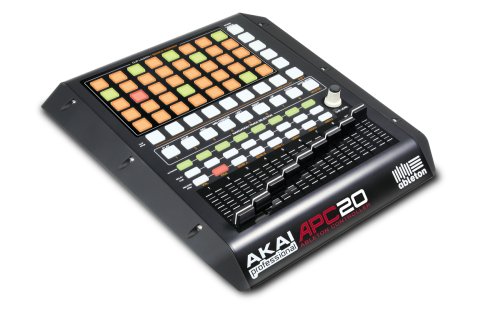
The Akai APC20 Compact Professional Ableton Controller stands out as an ideal choice for musicians and producers seeking a seamless integration with Ableton Live. Weighing just 2 pounds, its 5×8 Clip Launch grid and nine faders allow for effortless control and creativity. You’ll appreciate the customizable Clip Launch matrix with multicolor lighting that shows current clip status. Plus, with no mapping required, all buttons and faders are pre-mapped for immediate use. The included Ableton Live Akai Professional APC Edition software enhances your experience, making it a top-rated option among users. Enjoy streamlined editing and mixing like never before!
Best For: Musicians and producers looking for a compact and user-friendly controller to enhance their workflow with Ableton Live.
Pros:
- Fully customizable Clip Launch matrix with multicolor lighting for easy visual feedback.
- No mapping required; all buttons and faders are pre-mapped for immediate use.
- Lightweight design (2 pounds) makes it portable and easy to transport.
Cons:
- Limited to use with Ableton Live software, which may not suit all users.
- Fewer faders compared to other controllers may restrict complex mixing.
- May not have advanced features found in higher-end models for professional users.
Factors to Consider When Choosing a Post Production Control Surface
When choosing a post production control surface, you’ll want to take into account several key factors. Compatibility with your software, user interface design, and the control features offered can greatly impact your workflow. Don’t forget to reflect on portability, size, and build quality to guarantee it meets your needs in the long run.
Compatibility With Software
Choosing a control surface that seamlessly integrates with your software can greatly enhance your post-production workflow. It’s crucial to pick one optimized for the applications you plan to use, like Adobe Premiere Pro or DaVinci Resolve, ensuring smooth functionality. Confirm compatibility with your preferred digital audio workstation (DAW), such as Pro Tools or Logic Pro, to maintain an effective workflow. Look for surfaces that support industry-standard protocols like HUI and Mackie Control, as these enhance compatibility across various software. Additionally, some surfaces come pre-mapped for specific programs, saving you time during setup. Finally, consider the potential for future software updates; this can considerably impact the longevity and usability of your control surface as software evolves.
User Interface Design
A control surface’s user interface plays a significant role in your post-production experience. You’ll want a well-designed interface featuring intuitive layouts and touch-sensitive controls that enhance your workflow efficiency. Look for customizable touchscreens and illuminated buttons, which let you quickly access essential functions and improve visibility in low-light settings. The inclusion of LCD keys and dials also enables real-time control of multiple parameters, making your editing smoother. A user-friendly interface often comes with dedicated transport controls, providing immediate access to playback functions without digging through software menus. Finally, guarantee seamless integration and compatibility with major software applications so that the interface adapts to your diverse post-production needs effortlessly.
Portability and Size
Portability and size are essential factors to keep in mind while selecting a post-production control surface, especially if you often work in different locations. Consider the weight and dimensions; compact control surfaces typically weigh between 1.97 to 4.47 pounds, making them easy to transport without sacrificing functionality. Make sure the control surface fits comfortably in your workspace, as larger units may take up too much desk space and disrupt your workflow. Wireless connectivity options can also offer greater flexibility in positioning, which is particularly useful in collaborative environments. Finally, evaluate power requirements; some devices may need batteries for wireless use, while others rely solely on USB, impacting their usability across different setups.
Control Features Offered
When selecting a post-production control surface, the range of control features can greatly impact your editing and mixing experience. Look for touch-sensitive motorized faders that allow precise automation and real-time adjustments, enhancing your audio mixing capabilities. Customizable touchscreen displays can show up to 80 actionable functions, streamlining your workflow. Additionally, illuminated buttons and rotary encoders provide intuitive access to frequently used controls, making the interface user-friendly. Consider control surfaces with jog/shuttle wheels for smooth navigation through timelines, which helps refine projects with precision. Finally, guarantee compatibility with major digital audio workstations (DAWs) and support for control protocols like HUI and Mackie Control for seamless integration across different software platforms.
Build Quality and Durability
Choosing the right control surface goes beyond just its features; build quality and durability play a significant role in your overall experience. A robust metal casing often outlasts plastic alternatives, making it ideal for studio and on-the-go use. When you pick a heavier control surface, you’re likely choosing sturdier materials that can handle regular handling and transport without a hitch. It’s also essential to evaluate connector types and ports to guarantee compatibility with your devices and minimize wear during frequent use. Finally, pay attention to warranty periods. A longer warranty usually indicates that the manufacturer stands behind the product’s durability, giving you added peace of mind as you plunge into your post-production projects.
Price and Value
While exploring your options for post-production control surfaces, it’s vital to weigh the price against the features each model offers. Look for the number of faders, buttons, and display options to guarantee you’re getting good value. Remember that a higher upfront cost can save you time and enhance efficiency in the long run. Warranty periods and customer support also play an essential role in overall value, providing peace of mind for potential issues. Compatibility with various software is another factor; surfaces that support multiple DAWs may justify a higher price due to their versatility. Finally, consider resale value, as some brands retain their worth better than others, making them a smarter investment over time.