
If you regularly clone drives, recover data, or manage multiple SATA and NVMe disks, the right dock can save time and reduce mistakes.
This roundup of professional hard drive docking stations focuses on speed, bay flexibility, offline cloning, and practical features that matter in real workflows.
Best 10 Professional Hard Drive Docking Stations Picks for 2026
Dual-Bay Cloner Dock
SABRENT USB 3.0 Dual Bay Dock & Cloner

- Dual bay for 2.5-inch/3.5-inch SATA drives
- Offline cloning up to 60Mbps
- USB 3.0 plug-and-play operation
Best For: Simple dual-drive docking and basic offline cloning
USB-C Performance Dock
OWC Drive Dock Dual Bay SATA Solution

- USB-C connectivity with up to 522MB/s speeds
- Reads 2.5-inch and 3.5-inch drives simultaneously
- Independent power switches for each bay
Best For: Fast Mac/PC access to multiple bare SATA drives
Single-Bay SATA Dock
SABRENT USB 3.0 Lay-Flat Drive Dock

- Supports 2.5-inch and 3.5-inch SATA drives
- Includes 12V power adapter for 3.5-inch drives
- Tool-free hot-swap design
Best For: Simple single-drive access for SATA HDDs and SSDs
Five-Bay Cloning Station
ORICO USB-C 5 Bay Docking Station

- Five-bay SATA dock with up to 5x20TB capacity
- Offline 1:4 cloning without a computer
- USB 3.2 Gen 1 with USB-C and USB-A cables
Best For: Large storage setups and offline multi-copy cloning
Triple-Bay NVMe + SATA Cloner
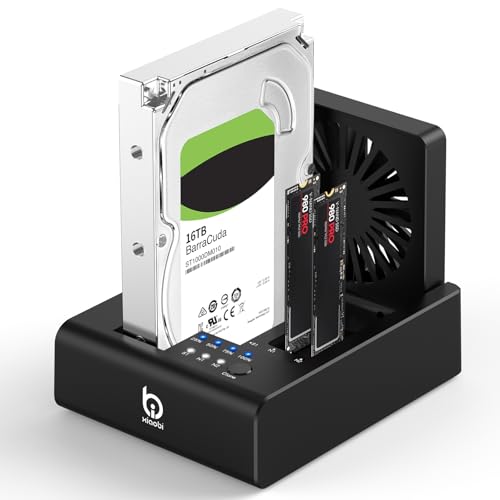
- Supports 2 M.2 NVMe plus 2.5"/3.5" SATA drives
- One-touch offline cloning with no software required
- USB-C 3.2 Gen 2 and built-in cooling fan
Best For: Flexible mixed-drive backups and cloning
Lay-Flat Single-Bay Dock

- USB 3.0 with UASP up to 5Gbps
- Supports 2.5"/3.5" SATA drives up to 24TB
- Tool-free lay-flat design with passive cooling
Best For: Simple single-drive SATA backups and swapping
Triple-Bay Offline Cloner

- Three independent bays for NVMe and SATA drives
- One-touch offline cloning with no PC software needed
- USB 3.2 Gen 2 up to 10Gbps with USB-C/USB-A cable
Best For: Mixed-drive professional cloning and access
Offline Cloning Dock
SABRENT Dual-Bay USB-C Hard Drive Docking Station & Cloner

- Dual-bay SATA dock with standalone cloning
- Supports 2.5-inch and 3.5-inch HDDs/SSDs
- Tool-free, hot-swappable design
Best For: SATA users who want easy dual-drive access and offline cloning
IT Pro Workhorse
StarTech.com 4-Bay Hard Drive Duplicator and Eraser

- 4-bay standalone duplicator and eraser
- Supports SATA and IDE drives with adapters
- LCD menu for cloning and secure erase
Best For: IT professionals who need cloning, wiping, and broad drive compatibility
High-Capacity Dual Bay
Dual Bay SATA Hard Drive Cloner Dock USB C 5Gbps

- USB 3.2 Gen1 5Gbps dock with RTL9201DP chip
- Offline cloning with LED progress bar
- Up to 40TB total capacity across both bays
Best For: Storage-heavy users who want fast SATA access and high-capacity cloning
Dual-Bay Cloner Dock – SABRENT USB 3.0 Dual Bay Dock & Cloner
If you want a practical option among professional hard drive docking stations, this SABRENT dual-bay model covers the basics well. It accepts 2.5-inch and 3.5-inch SATA HDDs or SSDs, supports offline cloning, and offers USB 3.0 speeds for everyday drive access and duplication.
Best For: Users who need a simple dual-bay dock for SATA drives and offline cloning.
Pros:
- Supports two 2.5-inch/3.5-inch SATA drives or SSDs at once
- Offline cloning up to 60Mbps
- Plug-and-play design with no drivers needed
- USB 3.0 performance up to 5Gbps
Cons:
- Cloning speed is limited to 60Mbps
- Made for SATA drives only
- Not the fastest option in this roundup
Overall, this is a straightforward dock-cloner combo for users who want easy drive swapping and basic duplication without extra setup. It is a sensible pick for general storage work, backups, and home or office use.
USB-C Performance Dock – OWC Drive Dock Dual Bay SATA Solution
For professional hard drive docking stations focused on speed, the OWC Drive Dock is built for fast access to bare SATA drives. It uses USB-C connectivity, supports reading multiple 2.5-inch and/or 3.5-inch drives simultaneously, and is rated for up to 522MB/s.
Best For: Mac and PC users who want a high-performance dual-bay dock with USB-C.
Pros:
- USB-C connectivity with up to 522MB/s speeds
- Supports multiple 2.5-inch and/or 3.5-inch drives simultaneously
- Independent power switches for each bay
- Works with Mac and PC
Cons:
- Premium-focused option compared with basic docks
- Requires bare SATA drives
- Not intended for NVMe or non-SATA formats
This dock stands out when speed, convenience, and cross-platform compatibility matter more than minimal cost. Its separate power control and internal power supply make it a strong fit for regular drive handling and workflow-heavy setups.
Single-Bay SATA Dock – SABRENT USB 3.0 Lay-Flat Drive Dock
This SABRENT model is a compact choice in professional hard drive docking stations when you only need one bare SATA drive connected at a time. It supports 2.5-inch and 3.5-inch SATA HDDs and SSDs, includes a 12V adapter for 3.5-inch drives, and offers plug-and-play operation.
Best For: Users who need a simple single-bay dock for SATA HDDs and SSDs.
Pros:
- Works with 2.5-inch and 3.5-inch SATA drives and SSDs
- Includes a 12V/2A power adapter for stable operation
- Tool-free, hot-swap design
- Compatible with Windows, macOS, and Linux
Cons:
- USB-A host connection only, not USB-C
- Does not support IDE, M.2, SAS, or pre-enclosed drives
- S.M.A.R.T. diagnostics are not passed through the bridge
As a no-frills lay-flat dock, this is a good fit for straightforward drive access and occasional swapping. It is especially practical if you already use USB-A and want a dependable SATA-only solution with external power.
Five-Bay Cloning Station – ORICO USB-C 5 Bay Docking Station
Among professional hard drive docking stations, this ORICO 5-bay model is aimed at users who need more capacity and cloning flexibility. It supports 2.5-inch and 3.5-inch SATA SSDs and HDDs, offers offline duplication of up to four copies, and uses a USB 3.2 Gen 1 USB-C connection.
Best For: Users who need multi-drive storage expansion and offline cloning in one dock.
Pros:
- Five-bay design with support for up to 5x20TB capacity
- Offline 1:4 cloning without a computer
- Supports S.M.A.R.T. and TRIM functions
- Aluminum alloy body with vertical design for heat dissipation
Cons:
- Only one supported device quantity is listed in the supplied details
- Best suited to SATA drives rather than mixed interfaces
- May be more dock than casual users need
This is the most expansion-friendly option in the group, with a strong emphasis on copying and large storage setups. It makes more sense for photographers, power users, and anyone managing multiple large SATA drives at once.
Triple-Bay NVMe + SATA Cloner – M.2 NVMe & SATA Dock
If you want professional hard drive docking stations that can handle mixed-drive workflows, this 3-bay xiaobi unit is built for flexible backups and fast transfers. It supports two M.2 NVMe SSDs plus 2.5″/3.5″ SATA HDDs, includes one-touch offline cloning, and uses USB-C 3.2 Gen 2 for up to 10Gbps performance.
Best For: Users who need a versatile dock for NVMe and SATA drives with offline cloning.
Pros:
- Supports both M.2 NVMe SSDs and 2.5″/3.5″ SATA HDDs in one dock
- One-touch offline cloning works without software or PC setup
- USB-C 3.2 Gen 2 connection supports up to 10Gbps transfer speeds
- Built-in 80mm foldable cooling fan helps reduce heat during heavy workloads
Cons:
- Does not support reverse cloning from M.2 NVMe SSD to SATA HDD
- Not compatible with SATA (NGFF) or mSATA SSDs
- Cloning requires the target drive to be equal or larger in capacity
Overall, this dock is a strong fit if your work spans both NVMe and SATA storage and you want simple, hardware-based cloning. The cooling fan and high-speed USB-C interface make it especially practical for long transfer sessions.
Lay-Flat Single-Bay Dock – ORICO USB 3.0 UASP Dock
For buyers comparing professional hard drive docking stations for simple SATA access, this ORICO lay-flat model keeps the focus on speed, stability, and easy drive swaps. It supports 2.5″ and 3.5″ SATA HDDs and SSDs, uses USB 3.0 with UASP for up to 5Gbps, and is designed for tool-free use.
Best For: Fast single-drive SATA access, backups, and everyday drive swapping.
Pros:
- USB 3.0 with UASP supports transfer speeds up to 5Gbps
- Works with 2.5″ and 3.5″ SATA HDDs and SSDs up to 24TB
- Lay-flat design increases surface contact for passive heat dissipation
- Tool-free, hot-swappable design makes drive changes simple
Cons:
- Supports only one drive at a time
- Limited to SATA drives rather than NVMe
- Uses a USB-A connection instead of USB-C
This is a straightforward dock for users who mainly need reliable SATA access rather than multi-bay expansion. Its combination of UASP support, passive cooling, and broad OS compatibility makes it easy to drop into a working setup.
Triple-Bay Offline Cloner – ICY BOX NVMe + SATA Dock
This ICY BOX model is aimed at users who want professional hard drive docking stations with broad drive support and fast cloning features. It offers three independent slots for M.2 NVMe SSDs and 2.5″/3.5″ SATA SSDs and HDDs, plus one-touch offline cloning and USB 3.2 Gen 2 speeds up to 10Gbps.
Best For: Professional users who need a triple-bay dock for mixed drives and quick offline cloning.
Pros:
- Supports M.2 PCIe NVMe SSDs plus 2.5″/3.5″ SATA SSDs and HDDs
- One-touch offline cloning avoids software installation and PC setup
- USB 3.2 Gen 2 delivers up to 10Gbps transfer speeds
- Includes both USB-C and USB-A cable options for easier connectivity
Cons:
- Cloning is limited to the supported drive combinations listed in the product notes
- Requires an external power adapter for operation
- Three-bay design may be more dock than casual users need
As a triple-bay docking station, this one is best suited to users who regularly move between different drive types and want a simple clone workflow. The mixed cable bundle and multi-OS support make it a practical choice for flexible desks and workstations.
Offline Cloning Dock – SABRENT Dual-Bay USB-C Hard Drive Docking Station & Cloner
If you want professional hard drive docking stations for quick swaps and simple drive migration, this SABRENT dual-bay model keeps things practical. It mounts two SATA drives at once, works with 2.5-inch and 3.5-inch SATA HDDs and SSDs, and also offers one-button offline cloning when you do not want to use a computer.
Best For: Users who need a straightforward dual-bay dock with standalone cloning for SATA drives.
Pros:
- Offline cloning works without a PC and supports up to 60MBps by design.
- Both bays can mount as separate drives over USB for file transfer or dual-drive work.
- Tool-free, hot-swappable design with an access LED per bay.
- Includes USB-C cable and power adapter in the box.
Cons:
- SATA only; it does not support IDE/PATA, M.2, or NVMe drives.
- The offline clone target must be the same size as the source or larger.
- The dock end uses USB-C, so USB-A users may need their own cable.
This is a strong fit if you want a compact, no-fuss dock that handles everyday SATA access plus easy standalone cloning. It is built around convenience rather than mixed-drive compatibility, so it makes the most sense for SATA-based workflows.
IT Pro Workhorse – StarTech.com 4-Bay Hard Drive Duplicator and Eraser
Among professional hard drive docking stations, this StarTech.com unit stands out for cloning, erasing, and drive access in one standalone tool. It supports 2.5-inch and 3.5-inch SATA drives, adds IDE compatibility through included adapters, and offers menu-driven sector-by-sector duplication and secure erase modes.
Best For: IT teams and power users who need a multi-bay duplicator with erase functions and broad drive support.
Pros:
- Standalone cloning and erasing with LCD menu controls.
- Supports SATA and IDE drives using the included adapters.
- Quick Erase and Secure Erase options based on NIST SP 800-88 Rev 1 Purge.
- USB 3.2 Gen 1 and eSATA host connections for flexible setups.
Cons:
- Target disk must be equal to or larger than the source for duplication.
- Bulkier 4-bay design may be more than casual users need.
- Best suited to dock, clone, and erase tasks rather than simple portability.
This is the most feature-heavy option here, especially if you need cloning plus sanitizing tools in one dock. It is clearly aimed at professional workflows where compatibility, control, and standalone operation matter more than a minimal footprint.
High-Capacity Dual Bay – Dual Bay SATA Hard Drive Cloner Dock USB C 5Gbps
If you are comparing professional hard drive docking stations for fast backups and easy swapping, this dual-bay dock focuses on speed and capacity. It supports 2.5-inch and 3.5-inch SATA drives, offers a one-key offline clone mode, and is rated for up to 40TB total capacity across both bays.
Best For: Users who want a modern dual-bay SATA dock with high-capacity support and standalone cloning.
Pros:
- USB 3.2 Gen1 5Gbps connection with RTL9201DP bridge chip.
- One-key offline cloning with LED progress indicators.
- Supports up to 20TB per bay, or 40TB total.
- Tool-free vertical design with UASP, TRIM, and S.M.A.R.T. support.
Cons:
- Compatible with SATA drives only, not other drive types.
- Offline cloning still requires a source and target drive setup.
- RGB lighting and styling may be unnecessary for users who prefer a plain dock.
This dock is a good choice if you want a feature-rich setup for large SATA libraries and easy cloning without a computer. Its mix of monitoring, transfer features, and high capacity makes it especially appealing for storage-heavy home or office use.
How We Picked the Best Professional Hard Drive Docking Stations
We prioritized docks that suit professional use: stable connections, strong transfer performance, clear bay layouts, and cloning features that work without a computer when possible. We also looked at drive compatibility, power delivery, cooling, and whether the design fits repeated daily use.
Quick Comparison
Single-bay docks are best for quick access and routine backups. Dual-bay models add cloning convenience and let you compare or duplicate drives more efficiently. Multi-bay stations are better for technicians, studios, and small offices that need to rotate several disks at once. If your workflow includes newer SSDs, check for NVMe support and USB-C 10Gbps or faster connectivity.
Key Buying Factors for Professional Hard Drive Docking Stations
Drive Type and Form Factor
Make sure the dock supports the drives you actually use, including 2.5-inch and 3.5-inch SATA HDDs, SATA SSDs, or M.2 NVMe SSDs. Some Professional Hard Drive Docking Stations handle only SATA, while others combine SATA and NVMe in one unit.
Connectivity and Speed
USB 3.0 is adequate for basic work, but USB-C and 10Gbps-class connections are a better fit for heavier transfers. If you work on large media files or backups, interface speed can make a real difference.
Cloning and Offline Duplication
If you need to duplicate disks regularly, choose a dock with offline cloning and clear source/target indicators. For teams that handle system migrations or recovery work, this feature is often more useful than raw bay count alone.
Cooling and Stability
Heat can slow drives and shorten lifespan, especially during long copy jobs. Look for vents, fans, and a sturdy base that keeps heavier 3.5-inch drives secure.
Who Should Buy Which Professional Hard Drive Docking Stations?
Choose a single-bay dock if you want simple access, quick diagnostics, or occasional backups. Pick a dual-bay clone dock if you regularly duplicate drives or migrate systems. Choose a 4- or 5-bay station if you manage multiple drives in a workshop, IT department, or production environment. If your work includes both modern SSDs and legacy SATA drives, a hybrid dock is usually the most versatile option.
For most buyers, the best choice is the model that matches your mix of drive types, your need for offline cloning, and how often you’ll use the dock in a demanding setting.