
When it comes to preserving your precious memories, choosing the right professional photo scanner is essential. You want a device that captures every detail, making your photos look as vibrant as the day they were taken. With so many options available, it can be overwhelming to find the perfect fit for your needs. Let’s explore the top contenders that can help you digitally immortalize your favorite moments.
Epson FastFoto FF-680W Wireless Photo and Document Scanning System

If you’re looking for the world’s fastest personal photo scanner, the Epson FastFoto FF-680W is an excellent choice. You can scan thousands of photos at an incredible speed of one per second at 300 dpi. With its batch-scanning feature, you can handle up to 36 photos simultaneously. This scanner not only preserves your memories but also enhances them with its Perfect Picture Imaging System, offering auto enhancement and color restoration. Plus, its flexible scanning options allow you to archive at various resolutions. Wirelessly upload your scans to Dropbox or Google Drive for easy sharing and backup.
Best For: Photography enthusiasts and families looking to efficiently digitize and preserve large collections of photos and documents.
Pros:
- World’s fastest personal photo scanner, capable of scanning 36 photos at once at 1 photo per second.
- Perfect Picture Imaging System enhances and restores photos with features like auto enhancement and color restoration.
- Flexible scanning options allow for various resolutions and easy uploading to cloud services like Dropbox and Google Drive.
Cons:
- Limited to scanning up to 8 x 10 inch photos, which may not accommodate larger formats.
- Initial setup and Wi-Fi connectivity may require some technical knowledge for users unfamiliar with technology.
- Bulk scanning may lead to file management issues if not properly organized after scanning.
Plustek Photo Scanner ePhoto Z300

The Plustek Photo Scanner ePhoto Z300 is perfect for busy photographers and hobbyists who need to digitize large volumes of photos quickly. It scans 4×6 photos in just 2 seconds, allowing you to tackle about 1,000 photos in an afternoon. With an optical resolution of up to 600 dpi, you can choose between 300 and 600 dpi settings for your images. This scanner also features powerful image enhancement tools to restore faded pictures effortlessly. Plus, it’s compatible with both Mac and PC, so you can easily access the latest software from the Plustek website. Preserve your memories with ease!
Best For: Busy photographers and hobbyists looking to quickly digitize large volumes of photos.
Pros:
- Scans 4×6 photos in just 2 seconds, allowing for efficient bulk scanning.
- Offers an optical resolution of up to 600 dpi for high-quality images.
- Includes powerful image enhancement tools for restoring old and faded photos.
Cons:
- Limited to specific photo sizes (3×5, 4×6, 5×7, and 8×10).
- May not be as versatile as flatbed scanners for different media types.
- Requires software downloads for optimal performance, which may be inconvenient for some users.
ScanSnap iX2500 Photo Edition Scanner with 5″ Touchscreen

For photographers and enthusiasts who demand efficiency, the ScanSnap iX2500 Photo Edition Scanner stands out with its impressive capability to scan up to 100 photos per minute. This versatile scanner features a 5″ touchscreen for easy navigation and supports both Mac and PC. With a built-in Wi-Fi 6 connection, you can scan securely without a computer, and the USB-C option adds flexibility. The automatic document feeder accommodates up to 100 documents or 36 photos, while included carrier sheets protect delicate prints. Plus, it automatically sorts and names files, simplifying your photo management and sharing experience.
Best For: Photographers and enthusiasts looking for a high-speed scanner to efficiently digitize photos, documents, and receipts.
Pros:
- High-speed scanning capability of up to 100 photos per minute.
- Large 5″ touchscreen for easy navigation and customizable profiles.
- Built-in Wi-Fi 6 for secure wireless scanning without the need for a computer.
Cons:
- Automatic document feeder may not handle very thick documents well.
- Future compatibility with ARM-based Windows environments is dependent on a software update in December 2025.
- Limited to scanning documents and photos; not suitable for 3D objects or larger formats.
ScanSnap iX2500 Wireless Document Scanner

Equipped with a large 5-inch touchscreen and high-speed double-sided scanning at 45 pages per minute, the ScanSnap iX2500 Wireless Document Scanner is perfect for busy professionals who need to manage documents efficiently. With built-in Wi-Fi 6, you can connect directly to smart devices and cloud services without a computer. The 100-sheet auto document feeder lets you scan large batches effortlessly. You can customize scanning profiles and quickly access your favorite applications through the Quick Menu. Plus, it automatically optimizes and organizes your files, ensuring a smooth experience with minimal paper jams and data loss.
Best For: Busy professionals who need an efficient and fast solution for managing large volumes of documents, photos, and receipts.
Pros:
- High-speed scanning at 45 pages per minute with double-sided capabilities.
- Built-in Wi-Fi 6 for direct connectivity to smart devices and cloud services.
- Customizable scanning profiles and Quick Menu for easy access to favorite applications.
Cons:
- Compatibility with ARM-based Windows environments will require a future software update.
- The reliance on wireless connectivity may pose challenges in environments with weak signals.
- The 100-sheet auto document feeder may not be sufficient for users with very high-volume scanning needs.
Canon imageFORMULA RS40 Photo and Document Scanner
Looking to preserve your cherished memories with ease? The Canon imageFORMULA RS40 Photo and Document Scanner is perfect for you. It features an Auto Document Feeder and a USB interface, compatible with both Windows and Mac systems. You can scan old and new photos at impressive speeds of up to 40 items per minute, capturing both sides simultaneously. The bundled software offers photo enhancement tools like red-eye correction and digital face smoothing. Plus, it handles various media types and saves files in multiple formats, ensuring your memories are beautifully digitized and easily accessible on your computer or cloud services.
Best For: Individuals looking to easily digitize and preserve a variety of photos and documents efficiently.
Pros:
- High-speed scanning at up to 40 items per minute, enhancing productivity.
- Versatile media handling allows for scanning of various document types, including photos, receipts, and IDs.
- Bundled software provides useful editing features for photo enhancement and document management.
Cons:
- Limited to USB connectivity, which may not suit users looking for wireless options.
- One-year limited warranty may not be sufficient for long-term users.
- Software compatibility may vary depending on system updates or specific configurations.
VIISAN A3 Flatbed Scanner
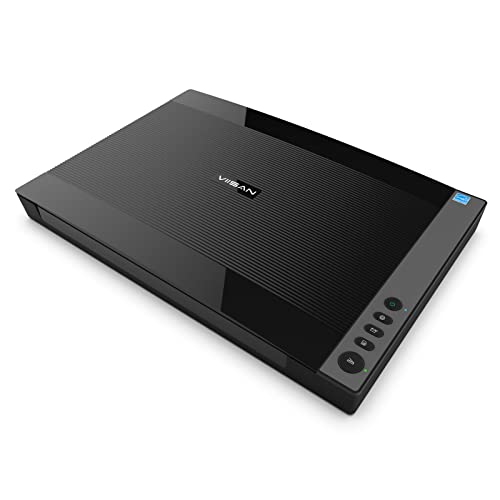
The VIISAN A3 Flatbed Scanner is a game-changer for schools, libraries, and small office/home office (SOHO) environments that need to digitize large documents quickly and efficiently. With a maximum scan size of 11.7” x 16.7”, it scans at a stunning 1200 DPI in just 8 seconds. Its frameless design and Auto-Scan feature guarantee ease of use, while the four-panel buttons allow for quick access to scanning, emailing, printing, and PDF creation. Compatible with both Windows and MacOS, this energy-efficient scanner is perfect for anyone needing high-quality digitization without the hassle. Plus, it comes with a one-year warranty for peace of mind.
Best For: The VIISAN A3 Flatbed Scanner is best for schools, libraries, and small office/home office environments that require efficient and high-quality digitization of large documents.
Pros:
- Scans large documents up to 11.7″ x 16.7″ in just 8 seconds at 1200 DPI.
- Easy-to-use Auto-Scan feature and quick access buttons for multiple functions.
- Energy-efficient LED light source with no warm-up time, enhancing productivity.
Cons:
- WIA driver support is limited to a maximum of 600 DPI.
- Cleaning may be necessary if white lines appear during scanning.
- Limited to a one-year warranty for non-man-made damage.
Epson Perfection V19 II Color Flatbed Scanner

For photographers and professionals needing high-quality scans, the Epson Perfection V19 II Color Flatbed Scanner stands out with its impressive optical resolution of 4800 dpi. Weighing just 3.1 lbs, it’s USB powered, making it perfect for portability. With one-touch scanning, you can quickly process letter-sized documents in as fast as 10 seconds. The high-rise, removable lid allows for easy scanning of books and photo albums. Plus, the included Epson ScanSmart software helps you create searchable PDFs and editable Microsoft Office documents. Easy Photo Fix technology revives faded photos, making this scanner ideal for preserving your cherished memories.
Best For: Photographers and professionals seeking a portable scanner with high-resolution capabilities for documents and photos.
Pros:
- One-touch scanning for quick and easy document processing.
- High optical resolution of 4800 dpi, ideal for detailed artwork and photo enlargements.
- Lightweight and compact design allows for convenient portability and storage.
Cons:
- Limited to letter-sized documents, which may not accommodate larger formats.
- May require additional software for advanced editing features beyond included Epson ScanSmart.
- USB powered means reliance on a computer or USB outlet for operation, limiting standalone functionality.
Epson Perfection V39 II Flatbed Scanner

Ideal for photographers and artists, the Epson Perfection V39 II Flatbed Scanner delivers stunning 4800 dpi optical resolution that captures intricate details in your images. Its compact, lightweight design makes it easy to fit into any workspace. You can effortlessly scan photos, artwork, and documents with one-touch buttons, maximizing your efficiency. Thanks to Easy Photo Fix technology, you’ll restore faded colors in your cherished memories. Plus, with scan-to-cloud functionality and USB power for convenient connectivity, sharing your scans is a breeze. Simplify your scanning tasks and preserve your memories in vibrant detail with this powerful scanner.
Best For: Photographers and artists looking for a high-resolution scanner to capture detailed images and restore faded memories.
Pros:
- High 4800 dpi optical resolution provides clear and detailed scans.
- Compact and lightweight design makes it easy to store and transport.
- Easy Photo Fix technology restores color to faded photos effortlessly.
Cons:
- Limited to flatbed scanning, which may not accommodate larger or bulkier items.
- USB power may require a nearby outlet, limiting flexibility in placement.
- Software features may have a learning curve for some users.
ClearClick QuickConvert 2.0 Photo, Slide, and Negative Scanner
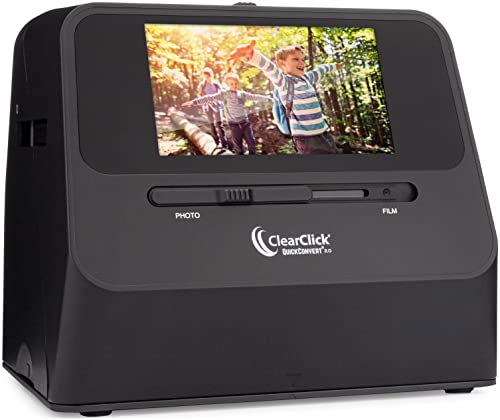
Designed for enthusiasts and casual users alike, the ClearClick QuickConvert 2.0 Photo, Slide, and Negative Scanner makes digitizing your cherished memories a breeze. It quickly scans 4×6 photos and 35mm, 110, and 126 film in just 2-3 seconds, capturing stunning 14 MegaPixel images. You won’t need a computer; just power it on and start scanning directly to an SD card. Plus, the built-in rechargeable battery lets you operate cord-free, and the 5-inch preview screen guarantees you see your images instantly. Keep in mind, though, it doesn’t support 5×7 photos. Enjoy the convenience and quality this compact scanner offers!
Best For: Casual users and photography enthusiasts looking to easily digitize 4×6 photos, slides, and negatives without a computer.
Pros:
- Quick scanning time of just 2-3 seconds per item.
- No computer or drivers needed, making it user-friendly.
- Built-in rechargeable battery allows for portable, cord-free scanning.
Cons:
- Does not support scanning of 5×7 photos.
- Limited to smaller sizes (4×6 or smaller) only.
- Requires a fully charged battery for optimal performance.
KODAK Slide N SCAN Film & Slide Scanner Digitizer
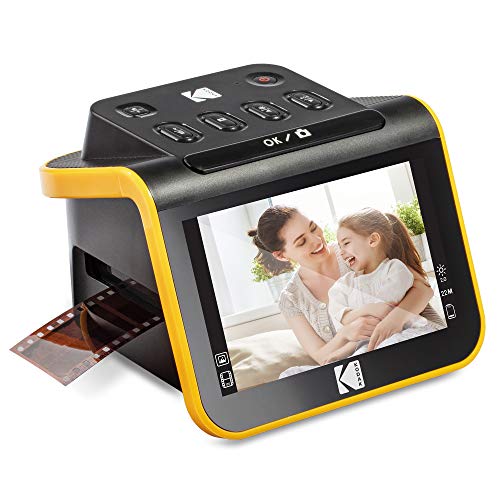
The KODAK Slide N SCAN Film & Slide Scanner Digitizer stands out for its ability to convert old negatives and slides into vibrant 22MP JPEG photos, making it a perfect choice for photography enthusiasts looking to preserve cherished memories. With a 5” LCD screen, you can instantly preview and edit your scans. It easily handles 135, 126, and 110 film formats and supports up to 32GB SD cards. The quick-feeding tray and easy-load film inserts streamline the scanning process. Plus, its sleek design doubles as a stylish digital picture frame, enhancing your home or office décor while keeping your memories alive.
Best For: Photography enthusiasts and anyone looking to digitize and preserve their old film negatives and slides.
Pros:
- High-Quality Scans: Converts negatives and slides into vibrant 22MP JPEG photos.
- User-Friendly: Features a 5” LCD screen for instant previewing and editing, simplifying the scanning process.
- Convenient Accessories: Comes with easy-load film inserts and a quick-feeding tray for fast and efficient scanning.
Cons:
- SD Card Not Included: Requires an additional purchase of an SD card for saving scanned images.
- Limited Compatibility: Supports only specific film formats (135, 126, and 110), which may not cover all users’ needs.
- No Built-in Storage: Lacks internal storage, necessitating the use of external SD cards for file management.
Factors to Consider When Choosing a Professional Photo Scanner
When you’re choosing a professional photo scanner, you’ll want to take into account several key factors. Scanning speed, image quality, and format compatibility can greatly impact your experience. Plus, user-friendly features and connectivity options will make your workflow much smoother.
Scanning Speed Efficiency
Choosing a professional photo scanner hinges on scanning speed efficiency, especially if you’re tackling large projects. Look for models that can scan up to 100 photos per minute, drastically cutting down your workload. For batch scanning, opt for scanners that can handle multiple photos at once; some can scan up to 36 photos simultaneously. Keep in mind that the scanning resolution impacts speed, as lower resolutions like 300 dpi are quicker than higher ones like 1200 dpi. Additionally, consider how fast the scanner processes each item—some can digitize a 4×6 photo in just 2 seconds. Features like automatic document feeders also enhance efficiency, enabling continuous scanning without manual intervention, making your digitization process even smoother.
Image Quality and Resolution
Scanners that excel in speed can sometimes overlook image quality, so it’s vital to reflect on how resolution impacts the final product. Higher optical resolutions, like 4800 dpi or 600 dpi, yield clearer, more detailed images, particularly when enlarging photos. You’ll want to take into account advanced image enhancement features, such as color restoration and red-eye correction, which can dramatically improve older or faded images. Scanning at higher bit depths, like 48-bit, captures more color information, resulting in richer reproductions. Keep in mind that while faster scanners may save time, they might compromise detail unless equipped with technology that preserves quality. Finally, versatility in scanning various formats, including slides and negatives, guarantees ideal image quality across different media.
Format Compatibility Options
Ensuring your professional photo scanner is compatible with various formats is essential for maximizing its functionality. Look for a scanner that supports standard sizes like 4×6, 5×7, and 8×10, as well as specialty formats like Polaroids and panoramas. If you plan to digitize slides, negatives, postcards, or documents, choose a scanner that handles multiple media types. Compatibility with document sizes such as letter and A4 enhances versatility, allowing you to scan both photos and text effortlessly. Additionally, opt for a scanner that offers various output formats, including JPEG, TIFF, and PDF, giving you flexibility in archiving and sharing. Finally, a model that scans both sides simultaneously can save you time and improve efficiency in your digitization projects.
User-Friendly Features
When it comes to selecting a professional photo scanner, user-friendly features can make a significant difference in your scanning experience. Look for one-touch scanning capabilities that allow you to start scans quickly and effortlessly. A built-in touchscreen interface is a great addition, providing intuitive navigation and easy customization of settings. Scanners with automatic document feeders save you time by letting you batch scan multiple photos at once. Real-time previews on an LCD screen help you assess image quality and make adjustments before finalizing the scan, enhancing accuracy. Finally, consider devices compatible with mobile apps for remote management, making it simple to share your scanned images on the go. These features guarantee a smoother, more enjoyable scanning process.
Connectivity and Integration
Choosing the right professional photo scanner hinges on its connectivity and integration capabilities. You’ll want options like USB and wireless features, which make it easy to connect with various devices and cloud services for effortless backup and sharing of your scanned images. Advanced models often provide built-in Wi-Fi, allowing you to link directly to smart devices without needing a computer, enhancing your convenience. Additionally, many scanners support popular cloud storage services like Dropbox and Google Drive for automatic uploads and organized digital files. Verify the scanner is compatible with both Mac and PC operating systems so you can use it seamlessly. These connectivity features not only streamline your workflow but also enhance the overall efficiency of your scanning process.
Image Enhancement Capabilities
After you’ve considered connectivity and integration features, it’s time to focus on image enhancement capabilities. These features are vital for restoring faded colors and improving the overall quality of your scanned images. Look for options like red-eye correction, digital face smoothing, and auto enhancement to greatly boost clarity and visual appeal. Advanced software can also help you create searchable PDFs and editable documents, adding extra functionality. Additionally, a scanner that captures handwritten notes on the backs of photos in a single scan enhances the preservation of personal memories. Powerful functions such as color restoration and cropping are essential for producing high-quality digital versions of old or delicate photographs, ensuring your memories are preserved beautifully.
Warranty and Support Services
A solid warranty and reliable support services can make all the difference in your experience with a professional photo scanner. When you’re selecting a scanner, pay attention to the warranty period; longer warranties often signal the manufacturer’s confidence in the product’s durability. Verify the warranty covers both parts and labor to protect yourself from unexpected repair costs. Access to technical assistance is essential for troubleshooting, so check what support options are available. Some manufacturers also provide online resources like user manuals and FAQs, which can be incredibly helpful. Finally, consider whether the warranty is transferable, as this can add value if you choose to sell or gift the scanner later on.