
In today’s fast-paced content creation environment, having the right teleprompter can make all the difference in delivering a flawless presentation. With advancements in technology, numerous models now stand out for their unique features and ease of use. If you’re looking to elevate your production quality, you’ll want to explore the top options available in 2026. Let’s examine what sets these professional teleprompter systems apart and which might be the best fit for your needs.
Elgato Prompter – Teleprompter with Built-in Screen for YouTube and More

If you’re a content creator looking to elevate your video presentations, the Elgato Prompter stands out with its built-in display, making it an ideal choice. This teleprompter supports a range of devices, including DSLR cameras, webcams, and smartphones, ensuring versatility. With a sharp 1080-pixel resolution, you can read scripts or Twitch chats while maintaining eye contact with the camera. The drag-and-drop functionality lets you easily move any app onto its display. Plus, setup is a breeze—just attach your camera, plug it in, and you’re ready to go. Enhance your presentations effortlessly with the Elgato Prompter!
Best For: Content creators, streamers, and professionals seeking a versatile teleprompter solution for engaging video presentations.
Pros:
- Built-in display eliminates the need for additional devices, streamlining setup.
- High-resolution 1080 pixels ensure clear visibility of scripts and chats.
- Easy integration with various cameras and compatibility with Stream Deck for enhanced control.
Cons:
- Requires DisplayLink software for full functionality, which may be an extra step for some users.
- Limited to specific software compatibility for Mac and Android, which may restrict use on other platforms.
- The design may not be suitable for all camera setups or physical spaces, potentially limiting versatility.
NEEWER 2 in 1 Teleprompter with Monitor for Windows and MacOS

The NEEWER 2 in 1 Teleprompter is an ideal choice for content creators, streamers, and presenters who need a reliable and versatile tool for their broadcasts. Featuring an 11-inch HD beam splitter glass and a built-in 9-inch LCD monitor, it supports screen mirroring for both Windows and macOS. You’ll enjoy clear text reflection, readable up to 2.5 meters, thanks to its multi-coated glass. Plus, it doubles as an external monitor for seamless interaction. With flexible mounting options and easy connectivity, this teleprompter simplifies your setup, allowing you to focus on delivering flawless presentations every time.
Best For: Content creators, streamers, and presenters seeking a reliable and versatile teleprompter for their broadcasts.
Pros:
- Clear text reflection up to 2.5 meters due to multi-coated beam splitter glass.
- Dual functionality as an external monitor for natural interaction during presentations.
- Easy connectivity with plug-and-play features, compatible with both Windows and macOS.
Cons:
- Voice sync is not supported, which may limit use for certain applications.
- Requires driver installation for some connection methods, adding complexity for users.
- Limited payload capacity of 2 kg may not support heavier camera equipment.
Glide Gear TMP 1000 Teleprompter for Cameras & Smartphones

For anyone seeking a versatile teleprompter that works seamlessly with both cameras and smartphones, the Glide Gear TMP 1000 is an excellent choice. This teleprompter features 17-inch beam-splitting glass, ensuring you get sharp, clear text. It’s compatible with all cameras, tablets, and smartphones, making it incredibly user-friendly. The cushioned tablet tray keeps your device secure, while adjustable glass height allows for ideal viewing angles. With rugged aluminum construction and a collapsible design, it’s easy to transport. Plus, multiple mounting options and compatibility with 15mm rail systems enhance its versatility for any production setup.
Best For: Content creators, videographers, and presenters who need a reliable and versatile teleprompter for both cameras and smartphones.
Pros:
- Versatile Compatibility: Works with all cameras, smartphones, and tablets, making it suitable for various setups.
- High-Quality Optical Performance: The 70/30 beam-splitting glass ensures sharp and clear text for easy reading.
- Portable Design: Collapsible design and included hard plastic carry case make it easy to transport and store.
Cons:
- Requires Additional Mounting Equipment: Compatibility with 15mm rail systems may necessitate extra purchases for some users.
- Limited to Certain Angles: Adjustable height may not accommodate all user preferences for viewing angles in every situation.
- Potential Learning Curve: Users unfamiliar with teleprompters may need time to adjust to optimal positioning and settings.
Glide Gear TMP 100 Teleprompter for DSLR, Tablet, Smartphone

Designed with versatility in mind, the Glide Gear TMP 100 Teleprompter is perfect for content creators who use DSLR cameras, tablets, or smartphones. It accommodates devices up to 10.5×8 inches, ensuring compatibility with popular models like the iPad Air and Mini, though not the iPad PRO. The professional-grade 70/30 beam splitter glass offers clear script reflection, while the protective hood minimizes glare for ideal visibility. Its collapsible design makes transport and storage a breeze, and it comes with a protective carry bag. Plus, setup is quick, and it works seamlessly with any teleprompter app that supports mirror text.
Best For: Content creators and professionals who utilize DSLR cameras, tablets, or smartphones for video production and presentations.
Pros:
- Versatile Compatibility: Accommodates a wide range of devices, including popular tablets and smartphones (excluding iPad PRO).
- High-Quality Glass: Features professional-grade 70/30 beam splitter glass for clear script reflection and camera clarity.
- Portable Design: Collapsible structure and included carry bag make it easy to transport and store.
Cons:
- Size Limitations: Not compatible with larger devices like the iPad PRO, which may limit some users.
- App Required: Requires a compatible teleprompter app with mirror text functionality (not included).
- Accessory Sales: Additional mounting options for lights and mics are sold separately, increasing overall cost.
NEEWER Basics X12B Aluminum Alloy Liftable Teleprompter for iPad and DSLR Camera

Lightweight and user-friendly, the NEEWER Basics X12B Aluminum Alloy Liftable Teleprompter is perfect for content creators using iPads or DSLR cameras. Its durable aluminum construction guarantees longevity while remaining easy to transport. The installation-free design allows you to set it up quickly for presentations or tutorials. With a 12-inch high-definition display, the reflected text stays clear up to 10 feet away. The included Bluetooth remote lets you control scroll speed, page turns, and font size effortlessly. Plus, its foldable design makes storage a breeze, fitting neatly into a carry case for your on-the-go needs.
Best For: Content creators, educators, and presenters who need a lightweight and portable teleprompter compatible with iPads and DSLR cameras.
Pros:
- Lightweight and portable design makes it easy to transport and set up for various events.
- High-definition 12-inch display ensures clear visibility of text up to 10 feet away.
- Bluetooth remote control allows for effortless adjustments to scrolling speed, page turns, and font size.
Cons:
- Not compatible with phone shooting, limiting use to iPads and DSLR cameras only.
- Requires NEEWER Teleprompter App for full functionality, which may not suit all users.
- Limited screen size compared to larger models, which may be less suitable for larger audiences or specific setups.
Desview T3 Teleprompter for iPad/Tablet/Smartphone

The Desview T3 Teleprompter is a game-changer for content creators who want to deliver polished presentations without losing focus on the camera. Designed for smartphones, iPads, and tablets up to 10 inches, it’s perfect for live streaming and professional video recording. With an 8-inch high-definition Beamsplitter Mirror, you’ll enjoy crystal-clear visuals without any double images. It’s compatible with various lens sizes, and the included Bluetooth remote lets you control your script effortlessly. Plus, it’s lightweight and easy to set up, making it a breeze to transport. The Desview T3 is truly a must-have for confident presentations.
Best For: Content creators looking for a convenient and professional teleprompter solution for live streaming and video recording.
Pros:
- High-definition Beamsplitter Mirror ensures clear visuals without double images.
- Lightweight and portable design makes it easy to transport and set up.
- Bluetooth remote and app integration allow for seamless script control and customization.
Cons:
- Not compatible with Sony ZVE10 kit lens, limiting options for some users.
- Battery for the remote control is not included, requiring an additional purchase.
- May require additional adapters for certain lens sizes, which may not be included.
SMALLRIG Teleprompter for iPad Tablet (up to 11 inch)

For content creators seeking a versatile teleprompter solution, the SMALLRIG Teleprompter for iPad Tablets (Model 3646) stands out with its compatibility for devices up to 11 inches. Weighing just 1.98 pounds, it’s portable yet sturdy, making it perfect for video conferencing and livestreaming. Enjoy a recommended reading distance of up to 16.4 feet without losing focus on your camera. With anti-glare features and a modular design, it guarantees clarity during use. Plus, you can easily extract scripts using the SmallGoGo App. Just remember, you’ll need a 15mm LWS baseplate for installation, sold separately.
Best For: Content creators and professionals looking for a lightweight and portable teleprompter solution for video conferencing and livestreaming.
Pros:
- Lightweight and portable design makes it easy to transport and set up.
- Anti-glare features ensure clear visibility of scripts without distractions.
- Compatibility with various lenses allows for flexibility in camera setups.
Cons:
- Requires a separate 15mm LWS baseplate for installation, which adds to the overall cost.
- Limited to tablets up to 11 inches, excluding smartphone users.
- Customer support and warranty details may not be readily available without request.
Mobile Teleprompter System (iPad/Smartphone Compatible)

Looking for a teleprompter system that won’t weigh you down during your presentations? The Mobile Teleprompter System is your perfect solution. Weighing just 6 lbs, its carbon fiber and aluminum construction guarantees durability without added bulk. With compatibility for smartphones and tablets up to 15 inches, including iPad Pro models, it adapts easily to your devices. Assembly is quick, and it collapses flat for transport. Enjoy the optimized viewing angle thanks to adjustable glass, while the anti-glare visor keeps your lens clear. This system truly enhances your mobile prompting experience, making it easier to deliver flawless presentations wherever you go.
Best For: Mobile presenters, videographers, and content creators seeking a lightweight and portable teleprompter solution.
Pros:
- Lightweight and durable construction with carbon fiber and aluminum materials for easy transport.
- Quick assembly and collapsible design for hassle-free setup and storage.
- Versatile compatibility with smartphones and tablets up to 15 inches, offering flexibility for various devices.
Cons:
- Limited to devices up to 15 inches, which may not accommodate larger tablets or screens.
- Requires careful assembly to ensure stability and optimal performance.
- Glass adjustment may be less user-friendly for beginners unfamiliar with teleprompter setups.
PROAIM Professional Speech Teleprompter (TP-SPH-01)

Designed with versatility in mind, the PROAIM Professional Speech Teleprompter (TP-SPH-01) is perfect for speakers in conferences, news broadcasts, and film productions. It supports tablets up to 17 inches and monitors, making it an ideal prompting solution for instructional videos and corporate events. The sturdy aluminum stand guarantees durability, while its height adjustment feature aligns with your line of sight. With high-quality 60/40 beam splitter glass, you’ll maintain eye contact with your audience, enhancing your delivery. Plus, it comes with a 100% satisfaction guarantee, giving you peace of mind with your purchase.
Best For: This teleprompter is best for speakers and presenters at conferences, news broadcasts, and film productions looking for a reliable prompting solution.
Pros:
- Versatile compatibility with tablets up to 17 inches and monitors, accommodating various devices.
- Durable construction with a sturdy aluminum stand that ensures longevity and stability.
- Enhanced visibility with high-quality 60/40 beam splitter glass, allowing for effective eye contact with the audience.
Cons:
- Potential weight of the aluminum stand may make it less portable for some users.
- Requires careful setup to ensure proper alignment and functionality.
- Limited to specific device sizes, which may exclude some users with larger screens or unconventional setups.
Desview T12S Teleprompter for Smartphones and Tablets
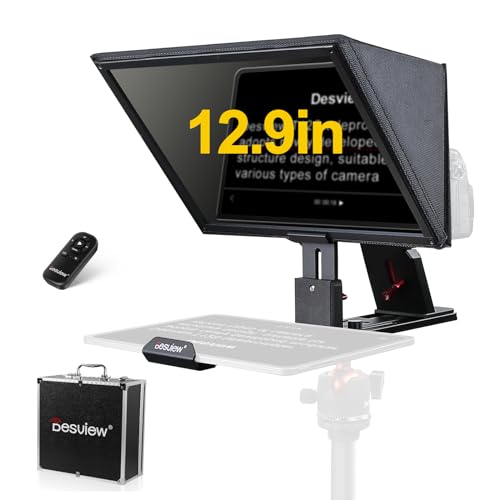
The Desview T12S Teleprompter stands out as an excellent choice for content creators who want to maintain eye contact with their audience while delivering polished presentations. Its 12.9-inch high display glass is compatible with smartphones, tablets, and cameras, making it versatile for various setups. You can easily connect it to DSLR and mirrorless cameras, plus the included Bluetooth remote allows for script editing and speed adjustments via the free “Desview” app. The beamsplitter mirror guarantees high-definition clarity, and its lightweight, durable construction with a protective carry case makes it perfect for travel and on-the-go presentations.
Best For: Content creators, presenters, and videographers who need a reliable teleprompter for maintaining eye contact while delivering their scripts.
Pros:
- Versatile Compatibility: Works with smartphones, tablets, DSLR, and mirrorless cameras.
- High-Quality Mirror: Beamsplitter mirror ensures high-definition clarity and prevents ghosting.
- Portable Design: Lightweight aluminum construction with a protective carry case for easy travel.
Cons:
- Bluetooth Remote Battery Not Included: Requires users to purchase a battery separately.
- App Dependency: Script editing and speed adjustments rely on the “Desview” app, which may not appeal to everyone.
- Limited Tablet Size: Only accommodates tablets up to 12.9 inches, which may restrict options for some users.
Factors to Consider When Choosing a Professional Teleprompter System
When you’re choosing a professional teleprompter system, several factors can make a big difference in your experience. You’ll want to contemplate display quality and size, compatibility with your devices, and how portable the system is. Plus, think about the ease of setup and whether it has remote control features to enhance your presentations.
Display Quality and Size
Choosing the right display quality and size for your teleprompter can make a significant difference in your presentation’s effectiveness. High-resolution displays, like 1080p, provide clearer text, making it easier for you to read during your speech. Size is also important; larger screens enhance visibility, especially when you’re reading from a distance, while smaller screens can limit readability. The quality of the beam splitter glass matters too; multi-coated options reduce ghosting and guarantee ideal light transmission for clearer reflections. Additionally, anti-reflective coatings can prevent double images, improving overall video quality—particularly in bright environments. Prioritizing these factors will help you choose a teleprompter that elevates your presentation and keeps your audience engaged.
Compatibility With Devices
Selecting a teleprompter system that’s compatible with your devices is essential for a smooth presentation experience. Confirm the system works with various devices like DSLRs, smartphones, tablets, and laptops to maximize versatility. Check the maximum screen size it can accommodate—some support devices up to 17 inches, while others may fit only smaller screens. Consider lens compatibility, as certain teleprompters only work with specific diameters and focal lengths, avoiding vignetting or distortion. Make sure the teleprompter includes necessary adapters for different device sizes, guaranteeing easy mounting. Finally, verify if it supports wireless functionality or requires specific apps, as this can greatly affect usability during your presentations or live streams.
Portability and Weight
Portability and weight are essential factors in the effectiveness of a professional teleprompter system. When you’re selecting one, consider lighter models that make transport and setup much easier, especially for mobile or on-location shoots. Designs that collapse or disassemble enhance portability, allowing for convenient storage in compact cases or bags. Opt for teleprompters made from lightweight materials like carbon fiber or aluminum; these notably reduce overall weight without sacrificing durability. Quick assembly and disassembly can save you valuable time during shifts between locations. Additionally, choose a portable teleprompter that accommodates various devices, like tablets and smartphones, ensuring versatility while still being lightweight. Ultimately, a well-chosen teleprompter can make your presentations seamless and efficient.
Setup and Installation Ease
When it comes to professional teleprompter systems, setup and installation ease can make all the difference in your workflow. Look for models that offer simple plug-and-play functionality to minimize setup time and avoid complications. Teleprompters requiring no additional software or drivers streamline the installation process, making them user-friendly. Adjustable mounts are also a plus, allowing you to align the teleprompter with various camera positions effortlessly. A collapsible design enhances portability, enabling quick assembly and disassembly at different locations. Finally, choose models that come with clear instructions and support, ensuring a hassle-free experience. By prioritizing these factors, you’ll set yourself up for smooth, professional presentations every time.
Remote Control Features
After ensuring a smooth setup and installation, the next factor to contemplate is the remote control features of your teleprompter system. These features allow you to play or pause scripts, adjust scrolling speed, and turn pages seamlessly, enhancing your presentation’s fluidity. Look for Bluetooth-enabled remotes for wireless control, which lets you interact effortlessly with your audience or camera. Customizable text size and scrolling speed are essential for ensuring readability and comfort during your talk. Some systems also integrate with mobile apps, offering script editing and speed adjustments from your smartphone. A well-designed remote should have a user-friendly interface and be lightweight, enabling you to manage your scripts without distraction.
Build Material and Durability
The build material of your teleprompter plays an essential role in determining its durability and overall performance. Materials like aluminum and carbon fiber are preferred for their impressive strength-to-weight ratios, guaranteeing your teleprompter withstands frequent use and transportation. A rugged build not only enhances stability during operation but also protects against wear and tear in various environments. Lightweight carbon fiber makes mobility and setup easier without sacrificing structural integrity. Additionally, a sturdy design with adjustable components can boost performance, making your teleprompter more reliable over time. So, when choosing a professional teleprompter system, consider how the materials impact both durability and functionality to guarantee a flawless presentation experience.
Price and Budget Considerations
How do you determine the right budget for a professional teleprompter system? Start by noting that prices can range from a few hundred to several thousand dollars, depending on features and build quality. Don’t forget to factor in additional costs like mounting accessories, compatible software, and remote controls, as these can impact your overall budget. Next, evaluate the cost-to-benefit ratio by comparing the features of higher-priced models to your specific needs for functionality and ease of use. If you’re on a tight budget, you might opt for more affordable models with basic features. However, investing in a higher-quality teleprompter often leads to improved presentation quality and user experience, making that initial cost worthwhile.