
Choosing the right monitoring hub can make a studio feel more accurate, faster, and easier to work in. A good rackmount studio monitor controller gives you clean level control, quick mute and dim access, and the routing flexibility needed for day-to-day tracking and playback.
Below, we focus on practical options for different studio sizes and workflows, from simple passive controllers to more feature-rich desktop control centers.
Best 9 Rackmount Studio Monitor Controller Picks for 2026
Best Passive Pick
Mackie Big Knob Passive 2x2 Monitor Controller

- Passive signal path for clean, simple monitoring
- 2x2 control for easy speaker switching
- Compact and affordable for small studio setups
Best For: Home and project studios that need basic, transparent monitor control.
Best for Multi-Source Routing

- 4 stereo input pairs plus S/PDIF source selection
- 3 speaker outputs with level control
- 4 headphone amps with independent source selection
Best For: Project studios needing flexible monitor switching, talkback, and multiple headphone feeds.
Best Budget
Behringer MONITOR1 Passive Stereo Controller
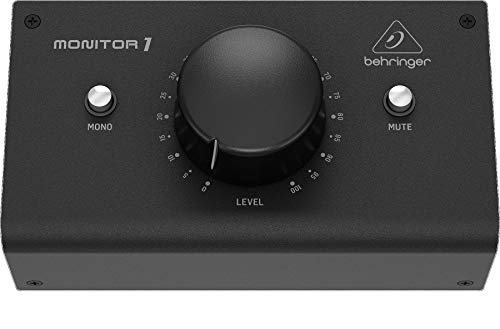
- Passive circuit keeps the path clean and simple
- Large knob enables precise volume changes
- XLR combo and 3.5 mm I/O support flexible hookups
Best For: Home studios and DAW users who want straightforward passive monitor control.
Best for Bluetooth Streaming
PreSonus MicroStation BT 2.1 Monitor Controller

- Bluetooth input for quick wireless playback
- Compact footprint for small studio setups
- Simple 2.1 monitoring control for everyday use
Best For: Home and project studios that want easy monitor control with Bluetooth audio support.
Best USB Monitor Control
Mackie Big Knob Studio 3x2 Controller

- 3-source, 2-pair monitor switching
- 192kHz/24-bit USB interface
- Dual Onyx preamps with phantom power
Best For: Home and project studios needing monitor control plus a built-in USB interface.
Best for Transparent Passive Control
DYNASTY PROAUDIO PMC-2 Monitor Controller
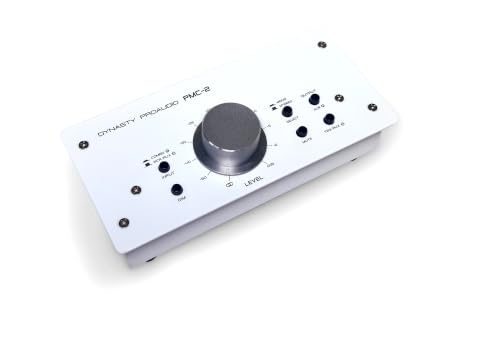
- Passive volume control keeps the signal path clean
- Works with XLR, RCA, and 3.5mm analog connections
- DIM, mute, and mono switches add quick monitoring utility
Best For: Engineers and creators who want simple, transparent monitor level control in an analog setup.
Best for Passive Routing
StudioMan M04 2 In 4 Out Monitor Controller

- Passive design helps keep the signal path clean and quiet.
- 2-in/4-out routing reduces cable swapping between devices.
- Mute button and volume knob make daily monitoring easy.
Best For: Users who want simple, low-noise monitor switching with basic routing flexibility.
Best for Precise Level Trimming
DYNASTY PROAUDIO PMC-1 Monitor Controller
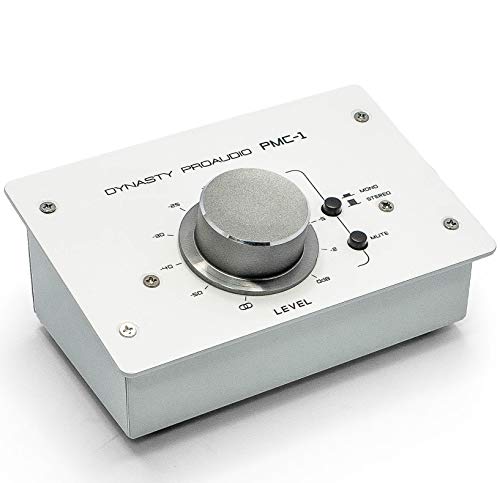
- Large rotary knob for precise adjustments
- Balanced XLR/TRS and 3.5mm connections
- Passive metal design for transparent monitoring
Best For: Home studios that need clean, hands-on monitor level control.
Best Passive Rackmount Pick
Passive Monitor Volume Controller

- Passive, no-power operation keeps setup simple.
- Balanced XLR/TRS I/O supports clean studio routing.
- 70mm fader enables precise volume control.
Best For: Home studios and engineers who want a clean, passive monitor level controller.
Best Passive Pick – Mackie Big Knob Passive 2×2 Monitor Controller
If you want a straightforward rackmount studio monitor controller for simple speaker switching and level control, the Mackie Big Knob Passive keeps the signal path clean and easy to understand. It’s a no-frills option for engineers who value reliability, passive operation, and quick control over a compact pro-audio setup.
Best For: Home studios, project rooms, and budget-conscious users who need simple monitor control without extra processing or power.
Pros:
- Passive design keeps the audio path simple and transparent
- 2×2 monitor control is easy to use for basic A/B switching
- Compact footprint fits well in small studio setups
- Useful as a dependable signal attenuator for everyday monitoring
Cons:
- No built-in power or advanced routing features
- Less flexible than larger monitor controllers with extra I/O
- Not ideal if you need talkback, cue mixes, or headphone control
For users who need a rackmount studio monitor controller mainly to manage volume and speaker selection, this model is a practical, low-complexity choice. It’s best when you want clean monitoring control without paying for features you may never use.
Best for Multi-Source Routing – PreSonus Monitor Station V2
If you need a rackmount studio monitor controller-style desktop hub for switching between multiple playback sources and speaker sets, the PreSonus Monitor Station V2 gives you a lot of control in one box. It combines several stereo inputs, selectable monitor outputs, cue controls, talkback, and multiple headphone feeds for hands-on studio monitoring.
Best For: Project studios and engineers who want flexible source switching, speaker selection, and talkback in a compact control center.
Pros:
- Four stereo input pairs plus S/PDIF make source switching flexible
- Three speaker output pairs with individual level control
- Four headphone amps with independent source selection
- Built-in talkback mic with gain control for tracking sessions
Cons:
- Desktop design may not suit buyers wanting a true rackmount unit
- Feature set is more than needed for very simple monitoring setups
This is a strong pick if you want a practical rackmount studio monitor controller alternative for a busy small studio, especially when switching between sources, speakers, and headphone mixes matters more than a minimal footprint.
Best Budget – Behringer MONITOR1 Passive Stereo Controller
If you want a simple rackmount studio monitor controller-style solution for clean level trimming, the Behringer MONITOR1 keeps the signal path passive and straightforward. It’s a practical choice when you need quick, precise monitor volume control without adding extra circuitry or complexity.
Best For: Home studios, DAW setups, and buyers who want a no-frills passive controller with multiple input options.
Pros:
- Passive design helps preserve a clean, transparent signal path
- Large volume knob makes fine level adjustments easy
- XLR combo and 3.5 mm connections add flexible desktop routing
- Simple setup for fast integration with studio monitors
Cons:
- Not a full-featured monitor controller with multiple advanced functions
- Passive design means no active monitoring extras or gain features
- Better suited to basic stereo control than complex studio routing
Overall, the MONITOR1 is a solid pick if your priority is clean, hands-on monitor volume control rather than a loaded control surface. For a rackmount studio monitor controller search, it stands out as a simple, affordable option that focuses on the essentials.
Best for Bluetooth Streaming – PreSonus MicroStation BT 2.1 Monitor Controller
If you want a compact rackmount studio monitor controller that adds simple Bluetooth playback to a desktop or project studio, the PreSonus MicroStation BT is an easy fit. It keeps speaker control straightforward while giving you a practical way to switch between wired and wireless sources.
Best For: Small studios, home setups, and creators who want basic monitor control with Bluetooth audio input.
Pros:
- Bluetooth connectivity makes it easy to stream reference tracks from a phone or tablet
- Compact design suits tight desks and smaller studio spaces
- Useful 2.1-style monitoring layout for simple speaker/subwoofer setups
- Straightforward controls make everyday level adjustments fast and easy
Cons:
- Not the most feature-rich option for larger or more advanced studio rigs
- Best suited to basic monitoring needs rather than complex routing
For buyers who mainly need an affordable, no-fuss rackmount studio monitor controller with Bluetooth convenience, this model delivers a very practical balance of simplicity and flexibility. It is a smart choice when easy source switching matters more than deep studio routing features.
Best USB Monitor Control – Mackie Big Knob Studio 3×2 Controller
Mackie Big Knob Series, 3x2 Studio Monitor Controller 192kHz USB I/O (BIG KNOB STUDIO)
Check Price On AmazonIf you want a rackmount studio monitor controller feel without giving up modern interface features, the Mackie Big Knob Studio is a practical hybrid. It combines source and speaker switching for 3 inputs and 2 monitor pairs with a 2×2 USB recording interface, so it works well as both a control hub and a compact desktop interface.
Best For: Home and project studios that want monitor switching, USB recording, and easy access to mic preamps in one unit.
Pros:
- Switches between 3 sources and 2 monitor pairs with the familiar Big Knob control
- Built-in 192kHz/24-bit USB interface with two Onyx mic preamps and phantom power
- Dual headphone outputs plus a handy 1/8″ input for phones or portable playback
- Compatible with major DAWs on both Mac and Windows
Cons:
- Not a true rackmount unit, so it may not suit a rack-centered studio setup
- 2×2 interface design is basic for users who need more I/O
- Best suited to small and mid-size monitoring setups rather than large control rooms
Overall, the Big Knob Studio is a strong pick if you need the core functions of a rackmount studio monitor controller but also want USB recording and mic preamps in one box. It’s especially appealing for smaller studios that value simple routing and quick monitor control over a more complex interface.
Best for Transparent Passive Control – DYNASTY PROAUDIO PMC-2 Monitor Controller
If you want a rackmount studio monitor controller that keeps your signal path simple, the DYNASTY PROAUDIO PMC-2 gives you passive, hands-on level control without needing a power supply. It sits between your interface or source and your monitors, making it easy to trim volume precisely while preserving a clean analog path.
Best For: Home and project studios that want straightforward passive monitor attenuation with flexible analog inputs and outputs.
Pros:
- Passive design for transparent level control without adding power or active circuitry
- Multiple connection options including XLR, 1/4" TRS/phone, RCA, and 3.5mm
- Useful DIM, mute, and mono switches for quick monitoring checks
- Solid metal enclosure that feels durable enough for desk or mobile use
Cons:
- Not a full-featured monitor controller with advanced routing or speaker switching
- Passive attenuation means it won’t add gain or headphone management
- Physical footprint may be more than minimal desktop setups need
Overall, the PMC-2 is a practical rackmount studio monitor controller choice if you value transparent volume control, simple operation, and broad analog compatibility over extra studio-routing features.
Best for Passive Routing – StudioMan M04 2 In 4 Out Monitor Controller
If you want a simple rackmount studio monitor controller style solution for switching between sources and monitor pairs without adding noise, the StudioMan M04 is built around passive operation and straightforward routing. Its 2-in/4-out layout, mute button, and unbalanced 1/4″ connections make it a practical fit for compact studios that value clean signal flow over extra features.
Best For: Home studios, podcasters, and small live rooms that need low-noise monitor switching with basic source/output flexibility.
Pros:
- Passive design needs no power and helps avoid added hum or hiss.
- 2 inputs and 4 outputs make it easier to route multiple devices and monitor setups.
- Dedicated mute button and smooth volume knob support quick, precise control.
- Simple setup is appealing if you want a no-fuss monitoring workflow.
Cons:
- Uses 1/4″ unbalanced connectors, so it is not ideal for every pro studio wiring setup.
- Passive, minimal design means fewer advanced monitoring features.
Overall, the StudioMan M04 is a sensible pick if you need a rackmount studio monitor controller alternative focused on clean passive switching, easy mute control, and dependable everyday monitoring rather than elaborate routing extras.
Best for Precise Level Trimming – DYNASTY PROAUDIO PMC-1 Monitor Controller
If you want a rackmount studio monitor controller for simple, transparent analog level adjustment, the DYNASTY PROAUDIO PMC-1 is built around a large rotary knob and balanced connections for clean day-to-day monitoring. It sits between your source and speakers, giving you quick fingertip control without adding complexity to the signal path.
Best For: Home studios and project rooms that need a straightforward passive controller for accurate speaker level trimming.
Pros:
- Large knob makes fine volume changes easy and precise
- Balanced XLR/TRS inputs and TRS outputs help reduce noise over long cable runs
- Passive design keeps the signal path simple and transparent
- Solid metal enclosure is better suited to regular studio use
Cons:
- No advanced monitoring features like speaker switching or talkback
- Passive design relies on your interface or source for gain control upstream
- Not the most space-saving option if you need a true rackmount format
For buyers who mainly want clean, hands-on attenuation, the PMC-1 is a practical rackmount studio monitor controller alternative that focuses on precision rather than feature count. It makes sense if your priority is reliable volume trimming and balanced connectivity over a full monitor-management hub.
Best Passive Rackmount Pick – Passive Monitor Volume Controller
If you want a simple rackmount studio monitor controller that keeps the signal path clean, this passive unit is built for straightforward level trimming without adding noise or requiring power. Its balanced XLR/TRS connections, metal chassis, and long-throw fader make it a practical fit for small studios, home setups, and other audio rigs where transparency matters.
Best For: Engineers, creators, and home studio owners who want a no-power, no-fuss monitor level controller with balanced I/O.
Pros:
- Passive design means no external power supply is needed.
- Balanced XLR/TRS inputs and XLR outputs help maintain clean audio over longer runs.
- 70mm fader offers precise, smooth volume adjustments.
- Metal build with gold-plated interfaces adds durability and stability.
Cons:
- Basic feature set may be too limited for users needing talkback or multiple monitor controls.
- Best suited to balanced studio gear, so it may be less flexible for mixed consumer setups.
Overall, this is a solid value choice if you need a rackmount studio monitor controller focused on clean passive attenuation rather than advanced routing. It prioritizes simple operation, durable construction, and transparent level control.
How We Picked the Best Rackmount Studio Monitor Controller
We focused on monitor controllers that offer dependable level control, simple signal paths, and the features most studios actually use. Priority went to models with solid build quality, straightforward operation, multiple input/output options, and useful workflow tools like mute, dim, mono, or source switching.
Because a Rackmount Studio Monitor Controller should improve monitoring without getting in the way, we also considered how well each option fits home studios, project rooms, and small professional setups.
Quick Comparison
Passive controllers are best if you want transparent signal handling and minimal complexity. Powered or feature-rich units are better when you need more connectivity, headphone support, Bluetooth, USB playback, or easier integration with a desktop production setup. In a rack-mounted workflow, front-panel access and clear controls often matter as much as raw specifications.
Key Buying Factors for Rackmount Studio Monitor Controller
Inputs and Outputs
Check how many sources and speaker pairs you need to manage. A simple 2-in/2-out layout works for many rooms, while larger setups may benefit from extra outputs for alternate monitors or subwoofers.
Passive Vs Active Design
Passive controllers are popular for their simplicity and low maintenance. Active models can offer added features, but they may also introduce more complexity and require power.
Level Control and Accuracy
Look for a large, smooth volume knob with precise gain steps or attenuation. The best controller makes low-volume listening easier without sacrificing stereo balance.
Workflow Features
Mute, dim, mono, source select, and headphone monitoring can save time during sessions. If you switch between multiple playback sources often, these controls become especially valuable.
Connectivity and Physical Fit
For a Rackmount Studio Monitor Controller, verify chassis size, connector type, and front-panel access. Balanced XLR or TRS connections are usually preferred in professional signal chains, while unbalanced setups may suit shorter runs in simpler rooms.
Who Should Buy Which Rackmount Studio Monitor Controller?
Choose a passive controller if you want the cleanest, simplest monitoring path and already have a separate interface or mixer. Choose a feature-rich desktop or rack-style controller if you need fast speaker switching, multiple inputs, or integrated playback options.
If your studio is growing, prioritize flexibility over extras you may not use every day. The right controller should match your room, your signal flow, and how often you need to change sources or monitor levels.