
As you navigate the fast-paced world of video production, choosing the right shared storage solution is essential for your team’s efficiency and collaboration. With numerous options emerging in 2025, understanding what each has to offer will help you make an informed decision. From high-capacity drives to portable NAS devices, there’s a solution tailored for every project need. Let’s explore the top contenders and what factors you should keep in mind for a seamless workflow.
Seagate Expansion 22TB External Hard Drive HDD

If you’re a video producer looking for ample storage, the Seagate Expansion 22TB External Hard Drive HDD is an excellent choice. It features a user-friendly design—just plug in the power adapter and USB cable, and it automatically recognizes both Windows and Mac computers. With USB 3.0, you’ll enjoy fast file transfers and the convenience of drag-and-drop file saving right out of the box. Plus, it comes with a limited warranty and Rescue Data Recovery Services, giving you peace of mind. Just remember, if you’re using Time Machine, reformatting will be necessary for full compatibility.
Best For: Video producers and users needing significant storage capacity for large files and media projects.
Pros:
- Easy setup: Simply plug in the power adapter and USB cable for automatic recognition by Windows and Mac.
- Fast file transfers: USB 3.0 technology ensures quick data transfer speeds.
- Peace of mind: Comes with a limited warranty and Rescue Data Recovery Services.
Cons:
- Reformatting required for Time Machine: Mac users need to reformat the drive for compatibility with Time Machine.
- Desktop-only design: Not portable; requires a power source and may not be ideal for on-the-go use.
- Limited built-in security features: Lacks advanced encryption and security options compared to some other external drives.
SanDisk Professional 5TB G-Drive ArmorATD Portable External Hard Drive

For video production professionals seeking a reliable and rugged storage solution, the SanDisk Professional 5TB G-Drive ArmorATD Portable External Hard Drive stands out. This durable HDD features a premium anodized aluminum enclosure and an easy-grip bumper, ensuring it withstands the rigors of on-the-go production. With USB-C connectivity, you can achieve transfer rates up to 130MB/s, making file backup a breeze. It’s compatible with macOS right out of the box, and you can easily reformat it for Windows. Whether you’re capturing footage or storing projects, this drive delivers the performance and durability you need for seamless collaboration.
Best For: Video production professionals needing a reliable and rugged portable storage solution for on-the-go projects.
Pros:
- Durable Design: Premium anodized aluminum enclosure and easy-grip bumper provide enhanced strength and protection.
- Fast Transfer Rates: Achieve transfer speeds up to 130MB/s for efficient file backup and storage.
- Cross-Compatibility: Compatible with macOS out of the box and can be reformatted for Windows use.
Cons:
- Weight: The rugged design may add some extra weight compared to non-rugged portable drives.
- Price Point: Higher cost compared to standard external hard drives without rugged features.
- Reformatting Required for Windows: Requires reformatting to be compatible with Windows systems, which may be inconvenient for some users.
iDiskk 2TB Family & Personal NAS Photo Storage

The iDiskk 2TB Family & Personal NAS Photo Storage is ideal for families and individuals who want a hassle-free way to back up and access their digital memories. It automatically backs up photos and videos from various devices—iPhones, Androids, tablets, and PCs—without any subscription fees. With real-time data synchronization, you can free up space on your devices while ensuring your files are secure with dual encryption. The user-friendly app simplifies management, letting you easily share and access your content globally. Enjoy seamless entertainment and keep your memories safe with this versatile storage solution.
Best For: Families and individuals seeking an effortless and secure way to back up and access their digital photos and videos.
Pros:
- Automatic backup of photos and videos from multiple devices without subscription fees.
- Real-time data synchronization frees up storage space on mobile devices.
- User-friendly app for easy management and global access to files.
Cons:
- Limited to 2TB of storage, which may not be sufficient for users with extensive media libraries.
- Initial setup may require some technical knowledge for optimal configuration.
- Performance may vary based on internet connection speed for remote access.
Synology 4-Bay DiskStation DS423 (Diskless)

Designed for creative professionals and teams in need of reliable storage, the Synology 4-Bay DiskStation DS423 (Diskless) offers a secure private cloud solution that makes file access and collaboration effortless. You can safely access and share files and media from anywhere, making teamwork seamless. With robust data protection features, you can back up media and documents to multiple destinations and leverage snapshots to guard against malware. Plus, its video surveillance capabilities support up to 30 IP cameras, perfect for monitoring your production environment. For setup assistance, check out Synology’s knowledge center or YouTube channel.
Best For: Creative professionals and teams seeking reliable and secure storage solutions for file access and collaboration.
Pros:
- Robust data protection features including backup options and malware snapshots.
- Flexible access and sharing capabilities for seamless collaboration from anywhere.
- Video surveillance support for monitoring with up to 30 IP cameras.
Cons:
- Diskless configuration requires additional investment in hard drives.
- Camera licenses sold separately, which can add to overall costs.
- Setup may require technical knowledge, potentially challenging for non-technical users.
UGREEN NAS DH4300 Plus 4-Bay Desktop NAS

If you’re looking for an entry-level home storage solution that supports extensive media storage, the UGREEN NAS DH4300 Plus 4-Bay Desktop NAS is an excellent choice. With the ability to hold up to 120TB, it’s perfect for your growing video projects. Enjoy remote access and AI photo album features that make organizing your media a breeze. Its intuitive interface is designed for beginners, while 2.5GbE connectivity guarantees speedy performance. Plus, it’s compatible with popular hard drive brands like Western Digital and Seagate. With dedicated support resources, you’ll have everything you need to get started easily and efficiently.
Best For: Individuals and families seeking an entry-level home storage solution with extensive media organization capabilities.
Pros:
- User-friendly interface ideal for beginners.
- Supports remote access and AI photo album functionality for easy media management.
- High storage capacity of up to 120TB, compatible with major hard drive brands.
Cons:
- Does not support M.2 NVMe drives, limiting upgrade options.
- Storage hard drives are sold separately, requiring additional purchases.
- Limited to Docker support without virtual machine capabilities.
UGREEN NASync DXP2800 2-Bay Desktop NAS

Small teams and video production enthusiasts will find the UGREEN NASync DXP2800 2-Bay Desktop NAS an excellent choice due to its powerful Intel N100 Quad-core CPU and massive storage capacity of up to 76TB. With its diskless design, you can customize storage using compatible drives. Enjoy seamless file sharing across devices with its user-friendly app and advanced features like an AI-Powered Photo Album for automatic organization. Plus, the secure private cloud guarantees your data stays protected. With a 2-year warranty and 24/7 support, you’ll have peace of mind while collaborating on your creative projects.
Best For: Small teams and video production enthusiasts looking for a powerful and customizable NAS solution.
Pros:
- Massive storage capacity of up to 76TB, allowing for extensive file storage.
- User-friendly app facilitates easy setup and file sharing across multiple devices.
- Advanced features like AI-powered photo organization and secure private cloud enhance user experience and data protection.
Cons:
- Diskless design requires separate purchase of compatible storage drives.
- Initial setup may be challenging for users unfamiliar with NAS systems.
- Limited to 2-bay storage, which may not be sufficient for larger teams or extensive data needs.
Synology BeeStation 4TB Personal Cloud Storage Device (BST150-4T)
For video production teams looking for an efficient and user-friendly storage solution, the Synology BeeStation 4TB Personal Cloud Storage Device (BST150-4T) stands out with its hassle-free setup. Just scan a QR code, and you’re ready to centralize data from your devices without any subscriptions. You can store, access, and share files easily via web or mobile. Plus, you can create personalized storage spaces for family or colleagues. With robust backup capabilities from major cloud services, you can keep everything in one secure location. Weighing just 3.36 pounds, it’s a practical choice for on-the-go production teams.
Best For: Video production teams seeking a user-friendly, centralized storage solution for easy file access and sharing.
Pros:
- User-friendly setup: Quick and easy installation through QR code scanning, requiring no technical expertise.
- Personalized storage: Allows sharing with family or colleagues, each having their own storage space.
- Robust backup capabilities: Conveniently back up files from major cloud services like Google Drive, OneDrive, and Dropbox.
Cons:
- Limited storage capacity: 4TB may not be sufficient for larger video projects or extensive media libraries.
- Weight: At 3.36 pounds, it may be less portable compared to lighter alternatives.
- Mixed customer ratings: With a 3.9 out of 5 stars rating, some users may experience issues or dissatisfaction with the product.
Synology 2-Bay DiskStation DS223j (Diskless)

The Synology 2-Bay DiskStation DS223j (Diskless) is an ideal choice for video production teams that prioritize data ownership and secure access. With its secure private cloud, you’ll enjoy 100% control over your data and can access it from multiple platforms, anywhere. File sharing and syncing are a breeze, keeping clients, colleagues, and collaborators aligned. Plus, thorough data protection features guarantee your media library or document repository is safely backed up to various destinations. For setup assistance and more resources, you can easily access the Synology knowledge center or their informative YouTube channel. Your production deserves this level of reliability!
Best For: Video production teams that prioritize data ownership, secure access, and seamless collaboration.
Pros:
- Comprehensive data protection features ensure your media library is safely backed up.
- Secure private cloud provides 100% control over your data with multi-platform access.
- Easy file sharing and syncing facilitate collaboration among clients and colleagues.
Cons:
- Diskless design requires additional investment in hard drives.
- May have a learning curve for users unfamiliar with network-attached storage setups.
- Limited built-in applications compared to more advanced models.
Synology 2-Bay DiskStation DS225+ (Diskless)

Looking for a reliable storage solution that can handle the demands of video production? The Synology 2-Bay DiskStation DS225+ (Diskless) is a compact NAS that lets you store up to 40 TB of data. With impressive sequential read/write speeds of up to 282/217 MB/s, it guarantees smooth performance for your video projects. Manage your files effortlessly using Synology DiskStation Manager (DSM), which offers tools for data protection and device backup. Weighing just 2.87 pounds and measuring 9.14 x 4.25 x 6.5 inches, it fits perfectly in any workspace. Plus, it comes with a 3-year limited warranty for peace of mind.
Best For: The Synology 2-Bay DiskStation DS225+ (Diskless) is best for video production professionals and small businesses looking for a compact and efficient data storage solution.
Pros:
- High Performance: Offers sequential read/write speeds of up to 282/217 MB/s, ensuring smooth data access and management.
- Large Storage Capacity: Capable of storing up to 40 TB of data, suitable for extensive media libraries and projects.
- User-Friendly Interface: Features Synology DiskStation Manager (DSM) for easy file management and data protection tools.
Cons:
- Diskless Design: Requires separate purchase of compatible drives, which may increase overall costs.
- Average Customer Rating: Holds a customer rating of 3.6 out of 5 stars, indicating mixed user satisfaction.
- Limited Warranty: Comes with a 3-year limited hardware warranty, which may be shorter than some competitors offer.
SSK 2TB Portable NAS External Wireless Hard Drive
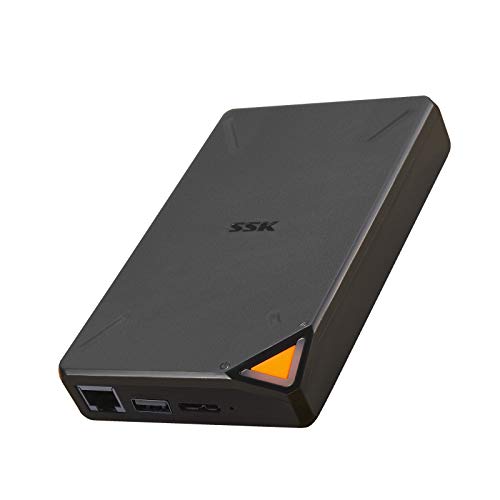
If you’re a video producer seeking a reliable and portable storage solution, the SSK 2TB Portable NAS External Wireless Hard Drive stands out with its built-in Wi-Fi hotspot. Weighing just 12.3 ounces and measuring 5.12 x 3.15 x 0.79 inches, it’s easy to carry. With a 2TB capacity and wireless transmission speeds up to 300Mbps, you can access and share files effortlessly on multiple devices, including smart TVs and mobile phones. The one-click backup feature simplifies data management, while point-to-point security keeps your files safe. Plus, you can manage everything through the SSKCloud app for added convenience.
Best For: Video producers and professionals seeking a portable and secure storage solution for accessing and sharing large files on multiple devices.
Pros:
- Built-in Wi-Fi hotspot allows for seamless remote access from various devices.
- One-click backup feature simplifies the process of safeguarding important data.
- Supports multiple users accessing data simultaneously, making it ideal for collaborative work.
Cons:
- Customer ratings are moderate at 3.4 out of 5 stars, indicating mixed user experiences.
- Limited storage capacity of 2TB may not be sufficient for users with extensive data needs.
- Battery life may vary and could require frequent charging during heavy use.
Factors to Consider When Choosing Shared Storage for Video Production
When choosing shared storage for your video production needs, consider several key factors. You’ll want to evaluate storage capacity, data transfer speed, and connectivity options to guarantee smooth workflows. Don’t forget to assess durability, reliability, and backup features to protect your valuable data.
Storage Capacity Requirements
Substantial storage capacity is essential for video production, especially as high-resolution formats become the norm. When working with 4K video, you’ll find that files can take up about 375 MB per minute, meaning you might need several terabytes for longer projects. A good rule of thumb is to allocate at least 1 TB of storage for every hour of 4K footage to cover raw files, edits, and backups. If you’re collaborating with a team, choose a cloud-based solution that meets everyone’s storage needs without delay or risk of data loss. Also, consider future file size increases due to evolving technology; selecting expandable storage can save you from costly upgrades later on.
Data Transfer Speed
Choosing the right storage solution goes beyond just capacity; data transfer speed plays a vital role in video production efficiency. High-resolution video files are large, so faster transfer rates are necessary for a smooth workflow and minimizing downtime. For instance, USB 3.0 offers speeds up to 5 Gbps, while USB-C can reach 10 Gbps, greatly speeding up file transfers. If you’re considering network-attached storage (NAS), a 2.5GbE connection outperforms traditional 1GbE, enhancing performance for multiple users. Remember, SSDs typically provide much faster read/write speeds than HDDs, which is essential for editing tasks. Ultimately, make sure your storage solution is compatible with your devices and network infrastructure to maximize data transfer efficiency.
Connectivity Options Available
As you evaluate shared storage solutions for video production, connectivity options play a crucial role in determining how efficiently your team can access and manage large video files. USB 3.0 provides fast transfer speeds up to 5Gbps, which is great for quick backups, while USB-C takes it a step further, offering versatility and speeds up to 10Gbps. If you opt for a network-attached storage (NAS) system, Ethernet connectivity allows multiple users to access and share files simultaneously. For remote collaboration, wireless options like Wi-Fi enable easy access without physical connections. Additionally, some external drives and NAS devices support advanced protocols like Samba and DLNA, enhancing compatibility and streamlining media sharing across various devices.
Durability and Reliability
When working with shared storage solutions in video production, durability and reliability are key factors that can’t be overlooked. Your drives need to withstand frequent use and transport, so choose models known for their longevity and backed by solid warranties. Look for hard drives that offer robust data protection features, like dual data encryption and extensive backup capabilities, to avoid data corruption or loss. Consider temperature and environmental resistance, ensuring your storage devices can operate under various conditions for consistent performance. Utilizing solutions with built-in resilience features, such as RAID configurations, enhances data integrity and availability, making them well-suited for the demanding workflows typical in video production. Prioritize these aspects to safeguard your valuable content effectively.
Backup and Security Features
To guarantee your video production workflow remains smooth and secure, prioritizing backup and security features in shared storage solutions is essential. Look for solutions that enable real-time synchronization across multiple devices, guaranteeing your files are consistently updated and protected against data loss. Advanced data encryption methods, like SSL and private encryption, safeguard sensitive content during transmission and storage. Choose systems that support automated backups from various cloud services and external drives, centralizing your data for easy access. User-specific access controls enhance privacy, letting only authorized personnel view certain files. Finally, guarantee the storage solution has built-in recovery features, such as snapshots, to quickly restore previous versions or recover from malware attacks.