
A good boom arm should free up desk space without making your microphone difficult to position. The best low-profile models keep the mic close, manage cable clutter, and fold away when you need more room.
We compared 10 space-saving desk boom arms across mounting stability, reach, adjustability, compatibility, and storage-friendly design to help you choose a setup that fits your desk and microphone.
Best 10 Space-Saving Desk Boom Arms Picks for 2026
Low-Profile Pick

- Low-profile design keeps the workspace clear
- Metal arm supports up to 1.5 kg
- Built-in cable management and multiple adapters
Best For: Clean podcasting, streaming, and home-office setups
Heavy-Duty Reach

- Supports microphones up to 3.5 pounds
- Extends up to 32.3 inches horizontally
- Cable channels and extension riser included
Best For: Heavy microphones and monitor-spanning recording setups
Portable Space Saver

- Folds away for storage and transport
- Anti-scratch clamp fits desks up to 2 inches
- Spring-supported metal arm adjusts 180 degrees
Best For: Compact desks, beginners, and portable recording
Lightweight Gear Pick

- Foldable low-profile arm reaches 27.1 inches
- Supports lightweight gear up to 2.8 pounds
- Includes mic clip and three adapter sizes
Best For: Light microphones and multi-device creator setups
Best for Easy Setup
MAONO BA92 Low Profile Mic Boom Arm

- Sits beneath the monitor for a clearer view
- Supports microphones up to 4.4 pounds
- Includes cable management and two mounting options
Best For: Clean, compact workstations needing sturdy microphone support
Best for Monitor Spanning

- Adds a 9.8-inch extension rod for extra reach
- Rotates 360 degrees for flexible placement
- Supports up to 4 pounds with a reinforced clamp
Best For: Wider desks and monitor setups needing added reach
Best Reach and Desk Compatibility
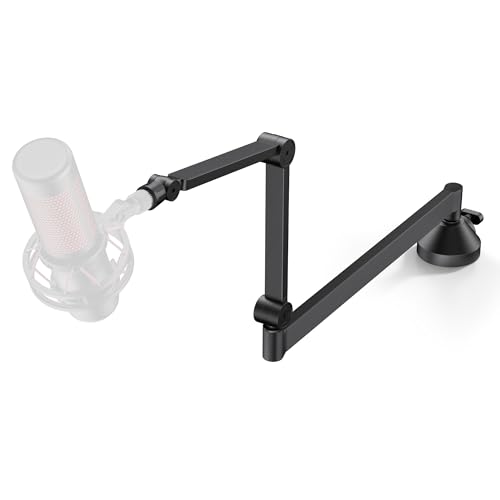
- Offers 26.1 inches of horizontal reach
- Fits desks up to 2.75 inches thick
- Includes a headphone hook and universal mic clip
Best For: Thicker desks needing low monitor clearance and long reach
Compact Choice

- Fold-away 29-inch reach
- Supports mics up to 3 pounds
- Cable channel and dual threads
Best For: Lightweight microphones and space-conscious gaming or podcast desks
Best Heavy-Duty Pick

- Arm sits 3.35 inches above desk
- Magnetic cable management
- Supports up to 3.3 pounds
Best For: Minimalist desks needing discreet positioning and broad adjustment
Heavy-Mic Solution
AA Audio Accessory Low-Profile Arm

- Supports microphones up to 6.6 pounds
- Gear-lock mechanism helps prevent sagging
- 780 mm reach with deep cable channels
Best For: Heavy studio microphones and stable podcasting or recording setups
Low-Profile Pick – FIFINE BM88W Boom Arm
For creators comparing space-saving desk boom arms, the FIFINE BM88W stands out with a low-profile design that extends from below the screen. Its metal construction, cable channels, and broad adjustment range help keep a recording workspace organized.
Best For: Podcasting, streaming, gaming, and home-office setups that need a clean, low-profile arm.
Pros:
- Low-profile design helps preserve clear desk and screen space.
- Metal build supports microphones up to 1.5 kg.
- Adjusts up to 220 degrees vertically and 360 degrees horizontally.
- Built-in cable management and included 1/4-inch, 3/8-inch, and 5/8-inch adapters improve versatility.
Cons:
- The clamp fits desktops from 0.8 to 2.4 inches thick.
- The section near the C-clamp cannot be adjusted vertically.
- Microphone is not included.
The BM88W is a practical choice when a tidy, screen-friendly profile matters as much as microphone support. Check your desk thickness and microphone connection before buying.
Heavy-Duty Reach – InnoGear MU-PSA28 Mic Arm
The InnoGear MU-PSA28 is a strong option among space-saving desk boom arms for users who need extra reach over a monitor. Its extension riser, internal springs, and cable channels balance flexible positioning with a tidy setup.
Best For: Heavier microphones, monitor-spanning streaming stations, and podcast or recording desks.
Pros:
- Supports up to 3.5 pounds, including heavier microphones such as the Blue Yeti and SM7B.
- Reaches up to 32.3 inches horizontally and 37.4 inches vertically with the riser.
- Built-in cable channels conceal cords without requiring separate clips.
- Multiple angle adjustments and a 360-degree rotating base support flexible positioning.
Cons:
- The clamp fits desks up to 2 inches thick.
- The included shock mount is not included.
- Its standard clamp design may occupy more visible desk space than a low-profile arm.
Choose this arm when load capacity and reach are higher priorities than the smallest possible footprint. It is especially useful for microphones that need to extend over large monitors.
Portable Space Saver – FIFINE CS1 Scissor Arm
The FIFINE CS1 is a straightforward choice for space-saving desk boom arms, especially if you want an arm that folds away between sessions. Its reinforced clamp, spring-supported metal construction, and compact portability suit gaming and recording desks with limited room.
Best For: Beginners, compact gaming desks, and creators who need a foldable arm for occasional recording.
Pros:
- Folds for easier storage and transport when not in use.
- Metal clamp includes an anti-scratch pad and fits desks up to 2 inches thick.
- Spring-supported arm provides stable positioning and 180-degree vertical adjustment.
- Includes a 5/8-inch-to-3/8-inch metal adapter for broader microphone compatibility.
Cons:
- The arm has a maximum height of 13 inches.
- It may offer less reach than longer boom arms.
- Microphone is not included.
The CS1 makes the most sense when foldability and simple storage are central to your buying decision. Its compact format is convenient, though users needing substantial monitor clearance may prefer a longer arm.
Lightweight Gear Pick – KRISKUL Low-Profile Mic Arm
For creators seeking space-saving desk boom arms beyond microphones, this low-profile KRISKUL arm combines a foldable design with a 360-degree metal ball head. Its included clip and adapters allow lightweight devices to share one compact desk mount.
Best For: Lightweight microphones, webcams, phone holders, LED lights, and action cameras.
Pros:
- Low-profile arm extends up to 27.1 inches while preserving desk space.
- Foldable design and built-in cable management help keep the workspace tidy.
- 360-degree rotation and stepless joints enable smooth positioning.
- Includes a mic clip plus 1/4-inch, 3/8-inch, and 5/8-inch adapters.
Cons:
- Recommended only for equipment up to 2.8 pounds.
- It is not intended for heavier microphone setups.
- The clamp fits desks from 0.4 to 2.36 inches thick.
This arm is a flexible fit for lightweight creators who want one compact mount for several accessories. Confirm your equipment weight before choosing it for a larger microphone.
Best for Easy Setup – MAONO BA92 Low Profile Mic Boom Arm
For creators comparing space-saving desk boom arms, the MAONO BA92 stands out with a low-profile design that can extend beneath a monitor and keep the viewing area clear. Its cable management, adjustable positioning, and support for microphones up to 4.4 pounds make it suitable for streaming, podcasting, recording, and gaming.
Best For: Clean, compact workstations that need a sturdy arm and built-in cable management.
Pros:
- Low-profile design helps preserve an unobstructed monitor view.
- Supports up to 4.4 pounds and works with 3/8-inch or 5/8-inch mic threads.
- Includes built-in cable management, a C-clamp, and a grommet mount.
- Offers 360-degree rotation and -90- to +90-degree tilt adjustment.
Cons:
- The clamp is specified for desktops up to 2.2 inches thick in the installation notes, while another listing detail states 2.36 inches.
- Its roughly 1 kg weight may be more than some basic desk arms.
The BA92 is a practical choice when keeping the microphone below the monitor and reducing visible cable clutter matter most. Verify your desk thickness before choosing between the included mounting options.
Best for Monitor Spanning – M05 Pro Foldable Boom Arm
The M05 Pro is one of the more flexible space-saving desk boom arms for setups where the microphone needs to span a wider desk or clear a monitor. Its 9.8-inch extension rod, 360-degree rotation, foldable design, and reinforced clamp provide useful positioning flexibility for streaming, gaming, podcasting, and radio work.
Best For: Wider desks and monitor setups where extra reach and adjustable positioning are priorities.
Pros:
- Includes a 9.8-inch extension rod for broader reach and monitor clearance.
- 360-degree adjustability helps position the microphone without obstructing the view.
- Supports up to 4 pounds and fits microphones using 3/8-inch or 5/8-inch threads.
- Upgraded clamp has a larger contact area and a silicone pad to help protect the desk.
Cons:
- The C-clamp is designed for desks up to 2 inches thick.
- HyperX QuadCast microphones require an adapter that is not included.
- Correct installation may require following the product video and instructions.
Choose the M05 Pro if a compact arm still needs to reach across a monitor or wider work area. Its added extension is useful, though it makes desk-thickness compatibility especially important.
Best Reach and Desk Compatibility – InnoGear Low Profile Mic Arm
The InnoGear MS153 combines a low-profile 3.27-inch lower-arm height with a 26.1-inch horizontal reach, making it a strong contender among space-saving desk boom arms. Its alloy-steel construction, 360-degree rotation, padded clamp, and headphone hook add practical value for recording and streaming setups.
Best For: Users who want low monitor clearance, long horizontal reach, and a clamp that fits thicker desks.
Pros:
- Low-profile arm tucks beneath a monitor for an unobstructed view.
- Provides 26.1 inches of horizontal reach and 360-degree rotation.
- Supports microphones up to 3.3 pounds and includes a 3/8-inch-to-5/8-inch adapter.
- Fits desks up to 2.75 inches thick and includes a headphone hook.
Cons:
- Its 3.3-pound capacity is lower than the MAONO BA92’s stated 4.4-pound capacity.
- The product includes a universal mic clip, but a separate shock mount may be needed for some setups.
- The listed warranty is 12 months.
The MS153 is a well-rounded option for users who need more horizontal reach without raising the microphone into the monitor’s viewing area. Its wider desk compatibility and headphone hook make it especially practical for busy workstations.
Compact Choice – TODI Lightweight Mic Arm
For shoppers comparing space-saving desk boom arms, the TODI offers a slim, fold-away design with a 29-inch reach. Its metal construction, 3-pound capacity, and low- or high-angle positioning suit lightweight microphones without taking over the desktop.
Best For: Gamers, podcasters, and streamers using lightweight microphones on larger office desks.
Pros:
- Fold-away design helps preserve desk space.
- 360-degree base hinge supports flexible positioning.
- Integrated cable channels help keep the setup tidy.
- Includes 3/8-inch and 5/8-inch threads.
Cons:
- Limited to microphones weighing up to 3 pounds.
- Not intended for heavy-duty or studio microphones.
- Does not fit some 1/4-inch microphones, including the listed Blue Yeti and Shure models.
The TODI is a practical pick when compact storage and a long reach matter more than heavy-mic support. Verify your microphone’s thread and weight before buying.
Best Heavy-Duty Pick – InnoGear LP98 Mic Arm
The InnoGear LP98 is a strong option among space-saving desk boom arms, placing its lower arm just 3.35 inches above the desk. It combines broad adjustment, magnetic cable management, and a 3.3-pound alloy-steel capacity for compact streaming or recording setups.
Best For: Minimalist workstations and users who want a discreet arm with wide positioning flexibility.
Pros:
- Low-profile design frees up visual and usable desk space.
- Magnetic cable channel keeps wires hidden and organized.
- Offers 360-degree base rotation, 180-degree swivel, and 170-degree tilt.
- Supports microphones and devices up to 3.3 pounds with included adapters.
Cons:
- Clamp fits flat desktops up to 2.36 inches thick.
- Shock mount is not included.
- Its 3.3-pound capacity may not suit heavier studio setups.
With its discreet profile and smooth range of motion, the LP98 balances space efficiency with everyday adjustability. Check your desk edge and microphone mounting requirements before ordering.
Heavy-Mic Solution – AA Audio Accessory Low-Profile Arm
For space-saving desk boom arms that can handle demanding microphones, this AA Audio Accessory model provides a 6.6-pound load rating in a low-profile format. Its gear-lock mechanism, 780 mm reach, and deep cable channels are designed for stable studio and podcast setups.
Best For: Users mounting heavier microphones such as the Shure SM7B, SM7dB, MV7, or RODE PodMic.
Pros:
- 6.6-pound capacity supports heavier studio microphones.
- Gear-lock design is intended to resist sagging over time.
- Extra-long 780 mm reach provides broad positioning options.
- Deep cable channels accommodate multiple cables.
Cons:
- Heavier at 1.63 kg than the lightweight alternatives.
- Its extended reach may be more arm than compact desks need.
- Only a 1-year warranty is listed.
This is the most capable choice of the three for heavy microphones while retaining a low-profile desk mount. Choose it when load support and long reach outweigh minimum bulk.
How We Picked the Best Space-Saving Desk Boom Arms
We focused on the features that matter most in compact desktop recording setups: a genuinely low-profile footprint, useful reach, stable desk clamping, smooth positioning, cable management, and compatibility with common microphone mounts. We also considered whether each arm folds or stores neatly when not in use.
Because microphones vary widely in weight and mounting hardware, load capacity and included adapters were important comparison points. A compact arm is only useful if it can hold your microphone securely without sagging or forcing the clamp into an awkward position.
Quick Comparison
| What to Compare | Why It Matters |
|---|---|
| Low-profile design | Leaves more room for monitors, keyboards, and other desk equipment. |
| Weight capacity | Helps prevent drooping with heavier microphones or shock mounts. |
| Reach and rotation | Determines whether the microphone can sit in the right position without blocking your screen. |
| Clamp and desk fit | Controls stability and whether the arm works with your desk thickness. |
| Adapters and cable routing | Improves compatibility and keeps the setup cleaner. |
Key Buying Factors for Space-Saving Desk Boom Arms
Desk Clamp and Available Clearance
Measure the rear or side edge of your desk before buying. Check the clamp’s maximum opening, the amount of clearance below the desktop, and whether shelves, drawers, or monitor stands will interfere. A strong clamp is especially important for glass, hollow, or thin desks, which may need a reinforcing plate.
Microphone Weight and Balance
Match the arm’s stated capacity to the complete microphone setup, including a shock mount, pop filter, and adapter. Lightweight arms suit compact USB microphones and small dynamic mics, while heavier broadcast microphones need a sturdier mechanism and a clamp designed to resist twisting and sagging.
Reach, Joints, and Positioning
Look for enough horizontal reach to bring the microphone close to your mouth without placing the arm across your keyboard. Multi-joint arms and 360-degree rotation offer more flexibility, but additional movement can create more opportunities for looseness. Tightening knobs should be easy to reach once the arm is installed.
Foldability and Cable Management
If you share a desk or regularly switch between work and recording, a foldable arm can be more valuable than maximum reach. Integrated clips or channels help keep the USB or XLR cable away from your hands and reduce visual clutter.
Who Should Buy Which Space-Saving Desk Boom Arms?
Choose a lightweight low-profile arm if you use a compact USB microphone and prioritize a clean, unobstructed workspace. Choose a sturdier heavy-duty model for large dynamic microphones, shock mounts, or frequent repositioning. Choose a foldable arm if you need to clear the desk after streaming or recording. Choose a model with broad adapter support if you own multiple microphones or may upgrade later.
Before ordering, confirm your microphone’s thread size, the arm’s included adapters, and your desk’s thickness. These checks take only a minute and help ensure your new boom arm is both stable and genuinely space-saving.