
Building a podcast setup in a small room requires more than choosing the narrowest desk. You need a stable surface for your computer and microphones, practical cable management, and enough flexibility for recording, editing, and occasional collaboration.
These 10 space-saving podcast workstations include studio desks, compact tables, folding conference options, and equipment bundles. Use the guide below to match the right configuration to your available space, workflow, and budget.
Best 10 Space-Saving Podcast Workstations Picks for 2026
Best All-Around Studio Desk
Armocity Music Studio Workstation

- Built-in 3 USB ports and 2 outlets
- Raised shelf fits two monitors
- Three layers plus pull-out keyboard tray
Best For: Home podcasting, music production, and editing setups
Best Smallest Footprint
Tribesigns 31.5-Inch Square Table

- Compact 31.5-inch square footprint
- Seats up to four people
- Modular design supports expansion
Best For: Minimal podcast setups and small collaborative rooms
Best for Audio Gear
Gator Frameworks Content Creator Desk

- Integrated 3U rack space
- Double-level platform for studio equipment
- Built-in mic mounting provisions
Best For: Podcasting and recording setups with rack gear
Best Large Podcast Table
Vyntyra Executive Podcast Table

- Large 200-by-100-centimeter work surface
- Hidden wiring box for cable management
- Painted steel frame for stability
Best For: Multi-person podcasting and shared recording rooms
Studio Hub

- Built-in USB ports and outlets
- Raised shelf fits two monitors
- Keyboard tray and three storage levels
Best For: Multi-device home podcast and music setups
Starter Sound Kit

- Compact mixer with two mic inputs
- Includes mic, stand, cables, and earphones
- Noise reduction and live-streaming controls
Best For: Beginner podcasting and streaming on a small desk
Compact Corner Desk
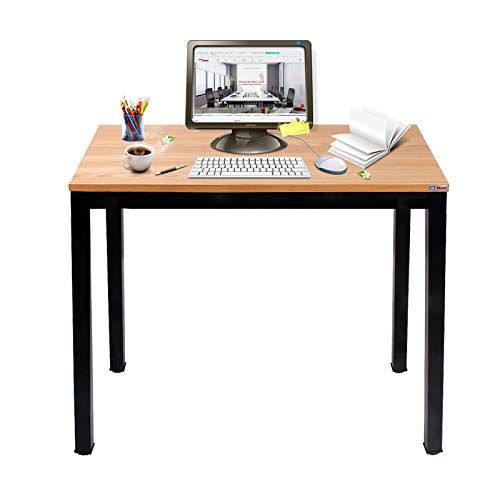
- Small 31.5-inch footprint
- Stable metal frame
- Easy assembly with included tools
Best For: Solo laptop-based podcasting in tight spaces
Best All-in-One Audio Kit

- Two microphones and suspension arms support collaborative recording.
- USB-C connectivity works with computers, mobile devices, and consoles.
- Built-in effects, noise reduction, and instrument inputs expand its uses.
Best For: Two-person podcasts and versatile live-streaming setups
Best Flexible Desk Option
Folding Mobile Conference Table

- Flip-top folding construction helps reclaim floor space.
- Locking swivel wheels make repositioning and recording-area changes easier.
- Storage panels and customizable arrangements support shared workspaces.
Best For: Multi-purpose rooms and mobile podcast workstations
Best Starter Recording Kit
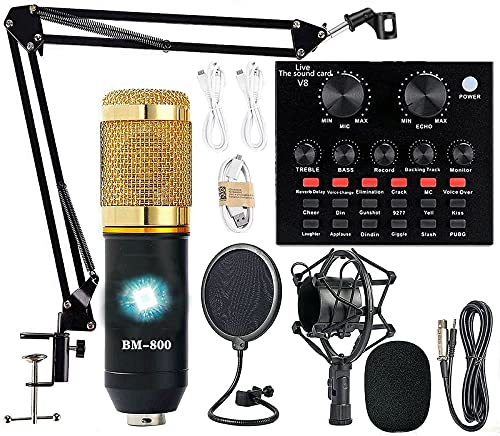
- Includes the microphone, arm stand, shock mount, pop filter, and cables.
- Cardioid pickup focuses on voice recording for podcasts and streaming.
- Compatible with computers, mobile devices, tablets, and gaming platforms.
Best For: Solo beginners building a complete compact recording setup
Best All-Around Studio Desk – Armocity Music Studio Workstation
For space-saving podcast workstations, the Armocity Music Studio Desk combines a 47-inch working area with elevated monitor storage, a pull-out keyboard tray, and three built-in power ports plus two outlets. Its layered layout helps organize a compact recording or editing setup while preserving legroom.
Best For: Home podcasters, music producers, and editors who need organized equipment storage and built-in charging.
Pros:
- Built-in 3 USB ports and 2 outlet plugs reduce the need for a separate charging station.
- Raised 47-inch shelf can hold two monitors at eye level.
- Three storage layers and a pull-out keyboard tray accommodate common studio gear.
- Z-shaped metal legs and a brace bar provide a sturdy base with usable legroom.
Cons:
- The 47-inch width may be limiting for larger multi-device setups.
- Assembly is required, and an electric screwdriver is recommended for faster installation.
This is a practical compact workstation when power access and vertical organization matter. It is especially well suited to a podcast or home studio that needs several essentials within reach without using a large desk.
Best Smallest Footprint – Tribesigns 31.5-Inch Square Table
The Tribesigns 31.5-inch square table is a straightforward option for space-saving podcast workstations in small rooms. Its compact footprint provides a writing or computer surface for up to four people and can also be combined with additional tables for a larger modular arrangement.
Best For: Podcasters who need a compact table for a laptop, notes, or a simple recording setup in a small room.
Pros:
- Compact 31.5-by-31.5-inch footprint suits smaller rooms.
- Stated seating capacity of up to four supports collaborative recording or meetings.
- Modular design allows multiple tables to be arranged into larger surfaces.
- Lightweight construction is designed for easier relocation and reconfiguration.
Cons:
- It lacks dedicated features such as a keyboard tray, rack space, mic mounts, or built-in power.
- The square surface may be tight for a full podcast setup with multiple microphones and monitors.
This table is best viewed as a flexible compact surface rather than a specialized studio desk. It makes sense for minimal setups, interview spaces, or users who value easy rearrangement over integrated recording features.
Best for Audio Gear – Gator Frameworks Content Creator Desk
The Gator Frameworks Content Creator Series desk is designed for space-saving podcast workstations that need dedicated support for audio equipment. Its double-level platform, integrated 3U rack space, slide-out keyboard tray, and built-in mic mounting points organize recording gear within a single workstation.
Best For: Podcasters, streamers, and home recording users with rack-mounted equipment and desktop microphones.
Pros:
- Integrated 3U rack space accommodates audio interfaces, preamps, and other professional equipment.
- Double-level platform provides room for monitors, mixers, MIDI controllers, or audio gear.
- Slide-out tray supports a computer keyboard or small MIDI controller.
- Dual threaded mic adapter posts and pre-bore holes support compatible boom-arm mounting.
Cons:
- Assembly is required.
- At 36.5 inches deep, it may require more floor depth than the most compact desks.
- Its specialized layout may offer less flexibility for users who do not need rack or microphone mounting.
Among these options, this is the most purpose-built for podcast and recording workflows. The rack space and mic-mounting provisions can reduce desktop clutter, though the deeper footprint should be measured against the available room.
Best Large Podcast Table – Vyntyra Executive Podcast Table
The Vyntyra executive table offers a broad surface for podcasting, meetings, or computer work while keeping cables more orderly through a hidden wiring box. Although its 200-by-100-centimeter format is not the smallest option, the multipurpose design can serve as a shared workstation where one large surface replaces several smaller pieces.
Best For: Multi-person podcast sessions, executive-style recording spaces, and users who need a large shared desktop.
Pros:
- Large 200-by-100-centimeter tabletop supports multiple participants and equipment.
- Hidden wiring box helps keep cables organized on the desktop.
- Painted steel frame is designed for stability and load bearing.
- Rounded edge sealing is intended to reduce collision and injury risks.
Cons:
- Its large dimensions are less suitable for genuinely tight spaces.
- The supplied details do not identify dedicated mic mounts, rack space, or keyboard storage.
- The table requires attention to available floor area and cable routing before purchase.
This table is a better fit for a spacious podcast room than a compact home office. Its main strengths are shared capacity, a sturdy frame, and concealed cable management rather than specialized studio accessories.
Studio Hub – Armocity Music Studio Desk
The Armocity Music Studio Desk is a practical choice for space-saving podcast workstations when you need room for monitors, a keyboard, and recording gear without adding a separate charging station. Its raised monitor shelf, pull-out keyboard tray, and built-in power connections help keep a compact home studio organized.
Best For: Home podcasters, music producers, and editors who need a dedicated workstation with integrated charging.
Pros:
- Built-in USB ports and outlet plugs support convenient device charging.
- Raised 47-inch shelf can hold two monitors and keep them near eye level.
- Three storage levels, a pull-out keyboard tray, and generous legroom support longer work sessions.
Cons:
- At 47.3 inches wide, it requires more floor space than a minimalist desk.
- Assembly is required, and an electric screwdriver may speed installation.
- The engineered-wood and metal construction comes without a stated warranty.
Choose this desk if your podcast setup includes multiple screens and several peripherals. It offers more organization than a basic writing desk while keeping essential controls and charging close at hand.
Starter Sound Kit – Hosabely SK500 Podcast Bundle
The Hosabely SK500 is a compact all-in-one option for space-saving podcast workstations, combining a microphone, tripod stand, earphones, cables, and a small audio mixer. Its 5.11-by-7.87-inch mixer footprint helps keep controls accessible on a crowded desktop.
Best For: Beginners recording podcasts, live streams, gaming commentary, or short-form content at a desk.
Pros:
- Includes a microphone, stand, earphone, cables, adapter, and manual for a ready-to-start setup.
- Compact mixer provides two mic inputs, three device outputs, real-time monitoring, and five volume faders.
- Built-in noise reduction, voice enhancement, voice changing, reverb modes, and sound effects add flexible controls.
Cons:
- It does not support USB microphones or phantom power and uses a 3.5mm microphone input.
- It is not compatible with Xbox as an output device, PS4, or tested VR systems.
- Battery runtime is listed at four to five hours and may require charging after shipping.
This bundle makes sense when limited desk space and a simple setup matter more than advanced studio connectivity. Check the compatibility limitations carefully before buying, particularly if you plan to use USB microphones or a console.
Compact Corner Desk – 31.5-Inch Teak Computer Desk
This 31.5-inch computer desk is a straightforward foundation for space-saving podcast workstations in apartments, dorm rooms, and small offices. Its compact footprint leaves enough surface for a laptop, microphone, or writing materials while the metal frame provides a stable base.
Best For: Solo podcasters who use a laptop and need an uncomplicated desk for a tight room layout.
Pros:
- Compact 31.5-by-23.6-inch design fits apartments, dormitories, and small offices.
- Thick metal frame is designed for added stability compared with lighter 0.8mm frames.
- Waterproof, scratch-resistant glossy particleboard surface is easy to maintain.
Cons:
- The small tabletop may be limiting for multiple monitors or extensive audio gear.
- There are no drawers, so accessories need to remain on the desktop or be stored separately.
- It is a basic writing desk without built-in power, cable management, or an integrated keyboard tray.
For a laptop-based podcast workflow, this desk keeps the furniture footprint low and assembly simple. Choose a larger workstation if you need a mixer, multiple displays, or several recording accessories within easy reach.
Best All-in-One Audio Kit – Dual-Mic Podcast Bundle
For space-saving podcast workstations, this bundle combines two condenser microphones, suspension arms, and a compact mixer-style audio interface in one setup. USB-C connectivity and broad device compatibility make it practical for creators who record, stream, or switch between devices.
Best For: Two-person podcasts, live streaming, and creators who want sound controls and voice effects in one bundle.
Pros:
- Includes two microphones with anti-vibration suspension arms.
- Offers noise reduction, DSP processing, and 360° omnidirectional capture.
- Supports PCs, smartphones, tablets, PS5, Xbox, and multiple operating systems.
- Provides four voice variations, 10 sound effects, and direct instrument inputs.
Cons:
- The battery-powered interface requires charging before initial use or after extended storage.
- At 1.48 kg, it adds noticeable weight to a compact workstation.
- Driver installation may require contacting the manufacturer if it does not start automatically.
This is a feature-rich choice when a small podcast desk needs to support multiple speakers, platforms, and creative effects. Its two-microphone configuration is especially useful for collaborative recording, though the charging requirement adds one more step to setup.
Best Flexible Desk Option – Folding Mobile Conference Table
This folding table can anchor a space-saving podcast workstation when you need a broad surface that can be moved or stored between sessions. Its flip-top design, swivel wheels, and configurable arrangement suit studios that also serve as meeting, classroom, or event spaces.
Best For: Multi-purpose rooms that need a mobile podcast desk with space for equipment, documents, and accessories.
Pros:
- Folding design supports storage and quick room reconfiguration.
- Four silent swivel wheels provide mobility, with locking wheels for stability.
- Aluminum alloy construction includes storage space for documents and bags.
- Can be arranged in different combinations for collaborative layouts.
Cons:
- Its conference-table format may be larger than necessary for a solo podcast setup.
- The product is designed for broad multi-use environments rather than dedicated audio production.
Choose this table if your podcast area must convert easily into a meeting or training space. The mobile, folding construction is its main advantage, while dedicated creators may prefer a smaller desk optimized specifically for microphones and recording hardware.
Best Starter Recording Kit – BM-800 Podcast Bundle
This BM-800 package gives a space-saving podcast workstation a complete microphone setup without requiring separate purchases for the stand, shock mount, pop filter, and sound card. Its cardioid microphone pattern is aimed at voice recording, while USB and mobile compatibility support flexible placement in a home studio.
Best For: Beginner podcasters, streamers, and solo creators building a compact voice-recording setup.
Pros:
- Includes the microphone, adjustable scissor arm, shock mount, pop filter, foam cover, and cables.
- Cardioid pickup is suited to podcasts, vocals, and other voice work.
- Works with Windows, Mac OS, smartphones, tablets, gaming consoles, and other platforms.
- Offers multiple sound effects and supports several connection methods.
Cons:
- The single-channel design is better suited to solo recording than multi-person sessions.
- The battery-powered sound card needs charging before use.
- At 1.37 kg, the complete package is not especially lightweight.
For a first recording station, this bundle keeps the essential accessories together and provides a straightforward path into podcasting or streaming. The single-channel interface limits expansion, but its included arm and voice-focused microphone help simplify a compact solo setup.
How We Picked These Space-Saving Podcast Workstations
We focused on products that can support a compact podcast workflow without demanding a dedicated studio room. The selection includes purpose-built studio desks, small computer and conference tables, folding workstations, and bundles that combine recording hardware with a usable setup.
Our main considerations were footprint, surface area, stability, storage or rack features, keyboard access, portability, and suitability for microphones, audio interfaces, laptops, and monitoring equipment. Because these products serve different needs, a compact table may be the better choice for two-person recording, while a studio workstation may be more useful for solo production and editing.
Quick Comparison
- Best for organized studio setups: Choose a dedicated music or content-creator workstation with a keyboard tray, rack shelf, or equipment storage.
- Best for shared recording: Compact conference and podcast tables provide a broader central surface for multiple microphones and participants.
- Best for very small rooms: Look for a narrow 31.5-inch-class desk or a folding table that can be stored after recording.
- Best for beginners: An equipment bundle can reduce setup complexity, but verify compatibility and included accessories before buying.
Key Buying Factors for Small Podcast Workspaces
Dimensions and Room Clearance
Measure the wall, corner, or recording area before ordering. Leave room for a chair, microphone stands, cable routing, and access to outlets. A desk that fits on paper may feel cramped once microphones and monitor speakers are installed.
Surface Layout and Equipment Support
Check whether the top can hold a computer, interface, notes, and microphones at the same time. Rack shelves and raised monitor platforms can free usable space, while a sliding keyboard tray keeps the main surface clearer. For two or more speakers, prioritize depth and legroom over a narrow footprint alone.
Construction and Stability
Podcasting involves frequent arm movement, cable adjustments, and microphone handling. A stable frame and level surface help prevent unwanted vibrations. Folding designs are convenient, but confirm their locking mechanism and stated weight capacity if you plan to leave equipment set up.
Connectivity and Bundle Contents
Equipment bundles vary considerably. Confirm the microphone type, interface connections, monitoring support, power requirements, and included cables. Features such as loopback, voice effects, or noise reduction may be useful for streaming, but they should not replace checking basic audio compatibility.
Who Should Buy Which Space-Saving Podcast Workstations?
Solo podcasters and editors should favor a dedicated studio desk with a keyboard tray, rack storage, or organized shelving. Two-person podcast teams may prefer a compact conference or podcast table with a central surface that keeps both participants comfortable. Remote workers who record occasionally can benefit from a small computer desk or folding conference table that serves another purpose between sessions. First-time creators may save time with a recording bundle, provided the included interface and microphone meet their computer and software requirements. If your room is especially tight, prioritize clearance, cable management, and easy reconfiguration over maximum tabletop size.