
Mobile production setups need more than a platform that raises a laptop. The right standing desk converter should make room for your computer, displays, keyboard, and accessories without overwhelming a compact workspace.
We selected 10 options spanning electric and gas-assisted lifts, single- and multi-monitor layouts, rolling workstations, and compact desktop designs so you can match the converter to your workflow.
Best 10 Standing Desk Converters for Mobile Production Picks for 2026
Best Mobile Workstation

- Monitor mount supports screens up to 32 inches
- Includes keyboard tray and CPU holder
- Four wheels and height up to 70 inches
Best For: Mobile, full-size computer setups
Best Electric Converter
42-Inch Electric Desk Converter

- Wide surface for dual monitors and a laptop
- Push-button height range of 5.7 to 19.5 inches
- Desktop supports up to 50 pounds
Best For: Large, powered multi-screen workstations
Best Slim Converter
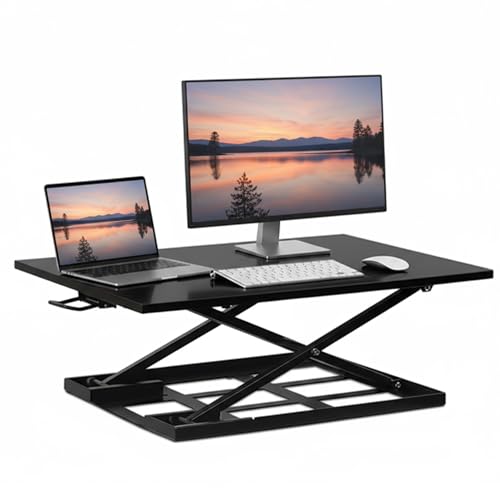
- 32-by-22-inch work surface
- Adjusts from 2.5 to 16.9 inches
- Preassembled with vertical lift
Best For: Small desks and shared workspaces
Best Lift-Assist Converter

- 36-inch surface for monitor and laptop setups
- Dual pneumatic lift assistance
- Includes keyboard tray and two-tier shelf
Best For: Wide manual workstation setups
Maximum Workspace
Rocelco 46-Inch Standing Desk Converter

- Extra-large surface for up to three medium monitors
- 45-pound capacity with 5-to-20-inch adjustment
- Retractable keyboard tray and no assembly required
Best For: Multi-monitor mobile production stations
Balanced Setup
VIVO 32-Inch Standing Desk Converter

- Space-efficient surface for dual monitors
- 4.5-to-20-inch lift-assist height range
- 3-year warranty and minimal assembly
Best For: Compact dual-monitor mobile workstations
Monitor-Mount Ready
Mount-It! Dual Monitor Standing Desk Converter

- Mounts two monitors up to 32 inches
- Gas-spring lift from 5.7 to 17.1 inches
- Wide tray includes gel wrist pad and cable management
Best For: Mounted dual-monitor mobile production rigs
Best Dual-Monitor Workspace
FLEXISPOT 36-inch Standing Desk Converter

- 36-inch surface fits dual monitors and accessories
- Mechanical spring lift system for stable adjustment
- Steel frame supports up to 33 pounds
Best For: Spacious dual-monitor home-office and remote-work setups
Best Adjustable Monitor Mount
VIVO 32-inch Dual-Monitor Converter

- Built-in mount supports two compatible monitors
- Height adjusts from 4.5 to 20 inches
- Arms tilt, swivel, rotate, and support portrait mode
Best For: Dual-monitor production workflows needing flexible screen positioning
Best Compact Setup
VIVO 26-inch Single-Top Converter

- Compact surface for a laptop or single monitor
- Five lockable height settings
- Pre-assembled and supports up to 17.6 pounds
Best For: Small desks and single-screen mobile production setups
Best Mobile Workstation – Rolling Computer Cart
For standing desk converters for mobile production, the Mount-It! Rolling Computer Cart is a full workstation rather than a tabletop riser. Its four-wheel steel frame supports a monitor, keyboard, and CPU, making it useful when your setup needs to move between rooms or work areas.
Best For: Professionals, educators, healthcare workers, IT specialists, and creators who need a mobile computer station.
Pros:
- Adjustable monitor mount supports screens up to 32 inches.
- Includes a full keyboard tray and floating CPU holder with buckle straps.
- Four caster wheels support movement between locations.
- Standing height adjusts up to 70 inches.
Cons:
- Maximum weight capacity is 17.6 pounds.
- Its 25.7-inch-wide, 19.6-inch-deep footprint may require dedicated floor space.
- Designed for a complete computer setup, not simply a compact desk riser.
This cart is the most mobile option in the group, especially for shared spaces and frequent repositioning. Choose it when moving the entire computer setup matters more than placing a converter on an existing desk.
Best Electric Converter – 42-Inch Electric Desk Converter
Among standing desk converters for mobile production, the VIVO DESK-VE42B offers powered height changes from an existing desk. Its broad surface accommodates dual monitors and a laptop, while the electric lift makes switching positions a simple button press.
Best For: Multi-screen workstation users who want a wide, powered sit-stand converter.
Pros:
- 42-inch surface provides room for dual monitors and a laptop.
- Electric lift adjusts from 5.7 to 19.5 inches.
- Supports up to 50 pounds on the desktop.
- Includes a 12-inch-deep keyboard tray that rises with the top.
Cons:
- Requires placement on an existing desk and access to its electric lifting mechanism.
- The 42-inch width needs substantial desk space.
- It is heavier and less portable than a compact manual riser.
The electric adjustment is the main advantage for users who change heights often. Its generous surface and 50-pound capacity make it a strong choice for larger production setups, provided your desk can accommodate its width.
Best Slim Converter – 32-Inch Gas-Spring Desk Riser
For standing desk converters for mobile production in a compact workspace, the Mount-It! MI-7929W uses a gas-spring lift and a slim 2.5-inch lowered profile. It sits on an existing desk and raises equipment vertically without shifting the platform forward.
Best For: Home offices, shared desks, and small workspaces that need a preassembled sit-stand solution.
Pros:
- 32-by-22-inch platform provides room for monitors, a laptop, and accessories.
- Gas-spring lift adjusts from 2.5 to 16.9 inches.
- Vertical movement helps preserve desk space.
- Arrives fully assembled and ready to use.
Cons:
- Manual lever operation requires lifting rather than push-button adjustment.
- The supplied notes do not specify a maximum weight capacity.
- The 22-inch depth may be substantial for very shallow desks.
This converter balances workspace and compact storage well. Its straight-up lift and low collapsed profile are particularly useful when you want standing capability without permanently losing usable desk area.
Best Lift-Assist Converter – 36-Inch VIVO Desk Riser
The VIVO DESK-V000V is a practical option for standing desk converters for mobile production when you want a wide manual riser with lift assistance. Its dual pneumatic springs and touch height-locking mechanism support transitions between sitting and standing.
Best For: Single- or dual-monitor users seeking a wide manual converter with an included keyboard tray.
Pros:
- 36-by-22-inch surface supports single or dual monitor and laptop setups.
- Dual pneumatic springs provide lift assistance.
- Height adjusts from 6.5 to 17 inches with a touch locking mechanism.
- Includes a two-tier design and keyboard tray.
Cons:
- Manual adjustment is less convenient than an electric converter.
- The 33-pound item weight may make repositioning difficult.
- It requires an existing tabletop for support.
This model offers a useful middle ground between compactness and workspace. Its 36-inch top, lift assistance, and three-year warranty make it a sensible fit for users who prefer a sturdy manual converter over a powered one.
Maximum Workspace – Rocelco 46-Inch Standing Desk Converter
For mobile production setups that need substantial equipment capacity, the Rocelco 46-inch converter provides an extra-large platform for up to three medium monitors or two large monitors. Its gas-assisted, continuous height adjustment and retractable keyboard tray make it a practical choice when switching between seated and standing work.
Best For: Multi-monitor mobile production stations that need generous workspace and a tall adjustment range.
Pros:
- 45.75-inch-wide desktop accommodates up to three medium monitors or two large monitors.
- Raises and lowers from 5 to 20 inches with gas piston assistance and supports up to 45 pounds.
- Retractable keyboard tray maintains 4.5 inches of spacing from the desktop and can hold a laptop.
- Ships without assembly and includes a grommet hole for cable management or monitor mounting.
Cons:
- Its 42-pound weight and large footprint may be inconvenient for frequent relocation.
- The 23.25-inch depth requires a reasonably deep supporting desk.
This is the most capable option here for a large, equipment-heavy workstation, though its size favors moving between production locations occasionally rather than carrying it daily.
Balanced Setup – VIVO 32-Inch Standing Desk Converter
The VIVO 32-inch converter is a space-conscious option for standing desk converters for mobile production, offering room for dual monitors while keeping the workstation smaller than a full-width riser. Its lift-assist design moves the platform straight upward, and the keyboard tray rises with the work surface.
Best For: Mobile producers who need a compact dual-monitor workstation with simple sit-to-stand adjustment.
Pros:
- 31.5-by-15.7-inch surface is designed to accommodate dual monitors.
- Adjusts from approximately 4.5 to 20 inches with a smooth lift-assist mechanism.
- Synced keyboard tray provides space for a keyboard and helps create a complete workstation.
- Steel construction is backed by a 3-year manufacturer warranty and technical support.
Cons:
- Its 33-pound maximum load is lower than the Rocelco’s stated capacity.
- The relatively compact surface may be limiting for larger monitors or additional production gear.
The VIVO offers a useful middle ground: more manageable than an oversized converter while still supporting a dual-monitor setup. It is a sensible pick when portability and workspace need to be balanced.
Monitor-Mount Ready – Mount-It! Dual Monitor Standing Desk Converter
The Mount-It! converter is built for mobile production workflows that benefit from mounted dual displays. It combines a compact top platform with a VESA-compatible monitor mount, a wide keyboard tray, cable management, and gas-spring adjustment from 5.7 to 17.1 inches.
Best For: Mobile production users who want two mounted monitors and an organized keyboard-and-mouse workspace.
Pros:
- Dual monitor mount supports two screens up to 32 inches and 22 pounds each.
- VESA compatibility supports 75-by-75 and 100-by-100 mounting patterns.
- 26.7-inch keyboard tray accommodates a keyboard and mouse and includes a gel wrist pad.
- Integrated cable management helps reduce cord clutter.
Cons:
- The 23.6-by-15.7-inch top platform is smaller than the Rocelco and VIVO work surfaces.
- Its listed 33-pound maximum recommendation may limit heavier combined equipment.
- At 47 pounds, the unit itself is relatively heavy for frequent transport.
This model stands out when monitor mounting and cable organization matter more than a broad desktop. Confirm your displays’ VESA pattern and weight before choosing it for a mobile rig.
Best Dual-Monitor Workspace – FLEXISPOT 36-inch Standing Desk Converter
For mobile production setups that need room to grow, this FLEXISPOT 36-inch converter provides a spacious sit-stand workstation for dual monitors, a laptop, and accessories. Its mechanical spring lift system is designed for smooth, stable height changes without relying on a gas spring.
Best For: Professionals building a spacious dual-monitor home-office or remote-work station.
Pros:
- 36-inch surface accommodates dual monitors with additional workspace.
- Mechanical spring system supports smooth height adjustment and avoids common gas-spring leakage concerns.
- Reinforced steel frame supports up to 33 pounds on the desktop.
- Includes a keyboard tray and arrives nearly assembled for quick setup.
Cons:
- At 34.5 pounds, it is relatively heavy to move.
- The keyboard tray supports 4.4 pounds, limiting heavier accessories.
- Its 36-inch width requires substantial desk space.
Choose this model when stability and workspace are more important than portability. It is a strong fit for a permanent production desk, especially when two monitors are part of the workflow.
Best Adjustable Monitor Mount – VIVO 32-inch Dual-Monitor Converter
For standing desk converters for mobile production that need flexible screen positioning, the VIVO DESK-V000K-M2 combines a 32-inch riser with a dual monitor stand. Its height range and full-motion arms make it useful for switching between seated and standing work while adjusting screen orientation.
Best For: Dual-monitor users who want built-in tilt, swivel, rotation, and height adjustment.
Pros:
- Supports two 13- to 30-inch monitors up to 17.6 pounds each with compatible VESA patterns.
- Height adjusts from 4.5 to 20 inches with a height-lock mechanism.
- Monitor arms provide tilt, swivel, rotation, and portrait-orientation flexibility.
- Steel construction, desk padding, and a three-year warranty add practical reassurance.
Cons:
- Monitor installation requires attaching the arms and mounting compatible VESA screens.
- The dual-monitor mount may be unnecessary for single-screen users.
- Its 32-inch footprint still needs a suitably deep, stable desk.
This is the most configurable option of the three for a production workflow that depends on two screens. Verify monitor size, weight, and VESA compatibility before buying.
Best Compact Setup – VIVO 26-inch Single-Top Converter
When desk space is limited, this compact VIVO riser offers a straightforward way to add standing intervals to a mobile production workstation. The 26.4-inch surface fits a single monitor or laptop with a full-size keyboard, and the pre-assembled design is ready to use immediately.
Best For: Small work areas using a single monitor or laptop setup.
Pros:
- Compact 26.4-inch surface suits smaller desks.
- Five lockable height settings range from 8.5 to 15.9 inches above the resting position.
- Steel frame supports up to 17.6 pounds.
- Requires no assembly and can be used straight out of the box.
Cons:
- Single-top design is not intended for dual-monitor setups.
- 17.6-pound capacity is lower than the larger converters in this roundup.
- Five preset positions offer less continuous adjustment flexibility.
This converter makes the most sense for a laptop or single-monitor workflow where conserving desk space matters. Its no-assembly setup is especially convenient for users who want an uncomplicated standing option.
How We Picked the Best Standing Desk Converters for Mobile Production
We focused on the features that matter when a workstation must adapt to changing locations: usable surface area, height range, monitor compatibility, keyboard space, lift mechanism, footprint, and setup flexibility. The lineup includes compact risers for laptops and single screens, larger platforms for multi-monitor production, and a rolling cart for users who need to move the entire workstation.
Because “mobile” can mean either portable between rooms or adaptable within a small studio, we considered both physical mobility and workspace efficiency. Weight capacity and stability remain important, especially with monitors, speakers, cameras, or other production equipment on the surface.
Quick Comparison
| Best For | Look For | Recommended Style |
|---|---|---|
| Small mobile setups | Compact footprint and simple adjustment | 26- to 32-inch single-platform converter |
| Dual-monitor production | Wide surface and monitor support | 32- to 42-inch converter with riser or mount |
| Triple-monitor workflows | Extra width, height, and load capacity | Large 46-inch platform |
| Room-to-room mobility | Casters and integrated workstation design | Rolling computer cart |
| Frequent height changes | Fast, low-effort adjustment | Electric or gas-spring lift |
Key Buying Factors for Standing Desk Converters for Mobile Production
Surface Area and Layout
Measure the equipment you actually use, not just the monitor. A keyboard, mouse, audio interface, tablet, notebook, and cables can quickly consume a narrow platform. Wider models are better for multi-monitor production, while compact designs are easier to fit on shared desks.
Monitor Support and Height
Check whether the converter includes a monitor stand, mounting hardware, or only a flat surface. A built-in riser can improve screen height, but verify screen-size and weight limits. VESA compatibility is useful when you need more precise positioning.
Adjustment Mechanism and Stability
Electric models offer convenient button-controlled movement, while gas-spring designs can be quick and quiet without requiring power. Whichever mechanism you choose, look for a broad base, smooth travel, and enough capacity for the fully loaded setup.
Portability, Clearance, and Cable Management
For mobile production, consider the converter’s weight, depth, wheel design, and clearance for your existing desk. A rolling cart is easiest to relocate, but a desktop riser may be simpler to store. Leave room for cables to move safely through the full height range.
Who Should Buy Which Standing Desk Converters for Mobile Production?
Choose a compact 26- or 32-inch model if you use a laptop or one monitor and need to preserve desk space. Pick a 36- or 42-inch converter for a more comfortable dual-screen or accessory-heavy setup. A 46-inch model makes the most sense for triple-monitor workflows and larger production surfaces.
Choose an electric converter if you change positions often and want effortless adjustment. Choose a gas-assisted riser if you prefer a simpler, power-free design. If your priority is moving the workstation itself between rooms, a rolling computer cart is the most practical choice. For everyone else, prioritize the model that fits your equipment securely while leaving enough room to work comfortably.