
Managing a 4K stream involves more than pressing Go Live. Scene changes, audio routing, camera switching, source monitoring, and recording controls can quickly overwhelm a keyboard and mouse.
These 10 stream control decks and related production tools cover everything from compact macro pads to integrated video interfaces and multi-input switchers, helping you match your setup to your cameras, software, and production style.
Best 10 Stream Control Decks for 4K Workflows Picks for 2026
Flexible Macro Control
SOOMFON Stream Controller Studio Deck

- 15 customizable LCD macro keys
- Dashboard displays CPU and memory data
- Works with OBS, Twitch, YouTube, and more
Best For: Creators needing visual one-touch software controls
Integrated 4K Streaming Hub

- 4K/30 capture and 4K/60 passthrough
- Integrated audio interface with combo input
- Dual USB-C outputs for two-computer setups
Best For: Creators combining HDMI capture and broadcast audio
Versatile Macro Deck
TreasLin VSDinside N1 Stream Controller
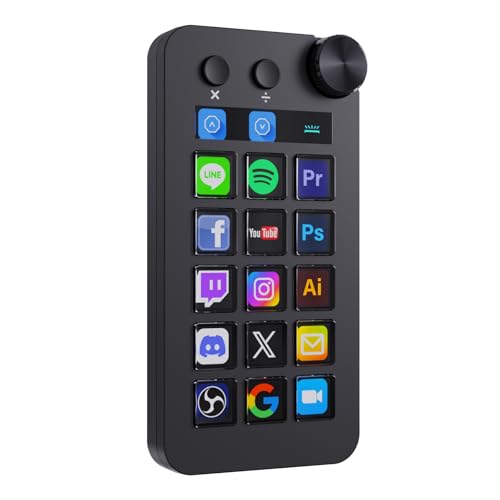
- 18 controls with LCD keys and rotary knob
- Shortcut, calculator, and keypad modes
- Profiles for OBS and creative software
Best For: Power users wanting one deck for varied workflows
Multi-Source 4K Capture
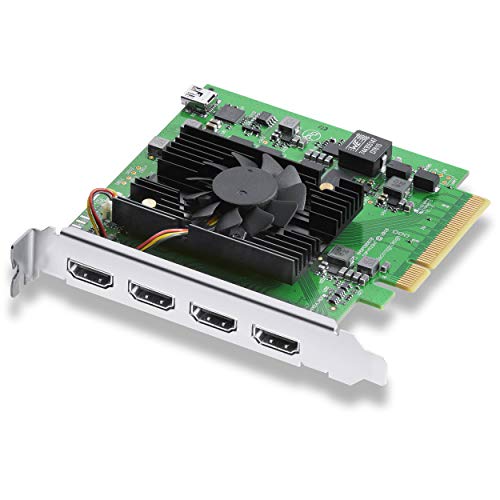
- Four HDMI 2.0b inputs
- Simultaneous SD, HD, and 4K capture
- Compatible with OBS, vMix, and Wirecast
Best For: Workstations capturing several HDMI sources at once
Best Macro-Key Control Deck

- 15 customizable LCD macro keys
- Profiles for streaming and creative apps
- Works with PC and Mac
Best For: Creators who need extensive one-touch app and workflow controls
Best Dual-Input Capture Deck

- Two 4K 60Hz HDMI inputs
- 1080p 60fps capture and output
- PIP/PBP switching with audio ports
Best For: Multi-source gaming, camera, and presentation streams
Best Compact Dial Control Deck
SOOMFON Studio Deck with Dials

- Six customizable LCD keys
- Three multifunction control dials
- Removable stand and desk adhesive
Best For: Creators who want tactile adjustments in a compact controller
Dedicated ATEM Control
ATEM Micro Live Stream Switcher Panel

- Program/preview buttons with tactile transition controls
- Bluetooth and USB connectivity for ATEM Software Control
- 50 tri-color buttons with up to six hours of battery life
Best For: ATEM Constellation users needing hands-on switching control
Custom Macro Control

- Ten macro keys and four knobs for shortcuts and adjustments
- 500+ plugins and 200+ icons for customization
- Adjustable LCD panel with wired Windows/macOS support
Best For: Computer-based streamers and editors wanting programmable controls
Integrated 4K Production
FoMaKo M6 4K Video Mixer Switcher

- 4K60 HDMI inputs plus four 3G-SDI inputs
- 10.1-inch multiview with PTZ and layered production tools
- Dual network streaming plus SD and USB recording
Best For: Multi-camera productions needing integrated switching and streaming
Flexible Macro Control – SOOMFON Stream Controller Studio Deck
For stream control decks for 4K workflows, the SOOMFON Studio Control Deck provides 15 customizable LCD keys for launching commands, adjusting audio, muting a microphone, and controlling supported apps. Its side dashboard can display system information such as CPU and memory usage, making it useful for streaming and other creative work.
Best For: Streamers, editors, and creators who want visual macro keys and quick controls for OBS, Twitch, YouTube, and compatible desktop software.
Pros:
- 15 customizable LCD buttons can display user-selected images and trigger actions.
- Supports integrations including OBS Studio, Twitch, YouTube, Discord, Spotify, and Voicemod.
- Removable stand, rubber feet, and USB-C connectivity suit desktop setups.
- Side dashboard shows computer CPU and memory information.
Cons:
- Spotify integration requires an active Spotify Premium account.
- The manufacturer recommends using the included cable and connecting directly to the computer rather than through a USB hub.
This is a practical control surface for software-based production, especially if you value readable LCD icons and a compact desktop design. It is a macro controller rather than a video capture device, so 4K video handling depends on the rest of your setup.
Integrated 4K Streaming Hub – RØDE Streamer X
The RØDE Streamer X combines a 4K video capture card with an integrated audio interface, making it a strong option for stream control decks for 4K workflows that also need camera, console, and microphone connectivity. It can record HDMI video up to 4K/30fps or 1440p/60fps while offering up to 4K/60fps passthrough monitoring.
Best For: Streamers and content creators who need one compact device for HDMI capture, professional microphone input, and computer-based broadcasting.
Pros:
- Captures video up to 4K/30fps or 1440p/60fps over HDMI.
- Provides up to 4K/60fps HDMI passthrough for real-time monitoring.
- Neutrik combo input and RØDE Revolution Preamp support microphone and line-level sources.
- Dual USB-C outputs can connect two computers for capture and streaming workflows.
Cons:
- HDMI capture recording is limited to 4K/30fps rather than 4K/60fps.
- The supplied notes do not specify current software-update support.
Choose the Streamer X when audio and video capture matter more than physical macro buttons. Its integrated design can reduce desk clutter, while dual-computer support adds flexibility for more involved streaming arrangements.
Versatile Macro Deck – TreasLin VSDinside N1 Stream Controller
The TreasLin N1 expands stream control decks for 4K workflows with 18 customizable controls, including LCD buttons, clickable buttons, and a rotary knob. Its VSD Craft software supports profiles for OBS, creative applications, media controls, and everyday shortcuts, while the knob can switch between shortcut, calculator, and numeric keypad modes.
Best For: Streamers, editors, and power users who want one configurable deck for live production, creative software, media playback, and numeric entry.
Pros:
- Includes 15 visual LCD buttons, two clickable buttons, and one rotary knob.
- Supports custom profiles for OBS, Streamlabs, Photoshop, DAWs, Premiere Pro, Blender, and more.
- Offers shortcut, calculator, and numeric keypad modes.
- VSDinside marketplace provides plugins, icons, profiles, and scenes.
Cons:
- Spotify integration requires an active Spotify Premium account.
- Operation depends on the included VSD Craft software and its marketplace ecosystem.
The N1 is the most broadly configurable controller in this group, particularly for users who move between streaming and production software. Its extra modes make it useful beyond live control, although it is still a command deck rather than a 4K capture interface.
Multi-Source 4K Capture – Blackmagic DeckLink Quad HDMI
For stream control decks for 4K workflows centered on multiple video sources, the Blackmagic Design DeckLink Quad HDMI offers four HDMI 2.0b inputs for simultaneous capture. Its PCIe connection, broad SD/HD/4K format support, HDR and deep-color handling, and compatibility with OBS, vMix, Wirecast, and Media Express suit production systems that need several HDMI feeds.
Best For: Desktop production systems capturing multiple cameras, consoles, or other HDMI sources simultaneously.
Pros:
- Four HDMI inputs support simultaneous multi-source capture.
- Supports 4K formats, HDR, deep color, and multiple color spaces.
- Works across Mac, Windows, and Linux with major production applications.
- Supports eight channels of embedded 24-bit, 48 kHz audio.
Cons:
- Requires an eight-lane PCI Express Gen 3 slot, compatible with eight- or 16-lane slots.
- HDMI inputs cannot capture copy-protected sources.
- Requires a suitable desktop computer and other supporting hardware.
This card is aimed at serious multi-input production rather than casual streaming. It offers substantially more source capacity than a simple controller or single-input capture device, but the PCIe installation and system requirements make it best suited to a planned workstation build.
Best Macro-Key Control Deck – SOOMFON Studio Controller
For stream control decks for 4K workflows, the SOOMFON Studio Controller focuses on broad app control through 15 customizable LCD macro keys. It is a practical choice for creators who want one-touch access to streaming, editing, audio, and productivity actions from a PC or Mac.
Best For: Streamers and content creators who need many customizable shortcuts for OBS, Twitch, Premiere Pro, Final Cut Pro, Photoshop, and similar software.
Pros:
- 15 LCD macro keys provide substantial shortcut capacity.
- Supports one-touch single or multiple actions, audio controls, and app launching.
- Offers ready-made profiles for OBS Studio, Twitch, vMix, Spotify, and creative software.
- Works with Windows 7 or later and macOS 10.15 or later.
Cons:
- Its USB connection adds another cable to the desk.
- OBS support is specifically listed for Windows versions 27.0, 28.0, and above.
The large key count makes this a flexible command center for complex streaming and editing setups. Choose it when customizable visual keys matter more than dedicated dials or video capture hardware.
Best Dual-Input Capture Deck – Osee GoStream M2 Capture Card
The Osee GoStream M2 is a video-focused option for stream control decks for 4K workflows, accepting two 4K 60Hz HDMI sources while capturing and outputting video at up to 1080p 60fps. Its dual inputs, USB 3.0 connection, and built-in audio ports suit gaming, camera, and live-production setups.
Best For: Streamers and presenters who need to combine two HDMI sources with PIP or PBP layouts in OBS and related software.
Pros:
- Accepts two 4K 60Hz HDMI inputs for cameras or gaming devices.
- Supports 1080p 60fps capture/output and low-latency USB 3.0 transmission.
- Includes microphone and audio input/output ports.
- Provides switchable PIP and PBP modes with multiple layouts.
Cons:
- Its capture and output workflow is limited to 1080p 60fps.
- It is a capture device rather than a programmable macro-key control deck.
This is the strongest fit here for handling multiple 4K HDMI sources, but buyers should distinguish 4K input support from 1080p capture output. Plug-and-play compatibility with OBS, Windows, macOS, Linux, and other listed platforms adds flexibility.
Best Compact Dial Control Deck – SOOMFON Studio Deck with Dials
For stream control decks for 4K workflows that benefit from physical adjustments, the SOOMFON Studio Deck combines six customizable LCD keys with three dials and three page-control buttons. The dials can be assigned to settings such as volume or brightness, while the keys launch apps, files, pages, and other actions.
Best For: Streamers, editors, and multimedia users who prefer a compact controller with both programmable buttons and tactile dial controls.
Pros:
- Six customizable LCD keys provide visual, one-click controls.
- Three multifunction dials can adjust volume, brightness, and other settings.
- Supports OBS Studio, Twitch, YouTube, Discord, Spotify, Voicemod, and more.
- Includes a removable 40-degree stand and adhesive for desk stability.
Cons:
- Supports Windows 10 64-bit or higher and macOS Big Sur 11.0 or higher only.
- Linux is not supported.
- Spotify integration requires an active Premium account.
The smaller key layout is less suited to users who need dozens of shortcuts, but its dials make live volume and brightness adjustments more direct. It is a sensible compact choice for creators who want hands-on control without a larger macro-key footprint.
Dedicated ATEM Control – ATEM Micro Live Stream Switcher Panel
For stream control decks for 4K workflows built around compatible ATEM equipment, the Blackmagic Design ATEM Micro Live Stream Switcher Panel provides tactile program and preview switching without relying solely on software controls. Its familiar layout combines backlit buttons with transition controls for hands-on operation.
Best For: Broadcasters, content creators, and live-stream professionals using ATEM Constellation switchers.
Pros:
- Two rows of ten program and preview input buttons support quick source selection.
- Includes transition controls, a macro key, and an onboard fader for manual operation.
- Bluetooth and USB connectivity support flexible pairing with ATEM Software Control.
- Offers 50 tri-color LED-backlit buttons and up to six hours of battery life.
Cons:
- Its compatibility is focused on ATEM-based setups, including ATEM Constellation switchers.
- The supplied details identify one USB port, which may limit wired connection options.
This is a focused hardware control surface rather than a complete video switcher. Choose it when tactile ATEM control and portable battery operation matter more than integrated video inputs or onboard production features.
Custom Macro Control – 10-Key Stream Control Deck
For stream control decks for 4K workflows that depend on computer-based production tools, this programmable macro keyboard combines custom keys, control knobs, and an LCD touch panel. It is designed to reduce screen switching while managing audio, lighting, camera actions, and software shortcuts from a desktop.
Best For: Windows and macOS streamers, video editors, office users, and creators who want customizable wired shortcuts.
Pros:
- Ten programmable macro keys and four aluminum knobs support one-touch actions and adjustments.
- Access to more than 500 plugins and 200 icons enables extensive customization.
- The 4.5-inch LCD touch panel and 0–60-degree adjustable design support flexible positioning.
- Wired USB connectivity is compatible with Windows 7 64-bit or newer and macOS 10.15 or newer.
Cons:
- It is a computer control keyboard, not a standalone video mixer or switcher.
- Its wired design does not provide wireless flexibility.
- The supplied details do not specify direct compatibility with particular 4K video hardware.
This deck is best viewed as a customizable shortcut hub for a PC- or Mac-based workflow. It can complement 4K production software, but buyers needing direct camera-input switching should consider a dedicated video mixer instead.
Integrated 4K Production – FoMaKo M6 4K Video Mixer Switcher
For stream control decks for 4K workflows that need video handling as well as operator control, the FoMaKo M6 combines HDMI and SDI inputs, a 10.1-inch multiview display, PTZ control, overlays, recording, and network streaming. It accepts 4K60 sources on two HDMI inputs while producing 1080p60 output.
Best For: Churches, studios, educators, broadcasters, and live-event teams managing multi-camera productions.
Pros:
- Provides four HDMI inputs, including two supporting 4K60, plus four 3G-SDI inputs.
- Supports up to eight PGM layers with dual PIP, alpha-channel logos, DSK subtitles, and more than 30 transitions.
- Built-in PTZ control, a 10.1-inch multiview screen, and web-based remote access support single-operator workflows.
- Can stream two RTMP/SRT channels, record to SD card and USB storage, and use recordings as auxiliary sources.
Cons:
- Although it accepts 4K60 inputs, the listed output is 1080p60.
- NDI functionality is upgradeable, and the NDI license is optional rather than included.
- Its extensive production feature set may be more than needed for simple switching.
The M6 is the most complete production option in this group, combining source switching, PTZ operation, streaming, recording, and compositing in one unit. Confirm the 1080p output limitation and any NDI requirements before purchase.
How We Picked the Best Stream Control Decks for 4K Workflows
We focused on tools that can make demanding live-production tasks faster and more repeatable. The lineup includes dedicated macro controllers, capture hardware, integrated audio/video interfaces, PCIe capture cards, and live switchers because a 4K workflow may need more than a traditional shortcut deck.
Our evaluation criteria include programmable controls, compatibility with common streaming software, input and output capabilities, monitoring, audio handling, desk footprint, and the practical limits of each device. Resolution claims were considered alongside frame rates, connection standards, and whether the hardware captures, passes through, switches, or simply controls video sources.
Quick Comparison
| Best For | Look For | Typical Choice |
|---|---|---|
| Macro control | Programmable keys, displays, dials | SOOMFON or TreasLin decks |
| Integrated audio and video | Microphone inputs, monitoring, 4K support | RØDE X Streamer X |
| Multi-camera capture | Multiple HDMI inputs and PCIe bandwidth | DeckLink Quad HDMI |
| Standalone switching | Physical source controls and preview monitoring | ATEM or FoMaKo switchers |
| Compact capture | USB connectivity and low-latency input | Osee GoStream M2 |
Key Buying Factors for Stream Control Decks for 4K Workflows
Control Versus Capture
A macro deck sends commands to software; it does not automatically capture or switch a 4K signal. If your priority is launching scenes, muting sources, adjusting software settings, or triggering graphics, programmable keys may be enough. For camera inputs, you also need a capture card or switcher.
4K Frame Rate and Signal Path
Check whether a device supports 4K at the frame rate your cameras produce. HDMI version, passthrough, HDR handling, and chroma support can affect the result. Some products accept 4K input but output or record at 1080p, so verify the full signal path rather than relying on the headline resolution.
Software and Connectivity
Confirm compatibility with OBS, Twitch, YouTube, your operating system, and any plug-ins required for custom actions. USB controllers are easy to add, while PCIe cards require an available desktop slot and adequate bandwidth. Also account for cable length, powered hubs, and driver support.
Ergonomics and Expansion
LCD keys, dials, physical buttons, and preview screens serve different purposes. Dials are useful for audio or repeatable adjustments; labeled displays help prevent mistakes during a busy show. Leave room for future cameras, microphones, and additional control layers.
Who Should Buy Which Stream Control Decks for 4K Workflows?
Choose a macro deck if you already have reliable capture hardware and want faster software control. Choose an integrated interface if audio and camera connectivity are the main bottlenecks. Choose a PCIe capture card for a powerful desktop handling several HDMI sources. Choose a standalone switcher when you want hands-on source selection, previewing, and production without depending entirely on keyboard shortcuts.
For a growing studio, pairing a control deck with a suitable capture or switching device can be more flexible than buying one oversized unit. Before ordering, map every camera, microphone, monitor, and output in your setup so the selected hardware supports the complete 4K workflow—not just one part of it.