
Professional studio workflows demand fast, reliable control over scenes, sources, audio, lighting, and shortcuts. The right stream control deck can replace scattered keyboard commands with clearly labeled, one-touch actions.
We compared 10 popular studio control panels and macro decks, focusing on customization, control layout, connectivity, software support, and the features that matter during live production.
Best 10 Stream Control Decks for Professional Studios Picks for 2026
Best for Large-Scale Live Production

- 32 customizable LCD keys
- Broad live-production integrations
- Visual command feedback
Best For: Complex studio workflows needing many one-touch controls
Best for Tactile Mixing and Precision

- 36 macro keys
- Six multifunction dials
- Touch strip with custom profiles
Best For: Audio and video workflows requiring shortcuts plus precise adjustments
Best Compact Alternative

- 18 programmable controls
- LCD icons support images and animations
- Windows and macOS compatibility
Best For: Compact streaming and production setups
Best for Audio and Studio Control

- LCD keys, dials, and touch strip
- Wave Link and production integrations
- Multi-actions and smart profiles
Best For: Studio audio mixing and combined production control
Most Versatile
TreasLin N1 18-Key Stream Controller Deck
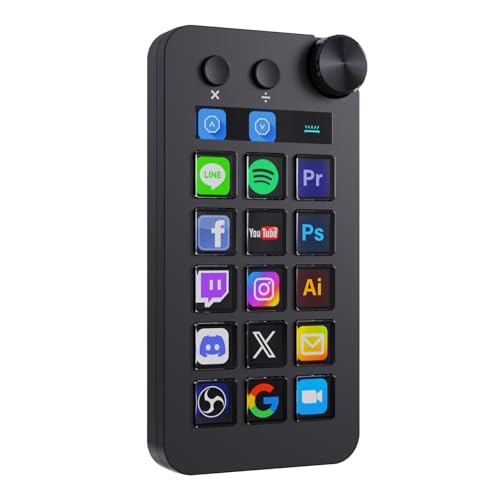
- 18 controls with LCD keys, clickable buttons, and a rotary knob
- Shortcut, calculator, and numeric keypad modes
- Profiles, automation, dynamic icons, and marketplace plugins
Best For: Multi-purpose studios needing streaming, production, and desktop controls
Best for Status Monitoring
Streonor S15 LCD Studio Control Deck

- 15 customizable LCD macro keys
- Three panels for system and status information
- Action flows, pages, GIF icons, and 100+ plugins
Best For: Studios that want controls plus real-time system information
Best Established Ecosystem

- 15 customizable LCD keys with visual feedback
- Triggers single or multi-action commands
- Plugins for OBS, Twitch, YouTube, Discord, Spotify, and more
Best For: Creators wanting a focused controller for streaming and production
Flexible Macro Control

- 10 customizable LCD macro keys
- Touch strip and four multifunction dials
- Plugin marketplace and one-touch actions
Best For: Creators wanting tactile controls alongside programmable LCD keys
Docking-Station Workflow

- Shortcut controls for creative and office apps
- 7-in-1 hub with card readers and 100W PD
- Compatible lighting control for selected products
Best For: Studios needing macro shortcuts plus expanded connectivity
Expanded LCD Shortcuts

- 15 customizable LCD macro keys
- Controls streaming, audio, apps, and lighting
- Removable stand with stable rubber feet
Best For: Creators who need many dedicated one-touch commands
Best for Large-Scale Live Production – Stream Deck XL
For professional studios needing broad access to stream control decks for professional studios, the Elgato Stream Deck XL provides 32 customizable LCD keys. It is designed for one-touch control of scenes, media, cameras, lighting, audio, and social posts across supported apps.
Best For: Studio operators who want many visible, independently programmable controls for complex live-production workflows.
Pros:
- 32 customizable LCD keys provide substantial control capacity.
- Supports integrations including OBS, vMix, Twitch, YouTube, 4KCU, Spotify, and VoiceMod.
- Visual feedback confirms when commands have been executed.
- Works with Windows 10 and macOS 10.13 via USB.
Cons:
- Its larger key count may be more than simple setups require.
- Configuration depends on compatible software and the Stream Deck app ecosystem.
The Stream Deck XL is a strong fit when a studio needs numerous physical shortcuts in a single controller. Its 32-key layout favors complicated productions over minimal desktop setups.
Best for Tactile Mixing and Precision – Stream Deck + XL
The Elgato Stream Deck + XL combines 36 macro keys with six multifunction dials and a touch strip, making it a versatile option among stream control decks for professional studios. The layout is suited to workflows where both shortcut access and precise adjustments matter.
Best For: Production teams working with audio, video switchers, DAWs, and other tools that benefit from tactile level and setting adjustments.
Pros:
- Offers 36 customizable macro keys for commands and multi-action sequences.
- Six multifunction dials support more precise adjustments.
- Touch strip displays information and provides swipe-based page access.
- Supports hundreds of integrations and custom profiles for different workflows.
Cons:
- Its expanded control surface may require more desk space than a compact deck.
- USB-C connectivity requires a compatible computer or cable setup.
With keys, dials, and a touch strip in one unit, the Stream Deck + XL is particularly compelling for studios that need both macro automation and hands-on control of levels or settings.
Best Compact Alternative – VSD M18 Macro Pad
The VSD M18 offers 18 programmable controls in a compact USB-C macro pad, giving smaller studios an accessible entry into stream control decks for professional studios. Its 15 LCD visual keys, three physical buttons, and multi-step macro support cover common streaming and production shortcuts.
Best For: Streamers, creators, and office-based production users who need customizable shortcuts without a larger control surface.
Pros:
- Combines 15 LCD visual keys with three physical buttons.
- Supports single actions, multi-step macros, text entry, app launches, and OBS scene switching.
- LCD keys accept JPG, PNG, and GIF images or animations.
- Works with Windows 11 and newer and macOS 11.0 and newer.
Cons:
- It has fewer controls than the larger Elgato models.
- Native Linux plug-and-play support is not available.
- Custom RGB tones require a device firmware upgrade.
The M18 is a practical choice for compact workstations and mixed streaming or office use. Its smaller key count limits expansion, but the programmable macros and visual icons keep frequently used actions easy to identify.
Best for Audio and Studio Control – Stream Deck +
The Elgato Stream Deck + combines LCD keys, a touch strip, and tactile dials in a studio-focused controller. For stream control decks for professional studios, it is especially useful when audio mixing, camera control, lighting, and production shortcuts need to share one interface.
Best For: Creators and studio operators who want an integrated controller for audio workflows, production commands, and compatible lighting or camera tools.
Pros:
- LCD keys, dials, and a touch strip provide tactile and visual control.
- Supports multi-actions and smart profiles for app-specific layouts.
- Unlocks Wave Link mixing and integrates with OBS, Camera Hub, Control Center, Twitch, and other tools.
- The Stream Deck app and store support drag-and-drop setup, plugins, icons, and audio assets.
Cons:
- It provides fewer keys than the Stream Deck XL models.
- Its USB-C, corded setup requires a wired connection.
The Stream Deck + is a well-rounded option for studios prioritizing hands-on audio and production control. Its mix of keys, dials, and touch interaction makes it more adaptable than a keypad focused only on shortcut triggering.
Most Versatile – TreasLin N1 18-Key Stream Controller Deck
For creators comparing stream control decks for professional studios, the TreasLin N1 stands out for its broad control options. It combines 15 visual LCD buttons, two clickable buttons, and a rotary knob, with shortcut, calculator, and numeric keypad modes for streaming, editing, and general desktop work.
Best For: Multi-purpose studio setups that need OBS controls, software shortcuts, numeric input, and custom workflows in one compact deck.
Pros:
- Offers 18 customizable controls, including LCD keys, clickable buttons, and a rotary knob.
- Supports dedicated profiles for OBS, Photoshop, DAWs, Premiere Pro, Blender, media, and daily tasks.
- Includes automation workflows, dynamic icons, and access to a marketplace with plugins, icons, profiles, and scenes.
- Works with Windows and macOS and connects through USB-C.
Cons:
- The feature-rich software and multiple operating modes may require more setup than a basic macro pad.
- Spotify integration requires an active Spotify Premium account.
The N1 is a flexible choice when a professional studio needs more than dedicated streaming buttons. Its numeric keypad mode, rotary control, and workflow automation make it especially useful for users moving between production, streaming, and everyday computer tasks.
Best for Status Monitoring – Streonor S15 LCD Studio Control Deck
The Streonor S15 is a practical option among stream control decks for professional studios, pairing 15 customizable LCD keys with three non-touch status displays. It is designed for quick access to OBS scenes, editing commands, application launches, and system information.
Best For: Windows and Mac users who want programmable production controls alongside at-a-glance weather, time, hardware, or system-performance information.
Pros:
- Provides 15 customizable LCD keys for shortcuts, app actions, OBS controls, and repeated tasks.
- Three status panels can display information such as CPU temperature, GPU status, memory usage, time, and weather.
- Supports separate pages for streaming, editing, office work, gaming, and other workflows.
- Offers action flows, GIF icons, custom layouts, and more than 100 plugins through its software.
Cons:
- Linux is not supported.
- Setup may require uninstalling similar controller software and downloading the latest STREONOR software.
- Some third-party integrations may require an account, subscription, or membership.
The S15 makes a strong case for studios where monitoring matters as much as triggering actions. Its dedicated status panels add useful visibility without giving up customizable keys for streaming, editing, and productivity.
Best Established Ecosystem – Elgato Stream Deck MK.2
The Elgato Stream Deck MK.2 is a straightforward choice for stream control decks for professional studios, offering 15 customizable LCD keys and visual feedback for each command. Its plugin support covers major streaming, production, communication, music, and smart-lighting platforms.
Best For: Content creators and studio operators who want a familiar 15-key controller for OBS, live production, editing, audio, social tools, and other app workflows.
Pros:
- Uses 15 customizable LCD keys with visual feedback after commands are triggered.
- Can launch single or multiple actions, adjust audio, mute a microphone, control lights, and publish social posts.
- Supports plugins for OBS, Twitch, YouTube, Discord, Spotify, Philips Hue, Elgato 4KCU, and more.
- Includes hotkey actions for film editing, music production, photography, and other workflows.
Cons:
- It has fewer physical controls than the TreasLin N1 and no supplied status-display panels.
- Its supplied feature set is centered on LCD keys rather than numeric keypad or calculator modes.
The MK.2 is a polished, focused controller for studios that prioritize reliable one-touch actions and broad plugin compatibility. It is particularly well suited to users already working across Elgato-supported streaming and production tools.
Flexible Macro Control – SOOMFON 10-Key Studio Deck
For creators comparing stream control decks for professional studios, the SOOMFON CN003 combines 10 customizable LCD keys with a touch strip and four multifunction dials. It is designed for quick access to apps, text, audio, and production controls from a Mac or Windows setup.
Best For: Streamers, editors, and multitaskers who want LCD shortcuts plus tactile dial controls.
Pros:
- Ten customizable LCD macro keys support static or animated icons.
- Touchscreen sliding helps navigate multiple control pages.
- Four multifunction dials can adjust volume, brightness, zoom, and other settings.
- Supports plugins and one-touch actions for launching apps, websites, text, and audio.
Cons:
- Requires Windows 10 64-bit or later, or macOS Catalina 10.15 or later.
- Spotify integration requires an active Spotify Premium account.
- The device should be evaluated against your preferred software and plugin workflow.
The CN003 is a well-rounded choice when your studio workflow benefits from both programmable displays and physical controls. Its four dials give it an advantage for adjustments that feel slower through on-screen menus.
Docking-Station Workflow – ULANZI D200H Studio Deck
The ULANZI D200H stands out among stream control decks for professional studios by combining programmable shortcut control with a 7-in-1 docking station. Its workflow is aimed at creators who need app commands, production presets, card transfers, charging, and selected lighting controls in one compact setup.
Best For: Mac and PC creators who want a shortcut deck integrated with storage, USB expansion, charging, and compatible studio lighting.
Pros:
- Presets and plugins support one-tap commands for streaming, editing, office apps, and more.
- Supports software including Photoshop, Premiere Pro, After Effects, DaVinci Resolve, and CapCut.
- Includes SD/TF card readers, USB ports, and 100W PD charging.
- Can control compatible ULANZI lights and Philips Hue lighting through Lightmaster.
Cons:
- Lighting control is limited to listed compatible ULANZI products and Philips Hue with a Bluetooth remote.
- The listed warranty is three months.
- Its 120 g design and LCD interface may not suit users seeking a larger dedicated control surface.
The D200H is most compelling when your studio needs a hub as much as a macro controller. The integrated connectivity reduces the need for separate card readers and USB accessories, while the software presets cover a broad range of creative tasks.
Expanded LCD Shortcuts – SOOMFON 15-Key Control Deck
For professional studios with many recurring commands, the SOOMFON CN001 provides 15 customizable LCD keys for controlling applications, audio, lighting, and social or streaming functions. Its removable stand and direct USB connection make it a straightforward desktop control option for Mac and PC users.
Best For: Streamers, video editors, photographers, and music creators who need more programmable buttons in a compact control deck.
Pros:
- Fifteen LCD keys provide more dedicated shortcuts than smaller macro decks.
- Supports actions such as launching posts, adjusting audio, muting the microphone, and controlling lights.
- Works with OBS Studio, Twitch, YouTube, Twitter, Spotify, Philips Hue, and other supported software.
- Removable stand and rubber feet help keep the controller stable on a desktop.
Cons:
- Requires Windows 10 64-bit or later, or macOS Big Sur 11.0 or later.
- Spotify integration requires an active Spotify Premium account.
- The supplied notes recommend using the original cable, a direct computer USB connection, and updated firmware.
The CN001 is a practical pick when button capacity matters more than built-in dials or a touch strip. Its 15 LCD keys can reduce window switching, making it particularly useful for workflows with numerous software and streaming commands.
How We Picked the Best Stream Control Decks for Professional Studios
We evaluated these decks as production tools rather than gaming accessories. Our comparison centered on the number and type of controls, customization options, software compatibility, physical usability, and how easily each model can fit into a professional desk setup.
LCD keys are useful when you need changing labels, profile switching, or visual confirmation of scenes and commands. Dials and touch strips add faster hands-on control for volume, color, zoom, and other adjustable settings. We also considered whether each deck is best suited to OBS, Twitch, YouTube, podcasting, video editing, or broader studio automation.
Quick Comparison
- Best for maximum one-touch control: Elgato Stream Deck XL Advanced Studio Controller, with 32 keys.
- Best for tactile adjustment: Elgato Stream Deck + XL and the standard Stream Deck +, which combine keys with dials and touch controls.
- Best mid-size options: The 15-key Elgato, Streonor, and SOOMFON models balance desk space and command access.
- Best budget-friendly flexibility: VSD, TreasLin, ULANZI, and SOOMFON macro decks offer programmable controls for smaller setups.
Key Buying Factors for Stream Control Decks for Professional Studios
Control Layout and Capacity
Count the actions you need during a typical session. Larger 32-key panels reduce profile switching, while 10- or 15-key decks take up less space and can work well when your commands are grouped into pages.
Keys, Dials, and Touch Controls
Keys are ideal for scenes, source toggles, transitions, and shortcuts. Dials are more efficient for continuous adjustments such as audio levels, while touch strips can provide quick navigation or secondary control. Choose the combination that matches your workflow.
Software and Integrations
Check support for your main applications before buying. OBS, broadcasting platforms, editing software, audio tools, and smart-device integrations may require dedicated plugins or configuration. Easy profile creation is especially valuable for studios with multiple shows or operators.
Desk Setup and Reliability
Review the footprint, cable arrangement, key visibility, and construction. A deck used daily should remain stable, readable, and easy to reach without obstructing monitors, microphones, or mixing equipment.
Who Should Buy Which Stream Control Decks for Professional Studios?
Choose the Elgato Stream Deck XL if you manage complex broadcasts and want the largest selection of immediately visible commands. Select the Stream Deck + or Stream Deck + XL if audio and continuous parameter control are central to your work.
The 15-key Elgato, Streonor, and SOOMFON models suit creators who want a balanced professional layout without a large footprint. VSD, TreasLin, and ULANZI options are worth considering for compact studios, secondary workstations, or buyers who want programmable controls at a lower cost. Before ordering, map your most-used actions and confirm that the deck’s software ecosystem supports the applications you use every day.