
The best stream control decks put frequently used actions within easy reach, helping you manage scenes, audio, apps, lighting, and shortcuts without interrupting your workflow.
We selected 10 options ranging from compact six-key controllers to full-size decks with dials, touch controls, and dedicated audio features. Use the guide below to choose the right layout, software support, and level of customization for your setup.
Best 10 Stream Control Decks Picks for 2026
Best All-Around Pick

- 15 customizable LCD keys
- Multi-actions and extensive plugins
- Works with Mac and PC
Best For: Everyday streaming and content-creation shortcuts
Best RGB Value
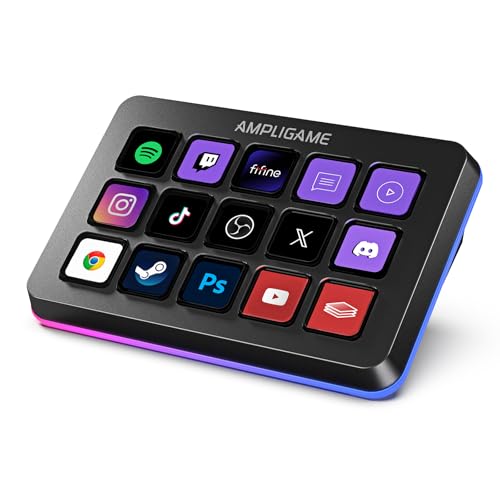
- 15 programmable LCD macro keys
- RGB ring with nine lighting modes
- Supports OBS, Streamlabs, and more
Best For: Windows-based streaming and multitasking setups
Best for Audio Control

- LCD keys, touch strip, and dials
- Designed for audio and studio control
- Supports Smart Profiles and Multi Actions
Best For: Creators who need tactile audio and production adjustments
Best for Large Workflows

- 36 customizable macro keys
- Six multifunction dials and touch strip
- Hundreds of integrations and custom profiles
Best For: Large, multi-application production workstations
Best for Feature-Rich Customization

- 10 LCD keys, 4 RGB knobs, and an interactive touch bar
- Multi-step macros, custom icons, and unlimited scene presets
- USB dock, ergonomic stand, and 500+ plugin ecosystem
Best For: Creators managing complex streaming, editing, and productivity workflows
Best Compact Budget Pick

- Six customizable LCD macro keys in a compact design
- Drag-and-drop setup with multi-action sequencing
- Works with Mac and PC and many popular apps
Best For: Beginners and desk-space-conscious users needing essential shortcuts
Best for Knob and Touch Control
Streonor S10 Stream Controller

- 10 LCD keys, touchscreen, and 4 programmable rotary knobs
- Multi-action macros and profiles for streaming, editing, and gaming
- 100+ plugins with Windows and Mac support
Best For: Creators who want tactile audio and timeline controls alongside macros
Best for Full-Scale Live Production
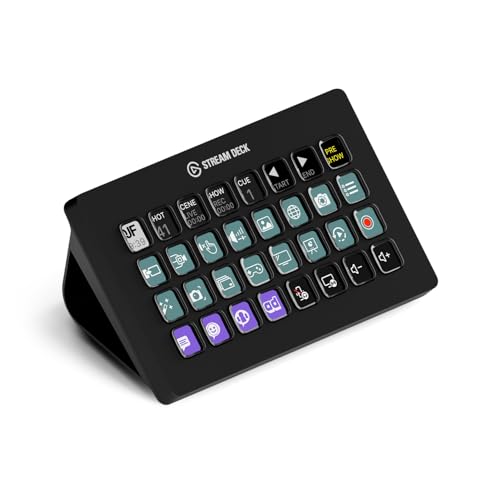
- 32 customizable LCD keys
- Broad streaming and production integrations
- Visual feedback for one-touch commands
Best For: Streamers and live producers managing many tools
Best for Flexible Macros and Dial Control

- Six customizable LCD keys
- Three physical control dials
- Windows and macOS compatibility
Best For: Streamers and multitaskers who use dials
Best for Compact 18-Key Macro Control

- 18 programmable keys with LCD visuals
- Supports multi-step macros
- Adjustable RGB surround light ring
Best For: PC and Mac users needing mid-size shortcut control
Best All-Around Pick – Elgato Stream Deck MK.2
The Elgato Stream Deck MK.2 is a practical choice for creators who want a compact set of stream control decks with dependable one-touch access to common commands. Its 15 customizable LCD keys can launch apps, adjust audio, mute a microphone, control lighting, and trigger actions in services such as OBS, Twitch, YouTube, Discord, and Spotify.
Best For: Streamers and creators who want a versatile 15-key controller for everyday production tasks.
Pros:
- 15 customizable LCD keys provide visual feedback for assigned commands.
- Supports multi-action shortcuts for streaming, social posts, audio, and lighting.
- Works with Mac and PC and offers a broad selection of plugins.
- Compact USB-C design includes a desktop stand.
Cons:
- Provides fewer physical controls than larger Stream Deck models.
- It is primarily a key-based controller without dedicated dials or a touch strip.
Choose this model if you want a straightforward, flexible entry point into programmable stream control decks. It balances useful customization and a compact footprint without adding specialized mixer hardware.
Best RGB Value – fifine D6 Macro Keyboard
The fifine D6 is a colorful option among stream control decks, combining 15 programmable LCD macro keys with a touchscreen-style visual interface and customizable RGB lighting. It supports OBS Studio, Streamlabs, Twitch, YouTube, Discord, editing software, and other multitasking workflows on Windows PCs.
Best For: Windows users who want programmable streaming controls with RGB personalization and broad multitasking support.
Pros:
- 15 customizable LCD macro keys display assigned applications or actions.
- Works with OBS, Streamlabs, Twitch, YouTube, Discord, games, and editing software.
- Offers nine controllable RGB lighting modes around the controller.
- Supports folders for organizing separate profiles or program-specific scenes.
Cons:
- The listed platform support is Windows rather than Mac.
- Firmware and software should be updated before initial use.
The D6 makes sense when visual customization and RGB lighting matter as much as shortcut access. Its folder support also gives users a practical way to organize controls across streaming, creative, and office tasks.
Best for Audio Control – Elgato Stream Deck +
The Elgato Stream Deck + expands stream control decks beyond standard macro keys with LCD keys, a touch strip, and tactile dials. It is designed for audio, video, lighting, and production work, while integrations with Wave Link, OBS, Twitch, YouTube, Discord, Spotify, and Philips Hue help centralize a creator’s setup.
Best For: Streamers and studio users who need tactile audio mixing and adjustable controls alongside programmable keys.
Pros:
- Combines LCD keys, a touch strip, and multifunction dials.
- Supports audio mixing, studio control, production tasks, and lighting adjustments.
- Multi Actions and Smart Profiles can automate sequences and switch layouts by app.
- Works with Mac and PC through the Stream Deck app and plugin store.
Cons:
- Its extra controls may be more than needed for simple macro triggering.
- It has fewer standard macro keys than the Stream Deck + XL.
If audio adjustment is central to your workflow, the dials and touch strip make this a more hands-on choice than a conventional macro pad. It is especially suited to users building a compact studio or production console.
Best for Large Workflows – Elgato Stream Deck + XL
The Elgato Stream Deck + XL is built for complex setups that need more room than compact stream control decks. It combines 36 customizable macro keys, six multifunction dials, and an expanded touch strip, with custom profiles and integrations for video, audio, creative, and other production tools.
Best For: Power users managing large streaming, studio, editing, or live-production workflows.
Pros:
- Provides 36 customizable macro keys for extensive command access.
- Six multifunction dials enable more precise adjustments.
- The touch strip displays information and supports page navigation by swiping.
- Supports hundreds of integrations and unlimited custom profiles.
Cons:
- Its larger footprint and 2.4-pound weight require more desk space.
- The expanded control surface may be excessive for basic streaming shortcuts.
The + XL is the strongest fit when you regularly switch between many commands, applications, or users. Its combination of high key count, dials, touch navigation, and profiles is intended for a dedicated production workstation rather than a minimal setup.
Best for Feature-Rich Customization – VSD N4 Pro Stream Controller
The VSD N4 Pro is one of the more feature-packed stream control decks in this roundup, combining 10 customizable LCD keys, four RGB knobs, and an interactive touch bar. It suits creators who want programmable macros, visual customization, audio controls, and extra USB connectivity in one desktop controller.
Best For: Streamers, editors, gamers, and office users who want extensive customization and multi-scene profiles.
Pros:
- Ten LCD keys support individual or multi-step actions with custom JPG, PNG, and GIF icons.
- Four RGB knobs, a touch bar, and adjustable lighting provide multiple control options.
- Includes a USB dock, foldable ergonomic stand, and access to more than 500 plugins.
- Works with Windows 10 or later and macOS 11.0 or later through USB-C.
Cons:
- The USB soundboard sends commands to the computer but has no built-in speakers.
- Its broader feature set may be more than users need for simple shortcut control.
The N4 Pro is a strong choice when you want a customizable control center rather than a basic macro pad. Its combination of keys, knobs, touch controls, profiles, and expansion options is particularly useful for complex streaming and editing setups.
Best Compact Budget Pick – Elgato Stream Deck Mini
The Elgato Stream Deck Mini is a compact stream control deck for users who want straightforward shortcut automation without taking up much desk space. Its six LCD keys use drag-and-drop software, support multi-action sequences, and integrate with popular meeting, office, creative, and music applications.
Best For: Beginners and users who need a small, easy-to-configure controller for common commands.
Pros:
- Six customizable LCD keys provide one-tap access to shortcuts and commands.
- Drag-and-drop setup is designed to be user-friendly.
- Supports multi-action sequences with precise timing.
- Works with Mac and PC and integrates with apps such as Zoom, Teams, Office, Photoshop, and Spotify.
Cons:
- Six keys offer less room for controls than larger decks.
- Uses a Micro USB connection rather than USB-C.
The Stream Deck Mini is a practical entry point for stream control decks. It prioritizes a compact design and simple setup, making it suitable for everyday shortcuts, meetings, presentations, and basic streaming commands rather than highly expansive control layouts.
Best for Knob and Touch Control – Streonor S10 Stream Controller
The Streonor S10 is a versatile stream control deck built around 10 LCD keys, an integrated touchscreen, and four programmable rotary knobs. It is designed for users who want quick macros alongside tactile control over audio, zoom, scrolling, media playback, or editing timelines.
Best For: Streamers, video editors, and multitaskers who need keys, touchscreen controls, and physical knobs in one console.
Pros:
- Combines 10 customizable LCD keys, a touchscreen, and four programmable knobs.
- Supports multi-action macros for app launches, OBS scenes, audio, and other commands.
- Offers profiles for streaming, editing, music, office work, and gaming.
- Includes access to more than 100 plugins, icon packs, GIF icons, and layouts.
Cons:
- Linux is not supported; compatibility is limited to Windows 10 64-bit or later and macOS Big Sur 11.0 or later.
- Some third-party services may require an active account or subscription.
- Setup may require uninstalling similar controller software.
The S10 stands out among stream control decks for its combination of physical knobs and touchscreen interaction. It is a compelling fit for demanding workflows where adjusting levels, timelines, or media controls is as important as triggering shortcuts.
Best for Full-Scale Live Production – Elgato Stream Deck XL
The Elgato Stream Deck XL is one of the most capable stream control decks for creators who need many commands immediately available. Its 32 customizable LCD keys can launch apps, switch scenes, adjust audio, control lighting, and trigger other actions with visual feedback.
Best For: Streamers, live producers, and multi-app setups that benefit from a large command layout.
Pros:
- 32 customizable LCD keys provide extensive control without paging through menus.
- Integrates with OBS, Twitch, YouTube, Discord, Spotify, vMix, VoiceMod, and more.
- Supports one-touch scene changes, camera switching, media launching, lighting, audio, and social posts.
- Works with Windows 10 and macOS 10.13 or later and includes a magnetic stand.
Cons:
- The large 32-key layout may be more controller than a simple setup requires.
- Its USB-powered design requires a wired connection.
Choose the Stream Deck XL when capacity and broad integration matter most. It is particularly useful for complex broadcasts where keeping many controls visible can speed up live production.
Best for Flexible Macros and Dial Control – ActionRing Stream Controller
The ActionRing Stream Controller is a versatile stream control deck with six customizable LCD keys and three dials. It can trigger single commands or ordered macro sequences for streaming, gaming, media control, office work, and creative applications.
Best For: Users who want a compact controller combining programmable keys, visual icons, and physical dials.
Pros:
- Six LCD keys support custom actions plus JPG, PNG, and GIF images or animations.
- Three dials provide hands-on control for volume and playback functions.
- Action Flow can run multiple macro actions in a selected order.
- Compatible with Windows and macOS and supports OBS, YouTube, Discord, PowerPoint, Adobe Premiere Pro, and other software.
Cons:
- Six keys offer less immediately accessible capacity than larger decks.
- Its many productivity plugins may require setup before they fit a specific workflow.
The ActionRing is a practical middle ground for buyers who prefer dials alongside programmable buttons. It suits mixed streaming and productivity use, especially when media adjustments are frequent.
Best for Compact 18-Key Macro Control – VSD M18 Macro Pad
The VSD M18 is a compact stream control deck with 18 programmable keys, including 15 LCD visual keys and three physical buttons. It supports one-tap commands and multi-step macros for OBS scenes, app launches, media playback, editing, gaming, and office workflows.
Best For: PC and Mac users who want a moderate number of customizable controls with RGB accent lighting.
Pros:
- 18-key layout balances shortcut capacity with a smaller footprint than full-size decks.
- LCD keys support JPG, PNG, and GIF images or animations for function identification.
- Operation Follow can run multiple macro steps in a chosen order or simultaneously.
- USB-C connectivity, RGB surround lighting, and built-in plugins add practical desktop features.
Cons:
- It requires Windows 11 or newer or macOS 11.0 or newer.
- Native Linux plug-and-play support is not available.
- The RGB light ring may be unnecessary for users seeking a purely functional controller.
The VSD M18 is a strong fit when six keys are too limiting but a 32-key deck feels excessive. Its visual keys and macro support make it adaptable for streaming, gaming, creative work, and everyday shortcuts.
How We Picked These Stream Control Decks
We compared these Stream Control Decks by looking at programmable key count, display feedback, software compatibility, audio controls, physical layout, and likely use case. Models from Elgato, Fifine, VSD, Streonor, and ActionRing cover a wide range of needs, from simple shortcut access to more advanced streaming and studio control.
We also considered how easily each type of deck can fit into a real desk setup. A compact controller may be better for a small workspace, while a larger model can reduce the need for multiple keyboard shortcuts or separate mixer controls.
Quick Comparison
| Best For | Look For | Typical Advantage |
|---|---|---|
| Beginners and small desks | Six to 15 programmable keys | Simple setup and low footprint |
| Frequent streamers | LCD keys, profiles, and plugin support | Fast access to scenes and apps |
| Audio-focused creators | Dials, touch strips, and mixer controls | More precise volume adjustment |
| Complex production workflows | 32 or more keys and multiple profiles | Fewer menu layers and keyboard shortcuts |
Key Buying Factors for Stream Control Decks
Number and Type of Controls
More keys are useful when you manage many scenes, sources, applications, or commands. However, a smaller deck can be faster to learn and easier to position. LCD keys add visual labels, while conventional macro buttons may offer a simpler, more keyboard-like experience.
Software and Compatibility
Check whether the controller works with your operating system, streaming software, conferencing apps, music tools, and smart-home services. Profile support is especially useful if you switch between streaming, editing, gaming, and office work.
Audio and Physical Controls
If you adjust microphone, game, music, or call volume often, prioritize models with dials, touch controls, or dedicated mixer functions. For basic scene switching and shortcuts, programmable keys may be all you need.
Desk Space and Connection
Measure the available area before choosing an XL or 32-key model. Also confirm the connection type, cable length, and whether the deck is powered directly through USB. A stable, accessible position is more important than having controls you cannot comfortably reach.
Who Should Buy Which Stream Control Decks?
Choose a compact deck if you are new to macro controllers, have limited desk space, or mainly need scene changes and a few application shortcuts.
Choose a 15-key model if you want a balanced option for streaming, productivity, and gaming. This size usually provides enough room for common commands without dominating the desk.
Choose a deck with dials or touch controls if audio mixing is central to your workflow. These controls can be more convenient than repeatedly opening software mixers.
Choose an XL or high-key-count controller if you run complicated broadcasts, use many applications, or want direct access to a large library of commands. Before buying, make sure the added capacity justifies the extra space and setup time.