
Long streaming sessions are easier to manage when essential actions are available from dedicated keys, dials, and touch controls instead of buried in menus. The right panel can reduce repetitive mouse movement and make scene changes, audio adjustments, and shortcuts more consistent.
This roundup compares 10 streaming control panels for long sessions, ranging from compact macro pads to larger consoles with LCD keys, touchscreen interfaces, and rotary controls. Use the guide below to match features with your setup, software, and endurance needs.
Best 10 Streaming Control Panels for Long Sessions Picks for 2026
Premium Editing Hub
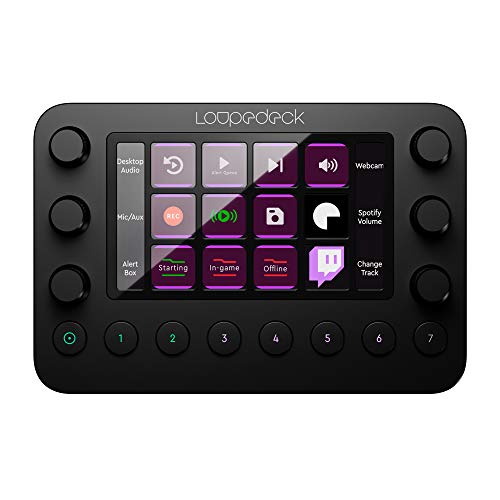
- Haptic dials and LED touchscreen
- Profiles for streaming and creative apps
- Compact aluminum construction
Best For: Streamers and editors needing tactile, cross-application controls
Ergonomic Macro Pad

- 15 programmable shortcut keys
- 500+ plugins and 200+ icons
- Five-step adjustable stand
Best For: Users wanting simple wired macro control for long sessions
Touchscreen Production Console

- LCD keys, touchscreen, and four knobs
- Deep OBS Studio integration
- USB hub and adjustable stand
Best For: Live producers needing varied controls and automation
High-Capacity Visual Pad

- 32 programmable macro keys
- Real-time visual function feedback
- Lightweight ergonomic design
Best For: Multitaskers needing many visible shortcuts
Reliable Macro Control
Visible Stream Controller 18-Key LCD Macro Pad

- 15 programmable keys with layered virtual pages
- Supports OBS, music, chat, editing, and productivity apps
- Adjustable stand designed for extended desktop use
Best For: Streamers who want focused, reliable macro control
Expanded Deck Control
Mars Gaming MSD-PRO Control Deck

- 10 LCD keys plus four clickable precision dials
- Extended touchscreen displays profiles and metrics
- Built-in USB hub adds three peripheral ports
Best For: Creators needing tactile controls and USB expansion
Profile-Rich Control
ULANZI D200 U-Studio Macro Pad

- 14 LCD keys with up to 10 secondary pages
- Dedicated CPU, GPU, and clock monitoring key
- Free U-Studio software with plugins and community presets
Best For: Multi-app creators who need flexible profiles
Wide-Format Workflow Hub

- 32 programmable LCD shortcut keys
- One-touch audio, lighting, and streaming controls
- Supports PC and OS X workflows
Best For: Creators needing a broad, highly visible shortcut layout
Balanced Studio Control

- 15 customizable LCD keys
- Supports OBS, Discord, and creative workflows
- Compact design with tactile operation
Best For: Streamers wanting a versatile mid-size control panel
Compact Profile Switcher

- 10 customizable LCD keys
- Supports 100+ shortcuts with profiles
- App-based profile switching
Best For: Space-conscious streamers managing multiple applications
Premium Editing Hub – Loupedeck Live
For creators who want streaming control panels for long sessions, the Loupedeck Live combines customizable buttons, haptic dials, and an LED touchscreen in a compact aluminum console. Native profiles for OBS Studio, Streamlabs on Windows, Twitch, and several creative applications make it a flexible choice for streaming and editing workflows.
Best For: Streamers and creative professionals who want tactile controls for broadcasting, editing, media, and operating-system tasks.
Pros:
- Offers customizable buttons, dials, LED touchscreen controls, pages, and workspaces.
- Includes ready-made profiles for OBS Studio, Streamlabs on Windows, Twitch, Ecamm, vMix, Spotify, and creative software.
- Aluminum construction and haptic analog dials provide tactile feedback during repeated adjustments.
- Supports custom actions, macros, app launching, volume control, brightness adjustment, and web-page shortcuts.
Cons:
- Some listed integrations are platform-specific, such as Streamlabs on Windows and Capture One Pro on macOS.
- Its compact control surface may provide fewer dedicated controls than larger panels.
The Loupedeck Live is a strong all-around option when tactile dial control and broad software support matter more than having a large number of dedicated keys. Its customizable profiles can reduce repetitive actions across long streaming or editing sessions.
Ergonomic Macro Pad – Stream Control Deck 15-Key
The Stream Control Deck is a straightforward option for shoppers seeking streaming control panels for long sessions. Its 15 programmable keys, built-in icons, plugin library, and five-step adjustable stand are designed for one-click shortcuts while helping you position the pad comfortably on a desktop.
Best For: Streamers, gamers, designers, and office users who prefer programmable keys and a wired Windows or Mac setup.
Pros:
- Provides 15 fully assignable keys for macros, shortcuts, and custom commands.
- Includes access to 500+ plugins and 200+ ready-to-use icons.
- Five-step adjustable stand supports different viewing and operating angles.
- USB-C wired connectivity is intended to provide a stable, lag-free connection without wireless disconnections.
Cons:
- The product uses a wired connection, so it requires a cable on the desktop.
- Its control layout centers on programmable keys rather than dials or a touchscreen.
- Although marketed for Windows and Mac, the details specify Windows 10 as the minimum required operating system version.
This macro pad is a practical choice for users who mainly need reliable one-touch commands and an adjustable angle. It is less suited to workflows that depend on tactile rotary controls or extensive screen-based navigation.
Touchscreen Production Console – CINETREAK CT-SD10
The CINETREAK CT-SD10 brings multiple interaction styles to streaming control panels for long sessions, combining 10 customizable LCD keys, a touchscreen, and four push-capable rotary knobs. Its OBS Studio support, macro system, USB hub, and adjustable stand make it suited to hands-on live-production workflows.
Best For: Streamers and creators who want touchscreen navigation, rotary adjustments, OBS controls, and automated multi-step actions.
Pros:
- Combines 10 LCD keys, touchscreen gestures, and four metal rotary knobs with push functionality.
- Supports OBS Studio controls for scenes, sources, streaming status, and virtual camera functions.
- Macro tools can combine applications, shortcuts, text input, and multimedia commands.
- Includes 200+ plugins, automatic profile switching, a three-port USB hub, and a 0–60° adjustable stand.
Cons:
- The supplied information does not specify the supported operating systems.
- Its feature-rich interface may require more setup than a basic programmable keypad.
With keys, touch navigation, knobs, macros, and OBS-focused controls, the CT-SD10 is the most production-oriented option in this group. It is particularly appealing if you regularly adjust several types of settings rather than triggering only simple shortcuts.
High-Capacity Visual Pad – Sisyeuo 32-Key Panel
The Sisyeuo visual control panel targets shoppers comparing streaming control panels for long sessions who want many programmable commands in one surface. It offers 32 customizable keys with visual function feedback, plus a lightweight, ergonomic design intended for streaming, editing, gaming, and general productivity.
Best For: Content creators, gamers, programmers, and multitaskers who need a large bank of customizable macro keys.
Pros:
- Provides 32 fully programmable keys for shortcuts and complex macros.
- Visual feedback displays functions in real time, reducing guesswork during use.
- Designed for extended use with a lightweight and ergonomic form.
- Suitable for home offices, gaming stations, and mobile work setups with plug-and-play positioning.
Cons:
- The supplied notes do not identify the specific connection type or supported operating systems.
- Software integrations, plugins, and included icons are not detailed.
- The listed manufacturer warranty is 90 days from the date of purchase.
This panel stands out for its 32-key capacity and visual feedback, making it worth considering when numerous shortcuts are more important than dials or touchscreen controls. Confirm compatibility and connection details before buying, since those specifications are not provided in the supplied information.
Reliable Macro Control – Visible Stream Controller 18-Key LCD Macro Pad
For creators who want straightforward streaming control panels for long sessions, the Visible Stream Controller emphasizes programmable shortcuts over decorative lighting. Its 15 keys, layered profiles, adjustable stand, and USB-C connection make it a practical way to manage scenes, apps, music, and messages from one compact desktop device.
Best For: Streamers and creators who prioritize reliable, distraction-free macro control and ergonomic positioning.
Pros:
- 15 programmable keys support shortcuts, text strings, app launches, and multi-action macros.
- Infinite layers expand the physical keys into hundreds of commands across virtual pages.
- Works with OBS, Twitch, YouTube, Discord, Spotify, Photoshop, Zoom, and other listed apps.
- Three stand angles and a non-slip base support more comfortable extended use.
Cons:
- No RGB or decorative lighting for users seeking a more visual setup.
- Requires companion software for customization.
- The wired USB connection may be less convenient than wireless control.
This is a strong fit when dependable shortcuts and profile depth matter more than extra controls or lighting. The adjustable stand and broad app compatibility make it especially suitable for lengthy broadcasts and productivity workflows.
Expanded Deck Control – Mars Gaming MSD-PRO Control Deck
The Mars Gaming MSD-PRO is one of the more feature-rich streaming control panels for long sessions, combining LCD keys, four clickable dials, an extended touchscreen, and an integrated USB hub. It is designed for creators who want hands-on control over streaming, audio, editing, and connected accessories.
Best For: Streamers, editors, and music or design users who need dials, touchscreen navigation, and extra USB connectivity.
Pros:
- Ten customizable LCD keys can launch apps, trigger scenes, run scripts, and play sound effects.
- Four 360-degree clickable dials provide volume, mute, playback, zoom, and fine-adjustment control.
- Extended touchscreen supports profile browsing, confirmations, and at-a-glance metrics.
- Built-in hub adds two USB 3.0 ports and one USB-C port for peripherals.
Cons:
- Its larger feature set may be more than users need for simple shortcut control.
- Listed software compatibility is limited to Windows and macOS.
- The supplied details indicate an included AA battery, which adds a maintenance consideration.
Choose the MSD-PRO when physical dials and accessory ports are as important as programmable keys. Its adjustable base and touchscreen make it a versatile command center for complex, long-duration creative sessions.
Profile-Rich Control – ULANZI D200 U-Studio Macro Pad
The ULANZI D200 offers a compact approach to streaming control panels for long sessions, with 14 LCD keys, multiple pages, nested folders, and a dedicated status key. Its U-Studio software is intended to simplify setup while keeping streaming, editing, office, and monitoring functions on one wired macro pad.
Best For: Streamers and multi-app creators who want many reusable profiles plus live system information.
Pros:
- Thirteen customizable LCD buttons plus a status key provide one-tap action control.
- Up to 10 secondary pages and unlimited folders support separate app layouts.
- Dedicated key shows real-time CPU load, GPU load, and time without alt-tabbing.
- U-Studio includes plug-ins, community presets, and lifetime updates without a subscription.
Cons:
- Requires a wired USB connection.
- Compatibility is specified for Windows 10 or later and macOS 10.13 or later.
- The listed warranty description is only three months.
The D200 stands out for creators who switch frequently between applications and want system monitoring available at a glance. Its page and folder structure gives the compact 14-key layout considerable workflow flexibility.
Wide-Format Workflow Hub – 32-Key LCD Desk Controller
For creators comparing streaming control panels for long sessions, the Dpofirs Desk Controller emphasizes visual feedback and a generous 32-key layout. Its programmable LCD buttons can trigger streaming, audio, lighting, editing, and other shortcuts without repeatedly switching windows.
Best For: Streamers and editors who want many visible shortcuts on a single desktop control panel.
Pros:
- 32 programmable LCD keys support customizable images and operation triggers.
- One-touch controls can handle volume, microphone muting, social posting, and lighting.
- Supports PC software and OS X, with compatibility listed for Windows 10 64-bit and newer versions.
- ABS construction is designed to be lightweight and portable.
Cons:
- The larger 32-key format may occupy more desk space than a compact keypad.
- The listed warranty is limited to 90 days.
This is the most expansive option of the three for users who need numerous visible commands. It is particularly practical for complex streaming, editing, or audio-production setups where reducing window switching matters.
Balanced Studio Control – 15-Key LCD Streaming Keypad
The Studio Controller offers a middle ground for streaming control panels for long sessions, combining 15 customizable LCD keys with a compact design. It is built for quick access to OBS, Discord, audio, lighting, editing, and other frequently used actions.
Best For: Streamers and creative professionals who want a balanced number of controls without a larger 32-key panel.
Pros:
- Each of the 15 keys displays titles and images for more intuitive operation.
- Single-touch macros can execute one or multiple actions.
- Compatible with OBS, Discord, and other popular platforms.
- Compact, lightweight construction and tactile clicking suit extended sessions.
Cons:
- Fewer physical keys than the 32-key Dpofirs controller.
- The listed warranty is limited to 90 days.
With its moderate key count and focus on responsive operation, this model is a practical choice for a home streaming setup or creative workstation. It should suit users who want visible macro control while keeping the controller relatively compact.
Compact Profile Switcher – 10-Key LCD Stream Controller
For buyers seeking compact streaming control panels for long sessions, this 10-key visual keyboard focuses on quick access and flexible profiles. Its LCD keys support custom images, while profile switching helps organize commands for streaming, communication, photography, and editing applications.
Best For: Streamers with limited desk space who value app-specific profiles and a compact shortcut layout.
Pros:
- 10 customizable LCD keys can display user-provided image files.
- Supports more than 100 shortcuts across the 10-key layout.
- Works with OBS Studio, Streamlabs, Discord, Lightroom Classic, Photoshop, After Effects, Illustrator, and Final Cut Pro.
- Smart profile switching can change layouts based on the detected app.
Cons:
- Only 10 physical keys are available, so multiple commands may require profiles or layers.
- The supplied details do not list included components.
This controller is the most compact and application-focused option in the group. Its profile features make it appealing for multitasking across several supported programs, although users who prefer many dedicated physical keys may want a larger model.
How We Picked These Streaming Control Panels for Long Sessions
We focused on controls that matter during extended broadcasts and production work: programmable keys, readable displays, shortcut flexibility, audio access, software compatibility, and physical comfort. We also considered whether each design offers useful feedback through LCD labels, touchscreens, RGB lighting, or adjustable positioning.
Because the lineup includes both established consoles and generic macro pads, buyers should verify current software support, plug-in availability, operating-system compatibility, and the exact number of included controls before ordering. Feature names and bundled accessories can vary by seller or region.
Quick Comparison
| Best for | Look for | Why it helps on long sessions |
|---|---|---|
| Frequent scene switching | Many programmable LCD keys | Reduces menu navigation and shortcut memorization |
| Audio-heavy workflows | Physical dials or knobs | Enables faster volume and mix adjustments |
| Mixed creative work | Profiles and layered actions | Lets one panel handle streaming, editing, and productivity |
| Small desks | Compact footprint and adjustable stand | Keeps controls accessible without crowding the workspace |
Key Buying Factors for Streaming Control Panels for Long Sessions
Comfort and Layout
Choose a panel that keeps commonly used actions within easy reach. An adjustable stand can improve viewing angles, while rotary dials are often more comfortable than repeated keyboard shortcuts for volume, zoom, or timeline control. Check the panel’s footprint and cable placement before buying.
Keys, Screens, and Feedback
LCD keys can display icons or labels, making profiles easier to recognize at a glance. Touchscreens provide more flexible layouts but may require more setup. Consider whether you prefer tactile buttons, illuminated feedback, touch controls, or a combination of these.
Software and Integrations
Confirm support for your streaming and production apps, such as OBS, before purchase. Useful features may include multi-action macros, profile switching, plug-ins, custom icons, and application-specific layouts. A panel with many keys is less valuable if its configuration software is difficult to use or poorly supported.
Reliability and Setup
For long sessions, stable USB connectivity, responsive inputs, readable labeling, and dependable software matter more than decorative lighting. Look for a sturdy base and check whether the product includes the stand, cable, and required software rather than assuming accessories are bundled.
Who Should Buy Which Streaming Control Panels for Long Sessions?
Choose a larger LCD-key panel if you regularly manage multiple scenes, sources, chat actions, and audio tasks. Models with dials are particularly useful for creators who adjust several volume levels throughout a broadcast. A compact 10- or 15-key macro pad is a better fit for beginners, smaller desks, or users who need only core actions such as start, stop, mute, and scene changes.
If you also edit photos, video, or audio, prioritize profiles, layered shortcuts, and customizable knobs so the controller remains useful beyond streaming. Buyers who want a dedicated OBS-focused setup should verify integration details first, while those seeking broad productivity use may prefer a panel with flexible macro software and application profiles.