
Professional streaming setups depend on fast, repeatable control. The right panel can put scene changes, audio adjustments, camera switching, and production macros within easy reach.
We selected 10 control-focused options spanning dedicated switchers, LCD macro decks, MIDI-style controllers, and audio interfaces. Use the guide below to match features, software compatibility, and desk space to your studio workflow.
Best 10 Streaming Control Panels for Professional Studios Picks for 2026
Live Production T-Bar Control

- Smooth T-bar for live transitions
- Built-in vMix template
- Customizable, durable USB design
Best For: Hands-on vMix switching and live production
Macro and Audio Command Deck

- LCD keys, knobs, and touch bar
- One-tap chained macros
- USB-C with Windows and macOS support
Best For: Multi-purpose streaming and editing automation
App-Controlled RGB Lighting Panel
NEEWER 18.3-inch RGB LED Panel

- 60W RGB output with CRI/TLCI 97+
- 2500K–8500K color temperature range
- App control and 17 lighting effects
Best For: Color-accurate streaming and video lighting
USB Audio and Monitor Control
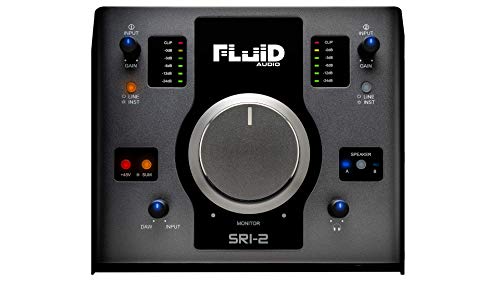
- 2x2 USB audio interface
- Monitor controller for two speaker pairs
- 192 kHz support with 48V phantom power
Best For: Compact studio recording and monitoring
Best LCD Macro Deck
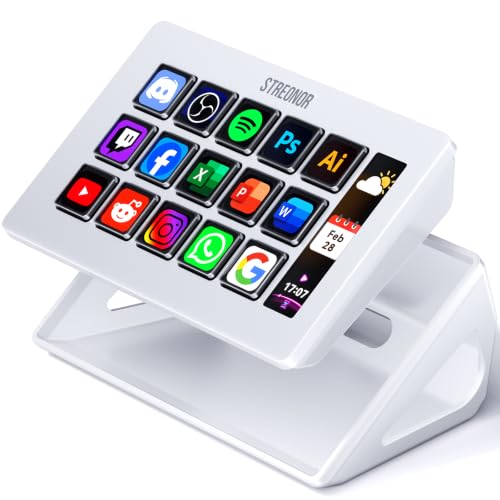
- 15 customizable LCD shortcut keys
- Three panels for real-time status information
- Preset pages and 100+ plugin support
Best For: Streamers and editors needing visual macro control
Best Live Audio Mixer

- DSP sound card with noise reduction
- Two-person broadcast support
- EQ, monitoring, tones, and voice effects
Best For: Podcasters and streamers prioritizing audio control
Best Modular MIDI Surface

- Four faders, knobs, and Hall effect buttons
- 14-bit MIDI, SysEx, NRPN, and HID support
- RGB feedback and modular expansion
Best For: Music, editing, and advanced tactile control setups
Flexible Shortcut Control

- 10 customizable LCD keys
- Dynamic application-based profiles
- PC and OS X compatible
Best For: Streamers and creative professionals needing compact shortcut control
Compact Broadcast Switching

- 8-channel video switching
- 4-way mixer and 16 switching keys
- USB connection for production software
Best For: Live broadcast and multi-camera production setups
High-Density Macro Control
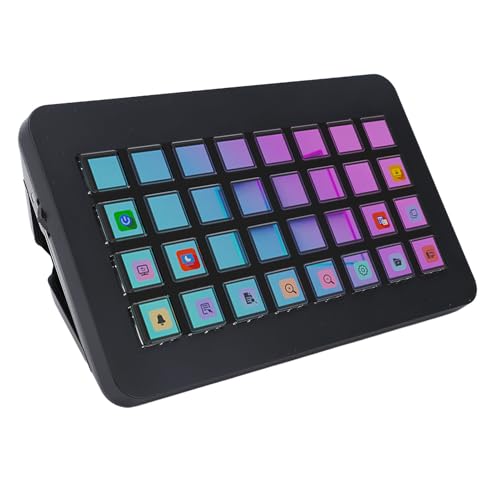
- 32 programmable LCD keys
- One-touch creator and studio controls
- Designed for PC and OS X workflows
Best For: Creators needing extensive macro and shortcut access
Live Production T-Bar Control – X-keys XKE-124
X-keys XKE-124 T-bar USB Video Switcher for vMix & Central Control Live Streaming
Check Price On AmazonFor studios looking for streaming control panels for professional studios, the X-keys XKE-124 focuses on tactile video switching and smooth transitions. Its USB connection, vMix template, customizable keys, and dedicated T-bar make it a practical choice for live production workflows.
Best For: Live streamers and studio operators who need hands-on vMix scene and transition control.
Pros:
- Smooth-action T-bar supports hands-on transitions.
- Built-in vMix template helps simplify setup.
- Heavy-duty aluminum case and USB power suit regular studio use.
- Keys can be added or repositioned to match individual workflows.
Cons:
- Designed primarily for PC use.
- Its specialized video-switching layout may be more than needed for basic streaming.
The X-keys stands out when physical transition control matters more than a general-purpose macro deck. It is a focused, durable panel for operators who want customizable tactile controls in a vMix-centered setup.
Macro and Audio Command Deck – VSD N4 Pro
The VSD N4 Pro is a versatile option among streaming control panels for professional studios, combining LCD keys, RGB knobs, a touch bar, and programmable macros. It is built for creators who want to trigger multi-step actions, control audio commands, and switch between saved workflows from one USB-C device.
Best For: Streamers, editors, and production teams managing repeatable shortcuts, scenes, app launches, and audio commands.
Pros:
- Ten customizable LCD keys, four RGB knobs, and an interactive touch bar provide flexible control.
- One-tap macros can trigger chained operations without coding.
- Supports Windows 10+ and macOS 11.0+ through USB-C.
- Built-in USB dock and adjustable stand add desktop convenience.
Cons:
- Audio functionality sends commands to the computer and does not include built-in speakers.
- Full functionality depends on the VSDinside plugin ecosystem.
- The plastic enclosure may be less rugged than an aluminum studio controller.
Choose the N4 Pro if your studio needs one customizable surface for streaming, editing, gaming, and office automation. Its broad feature set is useful, though users should account for software and plugin setup when planning the workflow.
App-Controlled RGB Lighting Panel – NEEWER 18.3-inch RGB LED Panel
For studios treating lighting as part of the control workflow, this NEEWER panel complements streaming control panels for professional studios with app-based color and effect management. It offers adjustable hue, brightness, and color temperature, plus high color-rendering ratings for video, portraits, and live backgrounds.
Best For: YouTube studios, streamers, and videographers who need flexible RGB lighting with app or onboard control.
Pros:
- 60W output, 120-degree beam angle, and CRI/TLCI 97+ support accurate, broad illumination.
- Hue, brightness, and color temperature are adjustable across wide ranges.
- Seventeen built-in special effects support creative scenes.
- Can be controlled from the rear panel or compatible Android and iOS app.
Cons:
- NP-F batteries are not included.
- The built-in diffuser is non-detachable.
- It is not water resistant.
This light is a strong studio accessory when consistent color and programmable effects are important. Its app support and two preset groups make it convenient for repeatable setups, while the included power adapter supports mains-powered sessions.
USB Audio and Monitor Control – Fluid Audio SRI-2
The Fluid Audio SRI-2 brings audio routing and monitor management into the same compact unit, making it a practical companion to streaming control panels for professional studios. Its two-channel interface, Class A microphone preamps, phantom power, and large volume knob support recording, monitoring, podcasting, and streaming.
Best For: Small studios and mobile creators who need USB recording plus convenient control of two speaker pairs.
Pros:
- Combines a USB audio interface with a monitor controller.
- Supports recording and mixing up to 192 kHz.
- Includes two Class A mic preamps and 48V phantom power.
- Large volume control and aluminum interface provide straightforward operation.
Cons:
- Two-channel I/O may limit larger multi-microphone productions.
- Its main focus is audio, not video switching or general macro control.
- USB power may require careful planning in a more complex studio rig.
The SRI-2 is best viewed as an audio-focused control hub rather than a complete streaming command deck. It makes sense for creators who prioritize clean monitoring, microphone connectivity, and a compact interface that can travel between sessions.
Best LCD Macro Deck – S15 Stream Controller
For creators comparing streaming control panels for professional studios, the STREONOR S15 is a practical shortcut and status-monitoring deck. Its 15 customizable LCD keys can handle OBS scenes, app actions, hotkeys, and editing commands, while three display panels show supported system information.
Best For: Streamers, video editors, and productivity-focused users who want customizable visual keys and separate status displays.
Pros:
- 15 customizable LCD keys support shortcuts, OBS controls, plugins, and action flows.
- Three status panels can display information such as time, weather, CPU temperature, GPU status, and memory usage.
- Preset pages can separate streaming, editing, office, and gaming workflows.
- Compatible with Windows 10 64-bit or later and macOS Big Sur 11.0 or later.
Cons:
- Linux is not supported.
- Setup requires the STREONOR software and direct USB connection for smoother operation.
- Some third-party integrations may require an account, subscription, or membership.
The S15 is best suited to a studio that values visual feedback and broad macro customization. Confirm operating-system and software requirements before buying, particularly if your workflow depends on Linux or third-party services.
Best Live Audio Mixer – F999MAX Sound Card
The F999MAX approaches streaming control panels for professional studios from the audio side, combining a USB sound card, mixer, voice effects, and monitoring controls. It offers hands-on adjustment of frequencies, accompaniment, headphone volume, tones, and live sound effects for streaming, podcasting, gaming, and karaoke.
Best For: Live streamers, podcasters, and small two-person broadcasts that need accessible audio shaping, monitoring, and voice effects.
Pros:
- Built-in DSP, noise reduction, RGB lighting, and an indicator panel support live-use feedback.
- Provides EQ adjustment, stepless accompaniment and monitoring controls, five recording options, eight tone modes, and 16 effects.
- Supports two-person live broadcasting with two microphone and two headphone inputs.
- Works with condenser and dynamic microphones and connects through USB Type-C.
Cons:
- Its control layout is focused on audio rather than general software shortcuts or scene launching.
- The supplied notes do not specify software update availability.
- Users should check their desired application and device setup despite the broad compatibility claims.
The F999MAX makes sense when tactile audio control is the priority. It is less suitable as a general-purpose macro deck, but its input options, monitoring controls, and effects are useful for live voice-focused production.
Best Modular MIDI Surface – Grid PBF4 Controller
The Grid PBF4 is a compact hybrid option among streaming control panels for professional studios, pairing four linear faders, four rotary knobs, and four Hall effect switch buttons. Its programmable USB-C design suits music production, video editing, and streaming workflows where physical parameter control is more useful than a screen-based macro pad.
Best For: Musicians, editors, and advanced users who need compact faders, knobs, programmable buttons, and MIDI or HID mapping.
Pros:
- Combines four 30 mm faders, four knobs, and four responsive Hall effect buttons.
- Supports 14-bit MIDI, SysEx, NRPN, LUA coding, and HID mappings.
- Individual RGB indicators help identify controls in low-light environments.
- Works with Mac, Windows, Linux, and mobile platforms, with magnetic expansion for other Grid controllers.
Cons:
- The compact layout provides only four controls of each type.
- Advanced mappings require the Grid Editor, MIDI host software, or additional programming knowledge.
- It does not provide LCD key displays or dedicated status panels.
The PBF4 is a strong fit for studios that prefer tactile mixing and parameter adjustment over touchscreen-style controls. Its modular design and broad mapping support give advanced users flexibility, while beginners may need time to configure the control surface.
Flexible Shortcut Control – Yunseity 10-Key Stream Deck
For creators comparing streaming control panels for professional studios, the Yunseity Stream Controller Deck offers ten customizable LCD keys for quick access to applications, shortcuts, audio, microphone, and lighting controls. Its dynamic profile switching can automatically change layouts based on the active application, supporting streamlined multitasking on PC and OS X.
Best For: Streamers and creative professionals who want a compact shortcut panel for broadcasting, editing, music production, or photography workflows.
Pros:
- Ten customizable LCD keys support personalized images and more than 100 shortcuts.
- Dynamic modes can switch command profiles according to the detected application.
- Supports one-touch sound, microphone mute, and lighting controls.
- ABS-and-metal construction is compatible with PC and OS X.
Cons:
- Offers fewer physical keys than the 32-key controller in this roundup.
- The listed manufacturer warranty is limited to 90 days.
The Yunseity is a practical choice when you value application-aware profiles and a smaller footprint over a larger macro surface. It is especially suited to mixed creative workflows that benefit from quick, visual controls.
Compact Broadcast Switching – Mini Vmix 8-Channel Panel
The Mini Vmix Switch Panel takes a different approach to streaming control panels for professional studios, combining video switching, mixing, recording, webcasting, and transitions in a compact USB-connected surface. With 8-channel switching, a 4-way mixer, and 16 video-switching keys, it is designed for multi-camera live production.
Best For: Live broadcast operators and small production teams working with compatible Windows or macOS software such as VMIX, OBS alternatives, Mshow, NSCaster, or VSM.
Pros:
- Provides 8-channel screen switching and a 4-way mixer.
- Includes 16 video-switching keys for rapid multi-screen control.
- USB input/output supports video signal transmission to computer production software.
- Combines switching, recording, webcasting, mixing, and special-effects transitions.
Cons:
- Its feature set is focused on video production rather than general shortcut control.
- Compatibility is centered on the listed supported software and computer operating systems.
Choose this panel if live video switching is more important than programmable desktop macros. Its compact design and broadcast-oriented controls make it a focused option for multi-camera or virtual-studio setups.
High-Density Macro Control – Zunate 32-Key Controller
For demanding streaming control panels for professional studios, the Zunate Stream Controller provides 32 programmable LCD keys for visual, one-touch access to software actions. It can support social posting, volume adjustment, microphone muting, lighting control, and repetitive tasks in broadcasting, video editing, and music production.
Best For: Streamers and content creators who need a large bank of customizable macros for multitasking and application management.
Pros:
- Offers 32 programmable LCD buttons with customizable display images.
- Enables one-touch controls for volume, microphone mute, lighting, and social posting.
- Designed for video editing, music production, broadcasting, and content creation.
- Lightweight ABS construction supports portability and visual key identification.
Cons:
- The listed manufacturer warranty is limited to 90 days.
- Driver downloads require entering the corresponding system address in a browser.
- The supplied details list Ethernet connectivity, which may not suit every studio setup.
The Zunate stands out when you need more programmable controls than a compact ten-key deck can provide. Its 32-key layout is well matched to creators managing many shortcuts across live production and editing applications.
How We Picked the Best Streaming Control Panels for Professional Studios
We evaluated these products by looking at the controls they provide, how easily they can be programmed, and the production tasks they support. Important considerations included physical keys, faders, knobs, LCD labeling, video-switching functions, audio connectivity, software compatibility, and portability.
The selection covers several categories rather than treating every device as interchangeable. Dedicated video switchers suit live camera and source changes, while programmable decks are better for scenes, shortcuts, overlays, and application commands. Audio interfaces and mixer-style controllers can complement a control panel when sound management is central to the studio.
Quick Comparison
| Controller type | Best suited to | Features to prioritize |
|---|---|---|
| Video switcher panel | Multi-camera live production | Source buttons, transition controls, software support |
| LCD macro deck | Streaming scenes and shortcuts | Custom labels, profiles, programmable keys |
| Fader or MIDI controller | Hands-on audio and automation | Faders, knobs, USB-C, mapping flexibility |
| Audio interface or mixer | Voice and monitoring control | Mic preamps, phantom power, outputs, metering |
Key Buying Factors for Streaming Control Panels for Professional Studios
Software and Platform Compatibility
Confirm support for your main applications before buying. vMix, OBS, Streamlabs, DAWs, video editors, and custom automation tools may require different plug-ins, MIDI mappings, or companion software. Windows and macOS support can also differ.
Control Layout and Feedback
Physical buttons are useful for reliable muscle-memory operation, while LCD keys provide labels that can change by profile or application. Faders and rotary controls are valuable for audio, lighting, and camera parameters. Consider whether you need tactile feedback, illuminated status indicators, or a display that confirms the active scene.
Connectivity and Expansion
Check the USB connection, required drivers, power requirements, and available inputs and outputs. A panel may control software without switching video directly, so verify whether your workflow needs HDMI, network, audio, MIDI, or only USB control.
Desk Space and Durability
Measure the available workspace, especially if the controller will share room with a keyboard, mixer, monitors, or lighting controls. Metal construction, sturdy knobs, and dependable switches matter for studios that run frequent broadcasts.
Who Should Buy Which Streaming Control Panels for Professional Studios?
Choose a dedicated video switcher if your priority is changing cameras, layouts, or sources during live productions. These are the most direct fit for multi-camera operators and vMix-focused workflows.
Choose an LCD macro deck if you need flexible control over scenes, overlays, applications, and recurring shortcuts. It is often the best all-purpose option for solo streamers and producers managing several software tasks.
Choose a fader, knob, or MIDI-style controller if hands-on audio, lighting, or parameter control matters more than labeled streaming buttons. These devices can be highly adaptable but may require more setup.
Choose an audio interface or mixer-style controller when microphone gain, monitoring, phantom power, and sound effects are central requirements. It may complement, rather than replace, a dedicated streaming deck.
Before ordering, map your most frequent actions and count the controls they require. The best panel is the one that reduces clicks without forcing you to compromise on compatibility, audio quality, or workspace.