
The best streaming control panels for video editing turn repetitive commands into quick, labeled button presses. They can speed up timeline navigation, playback, scene switching, audio control, and other daily tasks.
This roundup compares 10 programmable panels, including LCD-key decks, fader-based controllers, T-bar interfaces, and modular macro pads, so you can match the hardware to your editing setup.
Best 10 Streaming Control Panels for Video Editing Picks for 2026
Flexible Macro Control

- 18 programmable keys with LCD visual icons
- Supports single and multi-step macros
- Works with OBS, Photoshop, Windows, and macOS
Best For: Editors and streamers needing customizable one-tap shortcuts
Visual Workflow Console

- Provides 32 fully programmable keys
- Displays visual function feedback
- Designed for editing, streaming, gaming, and office tasks
Best For: Users who need a large customizable shortcut layout
Studio Macro Deck

- Combines LCD keys, knobs, and a touch bar
- Supports chained macros and scene presets
- Includes plugins, RGB lighting, and a USB dock
Best For: Creators wanting tactile editing and streaming controls
Broadcast T-Bar Control

- Adds a 90-degree programmable T-bar
- Includes 14 programmable RGB-backlit keys
- Supports vMix, replay, and custom SDK integration
Best For: Live-production users needing tactile switching control
Best LCD Macro Deck

- 15 customizable LCD keys for shortcuts and OBS controls
- Three panels display useful real-time system information
- Preset pages, action flows, and 100+ plugin support
Best For: Editors and streamers who want visual shortcuts and status displays
Best Fader Control Surface
Grid PBF4 Modular MIDI Controller

- Four faders, four knobs, and four Hall effect buttons
- 14-bit MIDI, SysEx, NRPN, LUA, and HID mapping support
- RGB indicators and compatibility with Mac, Windows, and Linux
Best For: Hands-on mixing and parameter control
Best White Stream Deck Alternative
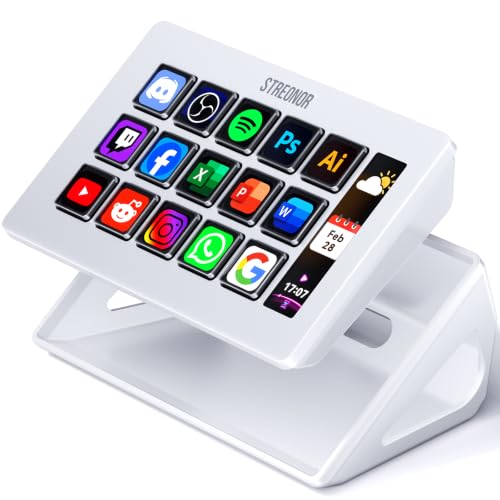
- 15 LCD keys for editing, OBS, and app shortcuts
- Three status displays for system and workflow information
- Custom pages, action flows, icons, GIFs, and plugins
Best For: Bright Mac or Windows editing and streaming setups
Portable Macro Workstation

- 32 programmable keys for custom macros
- Real-time visual function feedback
- Lightweight design with plug-and-play setup
Best For: Creators and editors seeking portable, customizable shortcut control
Creative App Shortcut Hub

- Customizable LCD keys with image support
- Over 100 shortcuts across profiles
- Works with OBS and major creative apps
Best For: Streamers and creatives needing compact app-specific controls
Full-Desk Editing Console
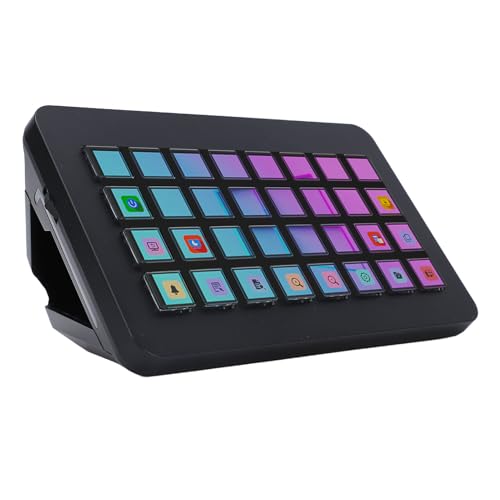
- 32 programmable LCD shortcut buttons
- One-touch audio and streaming controls
- Supports PC workflows for editing and broadcasting
Best For: PC creators who need a high-capacity production shortcut panel
Flexible Macro Control – VSD M18 Macro Pad
The VSD M18 is a practical entry point for streaming control panels for video editing, combining 18 programmable keys with visual LCD icons. It can trigger editing shortcuts, app launches, media controls, text, webpages, and OBS scene changes from a USB-C-connected desktop pad.
Best For: Video editors and streamers who want customizable one-tap shortcuts in a compact Windows or Mac setup.
Pros:
- Offers 18 programmable controls, including 15 LCD visual keys and three physical buttons.
- Supports single commands and multi-step macro sequences for editing and production workflows.
- Accepts JPG, PNG, and GIF icons or animations for easier function identification.
- Works with OBS, Streamlabs, Photoshop, and other listed Windows and macOS applications.
Cons:
- Native Linux plug-and-play support is not available.
- Requires Windows 11 or newer, or macOS 11.0 or newer, according to the supplied details.
- Its USB sound-board functions are command-based rather than a dedicated audio output system.
The M18 stands out for straightforward macro access and customizable visual labeling. It is a sensible choice when you want flexible controls for editing, streaming, and everyday desktop tasks without a larger control surface.
Visual Workflow Console – 32-Key Stream Control Panel
This 32-key visual control panel is designed for users comparing streaming control panels for video editing and live production. Its fully programmable keys provide a broad surface for assigning shortcuts and macros, while the visual interface is intended to show each function as you work.
Best For: Content creators, programmers, gamers, and home-office users who want many customizable shortcut keys for multitasking.
Pros:
- Provides 32 fully programmable keys for extensive shortcut and macro assignments.
- Uses visual function feedback to reduce guesswork during multitasking.
- Fits home offices, gaming stations, and mobile work setups.
- Designed for video editing, live streaming, productivity, and gaming workflows.
Cons:
- The supplied specifications do not identify the connection technology or supported operating systems.
- Only a 90-day manufacturer warranty is listed.
- The notes provide limited detail about software, plugins, or integration setup.
With 32 assignable keys, this model prioritizes control capacity and visual feedback. It may suit buyers who need a large customizable layout, but the sparse connectivity and compatibility information makes confirming setup requirements important before purchase.
Studio Macro Deck – VSD N4 Pro Controller
The VSD N4 Pro combines LCD keys, RGB knobs, and an interactive touch bar for a more studio-oriented approach to streaming control panels for video editing. It supports chained actions, scene presets, audio commands, and downloadable plugins, making it suited to repeatable production workflows.
Best For: Streamers and video editors who want tactile controls, scene presets, audio commands, and a built-in USB dock.
Pros:
- Combines 10 customizable LCD keys, four RGB knobs, and an interactive touch bar.
- Supports multi-step macros, unlimited independent scene presets, and custom image icons.
- Offers a 500-plus official plugin ecosystem and preloaded productivity widgets.
- Includes a foldable 60-degree stand, adjustable RGB lighting, and a passive USB dock.
Cons:
- The sound-deck feature sends audio commands to the computer but has no built-in speakers.
- It is more feature-rich and potentially more setup-intensive than a basic macro pad.
- The USB dock is passive, so it does not provide the functionality of a powered hub.
The N4 Pro is the strongest fit here for creators who want a dedicated production surface rather than only programmable keys. Its knobs, touch bar, presets, plugins, and stand provide useful flexibility for editing and live control.
Broadcast T-Bar Control – X-keys XBE-14 T-Bar Keypad
The X-keys XBE-14 takes a broadcast-focused approach to streaming control panels for video editing, pairing 14 programmable keys with a physical T-bar. Its RGB backlighting, wired USB connection, and compatibility with vMix and central-control applications make it especially relevant to switching and instant-replay workflows.
Best For: Video editors, live-production operators, and streamers who need tactile T-bar control alongside programmable keys.
Pros:
- Includes 14 programmable keys with a customizable layout.
- Provides a 90-degree T-bar using non-contact sensing for switching or replay control.
- Offers individually addressable RGB lighting with two RGB LEDs per switch.
- Includes an SDK for custom integration and supports HID keyboard, mouse, game-controller, and multimedia modes.
Cons:
- Uses a wired USB-A connection rather than USB-C.
- Its membrane switches may offer less mechanical feedback than the VSD N4 Pro.
- The T-bar and broadcast-oriented layout may be more specialized than needed for basic shortcut control.
The XBE-14 is a specialized option for users who benefit from physical fader-style operation. Its programmable keys handle shortcuts, while the T-bar adds a more natural control method for switching and replay tasks.
Best LCD Macro Deck – Streonor S15 Black
If you want streaming control panels for video editing that also handle live production and everyday shortcuts, the Streonor S15 provides 15 customizable LCD keys in a compact desktop deck. Its dedicated status panels and preset pages make frequently used commands easier to organize.
Best For: Video editors and streamers who want programmable shortcuts, OBS controls, and at-a-glance system information.
Pros:
- 15 customizable LCD keys support editing commands, hotkeys, OBS controls, and app actions.
- Three status displays can show information such as time, weather, CPU temperature, GPU status, and memory usage.
- Preset pages and action flows help organize different editing, streaming, office, or gaming workflows.
- Supports 100+ plugins and works with Windows 10 64-bit or newer and macOS Big Sur 11.0 or newer.
Cons:
- Linux is not supported.
- Setup may require uninstalling similar controller software to avoid conflicts.
- Some third-party integrations may require an account, subscription, or membership.
The S15 is a strong choice when visual key labels and multi-step actions matter more than physical faders or knobs. Connect it directly by USB and download the current STREONOR software for setup.
Best Fader Control Surface – Grid PBF4 Modular MIDI Controller
Among streaming control panels for video editing, the Grid PBF4 stands out for hands-on parameter control. Its combination of linear faders, rotary knobs, and Hall effect buttons is suited to mixing, adjustments, and programmable commands in a compact format.
Best For: Video editors, music producers, and streamers who prefer physical faders and knobs for mixing and parameter tweaking.
Pros:
- Four 30mm faders, four rotary knobs, and four buttons provide a balanced control layout.
- Supports 14-bit MIDI, SysEx, and NRPN for advanced control mapping.
- Individual RGB indicators help identify controls in low-light environments.
- Works with Mac, Windows, Linux, and mobile platforms, with HID mode and LUA coding options.
Cons:
- It offers 12 primary controls, fewer dedicated keys than a larger macro deck.
- Advanced mappings may require Grid Editor, MIDI host software, LUA, or HID configuration.
- Its focus on MIDI and physical controls may be less convenient for users seeking labeled LCD shortcut keys.
The PBF4 is the better fit for tactile editing workflows involving levels, filters, and other adjustable parameters. Its modular magnetic interface and side button also support page or bank switching as setups grow.
Best White Stream Deck Alternative – Streonor S15 White
The white Streonor S15 offers the same practical approach to streaming control panels for video editing in a lighter finish. Its 15 customizable LCD keys can launch editing shortcuts, OBS actions, and repeated commands while three status panels provide quick system information.
Best For: Video editors and content creators building a bright, coordinated Mac or Windows workstation.
Pros:
- Fifteen customizable LCD keys can display shortcuts, app actions, and editing commands.
- Three non-touch status panels show supported information such as CPU, GPU, memory, time, or weather data.
- Dedicated pages can separate editing, streaming, office, and gaming controls.
- Action flows, customizable icons, GIFs, and 100+ plugins allow extensive personalization.
Cons:
- Linux is not supported.
- Direct USB connection and current STREONOR software are recommended for setup.
- Some service integrations may depend on an active third-party account or subscription.
This model is functionally oriented toward users who want visual shortcut labels and organized workflow pages, with the white finish offering a different desk aesthetic. It is a sensible pick for shortcut-heavy editing rather than tactile fader-based work.
Portable Macro Workstation – 32-Key Visual Control Panel
This 32-key visual control panel is a practical option among streaming control panels for video editing, especially when you want programmable shortcuts for multitasking. Its visual interface is designed to show functions in real time, while plug-and-play connectivity supports flexible home-office, gaming-station, or mobile setups.
Best For: Content creators, programmers, gamers, and editors who want customizable macros in a portable control panel.
Pros:
- 32 fully programmable keys support personalized macros and shortcut configurations.
- Visual feedback helps identify assigned functions without relying on guesswork.
- Lightweight, ergonomic design is suited to extended use and mobile work setups.
- Plug-and-play functionality is designed for use across various devices.
Cons:
- The supplied details do not identify specific editing or streaming software compatibility.
- The listed manufacturer warranty is 90 days from purchase.
Choose this model if key count, visual feedback, and portability matter more than documented app-specific integrations. Buyers who need confirmed compatibility with a particular editing platform should verify it before purchasing.
Creative App Shortcut Hub – 10-Key LCD Stream Controller
This 10-key LCD controller is one of the more compact streaming control panels for video editing, with customizable key images and support for a broad selection of creative applications. It can organize more than 100 shortcuts across profiles, helping reduce app switching during editing, streaming, photography, and design work.
Best For: Streamers and creative professionals who want app-aware profiles and one-touch controls in a compact format.
Pros:
- 10 customizable LCD keys can display personal image files and assigned functions.
- Supports over 100 shortcuts across dedicated layouts and profiles.
- Listed compatibility includes OBS Studio, Streamlabs, Discord, Lightroom Classic, Photoshop, After Effects, Illustrator, and Final Cut Pro.
- One-touch controls can manage audio, microphone muting, social posts, and lighting.
Cons:
- It has fewer physical keys than the 32-key alternatives in this roundup.
- The supplied details do not list included components.
This is a strong fit for users who value software compatibility and automatic profile switching over maximum key count. Its LCD labels may also make frequently used editing and streaming commands easier to identify.
Full-Desk Editing Console – 32-Key LCD Controller
With 32 programmable LCD buttons, this desk controller is built for creators comparing streaming control panels for video editing and audio production. Custom images, one-touch controls, and support for mainstream PC software are intended to keep common actions accessible without repeatedly switching windows.
Best For: PC-based editors, broadcasters, and audio creators who want a high-capacity shortcut panel for production workflows.
Pros:
- 32 LCD keys support custom images and programmable operation triggers.
- One-touch controls cover tasks such as volume adjustment, microphone muting, social posting, and light control.
- Designed for video editing, music production, broadcasting, and application management.
- ABS construction, responsive keys, and a lightweight design support frequent use.
Cons:
- The listed connectivity is ethernet, so buyers should confirm it suits their intended setup.
- Driver installation is described as requiring a browser download through the relevant system address.
- The manufacturer warranty is listed as 90 days.
This controller makes sense when you want many visible, customizable controls on a PC workstation. Before buying, confirm operating-system support and the required driver process, particularly if your setup is outside the stated Windows 10 64-bit-and-higher or OS X coverage.
How We Picked the Best Streaming Control Panels for Video Editing
We focused on programmable hardware that can improve video-editing workflows rather than treating every product as a gaming keypad. The selection includes panels with customizable LCD keys, dedicated faders or knobs, T-bar controls, studio-oriented layouts, and USB connectivity. We also considered how easily each type can support shortcuts for editing software, streaming platforms, audio tools, and general desktop productivity.
Because compatibility and configuration software can vary, check the manufacturer’s current documentation before buying. A panel that works well with OBS or vMix may require additional setup for Premiere Pro, DaVinci Resolve, Final Cut Pro, or another editor.
Quick Comparison
- LCD-key controllers: Best for clearly labeled shortcuts, macros, scenes, and app-specific commands.
- 32-key panels: Better for users who need many shortcuts available without switching pages.
- 15-key decks: A practical middle ground for compact desks and focused editing workflows.
- Fader and knob controllers: Useful for audio levels, color adjustments, zoom, and other variable controls.
- T-bar and replay controls: Well suited to live production, switching, instant replay, and broadcast-style operation.
Key Buying Factors for Streaming Control Panels for Video Editing
Button Type and Layout
LCD keys are valuable when you use multiple applications or frequently change profiles because their labels can reflect the current function. Standard programmable buttons can be faster and simpler, while larger key counts reduce the need for page switching.
Faders, Knobs, and T-Bars
Choose a panel with physical controls if you regularly adjust audio, transitions, zoom, or other continuous settings. A compact macro deck may be enough for keyboard shortcuts, but tactile controls can provide better precision for mixing and live production.
Software and Profile Support
Look for compatibility with your operating system and preferred editing, streaming, and audio applications. Confirm whether profiles, macros, icons, and multi-action commands are configured through dedicated software or a third-party utility.
Desk Footprint and Connectivity
Measure the available space, especially if the panel will sit beside a keyboard, drawing tablet, mixer, or control surface. USB-C or USB connectivity is convenient, but verify the included cable, power requirements, and whether a powered hub may be needed.
Who Should Buy Which Streaming Control Panels for Video Editing?
Choose an LCD-key deck if you want visible labels and flexible profiles for editing, streaming, and everyday shortcuts. Choose a 32-key panel if you manage complex projects and want many commands immediately accessible. Choose a 15-key controller for a balanced, space-conscious setup centered on the most-used actions.
Choose a fader-and-knob controller if audio or hands-on parameter control matters more than a large shortcut library. Choose a T-bar or replay-focused panel for live switching and broadcast workflows. For beginners, prioritize simple configuration and broad software support; experienced editors should prioritize programmable depth, tactile controls, and profile flexibility.