
Choosing the right studio monitor controller with digital inputs can make everyday mixing faster, cleaner, and easier to trust. The best models simplify source switching, speaker control, and headphone monitoring without adding clutter to your desk.
Below, we focus on practical options for home studios and project rooms, from simple passive controllers to feature-rich desktop hubs with USB, Bluetooth, and advanced routing.
Best 8 Studio Monitor Controller with Digital Inputs Picks for 2026
Best for Analog + USB Routing

- 192kHz USB interface for direct computer connection
- Multiple source inputs for flexible monitoring
- Compact desktop control for everyday studio use
Best For: Home studios that need monitor control, USB audio, and straightforward source switching.
Best for Digital Routing

- S/PDIF digital input plus four analog stereo input pairs
- Three speaker outputs with individual level controls
- Four headphone amps with independent source selection
Best For: Engineers and home-studio users who need flexible source switching, multiple monitor pairs, and built-in digital input support.
Best for Passive Simplicity
ESI MoCo Passive Monitor Controller

- Fully passive design with no external power required
- Large knob plus mono, mute, and L/R flip controls
- Flexible TRS, RCA, and mini-jack stereo connections
Best For: Home studios and engineers who want clean, simple analog monitor control.
Best for Hybrid DAWs
Mackie Big Knob Studio 3x2 Monitor Controller

- 3-source/2-monitor switching with a classic big knob layout
- 192kHz/24-bit USB I/O plus dual Onyx mic preamps
- Front-facing headphone outputs and smartphone input for easy routing
Best For: Producers who want monitor control, USB recording, and flexible inputs in one desktop unit.
Best Passive Pick
Behringer STUDIO M Passive Controller

- Passive design for clean, simple monitoring
- Dual pair input/output for basic routing
- Compact desktop size with 1/8" stereo input
Best For: Home studios that want a no-frills passive monitor controller.
Best Bluetooth Pick
PreSonus MicroStation BT Monitor Controller

- Adds Bluetooth for wireless monitoring and playback
- Balanced and 1/8-inch inputs work with pro or consumer gear
- Compact control box for simple home-studio setups
Best For: Home-studio users who want wireless playback plus basic monitor control.
Best for Clean Analog Monitoring

- Ultra-low-noise monitoring path
- Dual stereo inputs plus aux output
- Independent headphone amps and rugged steel build
Best For: Audiophiles and studio engineers who want transparent, dependable monitor control.
Best for Passive Analog Control
DYNASTY PROAUDIO PMC-2 Monitor Controller
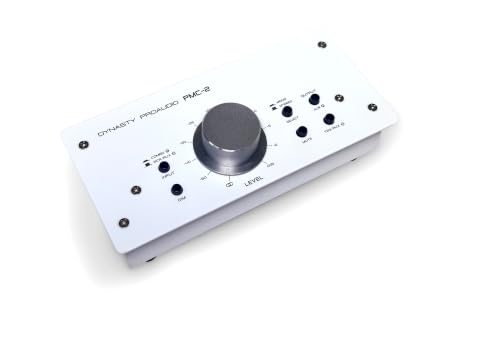
- Passive, no-power design keeps the signal path simple
- Balanced XLR, RCA, and 3.5mm connections
- DIM, Mute, and Mono controls for quick checks
Best For: Home studios that need simple, transparent analog monitor volume control.
Best for Analog + USB Routing – Mackie Big Knob Studio Plus
Mackie Big Knob Series, 4x3 Studio Monitor Controller 192kHz USB I/O (BIG KNOB STUDIO PLUS)
Check Price On AmazonIf you want a studio monitor controller with digital inputs that also keeps everyday routing simple, the Mackie Big Knob Studio Plus is a strong middle-ground choice. It combines monitor control, a built-in 192kHz USB interface, and flexible source switching so you can move between computer playback and external gear without constantly repatching.
Best For: Home studios and project rooms that need monitor switching, USB audio, and digital-friendly connectivity in one desktop unit.
Pros:
- Built-in 192kHz USB interface adds direct computer connectivity
- Multiple input paths make it easy to manage several sources
- Hands-on monitor control is convenient for daily mixing workflows
- Compact desktop layout fits well in smaller studios
Cons:
- Not as feature-rich as higher-end monitor controllers
- Desktop footprint may still feel large on very tight setups
- Best suited to practical routing rather than high-end mastering chains
Overall, the Big Knob Studio Plus is a practical studio monitor controller with digital inputs for users who want cleaner switching and computer integration without overcomplicating the desk. It’s a sensible pick when workflow and connectivity matter more than boutique extras.
Best for Digital Routing – PreSonus Monitor Station V2
If you want a practical studio monitor controller with digital inputs for a compact project room or hybrid setup, the PreSonus Monitor Station V2 gives you a lot of routing flexibility in one desktop unit. It combines analog and S/PDIF sources, multiple speaker outs, talkback, and headphone control, so you can manage monitoring without reaching for your interface.
Best For: Engineers and home-studio users who need flexible source switching, multiple monitor pairs, and built-in digital input support in an affordable desktop controller.
Pros:
- Includes a S/PDIF digital input alongside four stereo analog input pairs
- Three selectable speaker outputs with individual level controls
- Four headphone amps with independent source selection and volume
- Talkback mic, mono, mute, and variable dim controls add real studio utility
Cons:
- More of a control center than a minimalist monitor controller
- Desktop footprint may feel large for very tight setups
Overall, the Monitor Station V2 is a strong fit if you need a studio monitor controller with digital inputs and want extra monitoring tools beyond basic speaker switching. Its feature set is especially useful when one box needs to handle sources, headphones, and talkback at the same time.
Best for Passive Simplicity – ESI MoCo Passive Monitor Controller
If you want a straightforward studio monitor controller with digital inputs-like flexibility without adding noise or requiring power, the ESI MoCo keeps the setup simple. This fully passive unit is built for fast source switching, clean volume control, and practical monitoring tools in a compact desktop format.
Best For: Engineers and home-studio users who want a no-power monitor controller with flexible analog I/O and quick monitoring controls.
Pros:
- Fully passive design for clean, uncolored monitoring with no external power needed.
- Large master knob makes level changes easy and precise.
- Handy mono, mute, and left/right flip buttons simplify everyday monitoring.
- Flexible stereo input/output options for TRS, RCA, and mini-jack setups.
Cons:
- Does not provide true digital inputs, so it may not suit fully digital rigs.
- Best for basic monitoring rather than advanced routing or cue-mix control.
- Passive design depends on the rest of your chain for gain staging.
Overall, the MoCo is a practical pick if you value simple operation and transparent monitoring over feature-heavy routing. It is especially appealing if you’re comparing a studio monitor controller with digital inputs and realize you mainly need reliable analog control instead.
Best for Hybrid DAWs – Mackie Big Knob Studio 3×2 Monitor Controller
Mackie Big Knob Series, 3x2 Studio Monitor Controller 192kHz USB I/O (BIG KNOB STUDIO)
Check Price On AmazonIf you want a studio monitor controller with digital inputs that also doubles as a compact recording interface, the Mackie Big Knob Studio is built for practical day-to-day use. It combines source and monitor switching, 192kHz/24-bit USB audio, and flexible hookups for desktop studios that need more than basic volume control.
Best For: Producers and home-studio users who need monitor switching, USB recording, and multiple input options in one affordable desktop unit.
Pros:
- Switches between 3 sources and 2 monitor pairs with the classic Big Knob control
- Includes 192kHz/24-bit USB I/O plus two Onyx mic preamps with phantom power
- Handy headphone outs and a 1/8″ input make it easy to connect phones or secondary gear
- Works with major DAWs on both Mac and Windows
Cons:
- Not as feature-rich as higher-end dedicated monitor controllers
- Desktop layout may be more than some minimalist setups need
As a studio monitor controller with digital inputs, this Mackie model stands out for blending monitoring, interface, and input flexibility into a single box. It is a smart pick if you want simple routing and recording without filling your desk with separate gear.
Best Passive Pick – Behringer STUDIO M Passive Controller
The Behringer STUDIO M is a straightforward choice if you want a studio monitor controller with digital inputs?—except this model is better understood as a passive analog volume controller for simple desktop monitoring. It keeps the signal path clean, adds dual pair input/output routing, and is easy to drop into a compact setup without extra software or power requirements.
Best For: Home studios and budget-conscious users who need a simple passive monitor control hub for basic speaker switching and volume control.
Pros:
- Passive design keeps the signal path simple and quiet
- Dual pair input/output support adds flexibility for small setups
- Compact desktop format fits easily on a crowded workstation
- 1/8" stereo input is handy for casual playback sources
Cons:
- No true digital inputs for modern digital-only sources
- Limited feature set compared with fuller-featured monitor controllers
- Not ideal if you need advanced routing, metering, or talkback
For buyers comparing a studio monitor controller with digital inputs, the STUDIO M is mainly appealing if you value passive simplicity over connectivity. It works best as a clean, no-frills monitor volume and source-switching solution rather than a feature-rich control center.
Best Bluetooth Pick – PreSonus MicroStation BT Monitor Controller
If you want a studio monitor controller with digital inputs for quick wireless playback, the PreSonus MicroStation BT is a simple, practical choice. It adds Bluetooth to your monitor chain while still giving you balanced 1/4-inch and stereo 1/8-inch analog connections for flexible desktop or small-studio setups.
Best For: Producers, podcasters, and home-studio users who want easy Bluetooth streaming alongside standard monitor connections.
Pros:
- Stereo Bluetooth input makes wireless playback easy.
- Balanced 1/4-inch and 1/8-inch inputs support pro and consumer gear.
- Bluetooth on/off and pairing buttons simplify source switching.
- Headphone/aux output adds another useful monitoring option.
Cons:
- Not a full-featured controller for larger studio routing needs.
- Bluetooth convenience is the main digital input feature, not multiple digital formats.
Overall, this is a compact and affordable way to add wireless playback to a monitor setup. If your priority is a studio monitor controller with digital inputs that keeps things simple, the MicroStation BT fits small rooms and mixed-source setups well.
Best for Clean Analog Monitoring – Radial Nuance Select
If you want a studio monitor controller with digital inputs for a very clean, hands-on monitoring path, the Radial Nuance Select is built for serious studio work. It keeps the signal path simple and low-noise, with dual stereo inputs, speaker outputs, and an aux connection for flexible desktop routing.
Best For: Audiophiles, producers, and engineers who want transparent analog monitor control in a rugged desktop unit.
Pros:
- Low-noise operation helps preserve detail in critical monitoring
- Dual stereo inputs make source switching straightforward
- Independent headphone amplifiers support cueing and review work
- Steel enclosure and aluminum faceplate feel built for pro studios
Cons:
- Not a feature-heavy controller, so it may feel basic for complex rooms
- No built-in conversion stage, so digital routing depends on your interface
- Larger footprint than some compact desktop controllers
For buyers comparing a studio monitor controller with digital inputs, the Nuance Select stands out more for transparency and build quality than for onboard extras. It is a strong fit when you already have solid conversion and just want dependable, low-distortion monitor control.
Best for Passive Analog Control – DYNASTY PROAUDIO PMC-2 Monitor Controller
If you want a straightforward studio monitor controller with digital inputs in a mixed-source setup, the DYNASTY PROAUDIO PMC-2 is built for hands-on analog level trimming between your interface, sound card, or other line sources and your active monitors. Its passive design keeps the signal path simple, while the large knob and monitor control switches make day-to-day level changes fast and predictable.
Best For: Home studios and project rooms that need a no-power monitor controller for clean, precise analog volume control.
Pros:
- Passive design requires no external power supply.
- Balanced XLR, RCA, and 3.5mm input options add flexibility.
- Large rotary knob makes monitor level adjustments easy and precise.
- DIM and Mute/Mono controls are useful for quick monitoring checks.
Cons:
- Does not provide true digital inputs for direct digital sources.
- Analog-only signal control may not suit fully digital studios.
- Best suited to basic monitoring needs rather than advanced routing.
As a studio monitor controller with digital inputs would imply, many buyers want easy source flexibility; this model instead excels as a clean, passive analog controller for simple monitor chains. If your priority is transparent level control and a rugged desktop box, it is a practical pick.
How We Picked the Best Studio Monitor Controller with Digital Inputs
We focused on usability, connectivity, and monitoring flexibility. For a Studio Monitor Controller with Digital Inputs, the key questions are whether it integrates smoothly with your interface, keeps signal paths straightforward, and offers the control you actually need day to day.
We also favored models that fit common studio setups: compact desktops, stereo speaker systems, hybrid analog/digital workspaces, and users who want a reliable way to manage volume, mute, dim, source selection, and headphone monitoring.
Quick Comparison
In this group, the Big Knob and Monitor Station style units are better suited to users who want more routing and system control, while passive controllers like the ESI, Behringer, and DYNASTY PROAUDIO options appeal to buyers who want a simpler signal path. The PreSonus MicroStation BT stands out for compact setups that benefit from Bluetooth playback and 2.1 speaker control.
Key Buying Factors for a Studio Monitor Controller with Digital Inputs
Digital Vs. Analog Connectivity
Check whether the controller supports the digital sources you actually use, such as USB audio from a computer or wireless playback from Bluetooth. If your interface already handles conversion well, a passive controller may be enough; if you want a central desktop hub, digital I/O can be a major convenience.
Monitor Management Features
Useful controls include source switching, mono sum, mute, dim, talkback, headphone output, and multiple speaker pairs. These features matter most in studios that reference mixes on more than one set of monitors.
Signal Path and Transparency
Passive designs are often chosen for their simplicity and minimal coloration. Active controllers may add convenience and extra connectivity, but they also introduce circuitry that some buyers prefer to avoid in a critical monitoring chain.
Desk Space and Workflow
Consider the physical layout. Large desktop controllers can streamline a busy studio, while smaller units are better for compact workspaces. The best choice is the one that gives you fast access without getting in the way of your mixing workflow.
Who Should Buy Which Studio Monitor Controller with Digital Inputs?
If you want an all-in-one desktop controller for a busy production setup, choose a feature-rich model with USB or broad routing options. If you value a simple, clean monitoring path, a passive controller is often the better fit. If you need Bluetooth or 2.1 speaker support for a compact room, look closely at the more specialized compact models.
For most buyers, the right Studio Monitor Controller with Digital Inputs is the one that matches your sources, your monitor count, and the amount of hands-on control you want every day.