
When it comes to studio reference displays, achieving perfect color accuracy and clarity is essential for your work. You’ll want to explore options like the Apple Studio Display and Pro Display XDR, known for their exceptional quality. But it’s not just about the screens; there are several factors to evaluate that can impact your creative process. Let’s take a closer look at the top contenders and what makes them stand out.
Apple Studio Display – Standard Glass – Tilt-Adjustable Stand

The Apple Studio Display with Standard Glass and a Tilt-Adjustable Stand is the perfect choice for creative professionals seeking an exceptional visual experience. This 27-inch 5K Retina display delivers stunning visuals with 600 nits brightness and supports one billion colors, ensuring your work pops. With P3 wide color, your projects achieve true-to-life accuracy. The 12MP Ultra Wide camera enhances video calls, while the studio-quality three-mic array and six-speaker sound system provide crystal-clear audio. Plus, you’ll benefit from multiple connectivity options, including Thunderbolt 3 and USB-C ports, making it easy to power and connect your devices seamlessly.
Best For: Creative professionals seeking an exceptional visual and audio experience for their work.
Pros:
- Exceptional 27-inch 5K Retina display with vibrant colors and high brightness.
- Enhanced video calling experience with a 12MP Ultra Wide camera and quality audio.
- Multiple connectivity options including Thunderbolt 3 and USB-C ports for seamless device integration.
Cons:
- The standard glass option may not be ideal for environments with high glare.
- Limited adjustability compared to other stand options that offer more customization.
- Higher price point compared to other displays in the market.
Apple Pro Display XDR – Nano-Texture Glass

For professionals in photography, video editing, and design, the Apple Pro Display XDR with Nano-Texture Glass stands out as a superior choice. This 32-inch display boasts a stunning Retina 6K resolution and Extreme Dynamic Range (XDR), delivering exceptional brightness and contrast with 1000 nits sustained and 1600 nits peak brightness. You’ll appreciate the P3 wide color gamut and 10-bit color depth, ensuring accurate color reproduction. Plus, the superwide viewing angle enhances collaboration. With multiple reference modes tailored for professional needs, connectivity options like Thunderbolt 3 and USB-C ports, this display is designed for your creative precision.
Best For: Professionals in photography, video editing, and design who require high fidelity and precision in their work.
Pros:
- Exceptional Retina 6K resolution for stunning image clarity.
- High brightness and contrast levels with Extreme Dynamic Range (XDR).
- Wide color gamut and multiple reference modes for accurate color reproduction.
Cons:
- Pro Stand and VESA Mount Adapter are sold separately, increasing overall cost.
- Limited connectivity options with only one Thunderbolt 3 and three USB-C ports.
- Premium price point may not be suitable for casual users or hobbyists.
Calibrite ColorChecker Studio (CCSTUDIO)

Calibrite ColorChecker Studio (CCSTUDIO) stands out as an essential tool for photographers and designers who demand precise color accuracy in their work. As a direct replacement for the X-Rite i1Studio, it enhances your workflow with its thorough software. You can profile monitors, projectors, scanners, and printers effortlessly. The intelligent iterative profiling adapts to your unique display, ensuring ideal color precision. Plus, it measures ambient light to determine the best luminance for print comparisons. With the added capability of camera profiling using the ColorChecker Camera Calibration software, you’ve got everything you need for flawless color management at your fingertips.
Best For: Photographers and designers seeking precise color accuracy and comprehensive color management tools.
Pros:
- Supports multiple devices including monitors, projectors, scanners, and printers for versatile profiling.
- Intelligent iterative profiling technology ensures optimal color precision tailored to each unique display.
- Ambient light measurement feature helps in determining the best luminance for accurate print comparisons.
Cons:
- Requires software download for full functionality, which may be inconvenient for some users.
- May have a learning curve for those unfamiliar with color management tools and software.
- Price point could be higher compared to simpler color calibration solutions on the market.
Apple Studio Display with Tilt and Height-Adjustable Stand
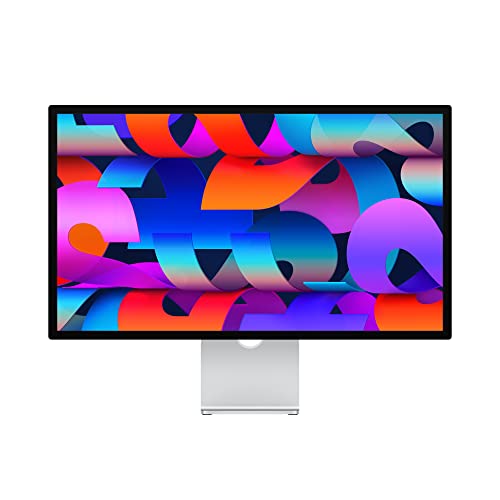
Designed for creative professionals, the Apple Studio Display with Tilt and Height-Adjustable Stand offers an immersive 27-inch 5K Retina display that elevates your visual experience. With 600 nits of brightness and support for one billion colors, your projects come to life in stunning detail. The 12MP Ultra Wide camera with Center Stage enhances video calls, while the studio-quality three-mic array guarantees crystal-clear audio. Plus, the six-speaker sound system delivers an unbelievable listening experience. With versatile connectivity options, including Thunderbolt 3 and USB-C ports, this display perfectly integrates into your workspace, making it a must-have for any creative setup.
Best For: Creative professionals who need a high-quality display for design work, video calls, and immersive audio experiences.
Pros:
- Exceptional 5K Retina display with vibrant colors and high brightness.
- High-quality camera and microphone setup for professional-grade video calls.
- Versatile connectivity options with Thunderbolt 3 and USB-C ports for easy integration.
Cons:
- Premium price point may not be suitable for all budgets.
- Limited adjustability options compared to other high-end monitors.
- Heavy weight may require a sturdy desk or mount for optimal setup.
Music Production Frequency & EQ Spectrum Reference Poster (24 x 36 inches)

The Music Production Frequency & EQ Spectrum Reference Poster (24 x 36 inches) stands out as an essential tool for musicians and audio engineers aiming for professional sound quality. Its large format guarantees clear visibility, while the high-contrast, color-coded design makes identifying frequency zones a breeze. You’ll find detailed EQ ranges for all major instruments, covering frequencies from 20Hz to 20kHz. This extensive guide helps you eliminate muddiness and optimize your mixes. Whether you’re recording, mixing, or mastering, this poster is invaluable for achieving the perfect sound balance that every audio professional seeks.
Best For: Musicians and audio engineers seeking to achieve professional sound mixing through comprehensive instrument frequency mapping and EQ spectrum analysis.
Pros:
- High-contrast, color-coded design for easy frequency zone identification.
- Detailed EQ ranges for all major instruments, covering a wide frequency spectrum.
- Essential tool for eliminating muddiness and optimizing sound mixing in recording, mixing, and mastering processes.
Cons:
- Large format may be difficult to display in smaller workspaces.
- May require prior knowledge of EQ and frequency ranges for full utilization.
- Limited to visual reference; practical application still requires hands-on experience and skill.
Apple Studio Display – Nano-Texture Glass – Tilt-Adjustable Stand
For professionals in photography, video editing, or graphic design, the Apple Studio Display with Nano-Texture Glass offers an unparalleled visual experience. Its 27-inch 5K Retina display delivers stunning clarity, reaching up to 600 nits brightness and supporting one billion colors within the P3 wide color gamut. The tilt-adjustable stand allows you to find the perfect viewing angle, enhancing comfort during long working hours. With a 12MP Ultra Wide camera and a studio-quality mic array, video calls feel immersive. Plus, the six-speaker system with Spatial Audio provides an incredible listening experience, making it an ideal choice for your creative workstation.
Best For: Professionals in photography, video editing, or graphic design who seek exceptional visual quality and immersive audio experiences.
Pros:
- Stunning 27-inch 5K Retina display with vibrant colors and impressive brightness.
- Enhanced video calls with a 12MP Ultra Wide camera and studio-quality microphone array.
- Superior audio experience with a six-speaker system featuring Spatial Audio.
Cons:
- Higher price point compared to standard monitors.
- Limited connectivity options with only one Thunderbolt 3 port and three USB-C ports.
- The tilt-adjustable stand may not satisfy users looking for more extensive ergonomic adjustments.
Apple 27 Inches Studio Display (Renewed)
Looking for a display that elevates your creative work? The Apple 27-Inch Studio Display (Renewed) is your perfect match. With a stunning 5K Retina display, it offers vibrant colors and impressive 600 nits brightness, supporting one billion colors within the P3 wide color gamut. You’ll love the 12MP Ultra Wide camera, ideal for immersive video calls, and the studio-quality mic array and six-speaker system that enhance your audio experience. Plus, it features one Thunderbolt 3 port and three USB-C ports for seamless connectivity. This renewed product delivers exceptional performance without breaking the bank. Upgrade your workspace today!
Best For: Creative professionals and content creators seeking a high-quality display for immersive work and video calls.
Pros:
- Stunning 5K Retina display with vibrant colors and 600 nits brightness for exceptional visual clarity.
- 12MP Ultra Wide camera with Center Stage feature enhances video call experiences.
- Six-speaker sound system with Spatial Audio provides an immersive audio experience for recordings and calls.
Cons:
- Renewed product status may raise concerns about the longevity and reliability compared to new products.
- Limited port options with only one Thunderbolt 3 and three USB-C ports, which may not suffice for users with multiple peripherals.
- Higher price point compared to other displays without similar features might deter budget-conscious buyers.
Apple Studio Display with Adjustable Stand
With its stunning 27-inch 5K Retina display, the Apple Studio Display with Adjustable Stand is perfect for creative professionals who demand high fidelity in their visual work. You’ll enjoy 600 nits of brightness and support for one billion colors, thanks to its P3 wide color gamut. The 12MP Ultra Wide camera with Center Stage makes video calls immersive, while the studio-quality three-mic array and six-speaker sound system provide an unbelievable listening experience with Spatial Audio. Plus, the adjustable stand lets you customize your viewing angle, ensuring comfort during long editing sessions. Connectivity options include Thunderbolt 3 and USB-C ports for versatility.
Best For: Creative professionals seeking high-fidelity visuals and immersive audio experiences in their work.
Pros:
- Stunning 27-inch 5K Retina display with exceptional brightness and color accuracy.
- Immersive audio experience with a six-speaker system and Spatial Audio.
- Adjustable stand for customized viewing angles, enhancing comfort during long sessions.
Cons:
- Higher price point compared to standard displays.
- Limited connectivity options with only one Thunderbolt 3 port.
- May not be necessary for casual users who do not require advanced features.
Apple Studio Display – Nano-Texture Glass
The Apple Studio Display featuring Nano-Texture Glass is perfect for professionals who demand the highest visual fidelity in their work. With its 27-inch 5K Retina display, you’ll enjoy stunning 600 nits brightness and support for one billion colors within the P3 wide color gamut. The Nano-Texture Glass minimizes glare, ensuring your creative process remains uninterrupted. Plus, the 12MP Ultra Wide camera with Center Stage and a studio-quality mic array elevate your video calls to new heights. Coupled with a six-speaker sound system delivering immersive Spatial Audio, this display transforms your workspace into a true multimedia powerhouse.
Best For: Creative professionals and content creators seeking high-quality visuals and audio for their work and video calls.
Pros:
- Stunning 27-inch 5K Retina display with 600 nits brightness and support for one billion colors.
- Nano-Texture Glass minimizes glare, enhancing the visual experience in various lighting conditions.
- Immersive six-speaker sound system with Spatial Audio for an exceptional listening experience.
Cons:
- Higher price point may not be suitable for casual users or those on a budget.
- Limited connectivity options with only one Thunderbolt 3 port and three USB-C ports.
- Weight and size may require a dedicated desk space, limiting portability.
5FT Full Scale Poseable Female Figure Doll for Art and Photography
Artists and photographers seeking a reliable reference for their work will find the 5FT Full Scale Poseable Female Figure Doll an invaluable tool. Crafted from durable, skin-safe material, this figure boasts a weighted stabilization system, ensuring secure placement during your sessions. With 36 movable joints, you can achieve flexible positioning that captures the essence of human anatomy. Its realistic detailing makes it perfect for art illustration and professional display. Plus, the water-resistant body allows for easy cleaning. Whether you’re setting up photography props or adding a discreet decorative touch, this doll meets all your artistic needs with style.
Best For: Artists, photographers, and anatomy enthusiasts looking for a flexible and realistic reference figure for illustration and display.
Pros:
- Durable, skin-safe material ensures long-lasting use and safety.
- Full articulation with 36 movable joints allows for a wide range of poses and realistic positioning.
- Water-resistant body facilitates easy cleaning and maintenance.
Cons:
- Weighted stabilization system may add to the overall weight of the figure, making it less portable.
- Realistic detailing might not appeal to all artistic styles or preferences.
- Suitable for adult-only spaces may limit its use in family-friendly environments.
Factors to Consider When Choosing a Studio Reference Display
When you’re choosing a studio reference display, several key factors come into play. You’ll want to take into account display resolution, color accuracy, and connectivity options to guarantee peak performance. Additionally, think about size, ergonomics, and audio quality to create the best setup for your needs.
Display Resolution Importance
Choosing the right display resolution is fundamental for achieving the best results in your work, especially as image detail becomes increasingly important. Higher resolutions like 5K or 6K provide greater clarity, enabling you to edit and color grade with precision. The increased pixels per inch (PPI) deliver sharper images and finer gradients, essential for professional photography and video editing. Monitors with 4K and above better represent the full range of colors in high-definition content, enhancing your visual experience. Viewing images at their native resolution without pixelation lets you make informed decisions about your work. As media production shifts to higher resolution formats, using a display that meets or exceeds these standards is imperative for maintaining quality and industry expectations.
Color Accuracy Standards
Understanding color accuracy standards is essential for anyone working with studio reference displays, as it directly impacts the fidelity of your work. Look for displays that meet industry benchmarks like sRGB, Adobe RGB, and DCI-P3. A wider color gamut, such as P3, enables you to work with a broader range of colors, vital for photography and video editing. Consider the bit depth too; a 10-bit display provides smoother gradients and better precision than an 8-bit one. Calibration tools and software are invaluable for ensuring consistent color reproduction across varying lighting conditions. Finally, pay attention to contrast ratios—higher ratios yield deeper blacks and brighter whites, enhancing overall color fidelity and making your visuals come to life.
Connectivity Options Available
Color accuracy is just one piece of the puzzle; connectivity options also play a significant role in your choice of studio reference display. Look for displays that feature Thunderbolt 3 and USB-C ports for high-speed data transfer and versatile compatibility with various devices. Multiple USB-C ports are a game-changer, allowing you to connect additional peripherals and even charge your Mac notebooks. Some displays come with dedicated ports for audio and video output, enhancing your professional setup. A single Thunderbolt 3 port can enable daisy chaining, streamlining your workspace and minimizing clutter. Verify the connectivity options align with your existing studio equipment to avoid compatibility issues, ultimately maximizing your workflow efficiency.
Size and Ergonomics
When selecting a studio reference display, size and ergonomics are essential factors that can make or break your workflow. Aim for a display that’s at least 27 inches to guarantee a detailed view of your content. Positioning is key—keep the display at eye level and about 20 inches away to minimize strain during long sessions. Look for adjustable height, tilt, and stands to accommodate your seating preferences. Higher resolutions like 5K or 6K not only enhance clarity but also improve your ability to color grade and work with intricate details. Finally, consider the weight and stability of the display; a sturdy design helps prevent wobbling, allowing you to maintain focus and productivity during critical tasks.
Audio Quality Considerations
Audio quality plays an essential role in choosing a studio reference display, especially if you’re involved in sound mixing or mastering. Look for displays with high-quality audio systems that use multiple speakers and advanced technologies like Spatial Audio. These features create an immersive listening experience critical for precise audio work. A studio-quality microphone array can enhance clarity during recordings and calls, capturing every nuance effectively. Consider displays with Center Stage technology to keep focus on the speaker during remote collaborations. Additionally, a design that minimizes distortion and improves sound projection is fundamental. Finally, guarantee the display offers a well-balanced frequency response across 20Hz to 20kHz to facilitate accurate adjustments during your mixing and mastering processes.