
Live streaming by phone is convenient, but built-in microphones rarely deliver the clarity, control, or connection flexibility that serious creators need. The right audio interface can connect microphones, guitars, mixers, and playback devices while helping you monitor and balance your broadcast.
We selected 10 telephone audio interfaces for live streaming across several use cases, including mobile streaming, podcasting, vocals, instruments, and computer-based setups. Below, you’ll find practical guidance for choosing the right inputs, outputs, power options, compatibility, and controls for your workflow.
Best 10 Telephone Audio Interfaces for Live Streaming Picks for 2026
Best Stereo Mobile Pick

- Stereo RCA input for mixers and studio gear
- Direct, latency-free headphone monitoring
- Supports phones, tablets, Mac, and PC
Best For: Musicians and creators streaming stereo audio from external gear
Best Podcast Control Hub

- Two XLR inputs with up to 60dB gain
- Eight customizable sound-effect buttons
- Loopback, phone connections, and eight-hour battery
Best For: Podcasters and streamers who need effects and multi-input control
Best Compact Mic Adapter

- Dual 3.5mm microphone inputs
- Auto-senses TRS and TRRS microphones
- USB-A, USB-C, and Lightning cables included
Best For: Mobile creators using compact 3.5mm microphones
Best Guitar Streaming Starter

- 1/4-inch input for electric guitar and bass
- 24-bit/48kHz low-latency recording
- Battery-free, pocket-sized plug-and-play design
Best For: Beginners streaming guitar or bass from mobile devices
Studio-Ready Pick
Focusrite Scarlett Solo 3rd Gen

- Clear preamp with switchable Air mode
- 24-bit/192kHz recording support
- Includes headphones, outputs, and software support
Best For: Computer-based voice, podcast, and instrument streaming
Portable Streaming Mixer

- Dual OTG ports for two-phone streaming
- Rechargeable battery for mobile sessions
- Includes phantom power, reverb, and monitoring controls
Best For: Mobile singers, musicians, and multi-phone live streams
Mobile Connection Adapter
Bolanle DAC222 USB-C Interface
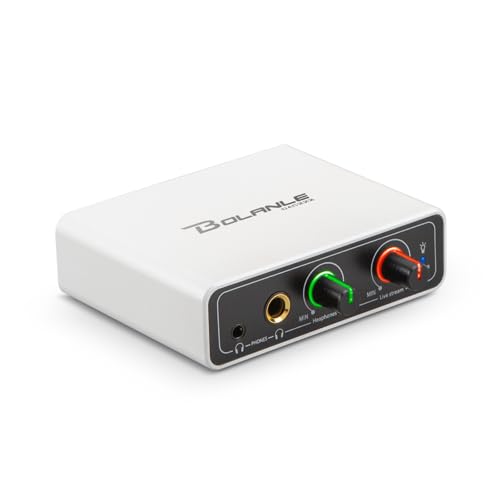
- Routes mixer or DJ output to a phone
- Separate monitor and stream volume controls
- Dual headphone outputs in a compact chassis
Best For: Mobile streaming with an existing mixer or interface
MAONO P1
Flexible Creator Audio Interface

- Dual USB connects computer and phone or iPad
- 70dB gain and 24-bit/192kHz recording
- Auto-Gain, loopback, and direct monitoring
Best For: Creators who stream across mobile and desktop devices
Mobile Stream Adapter
Charge-Through Phone Audio Interface

- USB-C phone compatibility with 3.5mm audio support
- Charges while streaming or recording
- Plug-and-play low-latency monitoring
Best For: Mobile creators who need portable, charge-through streaming audio
MAONO PS22 Lite
Compact PC Streaming Interface

- 24-bit/192kHz recording with 106dB dynamic range
- XLR, instrument input, 56dB gain, and 48V phantom power
- ProStudio routing, loopback, and direct monitoring
Best For: Beginners building a compact PC or Mac streaming setup
Best Stereo Mobile Pick – IK Multimedia iRig Stream
For creators comparing telephone audio interfaces for live streaming, the IK Multimedia iRig Stream is a compact choice for bringing stereo audio from mixers, keyboards, audio players, and other studio gear into a phone, tablet, Mac, or PC. Its RCA inputs, loopback support, and direct headphone monitoring suit music-focused streams and calls.
Best For: Musicians, podcasters, and streamers who need stereo input and flexible device compatibility.
Pros:
- Stereo RCA inputs connect mixers and other line-level equipment.
- Works with iPhone, iPad, Android, Mac, and PC setups using supported connections.
- Direct headphone monitoring helps prevent latency or echo while streaming.
- Loopback lets you combine device music with your stream.
Cons:
- RCA connectivity may be less convenient for users who primarily use XLR microphones.
- The supplied information lists multiple connection options, so the appropriate cable or adapter may depend on your device.
The iRig Stream is especially practical when your source is a mixer or other stereo device rather than a standalone microphone. Its level indicator and headphone output also make quick setup easier.
Best Podcast Control Hub – MAONO E2 Gen2 Audio Interface
The MAONO E2 Gen2 is a full-featured option for telephone audio interfaces for live streaming when you want microphone control, sound effects, and multiple connection choices in one unit. Two XLR combo inputs, up to 60dB of gain, loopback, and phone connectivity make it suited to podcasts, co-hosted shows, and interactive streams.
Best For: Podcasters and streamers who want two microphone inputs, onboard effects, and flexible routing.
Pros:
- Two XLR combo inputs and 60dB preamp gain support dynamic microphones.
- Eight customizable sound-effect buttons add intros, clips, or other samples.
- Loopback supports computer streaming, while USB-C and 3.5mm connections support phones and computers.
- Built-in battery provides up to eight hours of use.
Cons:
- Its larger feature set may be more than a simple one-microphone setup requires.
- The supplied package description is truncated, so included accessories should be confirmed before purchase.
Choose the E2 Gen2 if hands-on control matters as much as basic audio capture. Mute, monitoring, pitch, reverb, and sound-effect controls give live creators more ways to manage a show without extra software.
Best Compact Mic Adapter – RØDE AI-Micro
The RØDE AI-Micro is a particularly portable choice among telephone audio interfaces for live streaming. It provides two channels for microphones with 3.5mm outputs, automatically senses TRS or TRRS connections, and includes USB-A, USB-C, and Lightning cables for use with computers, phones, and tablets.
Best For: Mobile creators using lavalier, VideoMic, wireless, or stereo microphones with 3.5mm outputs.
Pros:
- Ultra-compact two-channel design weighs 13g.
- Auto-sensing inputs simplify TRS and TRRS microphone setup.
- High-power headphone output provides zero-latency monitoring.
- Supplied cables support USB-A, USB-C, and Lightning devices.
Cons:
- It is designed for 3.5mm microphones rather than XLR microphones or RCA line sources.
- The listed maximum sample rate is 20 kHz.
The AI-Micro makes the most sense for a lightweight, microphone-centered mobile rig. Its dual inputs can accommodate two compatible microphones, while the broad cable support reduces device-compatibility concerns.
Best Guitar Streaming Starter – Pocket Guitar Audio Interface
For guitarists seeking telephone audio interfaces for live streaming, this pocket interface offers a straightforward way to connect an electric guitar or bass to a phone, tablet, laptop, or PC. It uses a 1/4-inch instrument input, provides 24-bit/48kHz recording, and supports headphone monitoring through a 3.5mm output.
Best For: Beginners who want a small, plug-and-play interface for guitar or bass streaming.
Pros:
- 1/4-inch input connects electric guitar and bass.
- 24-bit/48kHz audio and low-latency processing support synchronized streaming.
- Type-C connectivity and a Lightning adapter support Android, iPad, and iPhone setups.
- Compact clip-on design operates without batteries.
Cons:
- It records without edit or mix functions, limiting advanced production use.
- The supplied notes focus on instrument input rather than microphone or stereo line connections.
This is a sensible entry-level option when portability and simplicity outweigh advanced routing. Volume buttons, a level indicator, and direct monitoring cover the essentials for basic guitar or bass broadcasts.
Studio-Ready Pick – Focusrite Scarlett Solo 3rd Gen
The Focusrite Scarlett Solo 3rd Gen is a strong choice for telephone audio interfaces for live streaming when you want clean, studio-oriented sound from a microphone or instrument. Its single XLR preamp, Hi-Z instrument input, headphone output, and USB connectivity suit voice-focused streams, podcasts, and music sessions.
Best For: Streamers and podcasters who prioritize high-quality vocal or instrument recording from a computer or compatible iPad.
Pros:
- High-performance preamp with switchable Air mode for added clarity.
- Supports recording and mixing up to 24-bit/192kHz.
- Includes low-noise balanced outputs and private headphone monitoring.
- Comes with useful recording software and a three-year warranty.
Cons:
- Only one XLR microphone input is provided.
- Requires a USB connection rather than offering built-in battery power.
The Scarlett Solo is best when your live-streaming setup centers on one microphone and one instrument. It offers more recording-focused headroom and software support than a basic mobile mixer, but it is less suited to multi-phone or highly portable streaming.
Portable Streaming Mixer – JOYO MOMIX PRO
The JOYO MOMIX PRO is a practical option among telephone audio interfaces for live streaming if you need direct smartphone connectivity and a rechargeable design. It combines two combo microphone/instrument inputs, dual OTG phone ports, monitoring controls, and basic vocal and guitar effects in a compact mixer.
Best For: Mobile creators, singers, guitarists, and small-band performers streaming from one or two smartphones.
Pros:
- Two OTG ports support simultaneous two-phone live streaming.
- Built-in 48V phantom power works with condenser microphones.
- Rechargeable battery provides approximately 4–5 hours of use.
- Offers vocal canceling, reverb, direct monitoring, and dual headphone outputs.
Cons:
- Maximum sample rate is 48kHz, below the Focusrite’s stated 192kHz.
- Battery life is limited for extended sessions without recharging.
- Its feature set is oriented toward mobile streaming rather than detailed studio recording.
The MOMIX PRO stands out for flexible phone-based streaming and outdoor use. Choose it over a desktop interface when battery power, two-phone workflows, and built-in performance effects matter more than high-resolution recording.
Mobile Connection Adapter – Bolanle DAC222 USB-C Interface
The Bolanle DAC222 is a compact choice for telephone audio interfaces for live streaming when you already own a mixer, DJ controller, or audio interface. Its 3.5mm AUX input accepts a stereo output from existing gear and sends it to an iPhone, iPad, or Android device through USB-C OTG.
Best For: Mobile DJs, musicians, podcasters, and streamers who need to route an existing stereo setup into a phone.
Pros:
- Connects mixers, interfaces, and DJ controllers to mobile streaming devices.
- Provides separate monitor and live-stream level controls.
- Includes both 3.5mm and 6.35mm headphone outputs for monitoring.
- Supports USB-C OTG plug-and-play operation on compatible iOS and Android devices.
Cons:
- Does not replace a microphone preamp or full mixer.
- USB-C OTG compatibility may require an adapter for older Lightning iPhones.
- Its 3.5mm AUX input is intended for line-level or headphone output from existing equipment.
The DAC222 is most useful as a bridge between professional audio gear and a smartphone. It keeps the setup compact and adds independent monitoring control, but buyers needing direct microphone inputs or onboard mixing should choose a full interface instead.
MAONO P1 – Flexible Creator Audio Interface
For creators comparing telephone audio interfaces for live streaming, the MAONO P1 stands out for its broad device support and flexible routing. Its dual USB connectivity can link a computer and phone or iPad simultaneously, while Auto-Gain, loopback, and direct monitoring help simplify voice, music, and desktop-audio workflows.
Best For: Streamers, podcasters, and musicians who need computer-and-mobile connectivity with advanced audio routing.
Pros:
- Dual USB connectivity supports simultaneous computer and phone or iPad connections.
- Up to 70dB gain, 24-bit/192kHz recording, and -130dB EIN support detailed, quiet captures.
- Auto-Gain, loopback, Stream Mode, and ProStudio2 software simplify streaming setups.
- Independent headphone, monitor, and mute controls improve live monitoring flexibility.
Cons:
- Its broader routing and software features may be more than a basic voice streamer needs.
- The supplied notes emphasize USB connectivity, so users should confirm their preferred device and cable setup.
The P1 is a strong choice when your setup spans mobile and desktop streaming or includes instruments and backing tracks. It offers more workflow control than a simple phone adapter, provided you are willing to use its routing features.
Mobile Stream Adapter – Charge-Through Phone Audio Interface
For mobile creators seeking telephone audio interfaces for live streaming, this compact USB-C adapter focuses on plug-and-play phone use. It combines external sound-card connectivity, 3.5mm microphone and headphone support, real-time monitoring, and pass-through charging for longer broadcasts.
Best For: Phone-based livestreamers, mobile podcasters, karaoke users, and creators recording away from a desk.
Pros:
- Supports mainstream Type-C phones and works with many external sound cards, 3.5mm microphones, and headphones.
- Allows simultaneous audio transmission and phone charging for extended streaming sessions.
- Designed for low-noise, zero-latency monitoring with internal shielding and decoding hardware.
- Plug-and-play construction is compact and does not require additional drivers or software.
Cons:
- It is primarily a mobile adapter rather than a full desktop interface with onboard preamp controls.
- Compatibility is centered on USB-C devices, so connector requirements should be checked before buying.
This adapter makes the most sense for creators who stream directly from a USB-C phone and need charging during broadcasts. Its compact design favors portability, while users wanting extensive mixing or recording controls may prefer a larger interface.
MAONO PS22 Lite – Compact PC Streaming Interface
The MAONO PS22 Lite is a practical option for telephone audio interfaces for live streaming when your workflow also includes a PC, Mac, or iPad. It supports XLR microphones, guitars, direct monitoring, and ProStudio routing software, giving beginners a straightforward starting point with room for more involved broadcasts.
Best For: Beginner streamers, podcasters, voice actors, and guitarists building a compact computer-based setup.
Pros:
- 24-bit/192kHz recording and a 106dB dynamic range support detailed audio capture.
- Up to 56dB preamp gain and 48V phantom power accommodate condenser and dynamic microphones.
- ProStudio routing software adds virtual channels and loopbacks for live broadcasts.
- Compact design, direct monitoring, intuitive modes, and plug-and-play connectivity suit beginners.
Cons:
- Its 56dB preamp gain is lower than the P1’s stated 70dB maximum.
- Advanced routing depends on using the included software and selecting the MAONO ASIO driver where required.
The PS22 Lite balances accessible controls with useful tools for streaming and music recording. Choose it if you want a compact PC-centered interface with XLR, instrument, and loopback capabilities without moving immediately to a more elaborate setup.
How We Picked the Best Telephone Audio Interfaces for Live Streaming
We evaluated these interfaces by focusing on the requirements that matter during real broadcasts: device compatibility, input and output flexibility, monitoring options, gain control, portability, power delivery, and ease of setup. The selection includes simple phone adapters, compact USB interfaces, podcast mixers, and models with instrument-friendly inputs or phantom power.
Because mobile devices vary, compatibility deserves special attention. Check whether an interface includes the correct USB-C, Lightning, or USB connection for your phone, tablet, or computer. Some setups may also require an adapter, powered hub, or separate charging arrangement while streaming.
Quick Comparison
| Best For | Look For |
|---|---|
| Phone-first streaming | USB-C or Lightning support, compact design, and charging passthrough |
| Vocals and instruments | Clean preamps, gain control, and an instrument input |
| Podcasting | Multiple inputs, monitoring, mute controls, and easy mix adjustment |
| Computer and mobile flexibility | Class-compliant USB operation and broad device compatibility |
| Condenser microphones | 48V phantom power and adequate gain |
Key Buying Factors for Telephone Audio Interfaces for Live Streaming
Inputs and Source Flexibility
Decide what you will connect before buying. A single microphone or guitar needs fewer inputs than a podcast with two speakers, a phone caller, and background audio. Stereo inputs can also be useful for music playback or mixers.
Phone Compatibility and Power
Confirm the connector and operating-system support. Lightning devices, USB-C phones, iPads, Macs, and PCs may use different cables. If you stream for long sessions, charging passthrough or a rechargeable design can prevent battery interruptions.
Monitoring and Controls
Headphone monitoring helps catch distortion, background noise, and connection problems before viewers do. Physical gain, volume, mute, and mix controls are especially valuable when you need to adjust audio without leaving your streaming app.
Sound Quality and Phantom Power
For professional vocals, prioritize low-noise preamps and sufficient gain. If you use a condenser microphone, verify that the interface provides 48V phantom power. For casual mobile streams, a simpler adapter may be more practical and portable.
Who Should Buy Which Telephone Audio Interfaces for Live Streaming?
Choose a compact phone-compatible interface if portability and fast setup matter most. Creators using guitars or dynamic microphones should favor a model with dedicated instrument support and useful gain control. Podcasters and interviewers will benefit from a mixer-style interface with multiple inputs and independent monitoring controls.
For a home studio that also supports streaming, a conventional USB interface is usually the most adaptable choice. If you move between a phone, tablet, and computer, prioritize broad compatibility and included cables. Finally, match the interface to your actual sources: extra features add value only when they simplify your workflow or improve the sound viewers hear.