
Choosing the right teleprompter for broadcast studio work can make on-air delivery smoother, faster, and more consistent. The best options balance readable glass, reliable mounting, and easy script control.
Below, we focus on 10 models that fit different studio setups, from compact creator rigs to larger professional broadcast workflows.
Best 10 Teleprompter for Broadcast Studio Picks for 2026
Studio Versatility Pick
Professional teleprompter for tablets, laptops, and monitors

- Supports devices up to 17 inches
- 60/40 beam splitter glass for clear prompting
- Telescopic stand for adjustable height
Best For: Broadcast studios and professional presenters using larger devices
All-in-One Camera Kit
Portable teleprompter kit with 18.5-inch Android monitor

- Built-in 18.5-inch Android display
- Works with app, remote, and Bluetooth control
- Includes carry case and foldable design
Best For: Studio teams wanting a self-contained camera teleprompter
Streaming Desk Choice
Built-in screen teleprompter for scripts and chat

- Built-in 9-inch display
- No extra tablet or phone needed
- Compatible with DSLR, webcam, and smartphone setups
Best For: Streamers and presenters who want quick desktop prompting
Budget Essentials Pick
Compact 12-inch teleprompter for tablets and iPad

- No-assembly design for fast setup
- Remote and app control included
- Foldable and portable with carry case
Best For: Creators who want a simple, budget-friendly prompting kit
Flagship Large-Format Prompter
Elgato Prompter XL for studio cameras
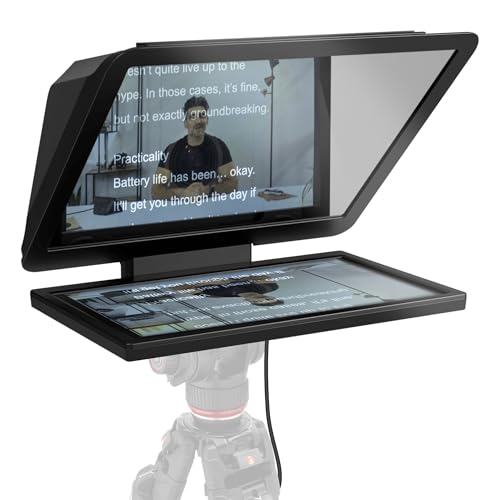
- 15.6-inch detachable Full HD display
- Extended range for comfortable reading
- Doubles as a conferencing monitor
Best For: Studio teams using DSLR, mirrorless, or studio cameras
Portable All-in-One Prompter
Glide Gear TMP 100 with carry case

- Fits phones and tablets up to 10.5 x 8 inches
- 70/30 beam splitter glass
- Collapsible design with carry bag
Best For: Portable studio setups that use phones or tablets
Built-In Monitor Prompter

- Built-in 9-inch HD LCD monitor
- 11-inch beam splitter glass reduces ghosting
- Works as an external monitor too
Best For: Streamers and broadcast users who want integrated prompting
Compact Multi-Device Teleprompter
Desview T5 for Smartphone, Tablet & DSLR

- Supports smartphones, tablets under 11 inches, and DSLR cameras
- Includes adapter rings plus Bluetooth remote for easier control
- Coated glass and light sealing help reduce glare during recording
Best For: solo creators and small studio setups needing flexible device support
Portable Studio Teleprompter

- 17-inch display area for easier script reading in studio use
- Foldable sunshade and quick-release mount simplify setup
- Bluetooth remote and app controls support hands-free prompting
Best For: presenters and studio creators who want a larger portable prompter
Budget-Friendly Prompting Screen
9.3-Inch Teleprompter for Phone & Camera

- 70/30 beam-splitter glass supports clear reading and eye contact
- Works with smartphones, DSLR, and mirrorless cameras
- App control and Bluetooth remote simplify hands-free prompting
Best For: compact studios, presenters, and mobile creators
Studio Versatility Pick – Professional teleprompter for tablets, laptops, and monitors
If you want a teleprompter for broadcast studio work that can handle more than just a tablet, the Proaim Professional Speech Teleprompter is built for flexible production setups. It supports devices up to 17 inches, uses 60/40 beam splitter glass, and includes a telescopic stand for comfortable height positioning during presentations, live streams, and studio shoots.
Best For: Presenters and studio teams that need a versatile prompt system for tablets, laptops, or monitors up to 17 inches.
Pros:
- Supports tablets, laptops, and monitors up to 17 inches
- 60/40 beam splitter glass helps keep scripts clear while preserving eye contact
- Telescopic stand makes height adjustment easier for different setups
- Suitable for conference rooms, broadcast studios, and professional production settings
Cons:
- Heavier than compact travel-focused options at 18.5 pounds
- Designed as a professional system, so it may be more than casual users need
Overall, this is a practical pick for crews that want a studio-oriented teleprompter with broad device support and a more traditional professional workflow. Its strengths are flexibility and presentation-friendly build, not ultra-portability.
All-in-One Camera Kit – Portable teleprompter kit with 18.5-inch Android monitor
This teleprompter for broadcast studio use is aimed at camera-based productions that want a self-contained kit. The GVM setup includes an 18.5-inch Android all-in-one monitor, 70/30 beam splitter glass, app and remote control, and a carry case, making it a strong fit for studio recordings, news, interviews, and live streaming.
Best For: Camera crews and content teams that want an all-in-one teleprompter with built-in display and remote control.
Pros:
- Includes an 18.5-inch Android display for built-in prompting
- App, phone, and Bluetooth remote control options add flexibility
- Compatible with DSLRs, camcorders, digital cameras, and DV players
- Foldable design and carry case make transport easier
Cons:
- At 38.8 pounds, it is relatively heavy
- May be more setup than users who only need a simple tablet teleprompter
This is a solid choice when you want a more complete studio package rather than a minimalist teleprompter. The built-in monitor and multiple control options are the main reasons to choose it over simpler camera rigs.
Streaming Desk Choice – Built-in screen teleprompter for scripts and chat
Elgato Prompter, Teleprompter with Built-in Screen - Effective Video Resolution
Check Price On AmazonIf your teleprompter for broadcast studio work also needs to double for streaming and video calls, the Elgato Prompter takes a different approach with a built-in 9-inch display. You can drag and drop any window or app onto the screen, then use it with DSLR cameras, webcams, smartphones, or laptops for scripts, chat, and professional eye contact.
Best For: Streamers and studio creators who want a built-in display teleprompter for scripts, chat, and video calls.
Pros:
- Built-in display means no extra tablet or phone is required
- Supports reading Twitch chat or scripts while looking at the camera
- Compatible with DSLR cameras, webcams, smartphones, PCs, and laptops
- Works with Stream Deck and the Camera Hub app for customization
Cons:
- Requires DisplayLink software on Mac, and DisplayLink Presenter on Android
- 9-inch screen may be smaller than larger pro studio rigs
For desk-based production and live communication, this is one of the most streamlined options in the group. Its built-in screen and direct computer workflow make it especially appealing if you want simplicity and fast setup.
Budget Essentials Pick – Compact 12-inch teleprompter for tablets and iPad
For buyers looking for a practical teleprompter for broadcast studio basics, the NEEWER BASICS X12B keeps the feature set focused and affordable. It uses a 12-inch beam splitter display, remote and app control, and a no-assembly design, making it a straightforward option for streaming, online courses, and tutorial recording.
Best For: Budget-conscious creators who want a simple tablet teleprompter with remote and app control.
Pros:
- No-assembly design makes setup quick and simple
- Included remote and app allow scroll, pause, and font adjustments
- 12-inch HD display with 75% light transmittance for clear text
- Foldable body and carry case help with storage and transport
Cons:
- Not for phone shooting
- Does not function as a monitor or support direct self-viewing during recording
- 12-inch screen may be small for users who want a larger pro display
This model makes sense when you want the essentials without extra complexity. It is best viewed as a compact, cost-conscious studio tool for tablets and iPad-based prompting rather than a full-featured monitor system.
Flagship Large-Format Prompter – Elgato Prompter XL for studio cameras
If you want a teleprompter for broadcast studio work that can sit comfortably on larger camera rigs, the Elgato Prompter XL is built around a detachable 15.6-inch Full HD display. The extended viewing range makes it easier to read scripts at a comfortable distance, and the unit can also double as a conferencing monitor when you are not prompting.
Best For: Studio teams and solo creators using DSLR, mirrorless, or studio cameras who want a larger prompt display.
Pros:
- 15.6-inch detachable Full HD display gives you a larger reading area.
- Extended range supports comfortable script reading from farther back.
- Works with DSLR, mirrorless, and studio cameras.
- Can also serve as a spare monitor for conferencing or multitasking.
Cons:
- Voice Sync requires NVIDIA RTX GPU or Apple M1 or better.
- Heavier than compact portable teleprompters at 7.43 pounds.
Overall, this is the most studio-oriented option in the group, especially if screen size and flexibility matter more than a lightweight setup. It is a strong fit for broadcast-style environments where a bigger display can improve readability and workflow.
Portable All-in-One Prompter – Glide Gear TMP 100 with carry case
Glide Gear TMP 100 Teleprompter – DSLR, Tablet, Smartphone – 12" Glass, Carry Case, No Assembly
Check Price On AmazonThe Glide Gear TMP 100 is a practical teleprompter for broadcast studio setups that need wide device support and fast deployment. It accepts smartphones and tablets up to 10.5 x 8 inches, uses 70/30 beam splitter glass, and ships with a carry bag, making it easier to move between locations or keep on hand for quick studio sessions.
Best For: Producers who want a compact teleprompter that works with phones or tablets and is easy to transport.
Pros:
- Supports smartphones and tablets up to 10.5 x 8 inches.
- 70/30 beam splitter glass helps keep the script readable while preserving camera clarity.
- Collapsible design and carry bag make transport simple.
- Includes tripod mounting threads and accessory mounting options.
Cons:
- Does not fit iPad Pro.
- App is not included and must support mirror text.
This model makes sense when you need a straightforward prompter that is compatible with common mobile devices and does not require a complicated buildout. It is a solid pick for smaller broadcast workflows, especially when portability and setup speed are priorities.
Built-In Monitor Prompter – NEEWER X11 for live streaming
The NEEWER X11 is a teleprompter for broadcast studio users who want a built-in monitor instead of relying on a separate tablet or phone. Its 11-inch beam splitter glass pairs with a 9-inch HD LCD for screen mirroring, and it also works as an external computer monitor for Windows and macOS, which can simplify live streaming and video conference workflows.
Best For: Streamers and broadcast users who want an integrated monitor-based prompting setup.
Pros:
- Built-in 9-inch HD LCD monitor allows plug-and-play screen mirroring.
- 11-inch multi-coated beam splitter glass reduces ghosting.
- Can function as an external monitor for Windows and macOS.
- Supports camera, webcam, and cellphone use with adjustable holder positioning.
Cons:
- Voice sync is not supported.
- First HDMI setup requires a driver.
- Some connection modes depend on specific USB or DP-compatible devices.
For users who want fewer separate components in the studio, this prompter’s integrated display is a practical advantage. It is especially useful when you want a single unit to handle prompting and mirrored display duties during broadcast or conferencing sessions.
Compact Multi-Device Teleprompter – Desview T5 for Smartphone, Tablet & DSLR
If you need a teleprompter for broadcast studio work that can also handle mobile production, the Desview T5 is built for flexible use with smartphones, tablets under 11 inches, and DSLR cameras. Its coated glass, light-sealing foam, and included adapter rings make it practical for controlled recording setups, live streaming, and video creation.
Best For: Creators and presenters who want one compact teleprompter for studio-style shooting with phones, tablets, or DSLRs.
Pros:
- Works with smartphones, tablets under 11 inches, and DSLR cameras
- Includes 49/52/55/58/62/67/72/77/82mm adapter rings
- Desview app supports TXT/DOCX import, font adjustments, and mirror/rotate controls
- Bluetooth remote adds hands-free play/pause and page control
Cons:
- Tablet support is limited to models under 11 inches
- Mobile-focused design may be less ideal for larger broadcast rigs
- Requires app setup to access the full scripting workflow
This is a versatile option if you need a straightforward teleprompter that can move between studio recording and smaller production setups. The adjustable mounting, coated glass, and included remote make it a practical choice for solo operators.
Portable Studio Teleprompter – Desview P17 Foldable 17-Inch
For a teleprompter for broadcast studio workflows where you want a larger reading window and fast setup, the Desview P17 is designed for camera, smartphone, and tablet use. Its foldable sunshade, quick-release tripod mount, and app-based controls make it a strong fit for structured recording sessions, online teaching, and creator setups.
Best For: Studio shooters and presenters who want a larger 17-inch teleprompter with portable, no-assembly convenience.
Pros:
- 17-inch format gives a larger script display area
- Foldable sunshade helps reduce glare
- Quick-release tripod mount and extendable arm speed up setup
- Bluetooth remote, voice control, and timer/countdown add flexible hands-free operation
Cons:
- Heavier than compact teleprompter options at 4.38 kg
- Uses 10-12 inch tablets for compatibility rather than larger tablet sizes
- Not waterproof, so it needs careful handling
The P17 makes sense when readability and workflow speed matter more than minimum footprint. Its bigger glass area and portable design are especially useful for creators who want a more studio-like prompt solution without a complicated buildout.
Budget-Friendly Prompting Screen – 9.3-Inch Teleprompter for Phone & Camera
This 9.3-inch teleprompter for broadcast studio use focuses on the basics: clear script reflection, quick setup, and broad device compatibility. With 70/30 beam-splitter glass, app control, and a Bluetooth remote, it works well for creators who need a compact prompting solution for recording, presenting, or streaming.
Best For: Creators and presenters who want a compact, easy-carry teleprompter for small studio or on-location work.
Pros:
- 70/30 beam-splitter glass helps keep text bright and readable
- Supports smartphones, DSLR cameras, and mirrorless cameras
- iOS and Android app integration makes script management simple
- Bluetooth remote offers hands-free scrolling and playback control
Cons:
- Smaller 9.3-inch size may feel limited for longer scripts
- Less suited to larger broadcast-style monitor setups
- Compact design may not suit users who want a bigger viewing area
Overall, this model is a practical pick when portability and quick deployment matter most. It gives you the core teleprompting features without adding extra bulk, which is useful for compact studios and mobile productions.
How We Picked the Best Teleprompter for Broadcast Studio
We looked for teleprompters that make sense in a Teleprompter for Broadcast Studio environment: clear beam-splitter glass, stable camera support, practical screen sizes, and control methods that fit live or recorded production. We also favored setups with straightforward assembly, wide device compatibility, and features that reduce setup friction between shoots.
Quick Comparison
At a high level, smaller 9.3-inch and 11-inch models are better for tight spaces, lighter cameras, and mobile-style production. 12-inch units are the most flexible middle ground for many studios. Larger 15.6-inch and 18.5-inch systems are better when readability matters more than compactness, especially for presenters reading longer scripts or working at greater distances.
Key Buying Factors for a Teleprompter for Broadcast Studio
Glass Size and Readability
Screen size affects how far the presenter can sit from the camera and how easily text can be read. Larger glass and monitors are easier on talent during long reads, while smaller units can work well for close camera positions and shorter scripts.
Camera, Tablet, and Monitor Compatibility
Make sure the unit supports your actual workflow. Some teleprompters are built around tablets or phones, while others include integrated displays or support larger monitors. Check lens clearance, adapter rings, and whether your camera body fits without vignetting.
Mounting and Stability
A broadcast setup should stay aligned once framed. Look for solid tripod mounts, sturdy frames, and designs that minimize wobble. If you move gear often, portability and faster assembly can matter nearly as much as raw size.
Control and Workflow
Remote control, app-based scrolling, and screen mirroring can improve speed and consistency. For studio teams, the best Teleprompter for Broadcast Studio use is usually the one that integrates cleanly with your existing production tools, not just the one with the most features.
Presenter Comfort
Distance to lens, text smoothness, and glare control all affect delivery. A good setup should keep eye lines natural and make it easy for talent to maintain pace without obvious strain.
Who Should Buy Which Teleprompter for Broadcast Studio?
Choose a compact model if you need portability, limited desk space, or occasional recording. Go with a mid-size 12-inch system if you want the most balanced option for general studio work. Pick a larger 15.6-inch or 18.5-inch teleprompter if you run a dedicated studio, work with longer scripts, or need better readability for multiple presenters. If your team values simplicity, prioritize no-assembly designs and direct app or remote control. If you want a more permanent broadcast workflow, focus on size, stability, and display quality first.