
When you’re working with multiple cameras, achieving perfect synchronization is vital for a smooth production process. Relying on timecode sync boxes can greatly streamline this task, ensuring your audio and video align seamlessly. With various options on the market, each offering unique features, it’s essential to know what to look for. Let’s explore the top nine timecode sync boxes that can help you maintain that all-important sync every time.
Alvin’s Cables Tentacle Timecode Cable for Sony Cameras
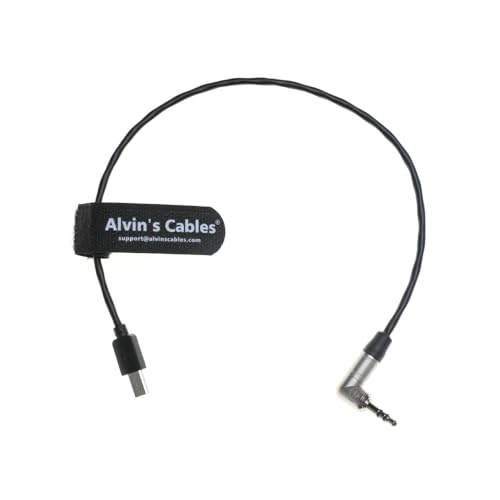
If you’re using Sony cameras like the FX3, FX30, A7S3, or A1, Alvin’s Cables Tentacle Timecode Cable is an essential tool for your multi-camera setups. This cable features a 3.5mm TRS to Micro USB connection, ensuring you can easily sync your footage. At 35cm (13.8 inches) long, it’s the perfect length for most configurations. It’s compatible with Tentacle Sync E, Track E, and Timebar, giving you seamless timecode feeding. Plus, if you need a different length, custom options are available. Each cable undergoes rigorous testing, so you can trust its reliability for your projects.
Best For: Filmmakers and videographers using Sony FX3, FX30, A7S3, or A1 cameras who need reliable timecode synchronization for multi-camera setups.
Pros:
- High Compatibility: Works seamlessly with Tentacle Sync E, Track E, and Timebar for easy timecode feeding.
- Custom Length Options: Available custom cable lengths to meet specific setup requirements.
- Quality Assurance: Each cable is rigorously tested to prevent short circuits and ensure reliability.
Cons:
- Limited Length: The standard length of 35cm may not suit all configurations without customization.
- Specific Camera Compatibility: Only compatible with select Sony camera models, limiting its use with other brands.
- Potential for Defects: Although tested, there is still a chance of receiving a defective cable, requiring customer support intervention.
Deity TC-1 Wireless Timecode Box Generator

The Deity TC-1 Wireless Timecode Box Generator is perfect for filmmakers and content creators who demand precise audio and video synchronization across multiple cameras. With wireless connectivity over 2.4G RF or Bluetooth 5.0, you can easily sync timecode up to 250 feet away. Enjoy continuous operation for up to 24 hours on a single charge, thanks to its 950mAh LiPo battery. The compact, lightweight design guarantees seamless integration into any setup. Plus, with compatibility for various frame rates and a drift of less than 1 frame every 24 hours, you’ll achieve accurate synchronization every time.
Best For: Filmmakers and content creators who require precise audio and video synchronization across multiple cameras.
Pros:
- Wireless connectivity allows syncing over 2.4G RF or Bluetooth 5.0 up to 250 feet away.
- Long battery life provides continuous operation for up to 24 hours on a single charge.
- Compact and lightweight design makes it easy to integrate into any setup without adding bulk.
Cons:
- Limited to specific frame rates, which may not cover all production needs.
- Drift of less than 1 frame every 24 hours may still be a concern for extremely high-precision projects.
- Reliance on battery power, which requires planning for recharges during extended shoots.
Timecode for Tentacle Sync to Sony FX3 FX30 A1 A7S3 A7SIII Camera Adapter
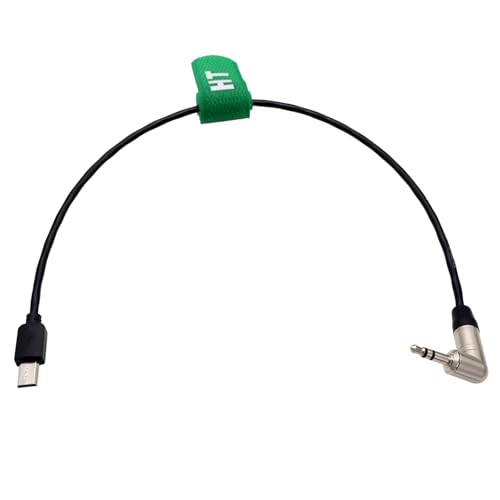
For filmmakers using Sony FX3, FX30, A1, A7SIII, or A7S3 cameras, the Timecode for Tentacle Sync adapter is an essential tool for seamless synchronization. This right-angle 3.5mm TRS to Multi USB cable measures 30cm and connects your Tentacle Sync E or TRACK E to your camera effortlessly. Weighing only 0.01 kilograms, it’s lightweight and easy to handle. The TC-1 timecode cable’s design allows for quick installation and removal, ensuring you save time on set. With its competitive pricing and positive feedback, this adapter is a must-have for achieving perfect sync in your multi-camera setups.
Best For: Filmmakers and videographers working with Sony FX3, FX30, A1, A7SIII, or A7S3 cameras who need reliable timecode synchronization.
Pros:
- Easy Installation: The right-angle connectors allow for quick and hassle-free attachment to the camera.
- Lightweight Design: At only 0.01 kilograms, it’s easy to transport and handle on set.
- Competitive Pricing: Offers a cost-effective solution for achieving timecode sync in multi-camera setups.
Cons:
- Limited Length: The 30cm cable may not be suitable for setups requiring longer reach.
- Indoor Usage Only: Not designed for outdoor environments, potentially limiting versatility.
- Specific Compatibility: Only compatible with Tentacle Sync E, TRACK E, and certain Sony camera models, restricting use with other devices.
Foto&Tech Timecode Cable BNC to PC Compatible with Betso Sync Boxes and GH5 GH4 Camera
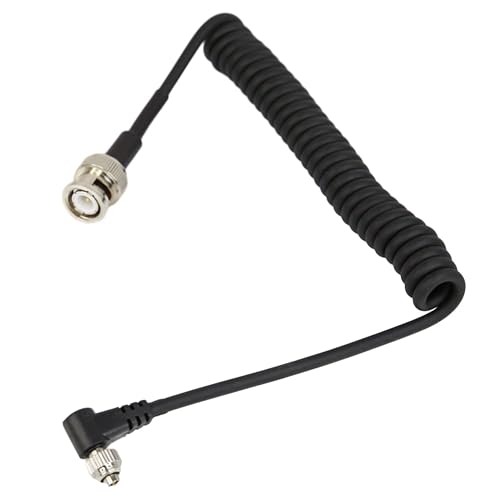
Designed for professional videographers and filmmakers, the Foto&Tech Timecode Cable BNC to PC seamlessly connects Betso Sync Boxes with GH5 and GH4 cameras, ensuring precise timecode synchronization across multiple devices. This 14-inch coiled cable stretches to approximately 54 inches, providing flexibility without clutter. Its compact design makes it easy to transport and store, enhancing your mobility on set. Built with high-quality materials, it withstands heavy use, ensuring secure connections and accurate syncing. Plus, it’s a plug-and-play solution, allowing for quick setup without extra adapters. You’ll appreciate its universal compatibility with a range of equipment for seamless integration.
Best For: Professional videographers and filmmakers seeking reliable timecode synchronization for their GH5 and GH4 cameras.
Pros:
- Universal Compatibility: Works seamlessly with various equipment, ensuring integration in diverse setups.
- Durable Construction: Made from high-quality materials to withstand heavy use in demanding production environments.
- Compact and Portable: Lightweight design minimizes clutter and is easy to transport and store.
Cons:
- Limited Length: The coiled cable may require stretching to achieve the desired length for some setups.
- Specific Compatibility: Primarily designed for Betso Sync Boxes and specific camera models, limiting versatility with other devices.
- Cost Consideration: Higher price point compared to standard cables may not fit all budgets.
Timecode Sync for Deity TC-1 to ARRI Alexa Mini LF and RED Camera
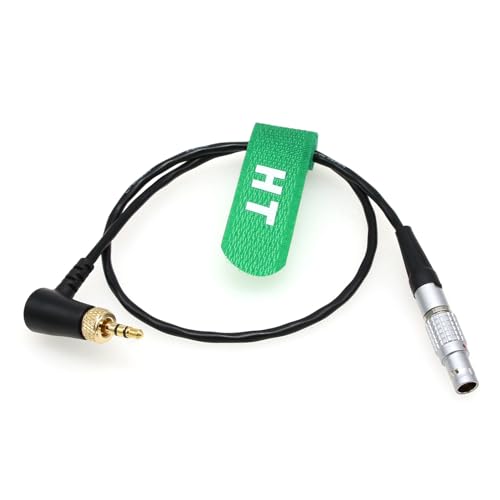
Filmmakers seeking seamless timecode synchronization between their Deity TC-1 generator and high-end cameras like the ARRI Alexa Mini LF or RED Ranger will find this sync cable indispensable. With its locking 3.5mm TRS to straight 5-pin connectors, you can trust it to maintain a secure connection during shoots. Measuring 45cm (18 inches), this cable is versatile enough for various setups. It’s compatible with other devices too, including the Kinefinity Mavo Edge and Sound Devices audio recorders. For reliable timecode synchronization across your equipment, this sync cable is a must-have for achieving professional-quality results.
Best For: Filmmakers seeking reliable timecode synchronization between their Deity TC-1 generator and high-end cameras like the ARRI Alexa Mini LF and RED Ranger.
Pros:
- Secure Connection: Locking 3.5mm TRS to straight 5-pin connectors ensure stability during shoots.
- Versatile Length: At 45cm (18 inches), the cable length is suitable for various filming setups.
- Wide Compatibility: Works with multiple devices, including Kinefinity Mavo Edge and various Sound Devices audio recorders.
Cons:
- Limited Length: The 45cm length may be restrictive for larger setups.
- Specific Compatibility: May not work with all camera models or brands outside the listed compatibility.
- Additional Accessories Needed: Depending on the setup, extra adapters may be required for some devices.
Timecode BNC to Multi Micro USB Cable for Sony Cameras

The Timecode BNC to Multi Micro USB Cable is an essential tool for audio professionals and filmmakers who seek seamless timecode synchronization between their audio recorders and Sony cameras. This cable connects BNC timecode generators to models like the Sony FX30, FX3, A7S III, and A1, ensuring reliable sync. With right angle BNC connectors, installation and removal become hassle-free, while the 30cm length offers a compact solution. The Multi/Micro USB connector integrates effortlessly, allowing you to maintain a tidy setup. If you need precision in your multi-camera projects, this cable is a must-have for flawless audio-visual alignment.
Best For: Filmmakers and audio professionals seeking reliable timecode synchronization between audio recorders and Sony cameras.
Pros:
- Easy Installation: Right angle BNC connectors simplify the connection process.
- Compact Design: At 30cm (12 inches), the cable is short enough to keep setups tidy without excess length.
- Wide Compatibility: Works seamlessly with multiple Sony camera models, enhancing versatility in various shooting environments.
Cons:
- Limited Length: The 30cm length may not suit all setups, particularly for larger distance requirements.
- Specific Compatibility: Primarily designed for Sony cameras, which may limit use with other brands.
- BNC Requirement: Requires audio recorders with BNC TC ports, which may not be available on all devices.
Timecode Cable for Tentacle Sync to Canon Cameras

For those using Canon cameras like the R5C or C400, the Timecode Cable for Tentacle Sync offers an efficient solution to synchronize timecode seamlessly. This 30 cm (12 inches) cable connects via a 3.5mm TRS to DIN 1.0/2.3, ensuring bidirectional timecode signals. You can easily jam-sync any Tentacle device from an external source, enhancing your filming setup. Weighing just 0.704 ounces, it’s lightweight and portable for both indoor and outdoor use. Coiled in protective tubing, it’s ready to perform right out of the box. With this cable, achieving perfect sync has never been easier.
Best For: Filmmakers and videographers using Canon R5C or C400 cameras who need to synchronize timecode efficiently.
Pros:
- Compact and Lightweight: At just 30 cm (12 inches) and 0.704 ounces, it’s easy to carry and manage during shoots.
- Bidirectional Timecode Signals: Supports seamless syncing between Tentacle Sync devices and Canon cameras.
- Durable Packaging: Comes coiled in protective tubing for enhanced durability and convenience.
Cons:
- Limited Length: The 30 cm (12 inches) length may not be suitable for all setups, potentially requiring extension cables.
- Male-to-Male Connector: May not be compatible with devices needing different connector types without an adapter.
- Specific Compatibility: Primarily designed for Canon R5C and C400, limiting its use for users of other camera brands.
DRRI Timecode Systems DIN to 5 Pin Timecode Output Cable
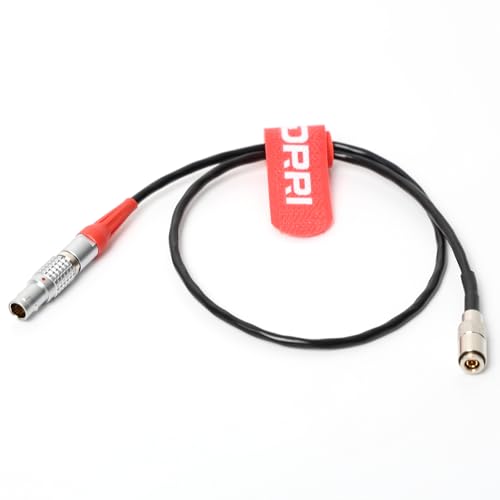
Ideal for those needing reliable timecode synchronization, the DRRI Timecode Systems DIN to 5 Pin Timecode Output Cable offers seamless connectivity for your UltraSync ONE. This 50CM cable features a FGG 0B 5 Pin Male Plug that easily accepts timecode out, paired with a DIN 1.0/2.3 connector. It’s specifically designed to feed timecode directly to the UltraSync ONE and is compatible with devices that output timecode from a 5-pin LEMO port. Plus, if you need a different length, custom options are available upon request. For more specifications, don’t hesitate to check the product details.
Best For: Those seeking reliable timecode synchronization for their UltraSync ONE and compatible devices.
Pros:
- High compatibility with devices that output timecode from a 5-pin LEMO port.
- Custom lengths available, allowing for tailored solutions to fit specific needs.
- Robust design with a durable FGG 0B 5 Pin Male Plug for secure connections.
Cons:
- Limited length option at standard 50CM may not suit all setups without customization.
- Specific compatibility may exclude some devices that do not use a 5-pin LEMO port.
- Potentially higher cost compared to generic cables due to specialized design.
UltraSync ONE Mini Lightweight Sync Unit for Multicamera Sync

Lightweight and versatile, the UltraSync ONE Mini is perfect for filmmakers seeking seamless multicamera synchronization. This sync unit supports LTC timecode and genlock, ensuring your cameras and audio stay perfectly aligned. With the ability to synchronize up to 14 channels, you can tackle complex shoots with confidence. Its impressive 200-meter synchronization range with a master unit means you can move freely without losing connection. Plus, the 8000mAh internal Li-ion battery charges via USB-C, providing ample power for long sessions. The high-resolution OLED display keeps you informed of settings and status, making it an essential tool for any production.
Best For: Filmmakers and production teams looking for a reliable solution for multicamera synchronization and audio alignment.
Pros:
- Lightweight and portable design, making it easy to transport and set up.
- Supports synchronization of up to 14 channels, ideal for complex shoots.
- Long 200-meter synchronization range allows for flexible movement during filming.
Cons:
- Limited to a maximum of 14 channels, which may not suffice for larger productions.
- Requires a USB-C charger, which may not be universally available on all sets.
- OLED display, while high-resolution, may be difficult to read in bright sunlight.
Factors to Consider When Choosing Timecode Sync Box for Multi Camera
When you’re choosing a timecode sync box for your multi-camera setup, you need to take into account several key factors. Think about wireless connectivity options, battery life, and how compatible the device is with your cameras. Don’t forget to evaluate the synchronization range and the overall size and portability of the unit.
Wireless Connectivity Options
Choosing the right wireless connectivity option for your timecode sync box can greatly impact your multi-camera setup. Most wireless sync boxes use 2.4 GHz RF or Bluetooth 5.0 technology, allowing for seamless audio and video alignment without the hassle of cables. With an effective range of up to 250 feet, you have flexibility in camera placements during shoots. Many models support multiple frame rates, ensuring compatibility with various recording standards. Precision is key; look for options that maintain a drift of less than 1 frame every 24 hours to keep your cameras synchronized. Prioritize these features to enhance your production quality while minimizing downtime, giving you the best results on set.
Battery Life Duration
Wireless connectivity options play a significant role in your timecode sync box’s overall performance, but battery life duration is equally important to evaluate for a smooth multi-camera shoot. Look for units that can run up to 24 hours on a single charge, minimizing downtime. Longer battery life is essential for projects with tight schedules, allowing for extended filming sessions without frequent recharging. Always check the battery capacity, measured in mAh; higher capacity typically means longer operating times. A good sync box should also feature efficient power management to prolong battery life in demanding environments. Finally, consider models that can be powered via USB-C for easy recharging and compatibility with portable power sources, ensuring you’re always ready to shoot.
Compatibility With Cameras
Selecting a timecode sync box that seamlessly integrates with your camera setup is essential for achieving precise synchronization in multi-camera shoots. First, verify the sync box is compatible with your specific camera models, like the Sony FX3, FX30, A7S3, or Canon R5C. Next, check the supported connector types—3.5mm TRS, Multi Micro USB, or DIN—to match your camera’s input needs. Verify that the sync box can handle your cameras’ frame rates, such as 24, 25, or 30 fps. Additionally, assess the maximum cable length and types supported to fit your shooting environment. Finally, look for compatibility with any timecode generators you plan to use, like Tentacle Sync E or Deity TC-1, ensuring effective communication between all equipment.
Synchronization Range Distance
Once you’ve confirmed your timecode sync box is compatible with your cameras, the synchronization range becomes a vital consideration for multi-camera setups. The range determines how far apart your cameras can be while still maintaining accurate timecode alignment, which is critical for smooth production. Wireless systems typically offer ranges up to 250 feet (76 meters), but environmental factors like obstructions and interference from other devices can reduce this distance. A greater synchronization range gives you more flexibility in camera placement, important for large sets or outdoor shoots. When selecting a timecode sync box, consider the expected working distance between your cameras to guarantee efficiency in your production workflow.
Size and Portability
When it comes to choosing a timecode sync box for multi-camera setups, size and portability are vital factors that can influence your filming experience. A compact sync box can greatly reduce the weight and bulk of your camera rig, making it easier to handle, especially during handheld or mobile shoots. Look for models that weigh as little as 1.4 ounces and have dimensions around 2.1 x 1.5 x 0.85 inches. These smaller sizes allow for easy mounting in tight spaces on your camera rig. A well-designed sync box also minimizes cable clutter, which simplifies transport and setup, essential for maintaining efficiency in fast-paced production environments. Opting for a portable sync box can streamline your workflow, enabling quick setups and breakdowns.
Cable Connection Types
Cable connection types play an essential role in the effectiveness of your timecode sync box for multi-camera setups. You’ll encounter various options like 3.5mm TRS, BNC, and multi-micro USB, each designed for seamless integration with cameras and audio devices. When choosing a cable type, consider ease of installation; right-angle connectors can be a lifesaver in tight spaces. Compatibility is important too, as certain connection types, like DIN and 5-pin connectors, are tailored for specific devices. Don’t forget about cable lengths, which typically range from 30cm to 50cm, and customizations may be available. Ultimately, selecting the right connector type is essential to guarantee reliable timecode synchronization, especially when adhering to standards like SMPTE.