
Live streaming away from a desk does not require a full-size gaming tower. The right compact computer can help you broadcast, manage chat, monitor scenes, and stay productive while traveling.
These 10 travel-friendly live streaming computers cover several portable formats, from handheld gaming PCs and lightweight laptops to small desktops for hotel rooms, mobile studios, and flexible streaming setups.
Best 10 Travel-Friendly Live Streaming Computers Picks for 2026
Best Portable Gaming Pick

- Ryzen Z1 Extreme processor with 16GB RAM
- 8.8-inch WQXGA 144Hz touchscreen
- Two USB4 ports and included carrying case
Best For: Traveling gamers who want a powerful handheld Windows PC
Best Compact ChromeOS Hub
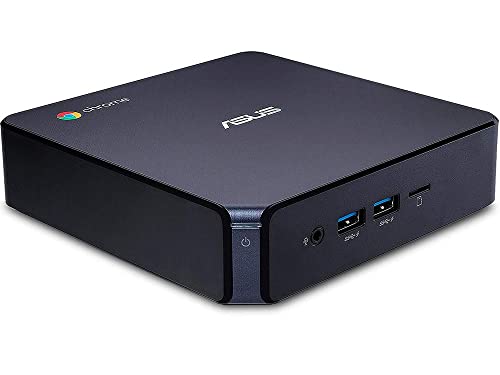
- Compact 5.85-inch square mini PC design
- 4K graphics with two-monitor support
- Wi-Fi, Bluetooth, HDMI, USB-A, and USB-C
Best For: Light streaming and media use with an external display
Best Travel Laptop Value

- 14-inch FHD touchscreen with integrated 720p webcam
- ChromeOS with Wi-Fi 6 and Bluetooth 5.1
- Light 2.9-pound design with USB-C and microSD
Best For: Basic streaming, video calls, and browser-based work
Best Expandable Mini PC

- Intel 100U processor with 16GB RAM
- 512GB NVMe SSD plus M.2 expansion slot
- Dual USB4, dual HDMI, 2.5G Ethernet, and Wi-Fi 6
Best For: Portable multi-display streaming workstations with upgrade needs
Travel-Ready Value Laptop

- 15.6-inch Full HD IPS display
- Upgradeable RAM and expandable storage
- Built-in webcam privacy slider
Best For: Travelers and remote workers handling light streaming and daily tasks
Compact Desk Streaming Hub

- Tiny 5.02-inch-wide mini PC design
- 8GB RAM, 256GB SSD, and Wi-Fi 6
- Dual HDMI outputs support flexible displays
Best For: Portable desk setups using a separate monitor or TV
Ultra-Portable Convertible

- 2.02-pound 360-degree convertible design
- 16GB RAM and 512GB expandable SSD
- 10.51-inch touch display with Wi-Fi 6
Best For: Frequent travelers needing a lightweight streaming and work device
Balanced Upgrade Pick

- Ryzen 3 5400U with 4 cores and 8 threads
- Expandable RAM up to 64GB and dual M.2 storage
- Triple 4K display outputs plus dual 2.5GbE LAN
Best For: Travelers needing upgradeable multitasking and multi-display support
Performance Travel Pick
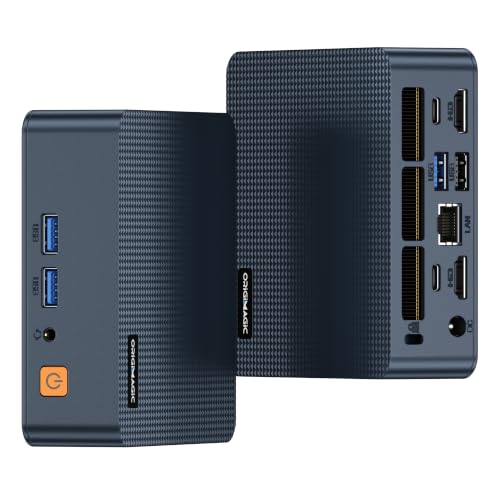
- Six-core Intel processor with up to 4.7GHz turbo speed
- 16GB RAM, 512GB NVMe SSD, and Wi-Fi 6
- Dual Thunderbolt 4 ports for expansion and displays
Best For: Mobile professionals needing stronger multitasking and connectivity
Ultra-Portable Value Pick

- Pocket-size design weighs only 7.3 ounces
- Can use compatible USB-C power banks and chargers
- Dual 4K HDMI outputs with Wi-Fi 6 and Bluetooth 5.2
Best For: Basic mobile streaming and desktop tasks in tight spaces
Best Portable Gaming Pick – Lenovo Legion Go
For shoppers seeking travel-friendly live streaming computers that can also handle demanding games, the Lenovo Legion Go combines Windows flexibility with a handheld design. Its Ryzen Z1 Extreme processor, 16GB of RAM, fast display, and included carrying case make it especially practical for mobile gaming and on-the-go content use.
Best For: Travelers who want a powerful handheld Windows gaming PC with integrated controls.
Pros:
- AMD Ryzen Z1 Extreme processor and 16GB RAM support fluid gaming and multitasking.
- 8.8-inch WQXGA 144Hz touchscreen provides sharp, smooth visuals.
- Two USB4 40Gbps ports, integrated camera, customizable controllers, and included carrying case.
- Compact design weighs under 2 pounds according to the supplied notes.
Cons:
- 512GB SSD may fill quickly with large games and media libraries.
- Handheld screen size may be less comfortable than a laptop or desktop setup for extended streaming workflows.
The Legion Go is the most performance-oriented and gaming-focused option here. Its Windows platform and fast connectivity offer useful flexibility, while the handheld controls and portable form factor make it a strong fit for gaming away from home.
Best Compact ChromeOS Hub – ASUS Chromebox 3
The ASUS Chromebox 3 is a compact ChromeOS desktop for simple, stationary streaming and media setups. For travel-friendly live streaming computers, its small footprint, Wi-Fi, Bluetooth, HDMI, and USB-C connectivity can work well when paired with a portable monitor, though its modest hardware is best suited to lighter workloads.
Best For: Basic live streaming, web-based work, and media playback in compact temporary workspaces.
Pros:
- Small 5.85-by-5.85-inch design is easy to pack compared with a conventional desktop.
- ChromeOS includes automatic updates, sandboxing, and verified boot.
- Supports 4K output and up to two monitors through HDMI and DisplayPort over USB-C.
- Includes Wi-Fi 802.11ac, Bluetooth 4.2, USB-A, and USB-C connectivity.
Cons:
- 4GB RAM and Intel Celeron 3865U processor limit demanding multitasking.
- Requires an external monitor, keyboard, and speakers for a complete workstation.
- The supplied model-year information is 2018, making it an older platform.
This Chromebox is appealing when portability means carrying a small computer between existing displays rather than using a self-contained laptop. It is better suited to browser-based streaming tools and light media tasks than intensive production.
Best Travel Laptop Value – Lenovo 14-Inch Chromebook
For a self-contained option among travel-friendly live streaming computers, this Lenovo Chromebook pairs a 14-inch FHD touchscreen with ChromeOS and an integrated webcam. Its light 2.9-pound design, Wi-Fi 6, and privacy-focused camera shutter make it convenient for remote streaming, video calls, and browser-based production.
Best For: Students, remote workers, and casual creators who need an affordable Chromebook with a built-in display and webcam.
Pros:
- 14-inch 1920-by-1080 touchscreen offers a practical workspace with wide viewing angles.
- Integrated 720p webcam includes a privacy shutter and dual-array microphones.
- MediaTek Kompanio 520 octa-core processor is designed for everyday performance and battery efficiency.
- Wi-Fi 6, Bluetooth 5.1, USB-A, USB-C, and microSD provide useful travel connectivity.
Cons:
- 4GB RAM and 64GB eMMC storage are limited for demanding streaming and large media libraries.
- ChromeOS may not support desktop streaming software available on Windows or macOS.
- Only two USB ports are listed.
This Chromebook is the most convenient all-in-one travel choice in the group for basic live sessions and online communication. Its screen, webcam, and wireless features are useful on the road, but serious creators should account for the limited memory and storage.
Best Expandable Mini PC – Mini PC C7 100U
The Mini PC C7 100U is a strong desktop-style choice for travel-friendly live streaming computers when you can bring a monitor or portable display. Its 16GB dual-channel RAM, 512GB NVMe SSD, dual USB4 ports, and multi-display support provide considerably more expansion potential than the compact Chromebook options.
Best For: Mobile workstations and live streaming setups that need strong connectivity, multiple displays, and upgrade room.
Pros:
- Six-core, eight-thread Intel 100U processor reaches up to 4.7GHz single-core turbo frequency.
- 16GB dual-channel DDR4 RAM and 512GB NVMe SSD provide a capable starting configuration.
- Dual USB4 ports support up to 8K output and 40Gbps data transfer.
- Includes dual HDMI 2.0, 2.5G Ethernet, Wi-Fi 6, multiple USB ports, and a second M.2 expansion slot.
Cons:
- It is a mini desktop, so a monitor, keyboard, and mouse are needed for a complete travel setup.
- The supplied notes do not specify an integrated webcam or microphone.
- Multi-display capability may require carrying additional cables and displays.
The C7 100U offers the broadest connectivity and upgrade path in this roundup. It is well suited to creators who travel with a compact workstation kit and value fast storage, wired networking, and multiple-display support over an all-in-one design.
Travel-Ready Value Laptop – 15.6-inch Core i5 Laptop
For shoppers seeking travel-friendly live streaming computers, this 15.6-inch Windows 11 laptop offers a portable setup with an Intel Core i5-7Y57 processor, Full HD IPS display, and built-in webcam. Its upgradeable memory and expandable storage add flexibility, although the included 4GB of RAM is best suited to lighter streaming and multitasking workloads.
Best For: Travelers, students, and remote workers who need a large-screen laptop for HD streaming, video calls, and everyday productivity.
Pros:
- 15.6-inch 1920×1080 IPS display with wide viewing angles
- Core i5 processor supports everyday multitasking and HD streaming
- Upgradeable RAM and expandable SSD and TF-card storage
- Physical webcam privacy slider and 38Wh battery
Cons:
- Only 4GB of RAM is included
- Integrated Intel HD Graphics is not intended for demanding production workloads
This laptop is a practical travel option when screen size and upgradeability matter more than high-end streaming performance. Consider upgrading the RAM before handling heavier multitasking sessions.
Compact Desk Streaming Hub – Getorli Ryzen 5 Mini PC
This Getorli mini PC is a compact choice among travel-friendly live streaming computers when you plan to stream from a hotel room, office, or temporary desk rather than carry a built-in screen. Its Ryzen 5 3500U processor, 8GB RAM, Wi-Fi 6, and dual HDMI outputs support everyday media use and flexible display setups.
Best For: Travelers who bring a portable monitor or TV and want a small Windows 11 computer for streaming, browsing, and light office work.
Pros:
- Very small 5.02 x 4.43 x 1.57-inch footprint
- 8GB DDR4 RAM and 256GB M.2 SSD
- Wi-Fi 6, Bluetooth 5.3, and Gigabit Ethernet
- Dual HDMI outputs with 4K video playback support
Cons:
- Requires a separate display, keyboard, and mouse for a complete setup
- Integrated graphics are aimed at light use rather than demanding production
The GT100 makes sense for mobile setups built around existing displays. Its compact chassis and wired or wireless networking provide useful flexibility, while the included 8GB memory is more comfortable for multitasking than entry-level configurations.
Ultra-Portable Convertible – CHUWI MiniBook X
The CHUWI MiniBook X is a particularly mobile option for travel-friendly live streaming computers, combining a 2.02-pound convertible design with 16GB RAM, a 512GB SSD, and Wi-Fi 6. Its compact touchscreen can work in laptop, tablet, tent, or stand modes for streaming, meetings, and on-the-go content review.
Best For: Frequent travelers who prioritize low weight, touchscreen flexibility, and enough memory for everyday streaming and multitasking.
Pros:
- Lightweight 2.02-pound, 0.68-inch-thin convertible design
- 16GB LPDDR4X RAM and 512GB SSD, expandable up to 2TB
- 10.51-inch 1920×1200 touch display with 100% sRGB coverage
- Wi-Fi 6, dual full-function USB-C ports, and active cooling
Cons:
- Small 10.51-inch screen may feel cramped for extended editing
- Does not support an active stylus
- Compact design provides fewer conventional ports
With substantially more memory and storage than the other portable options here, the MiniBook X is well suited to mobile productivity and light streaming workflows. Its small display and limited port selection are the main trade-offs for the exceptionally travel-friendly form factor.
Balanced Upgrade Pick – BOSGAME E5 Plus Ryzen Mini PC
The BOSGAME E5 Plus is a practical choice for travel-friendly live streaming computers when you need a compact Windows 11 Pro system with room to grow. Its Ryzen 3 5400U processor, dual-display flexibility, and upgradeable memory suit mobile workstations, video calls, browser-based streaming, and everyday multitasking.
Best For: Travelers and home-office users who want upgradeable memory, multiple display outputs, and flexible wired or wireless networking.
Pros:
- Ryzen 3 5400U provides 4 cores, 8 threads, and boost speeds up to 4.0GHz.
- RAM can be expanded from 8GB to 64GB, with an additional M.2 NVMe slot for storage expansion.
- Supports triple 4K@60Hz displays through HDMI, DisplayPort, and USB-C.
- Includes dual 2.5GbE LAN, Wi-Fi 5, Bluetooth 5.0, and a full-function USB-C port.
Cons:
- Ships with only 8GB of RAM, so heavier multitasking may benefit from an upgrade.
- The included 256GB drive is SATA-based rather than NVMe.
- Its integrated Radeon graphics are aimed at everyday visuals rather than demanding graphics workloads.
The E5 Plus stands out for expandability and multi-display connectivity. It is a sensible travel-friendly live streaming computer for general streaming and productivity, especially if you plan to add memory or faster storage later.
Performance Travel Pick – C7 Intel Core 3 Mini PC
The C7 is a strong option among travel-friendly live streaming computers for users who want modern connectivity and more ready-to-use memory and storage. Its six-core Intel Core 3 100U processor, 16GB of RAM, Wi-Fi 6, and compact 387g design make it well suited to mobile productivity, streaming, conferencing, and multi-monitor setups.
Best For: Mobile professionals and creators who want a compact system with Thunderbolt 4 expansion, fast wireless networking, and strong multitasking capability.
Pros:
- Intel Core 3 100U uses 6 cores, 8 threads, and boosts up to 4.7GHz.
- Comes with 16GB dual-channel DDR4 RAM and a 512GB M.2 NVMe SSD.
- Dual Thunderbolt 4 ports support high-speed peripherals, external GPU enclosures, and display expansion.
- Wi-Fi 6, 2.5GbE LAN, vapor-chamber cooling, and dual fans support extended use.
Cons:
- It is more feature-rich than necessary for basic browsing or simple streaming setups.
- The listed display support is up to two 4K displays, fewer than some compact alternatives.
- Thunderbolt 4 expansion may require additional compatible accessories.
With its included 16GB memory, fast SSD, and Thunderbolt 4 ports, the C7 is the most capable choice here for demanding mobile workflows. Its VESA mount also makes it easy to keep a portable setup tidy behind a monitor.
Ultra-Portable Value Pick – GMKtec G5S Mini PC
The GMKtec G5S is a particularly portable choice for travel-friendly live streaming computers when space and flexible power matter most. Its 7.3-ounce micro design can fit in a bag or cable-management box, while USB-C 12V/3A input allows use with compatible power banks and universal chargers.
Best For: Digital nomads, students, and field workers who need a basic streaming, video-call, and desktop setup in small spaces.
Pros:
- Extremely compact 2.8 x 2.8 x 1.75-inch design weighs just 7.3 ounces.
- USB-C power input works with compatible power banks, portable laptop chargers, and universal supplies.
- Dual HDMI ports support two 4K@60Hz displays.
- Wi-Fi 6, Bluetooth 5.2, three USB 3.2 ports, Gigabit Ethernet, and a microSD slot provide useful connectivity.
Cons:
- The Intel N5095 and 8GB RAM are intended for essentials rather than demanding workloads.
- The included 128GB SSD offers less starting space than the other options.
- Power-bank use depends on a compatible 12V/3A USB-C source.
The G5S prioritizes portability over performance. It is a good fit for basic streaming, web work, documents, and video calls, particularly when the ability to run from compatible portable power is more important than high-end processing.
How We Picked These Travel-Friendly Live Streaming Computers
We selected computers that balance portability, everyday usability, connectivity, and streaming practicality. The lineup includes handheld PCs, laptops, Chromebooks, and mini PCs so shoppers can match the form factor to their travel routine. We also considered memory, storage, processor capability, display size, operating system, upgrade potential, and the likely demands of streaming software, browser tabs, chat tools, and light content creation.
Because compact devices vary widely, no single model is ideal for every broadcaster. A Windows system generally offers broader support for streaming applications and accessories, while ChromeOS devices are better suited to browser-based workflows. Mini PCs can provide strong value but usually require a separate monitor, keyboard, mouse, and power setup.
Quick Comparison
| Computer type | Best suited for | Main advantage | Important trade-off |
|---|---|---|---|
| Handheld PC | Gaming and highly mobile streaming | Built-in screen and controls | Small display and limited ports |
| Mini laptop | Compact creator workflows | Integrated keyboard and display | Less workspace than a full-size laptop |
| Chromebook | Browser-based broadcasting and productivity | Lightweight, simple operation | App compatibility can be limited |
| Mini PC | Portable desk or hotel-room studios | Compact desktop performance | Requires external peripherals |
| Budget Windows laptop | Basic streaming and general use | All-in-one convenience | Lower-end hardware may limit multitasking |
Key Buying Factors for Travel-Friendly Live Streaming Computers
Processor and Memory
Streaming software, video encoding, browser tabs, alerts, and chat can quickly consume system resources. Prioritize a modern multi-core processor and at least 8GB of RAM for a more comfortable baseline. Models with 16GB are better suited to multitasking, multiple scenes, and light editing.
Operating System and Software Support
Check whether your preferred tools support Windows, ChromeOS, or another platform before buying. Windows is typically the safest choice for broad compatibility with OBS Studio, capture devices, plugins, webcams, and audio interfaces.
Ports, Wireless Connectivity, and Displays
Travel streaming often involves webcams, microphones, capture cards, Ethernet adapters, and external screens. Look for sufficient USB ports, reliable Wi-Fi, Bluetooth, and video output. A mini PC may be powerful enough, but its value depends on whether you already own the necessary peripherals.
Portability and Power
Consider weight, charger size, battery life, and setup time—not just processor specifications. A laptop or handheld is easier to use in transit, while a mini PC makes more sense when you travel between fixed locations with a monitor available.
Storage and Upgradeability
An SSD improves startup and application loading. At least 256GB is preferable if you store recordings locally, while 512GB provides more breathing room. Upgradeable RAM or storage can extend the useful life of a compact computer.
Who Should Buy Which Travel-Friendly Live Streaming Computers?
- Choose a handheld PC if gaming is central and you want the smallest all-in-one option.
- Choose a mini laptop if you need a built-in screen and keyboard for travel, chat, and occasional streaming.
- Choose a Chromebook for lightweight browser-based broadcasting and everyday productivity.
- Choose a mini PC if you want a compact streaming station and already have a display and peripherals.
- Choose a budget Windows laptop when simplicity matters more than maximum encoding or multitasking performance.