
Missing your CD collection in a car without a disc drive? An external player may help, but a USB port alone does not guarantee that your stereo can play CDs through it.
These seven listings focus on portable, car-oriented players with USB, AUX, or other connection options. Use the buying guide to narrow down which type fits your vehicle before checking a specific model’s compatibility.
Best 7 Universal Cd Player Picks for 2026
Compact Black Pick
ENVYCLOUD Portable Car CD Player
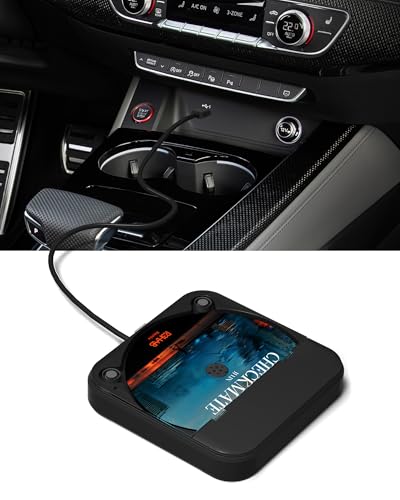
- USB and AUX connection options
- 4.5-inch square housing
- Remote works in AUX mode only
Best For: Drivers seeking a compact black player for a car with suitable USB or AUX connectivity
White Finish Pick
ENVYCLOUD Portable Car CD Player

- White, compact housing
- USB and AUX connection methods
- One-year warranty listed
Best For: Drivers who want a white external CD player for a compatible USB or AUX setup
Dust-Cover Pick
External Portable Car CD Player

- Protective disc cover
- Silicone anti-slip base
- AUX-mode remote needs a CR2025 battery
Best For: Drivers prioritizing a covered player with a suitable WAV-compatible USB or AUX setup
CD/DVD Pick

- Plays CDs and supported DVDs
- USB-A-to-USB-C adapter included
- Car USB CD playback requires WAV support
Best For: Buyers seeking CD and DVD capability who can verify stereo compatibility
Most Connection Options

- USB, AUX, and FM connection modes
- Anti-skip protection for driving
- Remote works in AUX and FM modes
Best For: Drivers needing several ways to connect a CD player to a car stereo
Best for Resume Playback

- AUX mode resumes track and position
- Steering-wheel-mount remote included
- Anti-skip design and hidden cable storage
Best For: Drivers with AUX who want playback to resume after restarting the car
USB-Only Pick
Xglysmyc External Car CD Player

- Single-cable USB connection
- Compact body with embedded cable
- WAV and WMA supported; MP3 excluded
Best For: Cars with compatible USB-reading stereos or Android navigation units
Compact Black Pick – ENVYCLOUD Portable Car CD Player
If you’re shopping for a universal cd player to use in a car without a built-in disc drive, this compact black ENVYCLOUD model offers USB and AUX connection options. It measures 4.5 by 4.5 by 0.85 inches and includes a USB extension cable, Type-C adapter, AUX cable, and remote.
Best For: Drivers who want a small external CD player and have a suitable USB or AUX connection in their vehicle.
Pros:
- Supports CD, CD-R, CD-RW, MP3, WMA, and WAV formats.
- Includes cables and an adapter for flexible placement and connection.
- Listed anti-skip protection helps with in-car playback.
Cons:
- No built-in speakers or Bluetooth.
- The included remote works only in AUX mode.
It’s a space-saving way to keep playing CDs, but check how your car handles USB audio before relying on USB playback; AUX mode uses USB for power and the AUX cable for sound.
White Finish Pick – ENVYCLOUD Portable Car CD Player
This white ENVYCLOUD model is another compact option if your search for a universal cd player is really about adding disc playback to a vehicle without a CD slot. It offers USB and AUX connection methods and comes with an extension cable, Type-C adapter, AUX cable, and remote.
Best For: Drivers who prefer a white finish and can connect an external player through their car’s USB or AUX setup.
Pros:
- Small 4.5-by-4.5-by-0.85-inch body is easy to place or store.
- Supports CD, CD-R, CD-RW, MP3, WMA, and WAV formats.
- Includes a one-year warranty in the supplied specifications.
Cons:
- No built-in speakers or Bluetooth.
- Remote control is limited to AUX mode.
The appeal here is the included connection accessories in a white housing. Verify your stereo’s USB playback behavior first, or plan on using USB for power and AUX for audio.
Dust-Cover Pick – External Portable Car CD Player
If your idea of a universal cd player includes moving between a car and other USB- or AUX-equipped devices, this external model is presented for use with vehicles, computers, TVs, and home audio systems. Its protective disc cover and silicone anti-slip base are useful details for in-car placement.
Best For: Drivers who want a covered, portable player and have checked their vehicle’s USB audio or AUX connection options.
Pros:
- Supports CD, CD-R, CD-RW, MP3, WMA, and WAV; it does not support DVDs.
- Cover helps shield the disc from dust and splashes while closed.
- Offers USB playback for suitable WAV-compatible stereos or USB-powered AUX playback.
Cons:
- No built-in speakers or Bluetooth.
- Remote works only in AUX mode and requires a separately supplied CR2025 battery.
The cover and anti-slip base distinguish this option, but its two connection paths have different requirements. Confirm WAV support for USB playback or use a working AUX input.
CD/DVD Pick – POSSPO Jupiter USB Player
The POSSPO Jupiter goes beyond a typical universal cd player by offering both CD and DVD playback. Its primary in-car approach connects to a stereo’s USB port and presents CD tracks through the stereo’s USB music interface, provided the stereo supports WAV files.
Best For: Buyers who want CD playback plus DVD capability and are willing to verify their vehicle’s supported formats before ordering.
Pros:
- Supports CD and DVD discs, including listed CD-R/RW and DVD±R/RW formats; it is not a Blu-ray player.
- Includes a USB extension cable and USB-A-to-USB-C adapter.
- Resume playback is listed among its features.
Cons:
- USB CD playback requires a car stereo that supports WAV music files.
- In-car DVD playback requires VOB DVD support; some vehicles may need a different connection method or decoder.
This is the most format-flexible option here, but it calls for the most careful compatibility check. In particular, the supplied notes flag certain recent vehicles for extra connection requirements, so confirm your stereo’s capabilities first.
Most Connection Options – Lehwey SX-2800A Car CD Player
If you want a universal cd player for a car without a built-in drive, the Lehwey SX-2800A offers three ways to reach your stereo: USB, AUX, or FM transmission. Check your vehicle’s inputs before buying, since USB playback requires WAV support and AUX or FM use the included adapter.
Best For: Drivers who want multiple connection options for playing CDs through their car stereo.
Pros:
- USB, AUX, and FM modes accommodate different stereo setups.
- Anti-skip protection is designed for playback on bumpy roads.
- Includes a remote for track, volume, and pause controls in AUX and FM modes.
Cons:
- USB mode requires a car system that supports WAV playback.
- No built-in speaker or Bluetooth; the remote does not work in USB mode.
The FM option gives this model a route for cars without a suitable AUX input or WAV-capable USB system. Match the connection mode to your stereo before purchasing.
Best for Resume Playback – Homlab C100 Car CD Player
The Homlab C100 is a universal cd player option for drivers who value picking up where they stopped. It connects by USB or USB plus AUX, with track, position, and volume memory available when using AUX.
Best For: Drivers who frequently stop and restart their car and have an AUX connection for resume playback.
Pros:
- AUX mode remembers the track, playback position, and volume.
- Includes a remote with a steering-wheel mount for accessible controls.
- Anti-skip protection and hidden cable storage suit a tidy in-car setup.
Cons:
- Resume playback and remote operation require AUX.
- Factory steering-wheel buttons cannot control the player.
USB mode auto-plays WAV files from the first track, so choose AUX if resuming your place is the priority. Its compact body can be placed in a console or glove box.
USB-Only Pick – Xglysmyc External Car CD Player
This USB-powered model is a universal cd player candidate for a compatible car stereo or Android navigation unit when you want a single-cable setup. Compatibility needs checking: the vehicle must be able to read USB flash drives, and its player must support the disc’s format.
Best For: Drivers with a compatible USB-equipped car system who want to play supported CDs without an AUX connection.
Pros:
- Uses one USB cable for connection and power.
- Compact design has an embedded cable for storage.
- Can also work with compatible Windows computers and Android smart TVs.
Cons:
- Supports WAV and WMA, but not MP3 playback.
- Requires a compatible USB-reading system; allow 10–20 seconds for each CD to index.
It is a straightforward choice if your system meets those USB and format requirements. Keep the player horizontal or vertical as directed, rather than upside down, for smooth playback.
How We Picked These Universal Cd Player Options
We focused on the seven selected listings and the practical differences visible in their descriptions: USB and AUX connections, an FM transmitter option, anti-skip claims, and stated uses beyond the car. Two listings have the same title, so treat them as separate offers to verify rather than assuming they have different capabilities. Product names can overstate compatibility; confirm the exact model, included cables, supported disc formats, and return policy on the seller’s page.
Quick Comparison: Choose by Connection
- USB-connected car players: Potentially tidy, but a USB port that only charges devices or reads flash drives may not recognize an external CD player.
- AUX-capable players: Worth considering if your stereo has a working 3.5 mm input. Check how the player gets power and whether the necessary cable is included.
- FM transmitter option: The Lehwey listing offers another possible route when a direct audio input is unavailable. Expect sound quality and interference to depend on local radio conditions.
- Multi-device claims: Some listings mention computers, TVs, or DVD use. Verify each device and format separately; a car-audio connection does not establish PC or TV compatibility.
Key Buying Factors for a Universal Cd Player
Check the Vehicle, Not Just the Plug
Look up your vehicle’s year, stereo model, and USB media support. A physical USB connection is not proof that the head unit supports CD audio from an external drive. If a listing claims broad or “universal” support, ask the seller for confirmation against your exact vehicle. Aftermarket and Android navigation units may have different requirements from factory stereos.
Match Audio Output and Power
Identify whether you will send sound through USB, AUX, or FM, then check how the player is powered. An AUX cable carries audio but generally does not power the player. Confirm that any required power adapter, USB cable, or AUX lead is supplied, and consider where you can safely place the unit without obstructing controls.
Verify Discs and Everyday Usability
Check support for the discs you own, especially burned CDs or MP3 CDs; do not assume DVD playback because a listing mentions DVD or PC use. For driving, look for accessible controls, reliable track handling, and anti-skip support. Anti-skip may reduce interruptions on rough roads, but it cannot guarantee uninterrupted playback.
Who Should Buy Which Universal Cd Player?
If your car has AUX, start with an AUX-capable listing and confirm its power requirements. If it has only USB, choose a USB model only after verifying stereo compatibility. If neither direct input works, consider the FM-equipped option while accepting its potential interference. For use across a car and computer, prioritize documented compatibility with both devices rather than a broad “universal” label. If the seller cannot confirm your setup, a straightforward return policy may be more valuable than an extra feature.