
If you need a simple way to move audio between analog gear and a computer, a usb digital audio transport can be the easiest fix. It helps with recording, playback, streaming, and legacy device conversion without requiring a full studio setup.
Below, we focus on practical, buyer-friendly options for different needs, from cassette and RCA capture to basic headset connectivity and external audio jacks.
Best 10 USB Digital Audio Transport Picks for 2026
Best for S/PDIF Output
StarTech USB Sound Card w/ SPDIF

- S/PDIF output with AC3/DTS pass-through
- Compact external replacement for internal sound cards
- Includes volume, EQ, headphone, and mic support
Best For: Users connecting a PC or laptop to a receiver or home-theater system over digital audio.
Best for Analog Recording
ClearClick Audio to USB Capture

- 3.5mm aux and RCA input support
- USB-C plug-and-play with USB-A adapter
- Includes software and instructions
Best For: Users converting legacy audio sources into digital files or live streams.
Best for Easy Plug-and-Play
USB 2.0 7.1-Channel External Sound Card

- USB bus-powered and portable
- Separate headphone and microphone jacks
- Built-in volume/mute controls with virtual 7.1 support
Best For: Windows users who want a simple, low-cost USB audio adapter for headsets and mic access.
Best for Vinyl & Cassette Archiving
DriverGenius AudioXfer USB Audio Capture

- 3.5mm and RCA inputs for cassette, LP, and radio sources
- Audacity included for recording and light editing
- Plug-and-play setup with PC, Mac, and Linux compatibility
Best For: Home archivists who want an easy way to digitize tapes and records.
Best for Plug-and-Play Desktop Fix
Micolindun GM280 USB Sound Card & Hub

- Adds audio and extra USB ports from one connection
- No-driver setup for common Windows and Mac systems
- Compact fix for broken headphone or mic jacks
Best For: People who need an easy desktop audio adapter with basic USB hub functionality.
Best for Tape-to-MP3 Conversion

- Records cassette audio straight to MP3 on a USB drive
- Auto reverse and track splitting suit music or audiobooks
- Includes headphones, AUX output, and volume control
Best For: People who want an easy, no-PC way to digitize cassette tapes into MP3 files.
Best Multi-Input USB Audio Hub
Cubilux CB5 USB Audio Interface

- 5-in-1 USB audio hub with multiple 3.5mm connections
- Supports multi-track recording with separate device names
- Bus-powered, compact design for portable use
Best For: Podcasters, streamers, and home-recording users who need a compact multi-input USB audio interface.
Best for Easy Setup
USB 2.0 Audio Grabber with USB-C Adapter

- USB-C adapter included for newer devices
- No-driver support for Windows, Mac, and Linux
- Dual RCA and 3.5mm inputs for common analog sources
Best For: Home archiving of vinyl, cassettes, and line-level audio with minimal setup.
Best Heavy-Duty Pick

- Adds 3.5mm headphone/speaker and mic ports over USB.
- Plug-and-play on Windows, macOS, Linux, Chrome OS, and Raspberry Pi OS.
- Compact aluminum body works well on a desk, dock, or hub.
Best For: People who want a simple, driver-free way to add analog audio ports to a USB-only device.
Best for Plug-and-Play Headset Use
CableCreation USB Audio Adapter
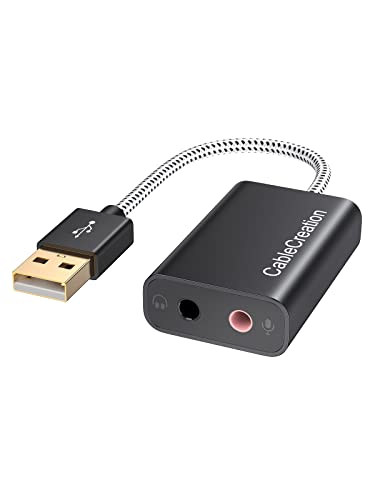
- Adds separate headphone and mic jacks over USB
- Plug-and-play with bus power and no driver hassle
- Wide compatibility for Windows, Mac, Linux, and PS4/PS5
Best For: People who want a simple USB adapter for headset audio and microphone support.
Best for S/PDIF Output – StarTech USB Sound Card w/ SPDIF
If you want a practical usb digital audio transport for a PC or laptop, the StarTech ICUSBAUDIO2D is a simple way to add S/PDIF output without opening your case. It’s especially useful for sending clean digital audio to a receiver or home-theater setup, while still keeping basic headset and mic support on hand.
Best For: Buyers who need S/PDIF digital output, Dolby Digital/DTS pass-through, and a compact external audio upgrade for Windows systems.
Pros:
- Includes S/PDIF output with AC3 and DTS pass-through support
- Compact USB design replaces an internal sound card quickly
- External volume and EQ controls make adjustments easy
- Also provides 3.5mm headphone and mic connections
Cons:
- 5.1 surround support is Windows-only
- Not the best fit if you only need basic analog audio
For home-theater hookup or a straightforward digital audio upgrade, this StarTech adapter is a focused usb digital audio transport rather than a feature-heavy desktop interface. It makes the most sense when your main goal is reliable S/PDIF output with a small footprint.
Best for Analog Recording – ClearClick Audio to USB Capture
If you need a practical usb digital audio transport for transferring or streaming sound from older gear, this ClearClick adapter keeps the setup simple. It accepts 3.5mm aux or RCA inputs, records to WAV or MP3, and works over USB-C with a USB-A adapter included for broader compatibility.
Best For: Converting cassette decks, turntables, CD players, and other analog audio sources into digital files or live streams with minimal setup.
Pros:
- Supports both 3.5mm aux and RCA audio inputs
- USB-C plug-and-play design with USB-A adapter included
- Includes recording/editing software and step-by-step instructions
- Compatible with Windows, Mac, and Linux
Cons:
- Not compatible with phones, tablets, or netbooks
- Designed for analog input capture, not modern digital sources
For buyers who want a straightforward usb digital audio transport for legacy audio gear, this model stands out for its flexible inputs and included software. It is a sensible pick if ease of setup matters more than advanced recording controls.
Best for Easy Plug-and-Play – USB 2.0 7.1-Channel External Sound Card
If you need a simple usb digital audio transport for adding headphone and mic jacks to a laptop or desktop, this compact USB sound adapter is an easy, low-cost option. It plugs into a USB-A port, supports Windows setups without driver hassles on many older systems, and adds virtual 7.1 surround processing for basic gaming or media use.
Best For: Users who want a small, inexpensive USB audio adapter for quick headphone and microphone access on Windows PCs.
Pros:
- USB bus-powered and compact, so it’s easy to carry or leave plugged in
- Separate 3.5 mm headphone and microphone ports for simple desktop or laptop use
- Built-in volume and mute controls for quick adjustments
- Virtual 7.1 audio support can add a more spacious sound profile on compatible Windows setups
Cons:
- Limited to basic USB 2.0-era audio features, not high-end DAC performance
- Surround processing is software-based and mainly useful for casual listening
- Best compatibility is with older Windows versions; support may vary on newer systems
As a usb digital audio transport, this adapter is more about convenience than audiophile quality, but that’s exactly why it works well for everyday voice chat, headset use, and quick audio expansion without extra clutter.
Best for Vinyl & Cassette Archiving – DriverGenius AudioXfer USB Audio Capture
If you need a simple usb digital audio transport for preserving old tapes, vinyl, or radio recordings, the DriverGenius AudioXfer Series is a practical pick. It accepts 3.5mm and RCA inputs, captures audio to MP3 or WAV, and keeps the workflow approachable for PC, Mac, and Linux users.
Best For: Home users who want an easy way to convert cassette, LP, or radio audio into digital files without a steep learning curve.
Pros:
- Works with 3.5mm and RCA inputs for flexible analog sources
- Includes Audacity support for recording and basic editing
- Plug-and-play design with LED activity indicator
- Captures in 44.1kHz or 48kHz at 16-bit for common digital use
Cons:
- Not a high-end audiophile capture solution
- Windows 12 is not supported
- 64-bit Mac users may need a specific Audacity version and LAME update
For straightforward digitizing, this device covers the essentials well and keeps the process accessible. It’s a sensible usb digital audio transport if your goal is to archive memories rather than build a pro studio workflow.
Best for Plug-and-Play Desktop Fix – Micolindun GM280 USB Sound Card & Hub
If you want a simple usb digital audio transport that also restores broken 3.5mm audio ports, the Micolindun GM280 is a practical low-cost fix. It adds headphone and mic support through USB, includes a small hub, and works without driver installation, making it easy to set up on a PC or laptop.
Best For: Users who need a quick plug-and-play replacement for faulty audio jacks and want a little extra USB connectivity.
Pros:
- Converts one USB port into audio outputs plus USB hub ports
- Plug and play with no driver setup on common Windows and Mac systems
- Supports headphones, headsets, speakers, and microphones
- Compact, lightweight design with a flexible 1.15 m cable
Cons:
- Not aimed at audiophile-grade sound quality
- USB hub ports are basic rather than high-performance
- Compatibility is focused on older/common desktop and laptop setups
As a usb digital audio transport, this model stands out more for convenience than advanced audio features, but that is exactly why it makes sense for everyday users. If you need an inexpensive way to revive audio on a computer and add a couple of USB ports at the same time, it delivers a straightforward solution.
Best for Tape-to-MP3 Conversion – USB Cassette to MP3 Converter
If you want a practical usb digital audio transport for preserving old tapes, this portable cassette-to-MP3 converter keeps the process simple: insert a USB flash drive, hit record, and save your audio without needing a PC. It also supports auto reverse and manual or automatic track splitting, which makes it more useful for music cassettes and spoken-word tapes alike.
Best For: Anyone who wants a straightforward way to digitize cassette tapes at home, especially if you prefer a self-contained, no-computer workflow.
Pros:
- Records directly to USB flash drive in MP3 format with no computer required
- Auto reverse plus auto/manual modes help with both music and audiobook tapes
- Includes headphones, 3.5mm AUX output, and volume control for flexible listening
- USB-powered operation is more stable than running on batteries alone
Cons:
- Works only with FAT/FAT32 USB drives, which limits storage compatibility
- Recordings depend on tape condition and USB drive speed, so skips can happen with slower drives
- More of a niche transfer tool than a general-purpose audio player
As a usb digital audio transport, this model is strongest for simple archive jobs rather than high-end restoration. If your goal is to move cassette content into MP3 files with minimal setup, it delivers a convenient walkman-style solution.
Best Multi-Input USB Audio Hub – Cubilux CB5 USB Audio Interface
If you need a practical usb digital audio transport for recording and monitoring, the Cubilux CB5 is built around flexibility rather than flashy extras. It turns a laptop USB port into multiple 3.5mm audio connections, so you can hook up mics, instruments, headphones, and speakers without juggling adapters.
Best For: Podcasters, streamers, and home-recording users who want a compact USB audio interface with multiple analog inputs and outputs.
Pros:
- 5-in-1 layout with stereo mic inputs, line-in, line-out, and a headphone jack
- Multi-track recording support through independent device names
- Compact, bus-powered design with no external power adapter needed
- Up to 96 kHz/24-bit recording and Hi-Res DAC output for cleaner playback
Cons:
- Line-out and audio output jack cannot be used at the same time
- 3.5mm connections may be less convenient than XLR-based studio gear
- Best suited to simple desktop rigs rather than complex pro setups
Overall, the CB5 makes sense if your usb digital audio transport needs center on small-space recording, monitoring, and easy device switching. It is not the most advanced interface, but it offers a useful mix of inputs and portability for everyday content creation.
Best for Easy Setup – USB 2.0 Audio Grabber with USB-C Adapter
If you need a straightforward usb digital audio transport for preserving tapes, vinyl, or live audio, this USB 2.0 grabber keeps the process simple. It converts analog sources to MP3 or WAV, works with USB-A and USB-C devices, and is designed for quick plug-and-play recording on everyday computers.
Best For: Home users, students, and hobbyists who want an easy way to digitize cassettes, records, or line-level audio without extra drivers or complicated setup.
Pros:
- USB-C adapter included for modern laptops and tablets
- Works with Windows, Mac, and Linux without drivers
- Dual RCA and 3.5mm inputs cover common analog sources
- Simple Audacity-friendly workflow for quick captures
Cons:
- RCA and 3.5mm inputs cannot be used at the same time
- Phono-level turntables need an external preamp
- Not aimed at pro studio or high-sampling-rate workflows
For basic archiving, this usb digital audio transport is a practical pick: it focuses on compatibility, convenience, and dependable conversion rather than advanced recording features. That makes it a solid choice if you want to move old audio into digital files with minimal friction.
Best Heavy-Duty Pick – Plugable USB Audio Adapter
If you need a simple usb digital audio transport for a laptop, desktop, dock, or Raspberry Pi, this Plugable adapter is an easy way to add 3.5mm headphone, speaker, and microphone connections. It works as a compact external sound card replacement, making it a practical fix for devices that lost their audio jack or never had one.
Best For: Buyers who want a no-drivers, plug-and-play USB audio adapter for basic everyday listening, calls, and microphone use.
Pros:
- Adds separate 3.5mm ports for headphones/speakers and microphone input.
- Plug-and-play compatibility across Windows, macOS, Chrome OS, Linux, and Raspberry Pi OS.
- Compact aluminum design is easy to leave connected to a hub or dock.
- Useful replacement for faulty built-in audio jacks or USB sound cards.
Cons:
- Basic adapter performance is fine for everyday audio, but not for audiophile setups.
- Limited to 3.5mm analog connections, so it won’t replace higher-end DAC features.
For a straightforward usb digital audio transport, this is a low-friction option that solves missing-jack problems without adding setup hassle. It’s best when you want reliable analog audio access more than advanced sound customization.
Best for Plug-and-Play Headset Use – CableCreation USB Audio Adapter
If you need a simple usb digital audio transport for adding 3.5mm audio I/O to a laptop, desktop, or console, this CableCreation adapter is a practical low-fuss option. It gives you separate headphone and microphone jacks over USB, with plug-and-play setup and broad compatibility across Windows, Mac, Linux, and supported PlayStation systems.
Best For: Users who want an easy USB sound adapter for headsets, mics, or speakers without installing drivers.
Pros:
- Separate mic-in and stereo audio-out ports for flexible headset use
- Plug-and-play operation with USB bus power and no external supply
- Works with a wide range of systems, including Windows, macOS, Linux, and PS4/PS5
- Built-in HS-100B chip supports 44.1/48kHz playback and recording
Cons:
- Not compatible with PS3 or most car systems/smart TVs
- Some EarPods may not support mic input through the adapter
- Basic two-jack layout won’t replace a full-featured audio interface
This is a straightforward usb digital audio transport choice when you mainly want reliable analog headset connectivity over USB. It’s best for users who value broad compatibility and simple setup over advanced recording features.
How We Picked These USB Digital Audio Transport Options
We prioritized models that solve a real audio problem: missing laptop jacks, analog-to-digital capture, or a cleaner path for recording and playback. Selection favored plug-and-play setup, broad OS compatibility, useful input/output options, and clear use cases such as cassette transfer, line-in capture, podcasting, or basic audio expansion.
We also looked at connection flexibility, since the best USB Digital Audio Transport for one buyer may be a simple 3.5 mm adapter while another needs RCA inputs or SPDIF output.
Quick Comparison
For everyday headset or speaker use, a compact external sound card is usually enough. For transferring tapes, vinyl, or other analog sources, choose a capture-focused adapter with RCA or line-in support. If you want broader recording flexibility, look for microphone input, monitoring support, and stable USB power. USB-C support can also matter if you plan to use the device with newer laptops and desktops.
Key Buying Factors for USB Digital Audio Transport
Input and Output Types
Match the device to your source and destination. A 3.5 mm adapter is convenient for headsets and speakers, while RCA and line-in inputs are better for legacy audio equipment. SPDIF output is useful if you want a digital connection to a receiver or DAC.
Capture Versus Simple Audio Expansion
Not every USB Digital Audio Transport is designed for recording. Some models are meant mainly to add headphone and microphone ports, while others are built to convert analog audio into digital files. Decide whether your main goal is listening, communication, or archival transfer.
Compatibility and Setup
Look for broad support across Windows, macOS, Linux, and USB-C when needed. Plug-and-play design is ideal if you want to avoid driver installs or troubleshooting.
Audio Needs and Use Case
For streaming and podcasting, mic input and monitoring matter most. For cassette or vinyl digitizing, stable capture and the right analog inputs matter more. For travel or office use, compact size and easy portability may be the top priority.
Who Should Buy Which USB Digital Audio Transport?
Choose a basic external adapter if you just need a missing audio jack replacement. Choose a capture-oriented model if you are converting old tapes, records, or other analog media. Choose a USB Digital Audio Transport with SPDIF or interface-style features if you want more flexible playback, recording, or integration with home audio gear. In short, match the device to the source, the destination, and how much control you want over the signal path.