
Choosing the right USB video adapter can make the difference between a clean, reliable livestream and a frustrating setup. Whether you’re capturing a camera, console, microscope, or live demo feed, the right adapter should fit your workflow without adding lag or complexity.
Below, we’ve narrowed the field to the most useful options for creators who want simple plug-and-play performance, solid resolution support, and dependable compatibility.
Best 10 USB Video Adapters for Content Creators Picks for 2026
Pass-Through Capture Pick
Guermok 4K USB3.0 HDMI Capture Card

- 4K@30Hz input with 1080p@60Hz capture output
- PD 3.0 100W passthrough for compatible USB-C hosts
- Works with OBS, VLC, Vmix, and major platforms
Best For: Creators who need charging support during capture sessions
Premium Minimal Converter
RØDE 1080p60 HDMI to USB-C Converter

- Up to 1080p60 HDMI-to-USB-C conversion
- Works with any UVC-compatible device
- Ultra-compact plug-and-play design
Best For: Creators who want a tiny, durable UVC converter
Native USB-A Capture Pick
1080p60 HDMI Capture Card USB 3.0

- 4K@30Hz input with 1080p@60FPS capture
- Native USB-A plug-and-play connection
- Works with OBS, VLC, Zoom, and major systems
Best For: Creators who want a direct USB-A capture workflow
USB Camera HDMI Bridge
ANDYCINE UVC2H USB to HDMI Converter

- Converts UVC USB camera signals to HDMI output
- Supports up to 4K@30Hz resolution
- USB mouse control and USB-C camera charging
Best For: Creators using USB cameras that need HDMI monitoring
Portable HDMI Capture
Roland UVC-01 for Live Streaming

- Plug-and-play on Mac and Windows
- Uncompressed 1080p at 60 FPS
- Dedicated analog audio input
Best For: Creators and musicians who need simple HDMI capture for livestreams
NDI Streaming Adapter
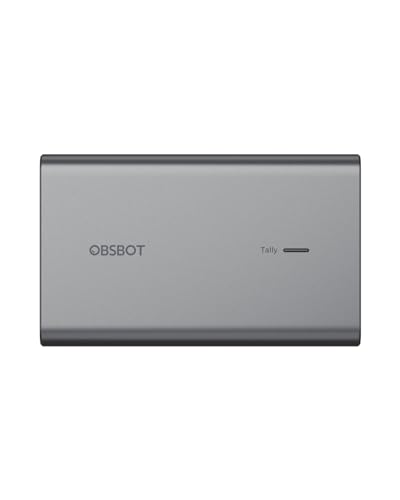
- Converts UVC cameras to NDI
- PoE support and remote control port
- Micro SD recording and tally light
Best For: NDI-based creators who want network streaming with backup recording
Precision HDMI Capture
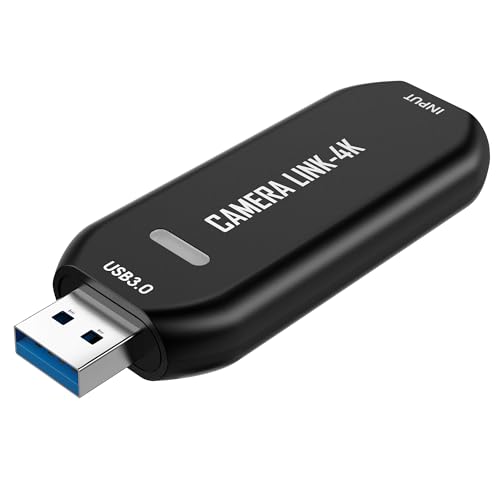
- 1080p60 or up to 2K50 capture
- Works with HDMI devices and microscopes
- Plug-and-play with OBS and Zoom
Best For: Detail-focused creators doing repair, teaching, or microscope work
Desktop Expansion
WAVLINK USB 3.0/USB-C HDMI Adapter

- Adds a monitor for mirror or extended display use.
- Supports up to 2048x1152@60Hz or 2560x1440@50.
- Needs DisplayLink driver installation to work.
Best For: Creators who need a simple multi-monitor workspace upgrade.
Streaming Capture
Guermok 4K USB3.0 HDMI Capture Card

- Captures up to 1080P 60FPS or 2K 30FPS.
- Plug-and-play with no extra power or driver needed.
- Not for direct monitor or TV screen casting.
Best For: Streamers who need a portable HDMI capture device.
Creator Capture
Acer HDMI to USB 3.0 Capture Card

- Captures smooth footage up to 1080P 60FPS.
- Includes both USB-A and USB-C connectivity.
- Works with OBS, Twitch, YouTube, and more.
Best For: Creators needing a portable, wide-compatible capture card.
Pass-Through Capture Pick – Guermok 4K USB3.0 HDMI Capture Card
If you need USB video adapters for content creators that can handle both capture and long sessions, this Guermok model is built around high-resolution HDMI capture with broad device support. It takes HDMI input up to 4K@30Hz and sends a 2K@30Hz or 1080p@60Hz signal to your recording software, while keeping setup simple with plug-and-play operation.
Best For: Creators who want capture-side USB-C charging plus wide compatibility for streaming, recording, and live meetings.
Pros:
- Supports up to 4K@30Hz input and 1080p@60Hz output for smooth capture
- PD 3.0 100W passthrough can power compatible USB-C host devices during recording
- Works with OBS Studio, VLC, Vmix, and major streaming platforms
- Aluminum alloy case helps with heat dissipation in portable setups
Cons:
- Capture only: it is not meant for direct screen casting to a monitor or TV
- Charging passthrough is limited to compatible USB-C host devices on the capture side
- Requires capture software to function
Overall, this is a practical pick if you want a flexible capture card that also keeps your host device charged. Its wide compatibility makes it a useful tool for creators working across streaming, recording, and conferencing workflows.
Premium Minimal Converter – RØDE 1080p60 HDMI to USB-C Converter
For content creators looking for a simple HDMI solution, this RØDE unit focuses on straightforward 1080p60 conversion in a very compact form factor. It is designed for UVC-compatible devices, so it fits neatly into livestream, meeting, and presentation setups where you want a dependable plug-and-play adapter.
Best For: Creators who want a premium, ultra-compact HDMI-to-USB-C converter for UVC workflows.
Pros:
- Supports up to 1080p60 for high-definition video conversion
- Compatible with any device that supports UVC input
- Ultra-compact design suits mobile and minimal setups
- Plug-and-play operation keeps setup simple
Cons:
- Top resolution is 1080p60, so it is not aimed at higher-resolution capture
- Compatibility depends on UVC input support
- Does not add extra features like pass-through charging
This is a clean, no-fuss option if you value portability and reliable UVC compatibility over advanced capture features. It makes the most sense for creators who need a compact converter that disappears into the workflow.
Native USB-A Capture Pick – 1080p60 HDMI Capture Card USB 3.0
This USB-A capture card is aimed at creators who want a simple, direct connection without adapters. As one of the more practical USB video adapters for content creators, it supports up to 4K@30Hz input and records at 1080p@60FPS through USB 3.0, making it a solid fit for streaming, recording, and webinars.
Best For: Users who want native USB-A plug-and-play capture for gaming, cameras, and online production.
Pros:
- Supports 4K@30Hz input and 1080p@60FPS capture
- Native USB-A connection works without adapters
- Aluminum alloy housing helps with heat dissipation and signal stability
- Compatible with OBS Studio, VLC, Zoom, and multiple operating systems
Cons:
- Designed for capture and recording, not direct HDMI display output
- Best performance depends on a USB 3.0 connection
- Minimum system requirements may limit older computers
For creators who prefer a straightforward USB-A workflow, this card offers the core capture features most people need. It is especially appealing if you want a portable, no-driver setup for consoles, cameras, and live production.
USB Camera HDMI Bridge – ANDYCINE UVC2H USB to HDMI Converter
If your workflow starts with a USB camera or action camera, this ANDYCINE adapter is a different kind of tool for content creators. It converts UVC-compatible USB camera signals to HDMI output, which can be useful for monitors, TVs, projectors, live streaming setups, and HDMI capture chains.
Best For: Creators who need to turn UVC camera output into HDMI for monitoring or live production.
Pros:
- Converts UVC USB camera signals to HDMI output in real time
- Supports up to 4K@30Hz resolution
- USB mouse control lets you adjust key settings on screen
- USB-C charging can power connected cameras during long sessions
Cons:
- On-screen settings require a camera that supports UVC protocol
- Only works with USB cameras or devices that output video over USB
- Not a traditional HDMI-to-USB capture card
This adapter makes the most sense when your camera outputs USB video and you want an HDMI display path without software-heavy setup. It is a specialized option, but that specialization is exactly what helps it fit certain creator and monitoring rigs.
Portable HDMI Capture – Roland UVC-01 for Live Streaming
If you’re comparing USB video adapters for content creators, the Roland UVC-01 is a straightforward HDMI-to-USB 3.0 option built for clean, plug-and-play streaming. It turns an HDMI-equipped camera or camcorder into a webcam-style source for Mac and Windows, with uncompressed 1080p at 60 fps for smoother live video.
Best For: Content creators, musicians, gamers, and anyone who wants a simple HDMI capture setup for livestreams.
Pros:
- Plug-and-play USB webcam operation on Mac and Windows
- Uncompressed 1080p HD capture at 60 FPS
- Dedicated analog audio line input for live music setups
- Powered via USB for a simple desk or field setup
Cons:
- Designed for HDMI-equipped cameras or camcorders rather than USB webcams
- Focused on 1080p capture instead of higher-resolution formats
Overall, the UVC-01 is a practical pick if you want a dependable capture device with minimal setup and strong live-streaming support. Its biggest appeal is the combination of easy operation and 60 fps uncompressed video for polished broadcasts.
NDI Streaming Adapter – OBSBOT UVC to NDI Adapter
For USB video adapters for content creators who want network-based streaming, the OBSBOT UVC to NDI Adapter converts a compatible UVC webcam or USB-C camera into an NDI-ready source. It’s built for low-latency streaming over NDI networks and adds practical broadcast features like PoE support, micro SD recording, and a tally light.
Best For: Streamers and creators who want to integrate a UVC webcam into an NDI workflow with backup recording.
Pros:
- Plug-and-play setup for UVC to NDI conversion
- PoE support helps avoid a separate power supply
- Micro SD card recording provides simultaneous backup capture
- Includes a tally light for at-a-glance broadcast status
Cons:
- Best suited to NDI workflows rather than basic USB-only use
- Designed for compatible UVC webcams and USB-C cameras
This adapter makes sense if your production workflow already uses NDI and you want a compact way to bring a webcam into that setup. The extra broadcast-focused features make it more specialized than a standard capture dongle.
Precision HDMI Capture – Cam Link 4K USB Capture Card
This Cam Link 4K USB capture card is a practical choice in the USB video adapters for content creators category if you need stable HDMI capture for detailed work. It supports plug-and-play use over USB 3.0 and works with HDMI devices such as microscopes, DSLR cameras, and action cams for streaming, recording, or teaching.
Best For: Creators who need reliable HDMI capture for microscopes, DSLR cameras, and detailed on-screen work.
Pros:
- Captures smooth 1080p60 or up to 2K50 resolution
- Works with microscopes, DSLR cameras, action cams, and other HDMI devices
- No drivers required for plug-and-play use
- Compatible with OBS, Zoom, and similar software
Cons:
- Requires an HDMI source device
- More specialized for detailed capture and teaching than general webcam use
In practice, this model is a strong fit if your content depends on showing fine detail clearly, whether that’s repair work, inspection, or camera-based demos. Its simple setup and stable performance make it easy to work into an existing streaming or recording workflow.
Desktop Expansion – WAVLINK USB 3.0/USB-C HDMI Adapter
If you need a USB video adapter for content creators who work across multiple windows, this WAVLINK adapter is built for simple screen expansion. It lets you mirror or extend a display, supports up to 2048×1152@60Hz or 2560×1440@50, and can add extra monitors with DisplayLink driver installation.
Best For: Creators and editors who want a compact way to add a monitor for multitasking on Windows, Mac, ChromeOS, or Ubuntu.
Pros:
- Supports mirror or extend modes for a more flexible workspace.
- Works with USB-C, USB-A, Thunderbolt 3/4/5, and USB4 devices.
- Can support multiple additional monitors, up to 6 total on PCs.
- Includes external microphone in and earphone out for convenient audio use.
Cons:
- Requires DisplayLink driver installation.
- Not a direct HDMI output without the adapter and driver setup.
For creators who want a lightweight desk upgrade rather than a capture device, this adapter is a practical choice. Its wide system support and compact design make it a useful add-on for everyday editing, streaming prep, or general productivity.
Streaming Capture – Guermok 4K USB3.0 HDMI Capture Card
Among USB video adapters for content creators, this Guermok model is aimed at capture rather than display output. It takes HDMI input up to 4K@30 and delivers up to 1080P 60FPS or 2K 30FPS for recording, streaming, online meetings, and live gameplay through compatible software.
Best For: Streamers and video creators who need a portable HDMI-to-USB capture solution for OBS, Zoom, Twitch, or similar apps.
Pros:
- Supports 1080P 60FPS capture and up to 2K 30FPS output.
- Plug-and-play design with no additional driver or external power needed.
- Compact aluminum build helps with heat dissipation and portability.
- Compatible with Windows, Mac OS, Linux, Android, and many capture platforms.
Cons:
- Capture use only; it is not intended for direct screen casting to a monitor or TV.
- Audio setup in OBS may require a restart after configuration.
- USB 3.0 is recommended for best bandwidth and resolution.
If your workflow centers on recording or streaming an HDMI source, this is a straightforward pick. It is especially appealing for creators who want a small, travel-friendly capture device with broad device support.
Creator Capture – Acer HDMI to USB 3.0 Capture Card
This Acer capture card fits the USB video adapters for content creators category when your focus is live capture and streaming. It accepts HDMI input up to 4K 30FPS and captures smooth footage at up to 1080P 60FPS, using USB 3.0 for lag-free transfer with consoles, cameras, desktops, and laptops.
Best For: Creators who want an easy-to-carry capture card for gaming, recording, or streaming across a wide range of devices.
Pros:
- Supports 1080P 60FPS capture and 2K 30FPS output.
- USB 3.0 high-speed interface is rated for up to 5Gbps bandwidth.
- 2-in-1 USB-A and USB-C design improves compatibility.
- Works with OBS Studio, QuickTime Player, TikTok, Twitch, and YouTube.
Cons:
- Supports one-way transmission only from HDMI to USB.
- Best performance depends on using a USB 3.0 port.
Overall, this is a flexible capture option for creators who move between consoles, cameras, and computers. Its driver-free setup and broad platform support make it a practical choice for straightforward streaming workflows.
How We Picked the Best USB Video Adapters for Content Creators
For this roundup of USB Video Adapters for Content Creators, we focused on the features that matter most in real production use: supported resolution and frame rate, USB 3.0 or USB-C connectivity, UVC compatibility, ease of setup, and overall flexibility for streaming or recording. We also looked for models that suit different source devices, from DSLR and mirrorless cameras to HDMI sources, microscopes, and live demo rigs.
Quick Comparison
If you want the simplest path, a standard HDMI-to-USB capture card is usually the easiest choice for most creators. If you need higher-end workflow flexibility, look for pass-through, uncompressed output, or adapters that support multiple standards such as USB-C and UVC. For studio environments, encoder-style products may be better; for everyday streaming, compact plug-and-play adapters are often enough.
Key Buying Factors for USB Video Adapters for Content Creators
Resolution and Frame Rate
Match the adapter to your output needs. 1080p60 is the sweet spot for smooth streaming and tutorials, while 4K support can help with sharper capture or future-proofing. If your work is mostly talking-head video or screen demos, 1080p60 is often more practical than chasing higher resolutions.
Connection Type and Compatibility
Check whether the adapter uses USB-A, USB-C, or both, and make sure it works with your computer and software. UVC support is especially valuable because it often means less driver hassle and easier use with OBS, Zoom, and similar apps.
Latency and Signal Quality
Low latency matters for live streaming, camera monitoring, and precision work. If you’re showing fast action or live switching, prioritize stable capture over marketing claims about maximum resolution.
Power and Workflow Features
Some adapters add useful extras such as PD passthrough, PoE, or pass-through monitoring. Those features can simplify a desk setup, but only if they fit your actual workflow.
Who Should Buy Which USB Video Adapters for Content Creators?
If you’re a beginner streamer or educator, choose a straightforward HDMI capture card with 1080p60 support and UVC compatibility. If you’re a creator working with DSLR footage, live product demos, or precision visuals, a more capable capture device with stronger signal handling is worth the upgrade. If your setup spans multiple monitors or non-capture workflows, a DisplayLink-style adapter may be the better fit than a traditional capture card.
In short, the best pick depends on your source device, your software, and how much flexibility you need today versus later. Choosing the right adapter now can save setup time and improve the reliability of every recording session.