
Content creators often split their time between recording, editing, and setting up gear. A useful Christmas gift can make one of those tasks more comfortable, organized, or flexible.
This 2026 guide covers audio, video, desk, and storage tools. Check the recipient’s devices and workspace before choosing equipment with specific connections or fit requirements.
Christmas Gifts for Content Creators
1. Fosi Audio K7 Desktop DAC and Headphone Amp
A Listening Upgrade for the Editing Desk
Fosi Audio K7 Desktop DAC and Headphone Amp

- Connects to headphones, powered speakers, and amplifiers through several input and output options.
- Supports USB-C, optical, coaxial, and Bluetooth input.
- Includes a display, control knobs, shortcut buttons, and a 12V power supply.
Best For: Audio creators who listen and edit at a desktop.
2. TRALT Adjustable Mesh Office Chair
A More Supportive Studio Seat
TRALT Adjustable Mesh Office Chair
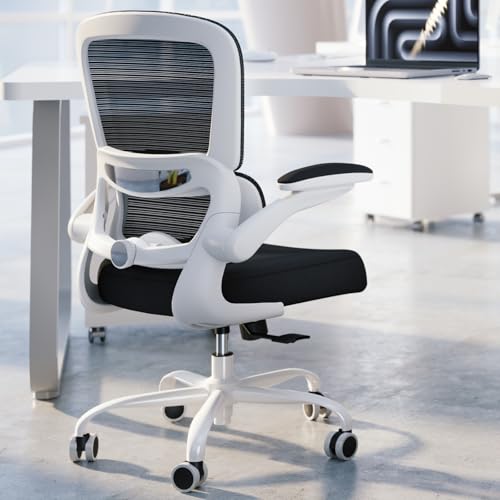
- Features adjustable lumbar support and a breathable mesh backrest.
- The listing describes a molded foam seat and metal-core reinforced base.
- Seat height adjusts from 17.7 to 21.7 inches, according to the listing.
Best For: Creators who spend long work sessions at a desk.
3. DaranEner 192Wh Portable Power Station
Power for Shoots Away From the Desk
DaranEner 192Wh Portable Power Station

- Provides 192Wh capacity and 300W output, with a stated 600W surge.
- Offers AC, USB-C, USB-A, and 12V DC outputs for compatible devices.
- Can recharge from a wall outlet, car charger, or compatible solar panel; solar panel is not included.
Best For: Creators powering compatible gear away from wall outlets.
4. Movo X1-Mini Camera Shotgun Microphone
A Compact Mic for Camera Days
Movo X1-Mini Camera Shotgun Microphone

- Includes 3.5mm TRS, 3.5mm TRRS, and USB-C output cables.
- Comes with a shock mount, foam and furry windscreens, and a carrying case.
- Can mount on a camera cold shoe or a boom pole.
Best For: Video creators recording speech with a camera or smartphone.
5. IXTECH Adjustable Microphone Boom Arm
A Flexible Position for a Desk Mic
IXTECH Adjustable Microphone Boom Arm

- The arm rotates 360 degrees and folds for storage.
- A C-clamp attaches it to a desk, and a cable holder helps manage the mic lead.
- Fits microphones with standard 3/8-inch or 5/8-inch threading.
Best For: Desk-based podcasters and streamers with a compatible microphone.
6. FIFINE AmpliTank K688 Dynamic Microphone
A Speech Mic With Two Connection Routes
FIFINE AmpliTank K688 Dynamic Microphone

- Offers both USB and XLR connections for different recording setups.
- USB use includes tap-to-mute, gain control, and headphone monitoring.
- Includes a windscreen and shock mount; mic stand and XLR cable are not included.
Best For: Creators recording voice at a computer or through an XLR setup.
7. S15 Stream Controller With 15 LCD Keys
Shortcut Control for Repeated Tasks
S15 Stream Controller With 15 LCD Keys

- Has 15 customizable LCD keys for shortcuts, app actions, and OBS scene controls.
- Includes three status display panels for information such as time or system performance.
- Designed for Windows 10 64-bit or higher and macOS Big Sur 11.0 or higher; Linux is not supported.
Best For: Streamers and editors who use compatible computers and repeated actions.
8. ULANZI VL-81 Rechargeable Bi-Color Video Light
Pocket-Sized Light for Filming
ULANZI VL-81 Rechargeable Bi-Color Video Light
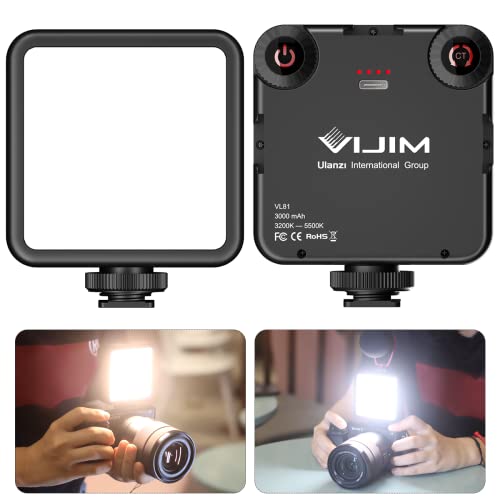
- Adjusts between 3200K and 5600K color temperature.
- Has three cold shoe mounts for attaching compatible accessories or connecting lights.
- Includes a built-in 3000mAh battery and a softbox design.
Best For: Creators lighting vlogs, livestreams, or product demonstrations.
9. Guermok HDMI-to-USB-C Video Capture Card
A Small Bridge for HDMI Video
Guermok HDMI-to-USB-C Video Capture Card

- Captures HDMI input to a computer through USB-C or USB 3.0.
- The listing specifies output up to 1080p at 60 fps or 2K at 30 fps.
- Requires capture software and supports one-way HDMI-to-USB transmission.
Best For: Creators capturing video from a compatible camera or console.
10. beyerdynamic DT 770 Pro Closed-Back Headphones
A Quiet Pair for Recording Sessions
beyerdynamic DT 770 Pro Closed-Back Headphones

- Closed-back isolation helps keep headphone sound out of a recording microphone.
- Includes replaceable velour ear pads, a fixed 3m cable, and a 1/4-inch adapter.
- The 80-ohm model is described as best paired with an audio interface or headphone amp.
Best For: Creators monitoring audio while recording or editing.
11. SmallRig AD-01 Heavy-Duty Video Tripod
A Stable Base for Planned Shots
SmallRig AD-01 Heavy-Duty Video Tripod

- Adjusts from 85 to 186cm and has a listed maximum load of 8kg.
- Fluid head supports 360-degree horizontal and +90/-60-degree vertical movement.
- Includes a carrying bag and quick-release plate.
Best For: Creators shooting interviews, tutorials, or other planned video.
12. Zoom H6 Essential Handheld Recorder
Portable Multitrack Recording for Location
Zoom H6 Essential Handheld Recorder

- Records up to six tracks in 32-bit float, according to the listing.
- Includes built-in X/Y microphones and four XLR/TRS combo inputs.
- Can work as a USB audio interface while recording to an SD card.
Best For: Creators recording interviews, events, or location audio.
13. SanDisk Extreme Portable 2TB SSD
Room for Active Project Files
SanDisk Extreme Portable 2TB SSD

- Provides 2TB of portable storage over USB-C.
- The listing states read speeds up to 1050MB/s and write speeds up to 1000MB/s.
- Includes password protection with 256-bit AES hardware encryption.
Best For: Creators organizing large video, audio, or design projects.
14. BenQ PD2706U 27-Inch 4K Monitor
A Detailed Display for Creative Work
BenQ PD2706U 27-Inch 4K Monitor

- Offers a 27-inch 4K UHD IPS display and a matte finish.
- The listing specifies 99% sRGB and 95% P3 coverage with Delta E ≤3.
- Includes 90W USB-C, a KVM switch, and an ergonomic design.
Best For: Desktop editors and designers who need a larger workspace.
15. Anker 8-in-1 USB-C Docking Station
One Hub for a Laptop Setup
Anker 8-in-1 USB-C Docking Station

- Adds two HDMI ports, Ethernet, two USB-A data ports, and an SD/microSD reader.
- Supports one 4K display at 60Hz or two at 4K 30Hz; macOS mirrors both external displays.
- Pass-through charging up to 85W requires a separate 100W PD charger and USB-C cable.
Best For: Creators expanding a compatible USB-C laptop workstation.
16. VIVO 32-Inch Standing Desk Converter
A Height-Adjustable Desk Refresh
VIVO 32-Inch Standing Desk Converter

- Raises a workstation from approximately 4.5 to 20 inches, according to the listing.
- Includes a keyboard tray that rises with the main surface.
- The stated weight capacity is 33 pounds.
Best For: Creators who want a standing option at an existing desk.
17. Hollyland Lark M2 Wireless Lavalier Mic
Wireless Audio for On-Camera Presenting
Hollyland Lark M2 Wireless Lavalier Mic

- The system includes a USB-C receiver for compatible phones, action cameras, and computers.
- Offers a one-click noise-cancellation control and app adjustments, according to the listing.
- The listing states up to 10 hours of continuous use and 30 hours with the charging case.
Best For: Presenters and vloggers recording while moving.
18. Behringer UMC202HD 2-Channel Audio Interface
A Computer Link for Mics and Instruments
Behringer UMC202HD 2-Channel Audio Interface

- Provides two channels and supports sample rates up to 192kHz, according to the listing.
- Includes Midas microphone preamps and phantom power.
- Works with Windows or macOS and names several compatible recording software options.
Best For: Creators connecting microphones or instruments to a computer.
19. TroyStudio Acoustic Foam Panels, 52-Pack
A Room-Treatment Gift for Recording
TroyStudio Acoustic Foam Panels, 52-Pack
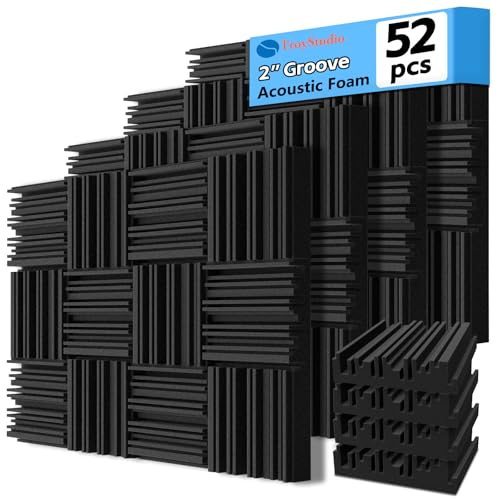
- The pack contains 52 panels measuring 12 by 12 by 2 inches each.
- The listing says the panels absorb reflections that contribute to room reverb and echo.
- They can be cut and installed with separately sourced adhesive or small screws.
Best For: Creators recording in an echo-prone room or home studio.
Choosing a Christmas Gift for a Content Creator
Start with the work the recipient does most often. A podcaster may appreciate a microphone, boom arm, headphones, recorder, or room treatment. A video creator may get more use from a light, tripod, capture card, or wireless lavalier mic. Editors and designers may prefer storage, a monitor, a docking station, or a more comfortable desk setup. The most helpful gift usually addresses a recurring obstacle: hard-to-place equipment, limited ports, room echo, or a crowded project drive.
Consider whether the item fills a gap or duplicates gear they already own. A creator with a good camera microphone may benefit more from lighting or storage. Someone with a laptop-based recording workflow may need a USB audio interface, but a creator who already records directly into a portable recorder may have little need for one. If you are unsure, ask about the kind of projects they are working on or look for clues in their current setup.
Set a Budget Around the Workflow
For a modest gift, practical accessories such as a boom arm, capture card, or compact LED light can support a specific task without requiring a full studio overhaul. Midrange gifts such as headphones, a dynamic microphone, or an SSD can become regular-use tools. Larger workspace purchases, including a monitor, chair, or desk converter, can have a bigger effect on daily comfort, but need more room and closer fit checks.
A useful way to compare prices is to ask how often the creator will use the item and what else is needed to make it work. An XLR microphone may call for an interface and cable; a capture card needs compatible capture software; a desk converter must fit the existing desk. Factor in these dependencies before choosing a gift. If a setup requires several additional purchases, a different product in the guide may be a more complete present.
Check Compatibility and Personalization
Before buying audio or video equipment, confirm the recipient’s devices, ports, and workflow. USB-C does not guarantee that every phone, computer, or camera supports the same features. Check operating-system requirements for a control pad, and verify a microphone’s connector and mounting thread. For the docking station, consider whether they use Windows, macOS, or Linux and how they want external displays arranged. The listing notes that macOS mirrors both displays on that dock.
Personalize the choice around the creator’s style of work. A field recorder suits interviews or location sound; a wireless lavalier suits someone presenting on camera; a tripod can help with repeatable, steady shots. For room treatment, consider the wall space and permission to attach panels. A chair, monitor, or desk converter calls for measurements: available workspace, screen placement, chair fit, and the weight of equipment placed on a riser all matter.
Timing and Last-Minute Decisions
For a Christmas gift, allow time to compare model requirements and any needed accessories. This is especially useful for equipment that depends on a specific connector, software, desk size, or camera mounting setup. Check current retailer delivery details directly; none of the product information here establishes availability or arrival dates.
When time is short, favor gifts whose role is easy to understand and whose fit you can verify quickly. An SSD, headphones, or a desk accessory may be straightforward if you know the recipient’s devices and workspace. For more specialized gear, give a note describing why you chose it and include a gift receipt if the retailer offers one. That leaves room for the creator to confirm compatibility or select the right setup while keeping the present connected to their work.
The best Christmas gift ideas for content creators are the ones that respect how the recipient actually makes things. A carefully matched tool can reduce setup friction, improve the working environment, or make it easier to capture the next idea.