
A compact streaming setup still benefits from dedicated controls. The right panel can put scene changes, audio adjustments, lighting, macros, and production shortcuts within easy reach without adding a full-size console to your desk.
These 10 options cover customizable macro pads, LCD-button controllers, audio interfaces, and video switchers. Use the guide below to match features, connectivity, and workflow fit to the way you stream, record, or produce.
Best 10 Streaming Control Panels for Compact Setups Picks for 2026
Premium Workflow Console
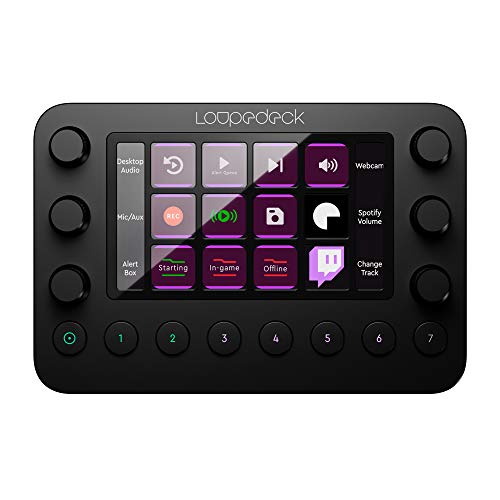
- Haptic dials, buttons, and LED touchscreen
- Profiles for streaming and creative software
- Compact aluminum build with deep customization
Best For: Streamers and editors sharing one compact workstation
Visual Macro Keypad
AJAZZ AKP153 Stream Controller

- 15 programmable LCD keys and side display
- Drag-and-drop macros and custom icons
- Compact design with detachable stand
Best For: Streamers and gamers needing many visible shortcuts
AI-Ready Display Panel
Waveshare MK10 Voice Control Panel
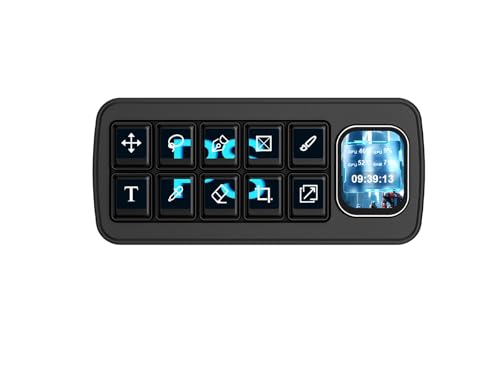
- 10 mechanical LCD keys plus secondary display
- QMK macros and multi-command control
- Drag-and-drop theme editor with voice features
Best For: Enthusiasts wanting visual customization and tactile input
Feature-Rich Stream Deck

- 10 LCD keys, four RGB knobs, and touch bar
- Macros, scene presets, and 500+ plugins
- Foldable stand with passive USB dock
Best For: Creators wanting expansive control in a compact desk setup
Focused Macro Control

- 15 programmable keys with multi-action macros
- Layered pages expand shortcut capacity
- Adjustable, non-slip stand with USB-C connectivity
Best For: Creators wanting distraction-free macro control in a compact setup
Audio Command Center

- USB XLR interface paired with desktop audio mixer
- Four dials, knob paging, and 5-inch color display
- DSP processing and independent streamer submixes
Best For: Creators prioritizing detailed audio control and routing
Flexible Scene Switching

- 15 customizable LCD buttons with hundreds of scenes
- Personal icons, plugins, and one-button workflows
- Five-angle stand for adaptable desktop positioning
Best For: Windows and Mac creators who prefer visual stream controls
Compact Audio Hub
IXTECH 4-Channel Streaming Mixer

- Four-channel mixer with individual volume and mute controls
- XLR support with built-in 48V phantom power
- Voice changer, sound pads, and adjustable RGB lighting
Best For: Streamers and podcasters needing compact physical audio control
Macro Command Center
GuileKeys 15-Key Stream Controller

- Fifteen LCD scissor keys show customizable icons
- Runs macros and workflow actions with one tap
- Supports OBS, Streamlabs, Discord, Photoshop, and Office
Best For: Streamers needing compact, visual shortcut control
Multi-Camera Production Hub
RGBlink mini-pro V3 Video Mixer

- Four 4K HDMI inputs for multi-camera switching
- Streams to up to four platforms via Ethernet
- Adds PTZ control, recording, audio management, and multiview
Best For: Multi-camera events and advanced live video productions
Premium Workflow Console – Loupedeck Live
The Loupedeck Live is a strong choice among streaming control panels for compact setups, especially if you also edit photos or video. Its customizable buttons, haptic dials, LED touchscreen, and software profiles let you manage streaming scenes, creative tools, media, and operating-system controls from one compact aluminum console.
Best For: Creators who want one tactile controller for streaming, editing, and everyday computer controls.
Pros:
- Ready-made integrations for OBS Studio, Streamlabs on Windows, Twitch, Ecamm, vMix, Spotify, and major creative applications.
- Custom profiles, unlimited control pages, macros, delays, and user-uploaded icons support detailed workflows.
- Compact aluminum construction includes haptic dials, LED backlighting, and a touchscreen.
Cons:
- Some listed integrations are platform-specific, such as Streamlabs on Windows and Capture One Pro on macOS.
- Its broad customization may require setup time to organize profiles and workspaces.
Choose the Loupedeck Live when tactile dial control and cross-application flexibility matter more than having the largest number of dedicated keys. It is particularly well suited to a compact desk shared by a streamer and content editor.
Visual Macro Keypad – AJAZZ AKP153 Stream Controller
The AJAZZ AKP153 is a compact option for streaming control panels for compact setups, combining 15 programmable LCD keys with a side information screen. Its drag-and-drop software supports hotkeys, app launches, lighting adjustments, and multi-action macros without requiring a full-size control surface.
Best For: Budget-conscious streamers and gamers who want many visual shortcut keys in a small footprint.
Pros:
- Provides 15 visual keys plus a side screen for shortcuts and information such as weather, CPU, or time.
- Supports chained commands, custom icons, app launches, messages, lighting, and media controls.
- Includes a detachable stand, non-slip design, USB-C cable, and compatibility with Windows, macOS, Android, and iOS as described.
Cons:
- Setup requires downloading the corresponding AJAZZ software from the supplied manual link.
- The enclosure is plastic rather than aluminum.
The AKP153 makes sense when visible, individually labeled macro keys are the priority. Its 15-key layout offers generous shortcut capacity for a compact streaming desk, while the stand helps position it for quick glances and taps.
AI-Ready Display Panel – Waveshare MK10 Voice Control Panel
The Waveshare MK10 brings a distinctive approach to streaming control panels for compact setups, with ten mechanical LCD keys and a separate 2.01-inch screen. Its Linux and QMK dual-system architecture supports macros, mouse control, command chaining, and voice-oriented interaction while keeping a tactile mechanical input feel.
Best For: Experimenters who want a highly visual, mechanical controller with built-in theme editing and AI voice features.
Pros:
- Combines ten 128-by-128 mechanical LCD keys with a 240-by-296 secondary display.
- QMK supports single keys, combinations, macros, mouse control, and multi-command chains without PC software.
- Built-in drag-and-drop theme editor requires no coding and supports Windows and macOS.
Cons:
- The supplied notes do not specify a broad library of ready-made streaming integrations.
- Its advanced dual-system design may appeal more to enthusiasts than users seeking a basic plug-and-play pad.
The MK10 stands out for display flexibility and mechanical feedback rather than sheer key count. It is worth considering if you want to customize visual layouts and use QMK-based controls in a compact streaming or productivity setup.
Feature-Rich Stream Deck – VSD N4 Pro Stream Controller
The VSD N4 Pro is a feature-rich choice among streaming control panels for compact setups, pairing ten LCD keys with four RGB knobs and an interactive touch bar. It supports chained macros, scene presets, sound-control commands, plugins, and a built-in USB dock while remaining compatible with Windows 10 and macOS 11 or later.
Best For: Streamers and editors who want visual macro keys, physical knobs, lighting effects, and expandable controls.
Pros:
- Offers ten customizable LCD keys, four RGB knobs, and an interactive touch bar for varied control.
- Supports multi-step macros, unlimited independent scene presets, custom images or animations, and more than 500 downloadable plugins.
- Includes a foldable 60-degree stand, adjustable RGB lighting, and a passive USB dock.
Cons:
- The USB sound-deck feature sends audio-control commands but has no built-in speakers.
- Its larger feature set may require more configuration than a basic macro pad.
Consider the N4 Pro when a compact controller needs to handle more than scene switching. The knobs, touch bar, macros, plugins, and USB expansion make it a versatile centerpiece for a small streaming, editing, or gaming desk.
Focused Macro Control – 18-Key LCD Macro Pad
For creators seeking streaming control panels for compact setups, this 15-key LCD macro pad offers a straightforward way to manage scenes, apps, messages, and multi-step commands without taking up much desk space. Its layered pages expand the number of available shortcuts while the adjustable stand supports different working positions.
Best For: Streamers and creators who want programmable controls without RGB lighting or unnecessary visual distractions.
Pros:
- 15 programmable keys support shortcuts, app launches, text strings, and multi-action macros.
- Virtual pages provide access to hundreds of hotkeys from the compact physical layout.
- Works with OBS, Twitch, YouTube, Zoom, Discord, Spotify, Photoshop, and other listed apps.
- Three-level stand adjustment and a non-slip base support comfortable desktop use.
Cons:
- It has no RGB or decorative lighting features.
- Customization requires installing the companion software.
- The control surface is USB-connected rather than wireless.
This is a practical choice when reliable macro access matters more than lighting effects. USB-C plug-and-play connectivity for PC and Mac, along with stated Windows, macOS, Android, and iOS compatibility, makes it flexible for a compact creator workstation.
Audio Command Center – BEACN Control Bundle
Among streaming control panels for compact setups, the BEACN Control Bundle is the audio-focused option for creators who need hands-on control over sources, levels, and vocal processing. It combines a USB XLR interface with a desktop mixer, giving streamers a more complete control center than a button-only macro pad.
Best For: Streamers, gamers, podcasters, and creators who need detailed audio routing and vocal processing controls.
Pros:
- The two-piece bundle combines the BEACN Studio USB XLR interface and BEACN Mix Create mixer.
- A 5-inch color display and four physical dials provide visual monitoring and hands-on adjustments.
- Independent submixes can separate the creator’s listening mix from the broadcast mix.
- On-board DSP supports EQ, compression, expander/gates, and adaptive noise suppression.
Cons:
- Its audio-centric design may be more equipment than users seeking simple scene controls need.
- The bundle includes two hardware items, requiring more desk planning than a single macro pad.
- Some advanced routing and VOD features may involve a learning curve.
This bundle makes the most sense when audio is the center of the workflow. Hardware DSP, dual-USB routing for up to eight channels, and configurable VOD outputs add capabilities for more demanding streaming and recording setups.
Flexible Scene Switching – Mirabox Stream Dock
The Mirabox Stream Dock is a useful fit for streaming control panels for compact setups, combining 15 customizable LCD buttons with scene pages, icons, plugins, and workflow triggers. Its five-angle stand and small footprint make it easy to position beside a keyboard or laptop.
Best For: Windows and Mac streamers who want visual, customizable buttons for scenes, workflows, and gaming actions.
Pros:
- 15 LCD buttons can be customized across hundreds of scenes.
- Icons can use default options, free themes, or personal images.
- One-button workflows can consolidate multiple operations into a single trigger.
- Five stand angles, plugin compatibility, and time or weather displays add flexibility.
Cons:
- It uses a wired USB connection and includes one USB port.
- Customization and plugin setup may require consulting the supplied tutorial videos.
- The listed compatibility is limited to Windows and Mac systems.
With its visual LCD controls and adjustable viewing angles, this dock suits users who prefer recognizable icons over memorized shortcuts. It also includes a USB cable, USB-C-to-USB-A adapter, and one-year warranty description, making it ready for common desktop setups.
Compact Audio Hub – IXTECH 4-Channel Streaming Mixer
For creators looking at streaming control panels for compact setups, the IXTECH Gaming Audio Mixer provides hands-on control over four audio channels without taking up much desk space. It supports line-in and XLR microphones, including condenser microphones through built-in 48V phantom power.
Best For: Streamers, podcasters, and karaoke users who want compact audio mixing with voice effects and RGB lighting.
Pros:
- Four channels with individual volume controls and mute buttons.
- Supports XLR microphones and 48V phantom power for compatible condenser microphones.
- Includes six voice-changing options and four customizable sound buttons.
- Plug-and-play compatibility with iOS, Android, macOS, and Windows.
Cons:
- Its feature set is focused on audio rather than video or broader workflow controls.
- Software update support is listed as unknown.
The IXTECH is a practical choice when physical audio controls matter more than a larger macro deck. Its compact body, adjustable RGB lighting, and built-in effects make it particularly suited to personality-driven streams and podcasts.
Macro Command Center – GuileKeys 15-Key Stream Controller
The GuileKeys Stream Controller Deck is a strong fit for shoppers comparing streaming control panels for compact setups. Its 15 LCD scissor keys display customizable icons, while one-tap actions can launch macros, control media, or trigger workflows in OBS, Streamlabs, Discord, Photoshop, and other supported software.
Best For: Streamers and multitasking creators who want customizable shortcut control in a compact USB-C deck.
Pros:
- Fifteen individually displayed LCD buttons help identify commands at a glance.
- Supports macros, sequential or simultaneous Action Flow commands, and app-based Scene Follow switching.
- Works with Windows 11 and later and macOS 14.0 and above.
- Includes folders, profiles, animated icons, multi-angle stands, and more than 500 icon packs and tutorials.
Cons:
- Compatibility is limited to newer Windows and macOS versions.
- No warranty is specified in the supplied details.
With its visual key displays and drag-and-drop customization, this deck can replace several keyboard shortcuts while preserving desk space. It is better suited to software and workflow control than to direct microphone or camera mixing.
Multi-Camera Production Hub – RGBlink mini-pro V3 Video Mixer
For more advanced streaming control panels for compact setups, the RGBlink mini-pro V3 combines video switching, streaming, recording, audio management, and PTZ camera control. Four 4K HDMI inputs, dual HDMI and USB 3.0 outputs, and a built-in 2.1-inch monitor support multi-camera productions from a single unit.
Best For: Multi-camera streamers, churches, educators, event producers, and live productions using HDMI cameras and PTZ systems.
Pros:
- Four 4K HDMI inputs support multi-camera switching.
- Can stream to up to four platforms simultaneously through RTMP(S) over Ethernet.
- Includes touchscreen and joystick controls for layers, chroma key, aspect ratios, and PTZ cameras.
- Supports USB 3.0 output, external SSD recording up to 2TB, and OBS or vMix integration.
Cons:
- Requires firmware updating before use and a 35W or higher USB-C power adapter is recommended.
- Its broader production feature set may be more than a single-camera streamer needs.
- Camera compatibility and setup require consulting the user manual.
The mini-pro V3 is the most capable option here for video-heavy workflows, but it also demands more setup than a simple audio mixer or macro deck. Choose it when multi-camera switching, PTZ control, and direct streaming or recording are central to your production.
How We Picked the Best Streaming Control Panels for Compact Setups
We focused on products that provide hands-on control while keeping desk footprint and setup complexity reasonable. The selection includes programmable keypads, touchscreen and LCD controls, audio mixers, creator-focused interfaces, and compact video switchers. We considered control flexibility, connection type, software or platform compatibility, audio and video capabilities, display feedback, build practicality, and the needs of solo creators working in limited space.
Because these products serve different roles, “best” depends on your workflow. A macro pad may be ideal for scene switching, while an audio interface or video mixer can replace several separate devices.
Quick Comparison
| Best For | Look For | Product Types in This Roundup |
|---|---|---|
| Scene and shortcut control | Programmable keys, profiles, software integration | Macro pads and stream decks |
| Audio-focused streaming | XLR input, mixer controls, monitoring, routing | Audio interfaces and soundboards |
| Video production | HDMI inputs, switching, USB output, preview display | Video mixer switchers |
| Visual feedback | LCD keys, touchscreens, secondary displays | LCD macro pads and smart control panels |
Key Buying Factors for Streaming Control Panels for Compact Setups
Desk Space and Mounting
Measure the available area beside your keyboard or microphone before buying. A small keypad may be easier to position than a wider console, while a control surface with an integrated audio interface can eliminate other hardware. Check cable placement and whether the unit can sit flat, be angled, or be mounted.
Controls and Feedback
Physical keys are useful for reliable one-touch actions, while dials and faders offer more precise volume or parameter control. LCD keys, touchscreens, and status displays help confirm active scenes, sources, or profiles, especially when you use many shortcuts.
Software and Compatibility
Confirm support for your operating system and streaming applications before purchasing. Check whether profiles, macros, plugins, MIDI, hotkeys, or companion software are supported. Hardware that works with your existing tools is usually more valuable than a panel with extra controls you cannot easily configure.
Audio and Video Connections
For audio, look for the inputs, outputs, monitoring, gain control, and routing you actually need. For video, verify HDMI resolution support, capture or USB output behavior, latency, and the number of sources. Avoid paying for production features if your workflow only requires scene switching.
Who Should Buy Which Streaming Control Panels for Compact Setups?
Choose a programmable keypad or stream deck-style controller if you mainly need scene changes, mute commands, media controls, and application shortcuts. Choose an LCD-equipped panel if visual labels and changing profiles are important. An audio interface or mixer is a better fit for creators who need microphone gain, monitoring, sound effects, or Windows and application audio control in one place.
Choose a compact video mixer when you switch multiple cameras, consoles, or HDMI sources. For a simple single-camera stream, it may be more hardware than necessary. Before ordering, prioritize the controls you will use every stream, then confirm compatibility, included cables, software support, and available desk space.