
The best 360-degree cameras for live streaming make it easier to capture presenters, guests, classrooms, events, and moving subjects without constantly repositioning a camera. The right choice depends on whether you need immersive 360-degree footage, automatic speaker tracking, or a straightforward webcam setup.
We compared resolution, stabilization, tracking, microphones, connectivity, software support, and installation flexibility to help you choose a camera that fits your streaming workflow and budget.
Best 10 360-Degree Cameras for Live Streaming Picks for 2026
Best Adventure Pick

- 5.7K 360-degree video with AI reframing
- Waterproof, stabilized action-camera design
- Supports live streaming and webcam use
Best For: Outdoor creators and action-focused live streams
Best Meeting-Focused Option
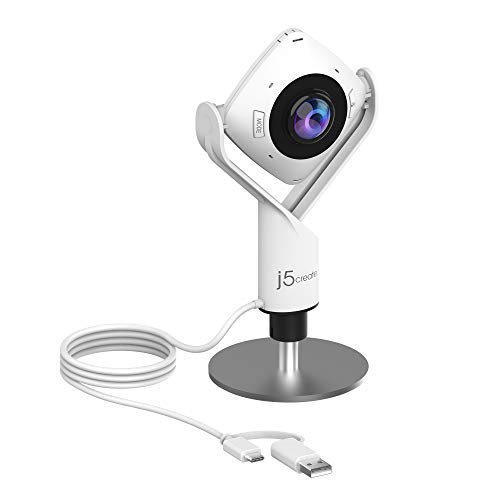
- Full HD 1080p video with six display modes
- Built-in omnidirectional microphone
- USB plug-and-play for major meeting apps
Best For: Conference rooms, classes, and group meetings
Best Hybrid Action Camera

- 5.7K 360 Active HDR and 4K single-lens video
- FlowState stabilization with Horizon Lock
- Waterproof design for action and travel
Best For: Vloggers, travelers, and action-sports creators
Best All-in-One Meeting Hub
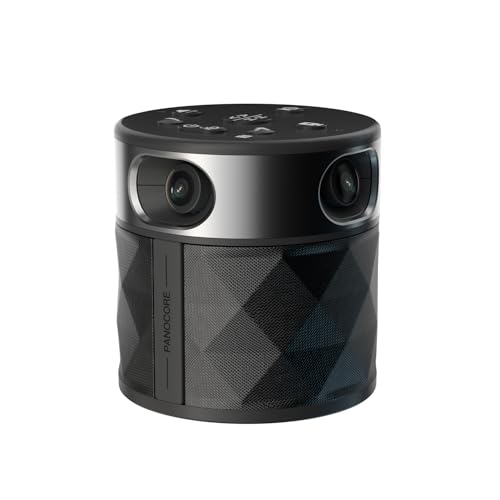
- Integrated 360-degree video, speaker, and microphones
- Active-speaker focus plus dual 180-degree modes
- USB plug-and-play with MicroSD local recording
Best For: Small to medium hybrid meeting rooms
Best Rugged 360 Action Camera
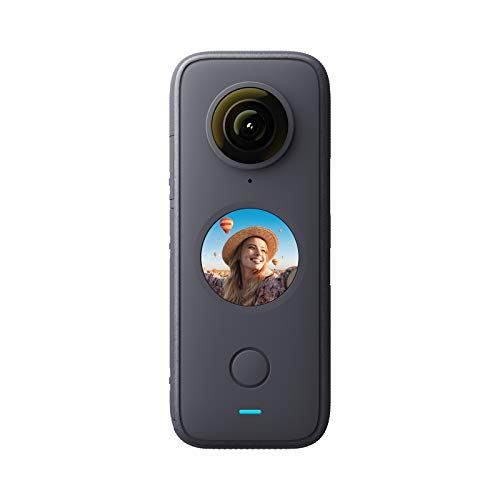
- 5.7K 360-degree video capture
- FlowState stabilization with horizon leveling
- Waterproof to 10 meters with webcam and streaming support
Best For: Outdoor and mobile content creators
Best AI-Tracking Streaming Webcam

- 4K HDR video from a 1/2-inch sensor
- AI tracking with physical pan and tilt
- Noise cancellation, gesture control, and Whiteboard mode
Best For: Presenter-focused streaming and video calls
Best Flexible 1080p Pick
AVerMedia Live Streamer Cam 313

- 1080p video at 30 fps
- 360° swivel with tripod support
- Plug-and-play USB with privacy shutter
Best For: Home offices, teaching, presentations, and flexible streaming setups
Best Zoom and Detail Option

- 4K USB video at 30 fps
- Up to 10X total zoom
- Simultaneous USB and HDMI output
Best For: Detailed demonstrations, teaching, inspection, and research streaming
Best All-Around Conference Camera
TOUCAN SC360 360-Degree Conference Camera
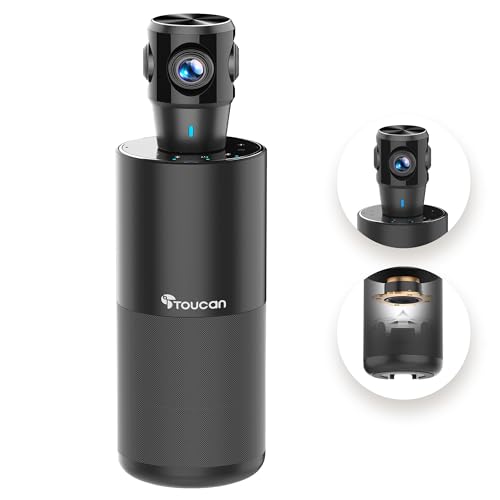
- 360° coverage with 1080p video
- Four noise-reduction microphones
- Built-in speaker and AI tracking
Best For: Conference rooms, hybrid meetings, and group presentations
Best Adventure Pick – Insta360 X3
The Insta360 X3 is a strong choice among 360-degree cameras for live streaming when you want an action-ready camera that can also capture immersive footage. It records 5.7K 360-degree video, includes stabilization, and offers live-streaming and webcam functionality in a compact, waterproof body.
Best For: Outdoor creators, action sports, travel, and buyers who want one camera for 360 video, live streaming, and reframed social content.
Pros:
- 5.7K 360-degree capture lets you choose the viewing angle after recording.
- Waterproof design and digital image stabilization suit action-oriented shooting.
- Large 2.29-inch touchscreen, voice control, and AI-powered reframing simplify operation.
- Supports live streaming and webcam use, along with 72MP still photos.
Cons:
- As an action camera with a fixed fisheye lens, it may be less suited to traditional studio framing.
- MicroSD storage is required, and high-resolution recording can demand fast media.
The X3 combines versatile capture modes with rugged portability, making it a practical all-around option for creators who move between live streaming and action footage.
Best AI Tracking Setup – EMEET PIXY Kit
The EMEET PIXY Kit is aimed at indoor creators comparing 360-degree cameras for live streaming and automated presenter coverage. Its 4K main camera, auxiliary AI camera, PTZ movement, gesture control, tripod, and three-microphone array create a complete setup for streams, classes, meetings, and demonstrations.
Best For: Fitness instructors, educators, presenters, podcasters, and streamers who need automatic tracking and flexible tripod positioning.
Pros:
- 4K main camera with a 1/2.55-inch Sony sensor and PDAF autofocus.
- AI tracking works with 310-degree pan and 180-degree tilt movement.
- Included tripod adjusts from 6.7 to 18.5 inches and has a 360-degree swivel head.
- Three sound modes and a triple-microphone array support meetings, podcasts, and recording.
Cons:
- It is not water resistant, so it is intended for indoor or protected setups.
- Its 4K and 1080p recording modes limit some field-of-view adjustments for stability.
- The optional remote is sold separately.
PIXY is less of a traditional pocket 360 camera and more of an intelligent PTZ streaming system, making it particularly useful when hands-free tracking and audio convenience matter more than outdoor portability.
Best Meeting-Focused Option – j5create 360° Webcam
The j5create 360 Degree All Around Meeting Webcam is a practical pick for buyers seeking 360-degree cameras for live streaming in meetings and collaborative spaces. It provides Full HD 1080p video, an omnidirectional microphone, six display modes, and plug-and-play USB connectivity for supported conferencing platforms.
Best For: Business meetings, online classes, group discussions, and conference-room streaming where multiple viewing layouts are useful.
Pros:
- Six display modes provide full-view, host, dual-host, single-view, and wide-angle layouts.
- Built-in omnidirectional microphone supports room audio capture.
- USB UVC/UAC plug-and-play compatibility simplifies setup.
- Works with platforms including Zoom, Microsoft Teams, Google Meet, Skype, and Slack.
Cons:
- 1080p resolution is lower than the 4K and 5.7K options in this roundup.
- It is not water resistant and does not include image stabilization.
- Firmware updates or app permissions may be needed to optimize functionality.
This webcam is best understood as a meeting and collaboration tool rather than an action camera, but its flexible viewing modes make it useful for live group communication.
Best Hybrid Action Camera – Insta360 X3 Standalone
The standalone Insta360 X3 is a versatile choice among 360-degree cameras for live streaming, combining 5.7K 360 Active HDR video with 4K single-lens capture. Its waterproof design, FlowState stabilization, Horizon Lock, and compact handheld form make it suitable for creators who want immersive footage and conventional wide-angle video from the same camera.
Best For: Motorcycle riders, winter-sports users, vloggers, travelers, and creators switching between 360-degree and single-lens footage.
Pros:
- Records 5.7K 360 Active HDR video and 4K wide-angle footage.
- FlowState stabilization and Horizon Lock help keep footage smooth and level.
- Waterproof body and compact handheld design support travel and action use.
- AI-powered reframing allows angle selection after recording.
Cons:
- It lacks the higher 72MP still-photo specification listed for the other X3 package.
- MicroSD storage is required, with fast card specifications recommended for high-resolution recording.
- The camera is not designed around PTZ tracking or room-wide meeting layouts.
The X3 Standalone offers a strong balance of immersive capture and traditional action-camera shooting, making it a flexible option for mobile live creators and vloggers.
Best All-in-One Meeting Hub – PANOCORE360 Conference Camera
For buyers comparing 360-degree cameras for live streaming and remote meetings, the PANOCORE360 stands out as a compact, all-in-one conference setup. It combines four cameras, a microphone array, a speaker, automatic speaker focus, and 1080p output in a driver-free USB design.
Best For: Small to medium meeting rooms with up to 12 participants that need integrated video and audio for Zoom, Teams, Webex, or Google Meet.
Pros:
- Captures a full 4K 360-degree view and merges it into a 1080p output stream.
- Offers active-speaker focus, full-room context, and dual 180-degree viewing modes.
- Includes an omnidirectional three-mic array, built-in speaker, AI voice processing, and up to 10 feet of pickup.
- Supports plug-and-play USB operation and local MP4 recording to a MicroSD card.
Cons:
- Designed primarily for small to medium conference rooms rather than large spaces.
- Maximum video output is 1080p despite 4K 360-degree capture.
- Requires the included power arrangement for full performance on some older or low-power computers.
The PANOCORE360 is more meeting-room system than action camera, making it a practical choice when simple setup and integrated room audio matter more than cinematic streaming footage.
Best Rugged 360 Action Camera – Insta360 ONE X2
The Insta360 ONE X2 is a versatile pick among 360-degree cameras for live streaming, especially for creators who also want portable action footage. It records 5.7K 360-degree video, includes FlowState stabilization, and can function as a webcam or live-streaming camera.
Best For: Mobile creators, outdoor streamers, and action shooters who want waterproof construction, stabilized video, and the option to reframe footage later.
Pros:
- Records 5.7K 360-degree video at up to 30 frames per second.
- FlowState stabilization and horizon leveling help maintain steady footage without a gimbal.
- Waterproof to 10 meters (33 feet), making it suitable for rain and water-based activities.
- Supports live streaming, webcam use, voice control, AI editing, and a 3-inch touch screen.
Cons:
- Rated battery life is approximately 80 minutes.
- Uses a proprietary operating system and Wi-Fi connectivity rather than a direct USB workflow described in the supplied specifications.
- Its 360-degree capture is more action-oriented than a dedicated conference-room camera system.
Choose the ONE X2 when portability and ruggedness are priorities. Its high-resolution capture and stabilization are especially useful for streams and recordings where the camera may move or face changing conditions.
Best AI-Tracking Streaming Webcam – Insta360 Link 2
The Insta360 Link 2 takes a different approach to 360-degree cameras for live streaming: it is a 4K PTZ webcam that physically pans and tilts to follow the presenter. Its 1/2-inch sensor, HDR, autofocus, AI tracking, and noise-canceling microphone target polished desk, teaching, gaming, and video-call setups.
Best For: Streamers, educators, presenters, and remote professionals who need automatic framing and high-quality 4K webcam video rather than a full panoramic room view.
Pros:
- Provides 4K video from a 1/2-inch sensor with HDR and low-light performance.
- Uses AI tracking with physical pan and tilt to keep individuals or groups in frame.
- Includes PDAF autofocus, AI noise cancellation, gesture control, and smartphone remote control.
- Offers DeskView, Whiteboard, 4K Portrait, privacy, and natural-bokeh features.
Cons:
- It is a PTZ webcam, not a true 360-degree panoramic camera.
- Advanced adjustments require the dedicated Link Controller software.
- It is not currently compatible with ARM-based Windows systems or Windows Hello Face Recognition.
The Link 2 is a strong choice for presenter-focused streaming where automatic tracking and image quality matter most. Buyers specifically needing simultaneous all-around room coverage should consider a true 360-degree model instead.
Best Flexible 1080p Pick – AVerMedia Live Streamer Cam 313
For shoppers comparing 360-degree cameras for live streaming, the AVerMedia Live Streamer Cam 313 is a practical choice when you want sharp Full HD video and a camera that can quickly adapt to different angles. Its 360° swivel, plug-and-play USB setup, dual microphones, and privacy shutter suit streaming, teaching, meetings, and content creation.
Best For: Home offices, online teaching, presentations, and creators who need flexible 1080p framing.
Pros:
- Records 1080p video at up to 30 frames per second.
- 360° swivel supports face shots, product demonstrations, overhead views, and side angles.
- Plug-and-play USB connectivity works with PCs, Macs, and laptops without extra drivers.
- Built-in privacy shutter, dual microphones, and tripod support add everyday versatility.
Cons:
- Fixed focus may be less flexible for subjects at varying distances.
- No image stabilization is listed.
- It is a 1080p webcam rather than a 4K model.
The PW313 emphasizes simple setup and adjustable positioning instead of advanced zoom or tracking. It is a sensible fit for streamers and remote presenters who value reliable Full HD video, privacy, and easy angle changes.
Best Zoom and Detail Option – IFWATER 4K HDMI USB Camera
Among 360-degree cameras for live streaming, the IFWATER 4K HDMI USB Camera stands out for applications where close-up detail and output flexibility matter more than panoramic coverage. Its 5–50mm manual lens offers up to 10X total zoom, while USB and HDMI can output simultaneously for computer and TV or monitor use.
Best For: Online instruction, demonstrations, inspections, research projects, and streams requiring detailed distant subjects.
Pros:
- Supports 4K video at 30 frames per second through USB output.
- 5–50mm manual focus and zoom lens provides up to 10X total zoom.
- USB and HDMI simultaneous output supports computer and external-display workflows.
- UVC plug-and-play compatibility works with listed Windows, Linux, macOS, Android, and Raspberry Pi setups.
Cons:
- Manual focus and zoom require hands-on adjustment.
- HDMI output is listed as 1080p, so 4K is associated with USB output.
- No image stabilization is listed, and the warranty is described as 30 days.
This camera is better suited to controlled shooting positions than hands-off room coverage. Choose it when 4K USB video, long-range framing, and simultaneous HDMI output are more valuable than automatic tracking or a built-in 360° viewing angle.
Best All-Around Conference Camera – TOUCAN SC360 360-Degree Conference Camera
For teams evaluating 360-degree cameras for live streaming and conferencing, the TOUCAN SC360 combines 360° coverage with built-in audio hardware. Its 1080p camera, four noise-reduction microphones, speaker, AI tracking, and USB plug-and-play design are aimed at making group conversations easier to capture in small or large conference rooms.
Best For: Conference rooms, hybrid meetings, and group presentations using Zoom, Microsoft Teams, Google Voice, or similar platforms.
Pros:
- 360° viewing angle helps capture participants around the room.
- 1080p video is paired with four microphones for clearer group communication.
- Built-in speaker and Bluetooth support add audio-conferencing flexibility.
- USB plug-and-play setup includes a Type-C Male to USB-A Female OTG adapter.
Cons:
- The 1.28 kg weight is heavier than a typical compact webcam.
- Video resolution is Full HD rather than 4K.
- No water resistance or image stabilization is listed.
The SC360 is designed as a room-oriented conferencing device rather than a basic solo webcam. Its combination of wide coverage, microphones, speaker, and compatibility with common meeting platforms makes it the strongest choice here for collaborative sessions and room-wide communication.
How We Picked the Best 360-Degree Cameras for Live Streaming
We focused on cameras suited to real-world streaming rather than judging resolution alone. Our comparison considers image quality, field of view, stabilization, autofocus or AI tracking, microphone performance, connection options, software compatibility, and ease of setup. We also separated immersive 360-degree action cameras from conference cameras that use multiple lenses, speaker tracking, or a wide viewing angle to cover a room.
For live production, reliability matters as much as headline specifications. Models with USB, HDMI, webcam, or wireless workflows can fit different setups, while built-in microphones, privacy features, and mounting options may be especially important for meetings and remote presentations.
Quick Comparison
- Best for immersive outdoor content: Insta360 X3 or ONE X2, with waterproofing, stabilization, and 360-degree capture.
- Best for modern desk streaming: Insta360 Link 2, with 4K video, AI tracking, and PTZ movement.
- Best for conference rooms: EMEET PIXY, PANOCORE360, j5create, or TOUCAN models with room coverage and speaker-focused features.
- Best for flexible studio connectivity: The HDMI 4K USB camera, particularly when simultaneous HDMI and USB output is useful.
- Best for simple video calls: AVerMedia Live Streamer Cam 313, with Full HD video, a privacy shutter, and a swiveling design.
Key Buying Factors for 360-Degree Cameras for Live Streaming
Capture Style and Field of View
Choose a true 360-degree camera when viewers need to explore the scene or when you want to reframe footage after recording. A conference camera or PTZ webcam may be better if the goal is to show a presenter, follow a speaker, or keep a meeting room visible in a conventional video window.
Resolution, Stabilization, and Lighting
Higher resolution gives you more room to crop or reframe, but lighting and stabilization often have a greater effect on perceived quality. Action cameras benefit from strong stabilization outdoors, while conference cameras need dependable exposure and focus across faces seated at different distances.
Audio and Tracking
Built-in microphone arrays and noise reduction can simplify meetings, but serious productions may still benefit from a dedicated microphone. AI tracking is useful for presenters and speakers, although it should not replace checking framing, movement speed, and tracking behavior before going live.
Connections and Streaming Workflow
Check whether the camera supports your preferred computer, streaming software, capture card, and operating system. USB webcam modes are convenient, HDMI is valuable for production hardware, and wireless features can improve mobility but may introduce extra setup or network demands.
Who Should Buy Which 360-Degree Cameras for Live Streaming?
Traveling creators and action videographers should prioritize the Insta360 X3 or ONE X2 for waterproof construction, stabilization, and flexible reframing. Streamers and presenters may prefer the Insta360 Link 2 for its 4K PTZ design and AI-assisted control. Businesses and educators should look toward the EMEET, j5create, PANOCORE360, or TOUCAN conference cameras when room audio and speaker coverage matter most. Production teams needing direct hardware integration should consider the HDMI 4K USB model, while casual callers may find the AVerMedia 313 sufficient and easier to operate.