
Choosing the right sdi video capture recorder for live production can make the difference between a smooth broadcast and a troubleshooting session. The best options balance signal compatibility, low latency, reliable audio handling, and the workflow you actually use.
Below, we focus on gear that fits real live production needs, from compact USB capture devices to standalone encoders and switcher-based setups.
Best 9 Sdi Video Capture Recorder for Live Production Picks for 2026
Best for Stable 24/7 Capture
Magewell USB Capture SDI Gen 2

- Captures SDI up to 1080p60 with 4:2:2 support
- On-device processing helps keep CPU usage low
- Built for always-on live production and recording
Best For: Live production teams and streamers who need a dependable single-channel SDI capture device.
Best for Multi-Platform Switching

- 4 HDMI inputs and 2 outputs for multi-cam workflows
- Records to SD card or USB SSD while streaming
- Hardware controls, macros, and keying for live shows
Best For: Teams that want an HDMI live switcher with recording and multi-platform streaming.
Best for 4K SDI + Loop-Through Monitoring
Magewell USB Capture SDI 4K Plus
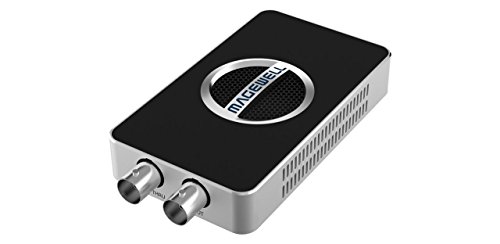
- Up to 4Kp30 capture from SD/HD/3G/2K/6G-SDI sources
- Built-in SDI loop-through for live monitoring
- USB 3.1 plug-and-play support across major operating systems
Best For: Live production teams and AV users who need reliable 4K SDI capture with passthrough monitoring.
Best SDI/HDMI Hybrid Switching
Osee GoStream Duet Live Stream Mixer

- Handles both SDI and HDMI camera inputs
- Works well for multi-camera live production
- Compact format suits tighter control spaces
Best For: Live producers who need a flexible switcher for mixed SDI and HDMI camera setups.
Best for Hybrid IP & SDI Workflows
Magewell Ultra Encode SDI Plus 53160

- 4K SDI encoding with H.264/H.265 compression
- Multi-protocol streaming includes NDI|HX, SRT, RTMP, and HLS
- Records while streaming to internal, USB, or network storage
Best For: Live production teams and AV integrators needing SDI encoding, recording, and IP streaming in one box.
Best for SDI/HDMI Switching
HDMI SDI Capture Card with Loopout

- 1080p60 capture from SDI or HDMI over USB 3.0
- SDI loopout helps with monitor pass-through in live setups
- Mic/line audio mixing supports simple commentary workflows
Best For: Streamers and small production teams that need an easy USB capture card with SDI loopout and basic audio mixing.
Best for SDI/HDMI Simplicity
AVMATRIX UC2018 HDMI/SDI Capture Card

- SDI and HDMI inputs with automatic signal detection
- 1080p60 uncompressed capture over USB 3.0 Type-C
- Plug-and-play compatibility with Windows, macOS, and Linux
Best For: Streamers and live production teams that want a straightforward SDI/HDMI capture card with dependable 1080p60 performance.
Best for Simple SDI-to-USB Streaming
HDMI to USB3.0 3G-SDI Capture Card

- 3G-SDI input with 1080p 60fps capture
- Plug-and-play, no driver setup needed
- Compatible with Windows, Linux, Android, and Mac
Best For: Streamers and small production teams that want a simple SDI-to-USB capture workflow.
Best for SDI + HDMI Loopout
Groza SDI Capture Card USB 3.0

- SDI input with HDMI loopout for monitoring
- 1080p60 capture for smooth live production
- USB 3.0 support on Windows, Linux, and OS X
Best For: Live production teams and streamers who want simple SDI capture with loopout monitoring.
Best for Stable 24/7 Capture – Magewell USB Capture SDI Gen 2
If you need an sdi video capture recorder for live production that can run reliably through long events, the Magewell USB Capture SDI Gen 2 is built for that job. It takes SDI up to 1080p60, handles video processing on-device, and connects over USB for a simple setup on major operating systems.
Best For: Live production teams, streamers, and AV setups that want a dependable SDI-to-USB capture device for extended recording or broadcasting.
Pros:
- Captures SDI up to 2048×1080 at 60 fps with 4:2:2 support
- FPGA-based processing reduces CPU load during live workflows
- USB 3.1 Gen 1 plug-and-play compatibility across Windows, macOS, Linux, and Chrome OS
- Designed for 24/7 operation with thermal protection and a 3-year warranty
Cons:
- Single-channel design only supports one SDI source at a time
- USB capture workflow is better for ingest and recording than multi-input switching
- Premium pricing may be more than casual users need
This is a strong pick if your sdi video capture recorder for live production needs to stay stable under real broadcast conditions. It favors reliability, compatibility, and low-CPU operation over extra channels or flashy features.
Best for Multi-Platform Switching – Osee GoStream Deck HDMI Pro
The Osee GoStream Deck HDMI Pro is a flexible choice if you need an sdi video capture recorder for live production-style workflows centered on HDMI sources, fast switching, and built-in recording. It gives you a compact control surface, multiple input/output options, and direct-to-card or SSD recording, making it easier to manage live shows without relying entirely on a computer.
Best For: Creators, churches, conference teams, and event producers who want multi-camera switching, live streaming, and onboard recording in one box.
Pros:
- 4 HDMI inputs plus 2 HDMI outputs for multi-camera monitoring and Multiview
- Records to SD card or USB SSD while handling playback for intros and breaks
- Streams to multiple platforms and supports both landscape and portrait modes
- Physical controls, macros, and built-in keying tools suit live production
Cons:
- HDMI-based design means it is not a native SDI switcher
- Feature-rich layout may take time to learn for first-time users
- Best results depend on matching your cameras and workflow to HDMI
For buyers who can work with HDMI rather than SDI, this unit offers a strong live-production feature set in a portable format. If your priority is an sdi video capture recorder for live production, the GoStream Deck is better viewed as a streaming switcher and recorder with broadcast-style controls than as a dedicated SDI capture device.
Best for 4K SDI + Loop-Through Monitoring – Magewell USB Capture SDI 4K Plus
If you need an sdi video capture recorder for live production that can handle modern 6G-SDI sources without adding friction, the Magewell USB Capture SDI 4K Plus is built for exactly that kind of workflow. It combines high-resolution capture, SDI loop-through monitoring, and broad OS compatibility in a compact USB device that fits switching, streaming, and AV control setups.
Best For: Live production teams, streamers, and AV operators who want reliable 4K SDI capture with passthrough monitoring and plug-and-play setup.
Pros:
- Captures SD/HD/3G/2K/6G-SDI signals up to 4Kp30 for professional live workflows.
- SDI loop-through output lets you monitor a source while capturing it.
- USB 3.1 plug-and-play support works across Windows, macOS, Linux, and Chrome OS.
- Onboard processing helps with scaling, de-interlacing, color conversion, and image flips.
Cons:
- Limited to 4Kp30, so it is not ideal for higher-frame-rate 4K capture.
- Single-channel capture only, which may be restrictive for multi-source setups.
For buyers comparing a dependable sdi video capture recorder for live production, this Magewell model stands out for its stable hardware processing, easy connection, and practical loop-through monitoring. It is a strong fit when reliability matters more than flashy extras.
Best SDI/HDMI Hybrid Switching – Osee GoStream Duet Live Stream Mixer
Osee GoStream Duet Multiple Camera SDI and HDMI Live Stream Video Mixer Switcher
Check Price On AmazonIf you need an sdi video capture recorder for live production that can handle mixed camera sources without a complicated rack setup, the Osee GoStream Duet is built for exactly that kind of workflow. It combines SDI and HDMI input switching in one unit, making it a practical choice for multi-camera streams, event coverage, and smaller studio rigs that need fast, reliable switching.
Best For: Live producers who want a compact switcher that can mix SDI and HDMI cameras in one system.
Pros:
- Supports both SDI and HDMI sources for flexible live setups
- Useful for multi-camera streaming, events, and hybrid production environments
- Compact design helps keep desk and control-space demands low
- Good fit for creators upgrading from basic single-input capture gear
Cons:
- Not the simplest option if you only need a basic one-camera recorder
- May offer more switching capability than casual streamers actually need
Overall, the GoStream Duet makes sense if you want an sdi video capture recorder for live production that bridges pro-style camera connections with a streamlined live switching workflow. It is especially appealing when your setup includes a mix of SDI and HDMI gear and you want fewer adapters in the chain.
Best for Hybrid IP & SDI Workflows – Magewell Ultra Encode SDI Plus 53160
If you need an sdi video capture recorder for live production that can do more than basic capture, the Magewell Ultra Encode SDI Plus is built for flexible broadcast, AV, and remote contribution workflows. It combines 4K SDI encoding, multi-protocol streaming, and onboard recording in a compact standalone box that can run without a computer.
Best For: Live production teams, corporate AV setups, and hybrid broadcast workflows that need SDI encoding, recording, and IP streaming in one device.
Pros:
- 4K SDI encoding up to 4096×2160p30 with H.264/H.265 support
- Streams to multiple destinations with RTMP, SRT, HLS, NDI|HX, and more
- Records simultaneously to internal, USB, or network storage
- PoE, Wi-Fi, and USB modem support make deployment flexible
Cons:
- More feature-rich than many simple capture-only recorders
- Internal storage is useful, but larger projects may still need external media
- Best suited to users comfortable with broadcast-style configuration
For buyers who want an sdi video capture recorder for live production with real IP workflow flexibility, this Magewell model stands out for its blend of encoding, recording, and networking options. It is a strong fit when you need one device to handle both on-site production and remote delivery.
Best for SDI/HDMI Switching – HDMI SDI Capture Card with Loopout
If you need an sdi video capture recorder for live production that can handle both SDI and HDMI sources, this USB 3.0 capture card is a practical, no-driver option. It supports up to 1080p60 capture, includes SDI loopout, and adds basic audio mixing for simple streaming or recording setups.
Best For: Streamers, camera operators, and small production teams that want an easy USB capture solution with SDI loopout and mic/line audio support.
Pros:
- Captures up to 1080p60 with SDI or HDMI input over USB 3.0
- SDI loopout is useful for monitors and live workflow monitoring
- Supports mic/line audio mixing for voice-over or commentary
- No-driver setup works across Windows, Mac, and Linux
Cons:
- Limited to 1080p60, so it is not a 4K capture solution
- Audio and input switching are functional but fairly basic
- Best suited to straightforward production needs rather than advanced routing
This is a solid value pick if your sdi video capture recorder for live production needs are centered on simple plug-and-play capture, SDI loopout, and lightweight audio handling. It is especially appealing for smaller studios or mobile workflows that want reliable 1080p60 recording without extra software complexity.
Best for SDI/HDMI Simplicity – AVMATRIX UC2018 HDMI/SDI Capture Card
If you need an sdi video capture recorder for live production that can switch between SDI and HDMI without extra setup, the AVMATRIX UC2018 is a practical pick. It captures up to 1080p60, supports uncompressed audio/video over USB 3.0 Type-C, and uses automatic input detection to make fast installs easier for streaming and production workflows.
Best For: Streamers, churches, and small production teams that want a plug-and-play SDI/HDMI capture solution for dependable live output.
Pros:
- SDI and HDMI inputs with automatic signal detection
- Up to 1080p60 capture with uncompressed transmission
- Plug-and-play design with UVC/UAC support and no driver install
- Works across Windows, macOS, and Linux
Cons:
- Limited to 1080p output, so it is not a 4K capture option
- Best suited to basic live production rather than advanced multi-channel setups
For buyers comparing an sdi video capture recorder for live production, the UC2018 stands out for easy compatibility and clean 1080p60 capture rather than extra features. It is a solid fit when reliability, simple hookup, and broad OS support matter more than higher-resolution specs.
Best for Simple SDI-to-USB Streaming – HDMI to USB3.0 3G-SDI Capture Card
3G-SDI to USB 3.0 Video Capture Card 1080P 60FPS with HDMI and SDI Loop Out | Driver Free
Check Price On AmazonIf you need an sdi video capture recorder for live production that keeps the setup straightforward, this HDMI/3G-SDI to USB 3.0 capture card is built for quick, plug-and-play use. It’s a practical choice for turning a camera or switcher feed into a clean computer input for streaming, recording, or video calls without adding driver headaches.
Best For: Streamers, small studios, and live production teams that want an easy SDI-to-USB capture solution with broad device compatibility.
Pros:
- Supports 3G-SDI input and up to 1080p 60fps capture.
- Plug-and-play design with no driver installation required.
- Works across Windows, Linux, Android, and Mac.
- USB 3.0 connection helps keep capture responsive for live use.
Cons:
- Limited to 1080p rather than higher-resolution capture.
- Best suited to basic capture workflows, not advanced broadcast routing.
For buyers prioritizing compatibility and speed over extra features, this is a sensible sdi video capture recorder for live production. It fits well in lean streaming rigs, especially when you want SDI input converted to USB with minimal setup time.
Best for SDI + HDMI Loopout – Groza SDI Capture Card USB 3.0
If you need an sdi video capture recorder for live production, the Groza SDI Capture Card is a practical USB 3.0 option that brings SDI input, HDMI loopout, and 1080p60 capture into one compact unit. It’s a straightforward pick for streaming, recording, and monitoring when you want a simple path from camera or switcher to your computer.
Best For: Live production setups that need SDI capture with HDMI passthrough for monitoring or a second display.
Pros:
- SDI input with HDMI loopout helps you monitor the source while capturing.
- Supports 1080p at 60 fps for smooth live streaming and recording.
- USB 3.0 connection keeps setup simple on Windows, Linux, and OS X.
- Useful all-in-one choice for game streaming and basic production workflows.
Cons:
- Limited to 1080p capture, so it won’t suit higher-resolution workflows.
- Best for straightforward use cases rather than advanced broadcast features.
Overall, this is a solid sdi video capture recorder for live production if you care more about reliable capture, monitoring, and cross-platform compatibility than extra broadcast-grade bells and whistles.
How We Picked the Best Sdi Video Capture Recorder for Live Production
We prioritized products that are relevant to live workflows, with attention to SDI input support, usable resolution and frame-rate limits, USB or network output options, audio integration, loop-through or passthrough features, and overall practicality for streaming or recording.
For an Sdi Video Capture Recorder for Live Production, the most important factor is not just headline resolution. Stable drivers, predictable latency, and clean signal handling matter more than flashy marketing claims.
Quick Comparison
Broadly, the lineup splits into three use cases: compact USB capture devices for direct recording or streaming, mixer/switcher-style units for multi-camera live production, and standalone encoders for network-based workflows. If you need a simple single-camera ingest path, USB capture is usually the fastest route. If you are managing multiple sources, a switcher may be the better fit. If you want to encode and stream without a computer, a standalone box is often the strongest choice.
Key Buying Factors for Sdi Video Capture Recorder for Live Production
Input Standard and Resolution
Confirm whether the device supports 3G-SDI, 6G-SDI, or higher. Match that to your cameras and switchers. Many live setups only need 1080p60, but 4K support can be useful if you want more future flexibility.
USB Versus Standalone Operation
USB capture devices are simple and affordable, but they depend on a connected computer. Standalone encoders can stream or record independently, which is valuable for mobile production, venue installs, and redundant workflows.
Audio Workflow
Look for clean embedded audio support, analog line I/O if you mix external sound, and consistent sync performance. Audio issues can be more disruptive than video artifacts in live production.
Loop-Through and Monitoring
Loop-through output helps you feed a monitor, switcher, or recorder while still capturing the source. This is especially useful in live environments where operators need confidence checks.
Software and Compatibility
Make sure the device works with your preferred streaming, conferencing, or recording software. Compatibility with Windows, macOS, and popular production tools can save setup time and reduce surprises.
Who Should Buy Which Sdi Video Capture Recorder for Live Production?
If you want a straightforward single-input workflow, choose a compact USB capture device. If your setup includes several cameras and you need switching on the fly, a live mixer or switcher is the smarter buy. If you need computer-free streaming, recording, or network distribution, a standalone encoder is the best fit.
For most buyers, the right choice comes down to your signal chain today and how much you want to scale later. Prioritize reliability first, then choose the format that best matches your live production workflow.