
The right control panel can turn a complicated live production into a faster, more repeatable workflow. Whether you stream games, worship services, events, or studio shows, dedicated controls reduce time spent hunting through software menus.
This roundup covers 10 options across macro pads, video switchers, encoder systems, PTZ controllers, and vMix-focused hardware, so you can match the controls to your production setup and budget.
Best 10 Streaming Control Panels for Live Streaming Picks for 2026
Best Multicam Switcher

- Four HDMI inputs for multicamera production
- Built-in streaming, recording, and multiview
- Includes transitions, keyers, and audio mixing
Best For: Multicamera livestreams and presentations
Best Macro Deck

- 18 programmable keys with 15 LCD displays
- Triggers OBS scenes and multi-step macros
- Compatible with Windows 11 and macOS 11+
Best For: Shortcut-driven streaming and desktop control
Best 4K Encoder

- Accepts HDMI and SDI with dual-input layouts
- Streams to up to six destinations
- Supports 4K encoding, recording, and overlays
Best For: Professional multicamera and multistream workflows
Best Status-Display Deck
STREONOR S15 Stream Controller
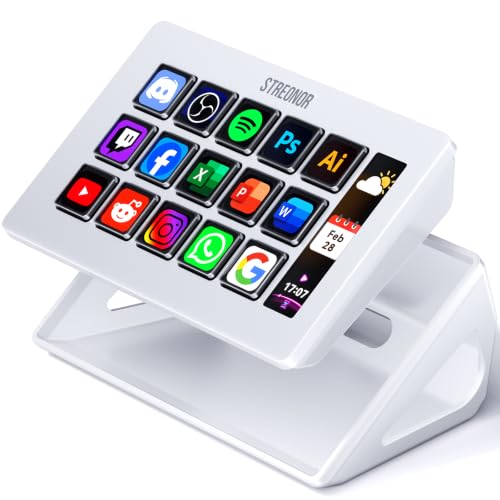
- 15 customizable LCD keys for shortcuts
- Three panels display system and status information
- Supports pages, action flows, plugins, and GIF icons
Best For: OBS control with at-a-glance desktop monitoring
Best All-in-One Mixer

- Handles multiple HDMI, USB, webcam, and SD sources
- Combines switching, recording, streaming, audio, and PTZ control
- Supports 4K input with 1080p60 output
Best For: Multi-camera events and advanced live productions
Best Macro Control Deck

- Offers LCD keys, RGB knobs, and a touch bar
- Triggers macros, scene presets, audio commands, and plugins
- Works with Windows 10+ and macOS 11.0+
Best For: Software-based streaming, editing, and gaming workflows
Best Built-In Monitor
MT-ViKI 4-Input Live Streaming Switcher

- Includes a 5.5-inch preview and program monitor
- Supports four HDMI sources and four PTZ cameras
- Streams and records 1080p60 over USB 3.0
Best For: 1080p weddings, conferences, and live events
Compact Production Hub

- 8-channel switching with 4-way mixing
- USB connection for computer streaming software
- Supports Windows, macOS, and listed platforms
Best For: Portable multi-camera production setups
PTZ Camera Command Center

- 4D joystick for movement, zoom, focus, and presets
- 5-inch touch preview and setup display
- PoE, NDI, Ethernet, RS232, RS422, and RS485 support
Best For: Multi-camera PTZ and NDI productions
Tactile Transition Control

- Smooth T-bar for live transitions
- Integrated vMix template for quick setup
- Customizable USB keys in a durable aluminum case
Best For: vMix operators needing tactile transition control
Best Multicam Switcher – ATEM Mini Pro HDMI
The Blackmagic Design ATEM Mini Pro is a practical choice among streaming control panels for live streaming when your setup uses multiple HDMI cameras. It combines switching, transitions, audio mixing, multiview monitoring, recording, and built-in streaming in a compact unit.
Best For: Multicamera livestreams, education, business presentations, and esports events.
Pros:
- Four HDMI inputs support multicamera production.
- Includes multiview, multiple transitions, keyers, and a six-input audio mixer.
- Built-in streaming, recording, HDMI output, and USB-C webcam output add workflow flexibility.
Cons:
- Designed around HDMI sources rather than SDI inputs.
- Its feature set may be more than needed for a simple single-camera stream.
Choose the ATEM Mini Pro if you want hands-on control over cameras, transitions, and audio without assembling separate switching and streaming hardware.
Best Macro Deck – VSD M18 Stream Controller
The VSD M18 is a customizable option among streaming control panels for live streaming, with 18 programmable keys for OBS scenes, media controls, app launches, and multi-step actions. Its LCD keys can display JPG, PNG, and GIF icons to help identify commands at a glance.
Best For: PC and Mac streamers, gamers, editors, and users who want programmable shortcuts.
Pros:
- Provides 15 LCD visual keys plus three physical buttons.
- Supports single actions, multi-step macros, text entry, file launches, and OBS scene switching.
- Works with OBS, Streamlabs, YouTube, Discord, and other listed software on Windows 11 and macOS 11 or newer.
- Includes an adjustable RGB surround light ring and built-in utility plugins.
Cons:
- Native Linux plug-and-play support is not available.
- USB connection and compatible computer are required.
The M18 is a strong fit when quick, visible shortcuts matter more than video switching or encoding hardware. Its programmable actions can simplify repeated streaming and desktop tasks.
Best 4K Encoder – Magewell Ultra Encode AIO
The Magewell Ultra Encode AIO is a professional-oriented choice among streaming control panels for live streaming when you need encoding, recording, and network distribution in one device. It accepts HDMI or SDI, supports 4K input formats, and can stream to multiple destinations simultaneously.
Best For: Live production workflows using HDMI and SDI sources, multistreaming, and simultaneous recording.
Pros:
- Supports HDMI and SDI inputs with picture-in-picture or side-by-side mixing.
- Encodes up to 4K using H.264 or HEVC, depending on the input format.
- Can stream to up to six destinations using multiple protocols.
- Supports overlays, recording to several storage options, web control, API control, Wi-Fi, and PoE.
Cons:
- Its rack-mountable professional form factor may be excessive for basic streaming.
- Some advanced workflows require compatible network services or storage.
The Ultra Encode AIO stands out for production teams that need flexible source connectivity and network delivery. It is better suited to complex broadcast workflows than casual desktop streaming.
Best Status-Display Deck – STREONOR S15 Stream Controller
The STREONOR S15 is a compact option among streaming control panels for live streaming, pairing 15 customizable LCD keys with three non-touch status displays. It can organize OBS controls, app shortcuts, editing commands, and other actions into dedicated pages for different workflows.
Best For: Windows and Mac users who want customizable streaming shortcuts plus at-a-glance system information.
Pros:
- Offers 15 LCD keys for OBS scenes, hotkeys, app actions, and macros.
- Three status panels can show information such as time, weather, CPU temperature, GPU status, and memory usage.
- Supports preset pages, action flows, icons, GIF customization, and more than 100 plugins.
Cons:
- Linux is not supported.
- Setup requires STREONOR software and a direct USB connection.
- Some third-party integrations may require an account, subscription, or membership.
The S15 is useful for streamers who want both command buttons and visible system information in one desk accessory. Its page-based layouts also make it adaptable for editing, office work, and gaming.
Best All-in-One Mixer – FoMaKo M1 4K HDMI Video Mixer
For shoppers comparing streaming control panels for live streaming, the FoMaKo M1 combines video switching, recording, streaming, audio mixing, and PTZ control in one unit. It accepts multiple HDMI and USB sources, supports 4K input, and outputs up to 1080p at 60fps for live production setups.
Best For: Multi-camera events, weddings, concerts, and creators who want an all-in-one production switcher.
Pros:
- Supports multiple HDMI, USB, webcam, SD card, and optional NDI inputs.
- Includes audio mixing, delay adjustment, noise reduction, chroma key, PIP, DSK, logos, and up to 30 transitions.
- Offers USB and SD recording, dual-platform IP streaming, portrait and landscape modes, and browser-based remote control.
Cons:
- NDI input requires an upgrade rather than being immediately available.
- Its broad feature set may take more time to learn than a basic switcher.
- Live output is specified at 1080p60 despite supporting 4K inputs.
The M1 is a strong choice when you need a single control surface for complex live productions. Its combination of PTZ support, recording, streaming, and audio tools can reduce the amount of additional equipment required.
Best Macro Control Deck – VSD N4 Pro Stream Controller
The VSD N4 Pro is a computer-based option for anyone comparing streaming control panels for live streaming. Rather than switching camera signals, it provides customizable LCD keys, knobs, a touch bar, macros, and plugins for controlling streaming software, audio commands, apps, and repetitive workflows.
Best For: Streamers, editors, gamers, and office users who want customizable software shortcuts and audio controls.
Pros:
- Provides 10 customizable LCD keys, four RGB knobs, and an interactive touch bar.
- Supports one-tap multi-step macros, unlimited scene presets, custom icons, and more than 500 downloadable plugins.
- Includes RGB effects, a passive USB dock, a foldable 60-degree stand, and USB-C compatibility with Windows 10+ and macOS 11.0+.
Cons:
- It sends audio control commands but has no built-in speakers for sound output.
- It requires a computer and compatible software, so it does not replace a standalone video switcher.
- Its main controls are programmable rather than dedicated camera-input switching controls.
Choose the N4 Pro if your live workflow centers on software automation, scene changes, sound triggers, and shortcuts. It is especially useful for reducing repeated keyboard and mouse actions during streams.
Best Built-In Monitor – MT-ViKI 4-Input Live Streaming Switcher
The MT-ViKI is a practical choice among streaming control panels for live streaming when you want integrated monitoring. Its 5.5-inch LCD displays preview and program feeds, while four HDMI inputs, PTZ control, chroma key, USB 3.0 streaming, and audio inputs support compact live-event setups.
Best For: Weddings, conferences, education, and other 1080p live events requiring four HDMI sources.
Pros:
- Built-in 5.5-inch LCD monitoring reduces the need for an external monitor.
- Controls up to four PTZ cameras and supports cut, mix, wipe, chroma key, and two custom logo overlays.
- Provides USB 3.0 1080p60 streaming and recording, plus XLR and 3.5mm audio connections.
Cons:
- It does not support 4K video.
- Its USB streaming output is limited to 1080p60.
- The feature set is focused on four HDMI inputs, which may be limiting for larger productions.
The MT-ViKI stands out for straightforward event production because monitoring is built into the switcher. It offers useful PTZ, keying, branding, and audio features without requiring a separate preview display.
Compact Production Hub – Mini vMix Switch Panel
For creators comparing streaming control panels for live streaming, this compact Mini vMix panel combines video switching, mixing, recording, webcasting, and transitions in one USB-connected surface. Its 8-channel switching support and compatibility with vMix, OBS-based software, and other listed platforms make it a flexible option for computer-based productions.
Best For: Multi-camera live productions and creators who want a portable control surface with video switching and mixing functions.
Pros:
- Offers 8-channel switching and a 4-way mixer for streamlined production control.
- Includes USB input/output for transmitting video signals to computer-based streaming software.
- Supports Windows and macOS, along with several listed production and streaming platforms.
- Compact 940-gram design is practical for portable setups.
Cons:
- Its compact format may provide less physical control space than a larger broadcast panel.
- Compatibility and workflow depend on the supported software and computer setup.
This is a feature-dense choice for users who need switching, mixing, and USB computer integration without a full-size production console. Verify that your preferred software is supported before buying.
PTZ Camera Command Center – Pro PTZ Joystick Controller
Among streaming control panels for live streaming, this wired PTZ controller is focused on camera operation rather than scene switching. It provides a 4D joystick, a 5-inch touch preview screen, multi-protocol support, and Ethernet connectivity for managing compatible PTZ and NDI cameras in multi-angle productions.
Best For: Churches, studios, and production teams operating multiple IP, NDI, or other compatible PTZ cameras.
Pros:
- Controls pan, tilt, zoom, focus, exposure settings, presets, and tracking functions.
- 5-inch touch display supports setup and live video preview through listed protocols.
- PoE can simplify installation by using a single Ethernet cable.
- Supports up to 100 camera shortcuts and includes six user-defined keys.
Cons:
- Designed for PTZ camera control, so it does not replace a general video switcher.
- Network configuration and protocol compatibility may require additional setup.
- The controller is wired and requires a corded power source.
This controller makes the most sense when camera movement, presets, and preview are central to your workflow. Its broad protocol support is useful, but confirm your cameras use a compatible connection or control standard.
Tactile Transition Control – X-keys XKE-124 T-bar
X-keys XKE-124 T-bar USB Video Switcher for vMix & Central Control Live Streaming
Check Price On AmazonFor buyers seeking streaming control panels for live streaming, the X-keys XKE-124 adds tactile switching and transition control to a vMix or central-control setup. Its smooth-action T-bar, USB connection, relegendable keys, and integrated vMix template are aimed at quick setup and hands-on operation.
Best For: vMix users who want a dedicated T-bar and customizable physical buttons for live transitions.
Pros:
- Built-in vMix template supports integrated, plug-and-play setup.
- Smooth-action T-bar is designed for controlled transitions.
- Keys can be added or relocated to suit different control layouts.
- Heavy-duty aluminum case and switches rated for over one million operations support frequent use.
Cons:
- Its stated integration is centered on vMix and central-control workflows.
- It connects by USB to a computer and is not a standalone video switcher.
- Customizing the extensive keycap and legend options may take additional setup time.
This is a focused control surface for operators who prefer physical controls over keyboard shortcuts. It is especially appealing for vMix workflows where smooth fades and configurable buttons matter more than built-in video processing.
How We Picked the Best Streaming Control Panels for Live Streaming
We selected these panels by comparing the type and number of physical controls, display feedback, video and audio capabilities, software compatibility, connection options, and suitability for different production environments. The list includes both compact USB controllers for software-based streaming and standalone hardware capable of switching, encoding, recording, or controlling cameras.
We also considered practical workflow factors: whether a panel can trigger scenes or macros, preview sources, manage PTZ cameras, handle multiple HDMI or SDI inputs, and provide useful status information without requiring constant mouse or keyboard use.
Quick Comparison
| Best For | Look For | Typical Strength |
|---|---|---|
| Software control | Programmable keys, LCD labels, macro support | Fast scene, source, and audio commands |
| Multi-camera switching | Multiple HDMI or SDI inputs, preview, transitions | Hands-on video production |
| Remote or network streaming | Built-in encoding, NDI, RTMP, or SRT support | Standalone distribution workflows |
| PTZ production | Joystick, camera presets, IP control | Precise camera movement and recall |
| vMix operation | Dedicated buttons, T-bar, USB integration | Tactile switching and transitions |
Key Buying Factors for Streaming Control Panels for Live Streaming
Control Type and Workflow
Choose programmable keys when you mainly operate OBS, vMix, or another computer-based application. LCD labels and customizable layouts make it easier to identify scenes, sources, audio actions, and macros. A hardware switcher is a better fit when you need direct input selection, transitions, picture-in-picture, or chroma keying without relying entirely on a computer.
Inputs, Resolution, and Output
Check the exact HDMI or SDI formats supported by your cameras. “4K input” does not always mean 4K streaming output, so verify whether the device passes, records, or streams at your required resolution and frame rate. Also confirm the number of inputs and whether simultaneous mixing is supported.
Software, Network, and Camera Compatibility
Confirm compatibility with your preferred streaming platform, vMix or OBS workflow, NDI or other network protocols, and operating system. PTZ users should check camera-control protocols, network requirements, joystick functions, and preset support before buying.
Ease of Use and Expansion
Look for clear labeling, preview screens, reliable USB or network connections, and controls that can be reached without interrupting the show. Leave room for future cameras, microphones, overlays, and remote contributors if your production is likely to grow.
Who Should Buy Which Streaming Control Panels for Live Streaming?
Streamers using OBS or vMix: Choose a programmable macro pad or LCD stream controller for compact, customizable scene and audio control.
Small studios and event producers: Select a multi-input HDMI switcher with preview, transitions, and streaming connectivity when you need hands-on camera switching.
Professional or distributed productions: Consider an encoder with multiple protocols, recording, and network features for a more self-contained workflow.
PTZ camera operators: Buy a dedicated joystick controller when camera movement, focus, zoom, and preset recall matter more than general scene automation.
vMix-focused crews: A panel with dedicated switching controls and a T-bar can provide more precise, tactile transitions than keyboard shortcuts alone.