
The right streaming control panel can turn a complicated live-production setup into a faster, more consistent workflow. Dedicated buttons, touch displays, faders, and camera controls help creators trigger scenes, manage audio, switch sources, and respond without reaching for a mouse.
This roundup covers compact macro pads, touchscreen command centers, video switchers, PTZ controllers, and professional control surfaces. Use the buying guide below to match the panel’s controls, software support, and connectivity to the way you stream.
Best 10 Streaming Control Panels Picks for 2026
Power Macro Hub

- 10 LCD keys, four RGB knobs, and touch bar
- Multi-step macros with 500+ plugin ecosystem
- USB dock, RGB lighting, and ergonomic stand
Best For: Creators needing broad customization and automation
Touchscreen Command Center
G.SKILL WigiDash PC Command Panel

- 7-inch 1024x600 IPS touch display
- Up to 20 widgets per page with multiple pages
- Controls media, audio, shortcuts, and PC monitoring
Best For: Windows users wanting visual widget-based control
Information-Rich Macro Deck
STREONOR S15 Stream Controller
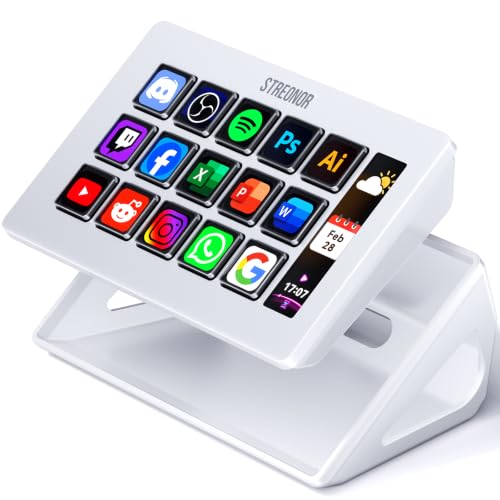
- 15 customizable LCD keys for shortcuts and OBS
- Three status panels for system information
- Preset pages, action flows, and 100+ plugins
Best For: Streamers who value layouts and live status details
Hands-On Video Switching
X-keys XKE-124 T-bar Video Switcher

- Smooth T-bar for live video transitions
- Built-in vMix template for setup
- Durable aluminum case and configurable keys
Best For: PC-based vMix operators and live productions
All-in-One Switcher

- Four HDMI inputs for multicamera switching
- Built-in streaming, recording, and multiview
- Integrated audio mixer and production effects
Best For: Multicamera live streaming and presentations
Custom Macro Deck

- 18 programmable keys with LCD visual labels
- Runs OBS controls and multi-step macros
- Compatible with Windows and macOS
Best For: Custom streaming shortcuts and desktop automation
Dedicated vMix Surface

- Dedicated Program and Preview button rows
- CUT, TAKE, rotary, and function controls
- Compact USB design for vMix workflows
Best For: Hands-on vMix live production
Compact Broadcast Switcher

- 8-channel switching with a 4-way mixer
- 16 video switching keys for multi-camera work
- USB connectivity for computer-based streaming
Best For: Portable multi-camera live production
PTZ Camera Control

- 4D joystick for detailed PTZ control
- 5-inch touchscreen with HD video preview
- PoE, NDI, and multiple camera protocols
Best For: Multi-camera IP and NDI production
Macro Stream Deck
Waveshare MK10 Voice Control Panel
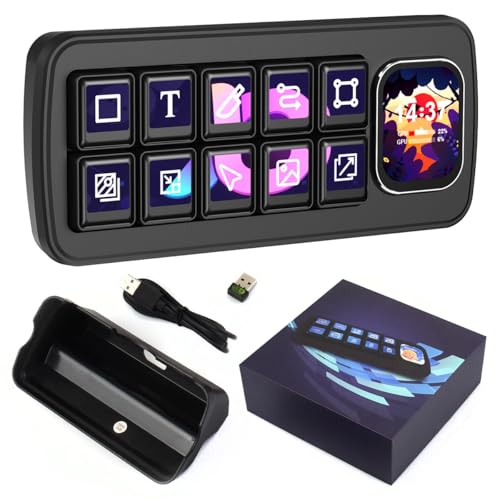
- 10 mechanical LCD macro keys with secondary display
- QMK macros and chained commands without PC software
- Windows and macOS support with theme editing
Best For: Customizable streaming and desktop automation
Power Macro Hub – VSD N4 Pro Stream Controller
For creators comparing streaming control panels, the VSD N4 Pro stands out as a versatile macro deck with LCD keys, RGB knobs, a touch bar, and scene presets. It can trigger shortcuts, app launches, webpages, text presets, and audio commands from a USB-C connection on Windows 10+ or macOS 11.0+.
Best For: Streamers, editors, gamers, and office users who want extensive customization and multi-step automation.
Pros:
- Combines 10 customizable LCD keys, four RGB knobs, and an interactive touch bar.
- Supports one-tap multi-step macros without coding and unlimited independent scene presets.
- Includes 500+ downloadable plugins, RGB media support, and a built-in passive USB dock.
- Comes with a foldable 60-degree ergonomic stand and switchable haptic keys.
Cons:
- Its audio functions send control commands to the computer; it has no built-in speakers.
- The feature-rich design may be more than needed for buyers seeking a simple macro pad.
The VSD N4 Pro is a strong all-purpose option when workflow automation, visual customization, and connectivity matter more than a minimal footprint.
Touchscreen Command Center – G.SKILL WigiDash PC Command Panel
The G.SKILL WigiDash takes a touchscreen approach to streaming control panels. Its 7-inch 1024×600 IPS display supports up to 20 widgets in a 5×4 grid per page, with additional pages available for hotkeys, media controls, audio, and system monitoring.
Best For: Windows users who prefer a visual, drag-and-drop control surface for streaming, gaming, productivity, and PC monitoring.
Pros:
- Provides a 7-inch touch display with customizable virtual buttons and widgets.
- Supports up to 20 widgets per page and as many pages as needed.
- Can handle shortcuts, media playback, audio volume, and system-performance monitoring.
- WigiDash Manager software offers straightforward drag-and-drop setup.
Cons:
- Requires Windows 10 or 11 64-bit; macOS and Linux are not listed as supported.
- Some HWInfo and AIDA64 monitoring features may require separate third-party software licenses.
- It uses one USB Type-C connection and is USB powered.
Choose the WigiDash if a configurable touchscreen and live information panels appeal more than physical programmable keys.
Information-Rich Macro Deck – STREONOR S15 Stream Controller
The STREONOR S15 is a practical choice among streaming control panels, pairing 15 customizable LCD keys with three non-touch status displays. Preset pages and action flows let you organize controls for OBS, editing, office work, gaming, and other recurring desktop tasks.
Best For: Streamers and multitaskers who want dedicated layouts plus at-a-glance system or workspace information.
Pros:
- Offers 15 customizable LCD keys for shortcuts, app actions, OBS controls, and repeated tasks.
- Three status panels can show information such as weather, time, CPU temperature, GPU status, and memory usage.
- Supports preset control pages, multi-command action flows, and 100+ plugins.
- Works with Windows 10 64-bit or higher and macOS Big Sur 11.0 or higher.
Cons:
- Linux is not supported.
- Setup guidance recommends connecting directly with a USB 2.0-or-higher cable and removing similar controller software to avoid conflicts.
- Some third-party integrations may require an account, subscription, or membership.
The S15 balances physical shortcut access with useful status information, making it appealing for users who want more context than a standard macro keypad provides.
Hands-On Video Switching – X-keys XKE-124 T-bar Video Switcher
X-keys XKE-124 T-bar USB Video Switcher for vMix & Central Control Live Streaming
Check Price On AmazonThe X-keys XKE-124 T-bar is a specialized option among streaming control panels, built for live video switching and transitions rather than general-purpose desktop macros. Its smooth T-bar, USB connection, and vMix template support are aimed at hands-on production control.
Best For: Live video operators using vMix who need a durable physical transition control and configurable keys.
Pros:
- Includes a smooth-action T-bar designed for video transitions.
- Offers integrated vMix software support with a built-in template for plug-and-play setup.
- Heavy-duty extruded aluminum construction is suited to production environments.
- Keys can be added or repositioned, and the switches are rated for over one million operations.
Cons:
- It is designed for PC use and is more specialized than general-purpose streaming decks.
- The controller connects over USB and does not list wireless operation.
- Its blank, relegendable key system may require setup and labeling to match your workflow.
For vMix-based productions where tactile transitions matter, the XKE-124 offers a focused, durable control surface; casual streamers may prefer a more broadly programmable deck.
All-in-One Switcher – ATEM Mini Pro
The Blackmagic Design ATEM Mini Pro is one of the more complete streaming control panels for creators who need to switch between multiple HDMI cameras and manage a live production from a compact unit. Its built-in streaming, recording, multiview, and audio features make it suitable for broadcasts that go beyond a simple webcam setup.
Best For: Multicamera livestreams, education, business presentations, and esports events.
Pros:
- Four HDMI inputs support multicamera production with 10-bit 4:2:2 video.
- Includes multiview, multiple transition types, keyers, and a built-in six-input, two-channel audio mixer.
- Provides built-in streaming and recording functions, plus HDMI, USB-C, and Ethernet connectivity.
Cons:
- Its feature-rich switching layout may be more than needed for basic single-camera streaming.
- The unit relies on HDMI-connected cameras and includes no mention of wireless input support.
Choose the ATEM Mini Pro if you want a compact hardware-centered workflow with camera switching, audio mixing, monitoring, and streaming capabilities in one device.
Custom Macro Deck – VSD M18 Stream Controller
The VSD M18 is a programmable USB macro pad designed for users who want customizable streaming control panels with visual key labels and one-touch automation. Its LCD keys can trigger OBS scene changes, application launches, media controls, text input, and multi-step macros from a PC or Mac.
Best For: Streamers, gamers, editors, and office users who want customizable shortcuts and OBS controls.
Pros:
- Offers 18 programmable keys, including 15 LCD visual keys and three physical buttons.
- Supports single actions and multi-step sequences for OBS, media playback, apps, files, and web pages.
- Works with Windows 11 and newer and macOS 11.0 and newer, with JPG, PNG, and GIF key imagery.
- Includes an adjustable RGB surround light ring and built-in utility plugins such as a clock and calendar.
Cons:
- Native Linux plug-and-play support is not available.
- It requires USB-C connection and compatible desktop software for its programmable functions.
The M18 is a flexible choice when shortcut customization matters more than dedicated video-switching hardware, especially for creators managing OBS scenes and repeated desktop actions.
Dedicated vMix Surface – Mini Panel Pro
The vMix Mini Panel Pro is a purpose-built option among streaming control panels for producers who use vMix software. Its dual rows of Program and Preview buttons, rotary controls, and dedicated transition buttons provide a physical interface for live switching and production tasks.
Best For: vMix users who want hands-on program/preview switching and dedicated production controls.
Pros:
- Provides eight Program and eight Preview buttons for organized source selection.
- Includes dedicated CUT and TAKE buttons for direct transition control.
- Four rotary knobs and customizable F1-F4 keys add adjustment and shortcut options.
- Compact USB-connected layout includes REC, STR, LED, and FTB buttons.
Cons:
- It is designed specifically for vMix software rather than broad platform compatibility.
- The control surface offers 23 buttons but does not list built-in streaming or video inputs.
If your production workflow is centered on vMix, this panel provides a more tactile alternative to mouse-based switching while keeping the controls compact and clearly arranged.
Compact Broadcast Switcher – Mini Vmix Switch Panel
For creators comparing streaming control panels, this compact Mini Vmix switch panel combines multi-source video switching, audio mixing, recording, webcasting, and transition effects in one USB-connected surface. Its 8-channel support and 16 video switching keys make it suited to multi-camera production, while Windows and macOS compatibility supports common live-production workflows.
Best For: Portable multi-camera streaming and small live-production setups using VMIX, OBS-compatible software, or similar platforms.
Pros:
- Provides 8-channel switching with a 4-way mixer.
- Includes 16 video switching keys for multi-screen production.
- USB input/output supports signal transmission to computer-based streaming software.
- Combines switching, recording, webcasting, mixing, and transition effects.
Cons:
- Its compact design may offer less hands-on space than a larger production console.
- Operation depends on compatible Windows or macOS software and supported applications.
This is a practical option when portability and broad production functions matter more than a full-size broadcast surface. Check software compatibility before buying, particularly if your workflow uses an application outside the listed support.
PTZ Camera Control – Pro NDI Joystick Controller
This PTZ controller is a specialized choice among streaming control panels, pairing a 4D joystick with a 5-inch touch display and live video preview. It supports NDI, VISCA over IP, Pelco protocols, and several wired connection types, making it useful for multi-camera systems that need centralized pan, tilt, zoom, focus, and preset control.
Best For: Churches, studios, and production teams managing multiple IP or NDI PTZ cameras from one wired controller.
Pros:
- Controls pan, tilt, zoom, focus, iris, shutter, presets, and tracking functions.
- 5-inch touchscreen supports setup, camera parameters, and controller settings.
- Provides HD video preview through RTSP, NDI, and ONVIF protocols.
- PoE allows installation with a single Ethernet cable, and NDI licensing is included.
Cons:
- This is a camera controller rather than a general video-switching or macro deck.
- Its wired, corded design may be less convenient for mobile setups.
- Advanced operation depends on compatible camera protocols and network configuration.
Choose this model when precise PTZ camera operation is the priority. Its preview screen, 100-camera shortcut capacity, and protocol support make it more appropriate for dedicated multi-camera control than for general stream-deck tasks.
Macro Stream Deck – Waveshare MK10 Voice Control Panel
The Waveshare MK10 takes a different approach to streaming control panels, combining 10 mechanical LCD macro keys with a 2.01-inch secondary display and AI voice-control functionality. Its Linux and QMK dual-system architecture supports macros, key combinations, mouse control, and chained commands, while cross-platform Windows and macOS support broadens its usefulness beyond streaming.
Best For: Streamers and power users who want customizable physical macros, secondary-screen information, and PC-independent QMK input functions.
Pros:
- Mechanical LCD macro keys can display customizable visual themes.
- QMK supports macros, key combinations, mouse control, and multi-command chains.
- Linux and QMK dual-system design separates complex processing from low-latency input.
- Theme editor offers drag-and-drop customization plus real-time data integration.
Cons:
- Its feature set may require configuration time to tailor to a specific workflow.
- Real-time hardware and weather displays depend on LibreHardwareMonitor and OpenWeather integrations.
- The notes do not specify the exact streaming applications supported.
This panel is a strong fit for users who value programmable controls and visual customization over dedicated camera or video switching. Its dual-system design and QMK features make it flexible for streaming, productivity, and desktop automation.
How We Picked These Streaming Control Panels
We selected these Streaming Control Panels to represent the main ways creators and production teams manage live video. The lineup includes programmable macro decks for software shortcuts, touchscreen panels for flexible dashboards, hardware switchers for multi-camera production, PTZ camera controllers, and surfaces designed for vMix or similar broadcast workflows.
Our comparison focuses on control layout, programmability, display feedback, software compatibility, connectivity, portability, and the amount of hands-on control each device provides. A panel that is excellent for a solo streamer may be a poor fit for a studio operator, so the best choice depends on your workflow rather than button count alone.
Quick Comparison
| Best For | Look For | Products In This Roundup |
|---|---|---|
| Streaming shortcuts | Programmable keys, profiles, and LCD labels | VSD N4 Pro, VSD M18, S15 |
| Flexible dashboards | Touchscreen widgets and customizable layouts | G.SKILL WigiDash, Waveshare MK10 |
| Live video switching | Source buttons, preview/program control, and hardware I/O | ATEM Mini Pro, X-keys XKE-124 |
| vMix production | Dedicated program/preview controls and function keys | VMix Mini Panel Pro, Mini vMix Switch Panel |
| PTZ camera operation | Joystick, camera presets, and network control | Pro PTZ Camera Joystick Controller |
Key Buying Factors for Streaming Control Panels
Software and Hardware Compatibility
Check support for your streaming or production software before buying. Macro decks may depend on companion applications, plugins, or configurable keyboard shortcuts, while broadcast switchers can use dedicated HDMI, USB, or network connections. Confirm compatibility with OBS, vMix, ATEM hardware, NDI, Linux, macOS, or Windows as required.
Control Type and Layout
Physical buttons are quick to identify by touch and work well for repeated actions. Touchscreens offer more flexibility but may require visual confirmation. Faders, joysticks, preview buttons, and dedicated audio controls are valuable when you need precise live adjustments rather than simple scene changes.
Feedback and Customization
LCD labels, status screens, colored indicators, and customizable profiles make it easier to understand what each control does. Look for multilevel profiles if you switch between streaming, editing, gaming, and production tasks.
Connections and Setup
USB is convenient for desktop control, while HDMI, Ethernet, and network protocols matter for cameras and video switching. Also consider desk space, cable management, power requirements, and whether the device is portable enough for mobile productions.
Who Should Buy Which Streaming Control Panels?
Solo streamers: Choose a compact programmable deck if you mainly need scene changes, mute controls, sound effects, and shortcuts. A touchscreen command panel is better if you want many software controls in a smaller physical footprint.
Gaming and content creators: Prioritize customizable keys, clear labels, fast profile switching, and audio shortcuts. A macro pad can provide the quickest access to recurring actions without the cost or complexity of a full switcher.
Live-production operators: Hardware switchers and dedicated vMix panels are the better choice when source selection, preview/program workflows, and dependable tactile operation matter more than portability.
Churches, studios, and event teams: Consider a PTZ controller when camera positioning and presets are central to the workflow. For multi-camera systems, verify video standards, network requirements, and the number of inputs before purchasing.