
When setting up your home studio, choosing the right USB audio interface can make all the difference in your recordings. With so many options available, it’s essential to find one that fits your specific needs. From the Focusrite Scarlett Solo‘s compact design to the versatile PreSonus AudioBox, each model offers unique features that cater to different recording scenarios. Let’s explore these top contenders and what they bring to the table for your audio projects.
Focusrite Scarlett Solo 3rd Gen USB Audio Interface

The Focusrite Scarlett Solo 3rd Gen USB Audio Interface is perfect for solo musicians and podcasters who want to capture studio-quality sound without breaking the bank. With high-performing mic pre-amps and a switchable Air mode, your recordings gain added clarity. You’ll love the two high-headroom instrument inputs that prevent clipping and distortion, thanks to Gain Halos. Achieve up to 24-bit/192kHz recording quality, preserving all sonic nuances. For playback, enjoy low-noise balanced outputs and a headphone jack for private listening. Plus, you get essential software like Pro Tools Intro+ and a three-year warranty, ensuring your investment is protected.
Best For: Solo musicians, vocalists, and podcasters looking to achieve studio-quality recordings on a budget.
Pros:
- High-performing mic pre-amps with switchable Air mode for enhanced clarity.
- Supports up to 24-bit/192kHz recording quality, ensuring high fidelity.
- Includes essential software and a three-year warranty for added value.
Cons:
- Limited to two inputs, which may not suffice for larger ensembles.
- Lacks onboard effects processing, requiring external software for effects.
- USB-powered, which may limit mobility without a laptop or power source.
MAONO USB Audio Interface for PC (PS22 Lite Black)

For podcasters and aspiring streamers, the MAONO USB Audio Interface PS22 Lite Black stands out with its high-resolution recording capabilities at 24-bit/192kHz. Its compact design fits in your palm, while the dynamic light ring keeps you informed about sound input status. You’ll love its compatibility with both condenser and dynamic microphones, providing up to 56 dB preamp and 48V phantom power. Plus, the dedicated instrument input enriches your guitar sounds. With included ProStudio Routing Software, you can easily stream and utilize virtual channels. Plug-and-play functionality makes setup a breeze, ensuring you focus on creating great content.
Best For: The MAONO USB Audio Interface PS22 Lite Black is best for podcasters, streamers, and musicians looking for high-quality audio recording and streaming capabilities.
Pros:
- High-resolution recording at 24-bit/192kHz ensures professional sound quality.
- User-friendly design with plug-and-play functionality simplifies setup for beginners.
- Compatible with various software and devices, making it versatile for different creative needs.
Cons:
- Limited to XLR input, which may not suit users with USB microphones.
- Compact design may feel too small for some users who prefer larger interfaces.
- The light ring indicator might not be visible in bright environments.
M-AUDIO M-Track Duo USB Audio Interface for Recording and Streaming

With its two combo XLR/Line/Instrument inputs and phantom power, the M-AUDIO M-Track Duo USB Audio Interface is perfect for musicians and podcasters looking to elevate their recording quality. It’s compatible with both Mac and PC, delivering 48kHz audio resolution for crystal-clear recordings. You’ll appreciate the 1/4 headphone output and stereo 1/4 outputs, allowing flexible monitoring. Plus, the USB/Direct switch provides zero latency monitoring for real-time feedback. Equipped with transparent Crystal Preamps, it optimizes sound quality for all microphones, including condensers. Enhance your music production experience with the included MPC Beats Software from Akai Professional.
Best For: Musicians and podcasters seeking high-quality recordings with versatile input options and low latency monitoring.
Pros:
- Versatile Inputs: Features two combo XLR/Line/Instrument inputs with phantom power for various recording needs.
- High Audio Resolution: Delivers 48kHz audio resolution for clear and professional sound quality.
- Zero Latency Monitoring: The USB/Direct switch allows for real-time audio feedback during recording.
Cons:
- Limited Inputs: Only two inputs may not be sufficient for larger setups or collaborative recordings.
- Basic Software: Included MPC Beats Software may lack advanced features found in more comprehensive DAWs.
- No MIDI Connectivity: Lacks MIDI inputs/outputs, which could be a drawback for users needing MIDI integration.
XTUGA USB Audio Interface for PC

Designed specifically for beginners and students, the XTUGA USB Audio Interface Q-12 makes setting up a home studio effortless. With its XLR and 3.5mm microphone jacks, you can easily record music. Enjoy professional audio quality with 16-bit/48kHz resolution and zero latency for seamless vocal tracking. The plug-and-play design means you won’t need an external adapter, making it perfect for mobile karaoke or on-the-go music creation. Plus, its durable build guarantees long-lasting use. Compatible with popular software like Audacity and FL Studio, the XTUGA USB Interface is a budget-friendly choice for anyone starting their audio journey.
Best For: The XTUGA USB Audio Interface is best for students and beginners looking to build an affordable home recording studio.
Pros:
- Professional audio quality with 16-bit/48kHz resolution for clear sound.
- Plug-and-play design allows for easy setup without the need for external adapters.
- Durable build ensures long-lasting use, making it ideal for home karaoke and music creation.
Cons:
- Limited to 2-channel input, which may not suffice for more complex setups.
- Lower popularity with a Best Sellers Rank of #4,042 might indicate less community support.
- Basic features may not meet the needs of advanced users or professional musicians.
Fender Quantum Creator Bundle | Home Recording Kit
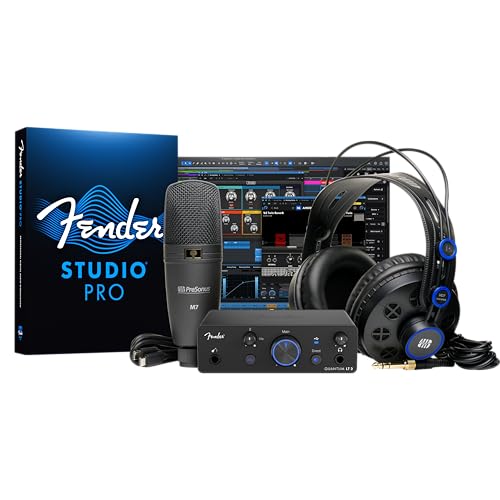
The Fender Quantum Creator Bundle is perfect for aspiring musicians and podcasters enthusiastic to plunge into home recording. This all-in-one kit includes the Quantum LT 2 USB-C interface, an M7 condenser microphone, HD7 headphones, an XLR cable, and a mic stand, so you’ve got everything you need right out of the box. The Quantum LT 2 features a premium mic preamp for low-latency recording and balanced outputs, ensuring clean audio. The M7 captures vocals and instruments with warmth, while the HD7 headphones provide comfort during long sessions. Plus, you’ll enjoy intuitive software to enhance your creative process effortlessly!
Best For: The Fender Quantum Creator Bundle is best for aspiring musicians and podcasters looking to easily start their home recording journey with a complete kit.
Pros:
- Includes all essential components for recording, making it user-friendly for beginners.
- High-quality audio performance with low-latency recording and premium mic preamp.
- Intuitive software included, enhancing creativity and workflow for music production.
Cons:
- May be more expensive than purchasing components separately.
- Limited advanced features for experienced users seeking professional-grade equipment.
- USB-C interface may require additional adapters for older devices lacking USB-C ports.
Focusrite Scarlett Solo Studio 4th Gen USB Audio Interface Bundle

For songwriters, guitarists, and vocalists seeking an all-in-one solution for home recording, the Focusrite Scarlett Solo Studio 4th Gen USB Audio Interface Bundle stands out. It includes a condenser microphone and headphones, ensuring you have everything you need to create professional-quality recordings. With a dynamic range of 120dB and Air mode to enhance your sound, your vocals and instruments will shine. You’ll also gain access to an extensive software toolkit, featuring Pro Tools Intro+ and Auto-Tune Access. Plus, its USB connectivity makes it compatible with various devices, backed by a three-year warranty and 24/7 support for peace of mind.
Best For: Songwriters, guitarists, and vocalists looking for a comprehensive home recording solution that includes essential recording equipment and software.
Pros:
- Studio-quality sound with a 120dB dynamic range for professional recordings.
- Includes essential tools like a condenser microphone and headphones for an all-in-one package.
- Extensive software bundle with popular applications such as Pro Tools Intro+ and Auto-Tune Access for enhanced creativity.
Cons:
- May be more expensive compared to basic audio interfaces without included accessories.
- USB connectivity may limit compatibility with certain devices or setups.
- The weight of the bundle (3.02 pounds) could be cumbersome for portable use.
PreSonus AudioBox Go Creator Studio Recording Bundle

Looking to kickstart your home studio experience without breaking the bank? The PreSonus AudioBox Go Creator Studio Recording Bundle offers everything you need for studio-quality recordings at an affordable price. This bundle includes a 96 kHz USB audio interface, a PreSonus M7 condenser microphone, and high-definition HD7 headphones. With its low-noise design and adjustable gain, you’ll capture every detail of your sound. Plus, the included Studio One 6 Artist Edition software is compatible with various DAWs, making it easy to start mixing right away. With a solid warranty and positive reviews, this bundle is a smart choice for aspiring musicians.
Best For: This bundle is best for aspiring musicians and content creators looking for an affordable yet high-quality solution for home studio recordings.
Pros:
- Ultra-affordable price for a complete recording setup.
- Compatible with multiple DAWs, making it versatile for different users.
- Includes high-quality components such as a condenser microphone and professional monitoring headphones.
Cons:
- Limited to 2 channels, which may not suit larger recording needs.
- The maximum sample rate of 96 kHz may not meet requirements for professional studios.
- The warranty period is only one year, which may be shorter than some competitors.
M-AUDIO M-Track Solo USB Audio Interface for Recording and Streaming

Designed with budding musicians and podcasters in mind, the M-AUDIO M-Track Solo USB Audio Interface stands out for its user-friendly features and high-quality audio performance. It’s compatible with both Mac and PC, delivering 48kHz audio resolution for crystal-clear recordings. You’ll appreciate the combo XLR/Line input with phantom power for your microphones and a dedicated Line/Instrument input for guitars. The zero latency monitoring via the USB/Direct switch guarantees real-time sound clarity, while the transparent Crystal Preamp enhances the quality of your recordings. Plus, it includes MPC Beats Software, giving you essential tools to elevate your music creation.
Best For: Budding musicians, podcasters, and streamers looking for an affordable yet high-quality audio interface.
Pros:
- High-quality audio resolution of 48kHz for clear recordings.
- Zero latency monitoring feature for real-time sound clarity.
- Includes MPC Beats Software for enhanced music production capabilities.
Cons:
- Limited to one microphone input, which may not be sufficient for larger setups.
- No MIDI input/output options for connecting MIDI devices.
- Basic build quality may not withstand heavy professional use.
Audio Interface, 2X2 24-bit/192kHz for Studio Quality Recording

The 2X2 24-bit/192kHz audio interface stands out as an outstanding choice for musicians and content creators who demand studio-quality recordings without the hassle of complex setups. With plug-and-play USB C connectivity, you won’t need any drivers, making integration seamless. Its high-performance converters deliver crystal-clear, low-noise recordings. Enjoy studio-grade fidelity that captures every nuance, thanks to the integrated 48V phantom power for your microphones. Plus, the zero-latency monitoring guarantees silent tracking. Designed for versatility, it accommodates vocals, guitars, and more, making it perfect for home recording and mobile creators seeking first-rate audio solutions.
Best For: Musicians and content creators seeking high-quality audio solutions for home recording and mobile use.
Pros:
- Plug-and-play USB C connectivity allows for easy setup with no drivers needed.
- Studio-grade 24-bit/192kHz fidelity ensures superior sound quality and captures every detail.
- Integrated 48V phantom power supports demanding microphones, enhancing recording options.
Cons:
- May not support all microphone types without additional equipment.
- Limited to two input channels, which may not suffice for larger setups.
- Dependency on USB C port may require adapters for devices lacking this connection type.
PreSonus AudioBox USB 96 Studio Recording Package

For aspiring musicians and podcasters seeking an all-in-one solution, the PreSonus AudioBox USB 96 Studio Recording Package stands out as an ideal choice. This package includes a rugged AudioBox USB 96 audio/MIDI interface, perfect for capturing high-quality vocals and instruments. You’ll also get the versatile M7 large-diaphragm condenser microphone, which excels with both vocals and acoustic instruments. The HD7 headphones let you mix and monitor without disturbing others. Plus, you’ll receive Studio One Artist and Studio Magic software, valued over $1000, along with all necessary cables and a desktop mic stand, making your recording experience seamless.
Best For: Aspiring musicians and podcasters looking for an all-in-one recording solution.
Pros:
- Rugged audio/MIDI interface for reliable recording of vocals and instruments.
- Versatile M7 microphone suitable for various audio sources, enhancing recording quality.
- Comprehensive software package valued over $1000, providing essential tools for music production.
Cons:
- Limited to USB connectivity, which may not suit users with other interface preferences.
- Entry-level software may lack advanced features for professional producers.
- Headphones may not provide the highest fidelity compared to more expensive options.
Factors to Consider When Choosing a USB Audio Interface for Home Studio
When choosing a USB audio interface for your home studio, you’ll want to take into account several key factors. Audio quality specifications, input/output options, and software compatibility can greatly impact your recording experience. Additionally, pay attention to latency, monitoring capabilities, and the overall build quality to guarantee lasting performance.
Audio Quality Specifications
Choosing a USB audio interface for your home studio hinges on understanding audio quality specifications. Look for interfaces that support at least 24-bit/192kHz resolution; this guarantees high-fidelity recordings and detailed sound reproduction. High-performance converters are vital for maintaining clarity in your audio signals during recording and playback. Pay attention to the dynamic range specification—aim for 106dB or more to capture subtle nuances without distortion. If you plan to use condenser microphones, make sure the interface provides 48V phantom power for peak performance. Finally, zero-latency monitoring is essential for real-time audio feedback during recordings, helping you achieve precise timing and performance. Consider these factors to enhance your recording experience greatly.
Input/Output Options
Understanding input and output options is vital for building an effective home studio setup. First, consider how many input channels you need; more inputs let you record multiple microphones and instruments simultaneously, which is great for bands or complex sessions. Look for combo inputs that accept both XLR and line-level signals to enhance connectivity. If you plan to use condenser microphones, check for phantom power (typically 48V), as it’s necessary for their operation. Evaluate output options too; balanced outputs are essential for connecting to studio monitors, while dedicated headphone outputs facilitate real-time monitoring. Finally, verify the interface supports low-latency monitoring, so you can hear your input signal without delay, guaranteeing precision in your recordings.
Software Compatibility
Selecting a USB audio interface that meshes well with your software setup is essential for a smooth recording experience. First, confirm the interface is compatible with your operating system, whether it’s macOS or Windows. Some units may have specific requirements, so double-check before you buy. Look for models that support popular Digital Audio Workstations (DAWs) like Pro Tools, Ableton Live, or Cubase for seamless integration. It’s also beneficial if the interface includes bundled software or plugins, enhancing your recording and mixing capabilities. Verify it supports industry-standard driver protocols, such as ASIO, for peak performance. Finally, consider the availability of firmware updates and customer support, as these will help maintain compatibility with future software versions.
Latency and Monitoring
When it comes to achieving professional-quality recordings in your home studio, latency and monitoring play essential roles. Latency is the delay between your audio input and its playback, which can disrupt your recording process. Ideally, you want latency under 10 milliseconds for a seamless experience; anything above 15 milliseconds can be distracting. Many USB audio interfaces feature direct monitoring, allowing you to hear your input signal without the delay caused by your computer. Keep in mind that latency is influenced by your interface’s drivers, buffer size in your DAW, and your computer’s processing power. Additionally, robust monitoring capabilities, like headphone outputs and balanced outputs, are vital for accurate sound reproduction and ensuring your recorded audio reflects your true performance.
Build Quality and Durability
A solid build quality is essential for any USB audio interface, especially in a home studio where equipment often endures frequent use. Look for interfaces made with durable materials like metal casings to withstand daily wear and tear. Ergonomic layouts can minimize strain on connectors and knobs, boosting longevity and usability. While a compact design aids portability, it shouldn’t sacrifice stability during use. Prioritize interfaces equipped with high-quality components, such as premium preamps and connectors, to guarantee reliable performance over time. Also, consider products with warranties or robust customer support options; these can indicate the manufacturer’s confidence in the interface’s durability and build quality. Choosing wisely here can save you headaches down the line.
Portability and Design
Portability and design play an essential role in your choice of a USB audio interface for a home studio, especially if you plan to move your setup frequently. Look for compact and lightweight models that make transport a breeze. User-friendly designs with plug-and-play functionality allow for quick setups, so you can start recording without hassle. Ergonomic designs not only enhance usability but also help reduce cable clutter, keeping your workspace organized. Battery-powered options offer even more flexibility, letting you record in locations without power outlets. Some interfaces are designed to fit comfortably in your hand, making them perfect for mobile recording. Consider these factors to guarantee your audio interface meets your creative needs on the go.
Price and Value
Choosing the right USB audio interface involves more than just considering portability and design; price and value are equally important. You’ll find options ranging from budget-friendly models around $50 to professional-grade interfaces exceeding $500. Evaluate the value by looking at features like the number of inputs and outputs, audio resolution (e.g., 24-bit/192kHz), and any bundled software. Aim for a balance between cost and quality to guarantee you get high-performance preamps and converters without overspending. Don’t overlook long-term value—consider warranty periods and customer support, as a solid warranty can save you money down the line. Finally, check user reviews to see how well different models perform in real-world situations, guiding you in your investment decision.