
A wide view can make live streams feel more open, polished, and professional—especially when you are working from a small desk, studio, or conference room. The right setup helps frame you, your guests, and your equipment without forcing the camera too far away.
This roundup covers wide-angle camera lenses for live streaming across phones, webcams, compact cameras, and interchangeable-lens systems. Use the buying guide below to match field of view, image quality, autofocus, lighting, and compatibility to your streaming setup.
Best 10 Wide-Angle Camera Lenses for Live Streaming Picks for 2026
Dual-View Streaming Pick
EMEET C60E Dual-Camera 4K Webcam
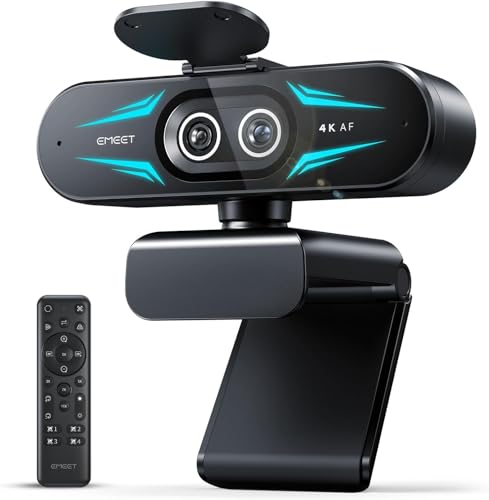
- Dual 4K wide-angle and telephoto cameras
- Up to 11X hybrid zoom with PDAF autofocus
- Remote control, RGB lighting, and dual microphones
Best For: Streamers and presenters switching between full scenes and close-ups
Compact FOV Upgrade
DJI Osmo Pocket 3 Wide-Angle Lens

- Expands the Pocket 3 view to 108°
- Lightweight 3.82-gram design
- Reflection-reduction coating and fixed-focus optics
Best For: Osmo Pocket 3 users needing broader scene coverage
Adjustable Webcam Pick
EMEET S600 4K Streaming Webcam

- 4K/30FPS and 1080p/60FPS capture
- PDAF autofocus with automatic light adjustment
- 40°-73° adjustable FOV at 1080p
Best For: Desk streamers wanting 4K quality and flexible 1080p framing
Best Mobile Add-On

- 0.45x lens captures 45% more of the scene
- Works with phones, tablets, and laptops
- Includes rechargeable three-level LED light
Best For: Portable smartphone streaming setups
Best Threaded Wide-Angle Add-On
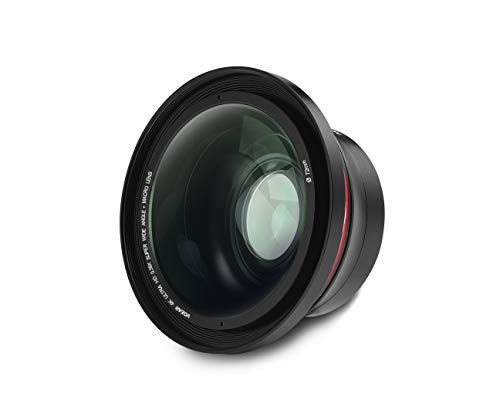
- 0.39x wide-angle conversion
- Fits cameras with a 37mm thread
- Converts to macro and supports 72mm filters
Best For: Thread-compatible cameras used for wider live-streaming views
Dual-View Streaming Pick – EMEET C60E Dual-Camera 4K Webcam
The EMEET C60E is a flexible option among wide-angle camera lenses for live streaming, combining a panoramic camera with a telephoto camera. Its dual-camera design lets you switch between showing the full scene and presenting close-up details without physically repositioning the webcam.
Best For: Streamers, teachers, presenters, and product demonstrators who need both broad framing and close-up views.
Pros:
- Dual 4K cameras provide wide-angle and telephoto perspectives.
- Up to 11X hybrid zoom with PDAF autofocus supports flexible framing.
- Remote and EMEET STUDIO controls allow image adjustments during setup or streaming.
- Includes RGB lighting, dual microphones, and broad Windows/macOS compatibility.
Cons:
- Zoom is not supported in 4K, 60FPS, or YUY2 modes.
- The telephoto camera is recommended for subjects at least 13.8 inches away.
- USB 2.0 Type-A connectivity may be less convenient for newer setups.
Choose the C60E when your live content benefits from quick changes between room-wide context and detailed demonstrations. It is more versatile than a basic fixed-view webcam, though its most advanced zoom features require specific video modes.
Wireless Production Pick – Logitech Mevo Start Wireless Streaming Camera
The Logitech Mevo Start is a compact wireless camera for creators who value mobile live production. While it is not a detachable wide-angle lens, its app-controlled workflow, wireless connectivity, and multicamera support make it a practical alternative for live streaming setups that need portability and multiple viewpoints.
Best For: Mobile streamers, event coverage, and creators building a wireless multicamera setup.
Pros:
- Streams and records in 1080p HD.
- Works over Wi-Fi, Ethernet, or a smartphone’s LTE connection.
- Smartphone control includes Auto-Director features.
- Supports up to three Mevo Start cameras plus Webcam Mode, RTMP, and NDI|HX.
Cons:
- Maximum video resolution is 1080p rather than 4K.
- Its fixed-focus lens offers less framing flexibility than interchangeable wide-angle options.
- Wireless operation depends on network availability and battery life.
The Mevo Start is a strong fit when mobility and remote control matter more than maximum resolution. Its six-hour stated battery life and multicamera compatibility can simplify location-based streaming, but creators seeking 4K detail or a dedicated lens accessory should look elsewhere.
Compact FOV Upgrade – DJI Osmo Pocket 3 Wide-Angle Lens
The DJI Osmo Pocket 3 Wide-Angle Lens is a small accessory for expanding the field of view in compact live streaming rigs. It attaches directly to the Osmo Pocket 3 and widens the view to 108°, helping fit more of a room, presenter, or surrounding scene into each frame.
Best For: Osmo Pocket 3 owners who need a wider perspective without replacing their compact camera.
Pros:
- Expands the Osmo Pocket 3 field of view to 108°.
- Very lightweight at 3.82 grams.
- Includes a reflection-reduction coating.
- Supports the Pocket 3’s listed 4K video workflows.
Cons:
- Compatible only with the DJI Osmo Pocket 3.
- It is a fixed-focus prime lens with no zoom.
- The lens does not provide image stabilization.
This is the most direct choice for Pocket 3 users comparing wide-angle camera lenses for live streaming. Its low weight and 108° view improve scene coverage, but compatibility is strictly limited and stabilization remains dependent on the camera rather than the lens.
Adjustable Webcam Pick – EMEET S600 4K Streaming Webcam
The EMEET S600 is a 4K webcam with a customizable field of view in 1080p, making it useful for creators comparing wide-angle camera lenses for live streaming without adding a separate lens. It combines a Sony 1/2.55-inch sensor, PDAF autofocus, and software controls for adjusting the image and audio to suit different streaming spaces.
Best For: Streamers and content creators who want 4K capture, autofocus, and adjustable framing from a plug-and-play webcam.
Pros:
- Records or streams at 4K/30FPS or 1080p/60FPS.
- PDAF autofocus and automatic light adjustment help maintain a clear image.
- 1080p field of view adjusts from 40° to 73°.
- Includes dual noise-canceling microphones, a privacy cover, and flexible mounting adjustment.
Cons:
- The field of view is fixed at 73° when recording in 4K.
- Advanced image and audio customization requires EMEETLINK software.
- It connects through USB rather than offering wireless streaming.
The S600 suits desk-based live streaming when image quality and straightforward setup are priorities. Its adjustable 1080p framing is helpful for switching between a tighter portrait and a broader workspace view, while 4K users should plan around the fixed 73° field of view.
Best Mobile Add-On – Xenvo Pro Lens Kit
If you want wide-angle camera lenses for live streaming from a phone, the Xenvo Pro Lens Kit is a flexible, portable option. Its 0.45x TruView lens is designed to capture 45% more of the scene, while the included rechargeable LED light can help brighten darker setups.
Best For: Smartphone, tablet, and laptop users who want a compact wide-angle lens kit with extra lighting and accessories.
Pros:
- 0.45x wide-angle lens captures more of the surrounding scene.
- Universal clip is compatible with smartphones, tablets, and laptops.
- Includes a rechargeable LED light with three brightness settings.
- Travel case, lanyard, macro lens, and cleaning cloth are included.
Cons:
- Requires manual positioning and clipping rather than a built-in camera mount.
- The macro lens is intended for close subjects and is not designed for distant zooming.
- Not water resistant.
This kit is a practical choice for casual mobile streaming, especially when you need a wider phone view and additional fill light without carrying a full camera setup.
Best All-in-One Webcam – Angetube 120° 4K Webcam
For wide-angle camera lenses for live streaming on a computer, the Angetube 914Max combines a 120° view with 4K capture and autofocus. It supports 4K at 30fps or 1080p at 60fps, although 4K must be enabled through compatible camera software or apps.
Best For: PC and Mac streamers, presenters, and remote workers who want a broad webcam view with built-in microphones.
Pros:
- 120° wide-angle view helps include more people or background.
- Records 4K at 30fps and 1080p at 60fps.
- PDAF autofocus is designed for fast, precise focusing during movement.
- Includes dual microphones with AI noise cancellation and a physical privacy cover.
Cons:
- Defaults to 1080p; 4K requires activation through camera software or an app.
- Not compatible with PS4 or PS5.
- USB connection requires a computer or compatible host device.
With plug-and-play USB connectivity, flexible positioning, tripod compatibility, and a wide field of view, this webcam is a straightforward choice for desktop streaming and video calls.
Best Premium Sony E-Mount Lens – Sony E 11mm F1.8
The Sony E 11mm F1.8 is a dedicated lens for APS-C Sony E-mount cameras and suits creators seeking wide-angle camera lenses for live streaming with a mirrorless setup. Its 11mm focal length, 104° angle of view, and bright F1.8 aperture are useful for arm’s-length vlogging and low-light-oriented shooting.
Best For: Sony APS-C creators who want a compact ultra-wide prime for vlogging, video, and live production.
Pros:
- 11mm focal length provides a 104° angle of view for expansive framing.
- Bright F1.8 aperture supports subject separation and wider shooting perspectives.
- Fast, precise, quiet autofocus uses two linear motors.
- Compact, lightweight design pairs well with APS-C and Super35 E-mount cameras.
Cons:
- Compatible with Sony E-mount APS-C cameras rather than universal camera systems.
- Prime design provides no optical zoom adjustment.
- Not water resistant.
This lens is the strongest fit for creators already using a Sony APS-C camera and seeking a polished, ultra-wide look with responsive autofocus and a bright aperture.
Best Conference-Room View – Spedal 920 Pro 120° Webcam
For shoppers comparing wide-angle camera lenses for live streaming, the Spedal 920 Pro is a complete USB webcam built around a 120-degree viewing angle. It records in 1080p at 30 fps, includes dual noise-canceling microphones, and offers flexible positioning for meetings, group chats, OBS streaming, and other video applications.
Best For: Conference rooms, team meetings, group video calls, and streamers who need a plug-and-play wide view.
Pros:
- 120° wide-angle lens helps frame multiple people and larger scenes.
- 1080p video at 30 fps with automatic low-light correction.
- 360° horizontal and 180° vertical adjustment with a tripod-ready clip.
- Dual noise-canceling microphones and broad software compatibility.
Cons:
- Manual focus requires user adjustment rather than automatic focusing.
- It is a webcam, not a standalone interchangeable camera lens.
The Spedal 920 Pro is the most practical option here for desktop live streaming and multi-person framing because it combines a wide field of view, built-in audio, and simple USB setup in one device.
Best Threaded Wide-Angle Add-On – VGear 0.39X Super Wide Lens
The VGear VGPAWAL37 is a compact add-on for cameras with a 37mm front thread. Its 0.39x conversion expands the view for live streaming and video recording, while the lens unscrews to reveal a macro lens for close-up work. A 72mm front thread also accepts filters.
Best For: Creators using a compatible 37mm-thread camera who want a wider perspective without replacing the camera.
Pros:
- 0.39x super-wide conversion with a listed 100° real angle of view.
- Compatible with cameras featuring a 37mm thread.
- Unscrews to provide access to a macro lens.
- Aluminum body and a 72mm front thread for filters.
Cons:
- Requires a camera with a compatible 37mm thread.
- No image stabilization is built in.
This lens is a focused choice for creators who already own compatible threaded equipment. Confirm your camera’s mount before buying, since it is not a universal clip-on accessory.
Best Phone Streaming Kit – AMIR 0.45X Wide-Angle Lens
For mobile creators seeking wide-angle camera lenses for live streaming, the AMIR kit adds a 0.45x wide-angle lens to compatible phones, tablets, and other devices. Its detachable universal clamp is designed for portability, and the kit also includes a 15x macro lens for close-up shots.
Best For: Phone-based live streaming, vlogging, short videos, group shots, and portable content creation.
Pros:
- 0.45x lens expands the phone’s shooting field of view.
- Universal detachable clamp fits many iPhone, Samsung, Google, and Android devices.
- Includes a 15x macro lens for subjects about 1.18 to 1.57 inches away.
- Compact design, carrying case, optical glass, and aluminum alloy housing.
Cons:
- Requires removing the phone case for proper clamp placement.
- Manual focus and no image stabilization are listed.
- Subjects placed too close can show more wide-angle distortion.
The AMIR kit is a convenient mobile option when portability matters. It provides both a wider phone perspective and macro capability, but careful positioning and device compatibility checks are important for clean streaming footage.
How We Picked the Best Wide-Angle Camera Lenses for Live Streaming
We selected these options for the different ways creators stream, including smartphones, USB webcams, compact cameras, and APS-C mirrorless systems. Our priorities were usable field of view, image quality, compatibility, focusing performance, connection requirements, and overall practicality for live production. We also considered whether each product suits a solo creator, interview setup, mobile streamer, or fixed studio.
Some selections are complete cameras or webcams rather than standalone lenses. That distinction matters: an optical accessory can expand an existing camera, while a webcam or streaming camera may provide the lens, sensor, autofocus, and connectivity in one package.
Quick Comparison
| Best For | Recommended Type | What to Prioritize |
|---|---|---|
| Desk and conference streaming | Wide-angle USB webcam | Field of view, autofocus, USB compatibility |
| Phone-based streaming | Clip-on wide-angle lens | Phone fit, distortion control, mounting stability |
| Portable live production | Compact streaming camera | Battery life, wireless features, stabilization |
| Premium image quality | Interchangeable-lens camera and ultra-wide prime | Mount, aperture, sensor coverage, autofocus |
| Close framing in tight rooms | Ultra-wide lens or 120-degree webcam | Edge distortion, perspective, low-light performance |
Key Buying Factors for Wide-Angle Camera Lenses for Live Streaming
Field of View and Distortion
A wider angle shows more of the room but can exaggerate faces and bend straight lines near the edges. For a talking-head stream, a moderately wide view is often more flattering; 120-degree models are useful when you need to include multiple people or a large workspace.
Compatibility and Mounting
Check the lens mount or clip design before buying. Phone lenses must align with the phone camera and clear its case, while interchangeable lenses need the correct camera mount and sensor coverage. Webcams are simpler, but confirm operating-system, USB, and streaming-software support.
Image Quality, Focus, and Light
Look for a capable sensor, reliable autofocus, and a useful maximum aperture if you stream in modest light. A wide lens does not replace good lighting. Position a soft key light in front of you and avoid placing bright windows directly behind the subject.
Streaming Workflow
Consider resolution, frame rate, wireless connectivity, microphone options, and power. A 4K camera can provide cropping flexibility, but stable exposure and dependable autofocus may matter more than resolution for a live broadcast.
Who Should Buy Which Wide-Angle Camera Lenses for Live Streaming?
Choose a wide-angle USB webcam if you want the easiest plug-and-play setup for a desk, meeting room, or gaming stream. A phone lens kit is best for creators who already rely on a smartphone and want a broader frame without carrying a separate camera. Compact wireless cameras suit mobile creators and multi-angle productions.
For the strongest image quality and creative control, pair an interchangeable-lens camera with an ultra-wide prime such as an APS-C option. If you need the broadest framing in a tight space, prioritize a 120-degree webcam or super-wide accessory, but test the edges of the image before going live. Finally, verify compatibility, mount stability, lighting, and your streaming software before choosing among these Wide-Angle Camera Lenses for Live Streaming.